SCADA Security
8 Topics
Latest Threat Intelligence (July 2025)
Microsoft Defender for IoT has released the July 2025 Threat Intelligence package. The package is available for download from the Microsoft Defender for IoT portal (click Updates, then Download file). Threat Intelligence updates reflect the combined impact of proprietary research and threat intelligence carried out by Microsoft security teams. Each package contains the latest CVEs (Common Vulnerabilities and Exposures), IOCs (Indicators of Compromise), and other indicators applicable to IoT/ICS/OT networks (published during the past month) researched and implemented by Microsoft Threat Intelligence Research - CPS. The CVE scores are aligned with the National Vulnerability Database (NVD). Starting with the August 2023 threat intelligence updates, CVSSv3 scores are shown if they are relevant; otherwise the CVSSv2 scores are shown. Guidance Customers are recommended to update their systems with the latest TI package in order to detect potential exposure risks and vulnerabilities in their networks and on their devices. Threat Intelligence packages are updated every month with the most up-to-date security information available, ensuring that Microsoft Defender for IoT can identify malicious actors and behaviors on devices. Update your system with the latest TI package The package is available for download from the Microsoft Defender for IoT portal (click Updates, then Download file), for more information, please review Update threat intelligence data | Microsoft Docs. MD5 Hash: 8581e1e0d30133191885115d73b38cf9 For cloud connected sensors, Microsoft Defender for IoT can automatically update new threat intelligence packages following their release, click here for more information.118Views2likes0CommentsLatest Threat Intelligence (June 2025)
Microsoft Defender for IoT has released the June 2025 Threat Intelligence package. The package is available for download from the Microsoft Defender for IoT portal (click Updates, then Download file). Threat Intelligence updates reflect the combined impact of proprietary research and threat intelligence carried out by Microsoft security teams. Each package contains the latest CVEs (Common Vulnerabilities and Exposures), IOCs (Indicators of Compromise), and other indicators applicable to IoT/ICS/OT networks (published during the past month) researched and implemented by Microsoft Threat Intelligence Research - CPS. The CVE scores are aligned with the National Vulnerability Database (NVD). Starting with the August 2023 threat intelligence updates, CVSSv3 scores are shown if they are relevant; otherwise the CVSSv2 scores are shown. Guidance Customers are recommended to update their systems with the latest TI package in order to detect potential exposure risks and vulnerabilities in their networks and on their devices. Threat Intelligence packages are updated every month with the most up-to-date security information available, ensuring that Microsoft Defender for IoT can identify malicious actors and behaviors on devices. Update your system with the latest TI package The package is available for download from the Microsoft Defender for IoT portal (click Updates, then Download file), for more information, please review Update threat intelligence data | Microsoft Docs. MD5 Hash: 06f35a3010697d7978bf89a13f6ae27e For cloud connected sensors, Microsoft Defender for IoT can automatically update new threat intelligence packages following their release, click here for more information.
Introducing Single Sign-On (SSO) for Sensor Console: Enhanced Security and Streamlined Access
We’re thrilled to announce the release of Single Sign-On (SSO) for the Defender for IoT Sensor Console! This powerful feature simplifies the login process, enhances security, and provides a seamless experience for all users. Let’s dive into the details: What’s New? Simplified Access With SSO, users can log in once and gain access to the sensor console without the hassle of re-entering credentials. Say goodbye to multiple users and passwoards and enjoy a frictionless experience. Enhanced Security Leverage the robust security features of SSO. By using Microsoft Entra ID, your organization ensures consistent access controls across different sensors and sites. SSO simplifies onboarding and offboarding processes, reduces administrative overhead, and strengthens security. Getting Started Ready to set up SSO for your sensor console? Follow these step-by-step guide, visit our documentation: Set up single sign-on for Microsoft Defender for IoT sensor console. Learn More What's new in Microsoft Defender for IoT? Get ready to experience enhanced security and seamless access with SSO for the Sensor Console. If you have any questions, feel free to reach out!401Views0likes0CommentsAzure Defender for IoT - Version 22.1.4 Release
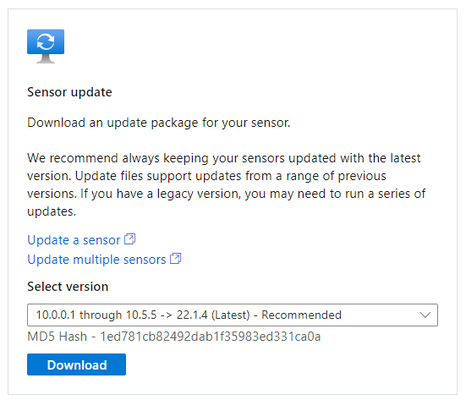
Microsoft is excited to announce version 22.1.4 release of Azure Defender for IoT. To learn more, visit Azure Defender for IoT Release Notes | Microsoft Docs Download links available at Defender for IoT Management Portal - Microsoft Azure. What's New? Version 22.1.4 of Microsoft Defender for IoT delivers extended device inventory information on the Azure portal with extended data for the following fields: Description Tags Protocols Scanner Last Activity MD5 Hash - 1ed781cb82492dab1f35983ed331ca0a About Defender for IoT Azure Defender for IoT provides agentless, network-layer security, provides security for diverse industrial equipment, and interoperates with Azure Sentinel and other SOC tools. Continuous asset discovery, vulnerability management, and threat detection for Internet of Things (IoT) devices, operational technology (OT) and Industrial Control Systems (ICS) can be deployed on-premises or in Azure-connected environments.2.5KViews0likes5CommentsLatest Threat Intelligence (September 2025)
Microsoft Defender for IoT has released the September 2025 Threat Intelligence package. The package is available for download from the Microsoft Defender for IoT portal (click Updates, then Download file). Threat Intelligence updates reflect the combined impact of proprietary research and threat intelligence carried out by Microsoft security teams. Each package contains the latest CVEs (Common Vulnerabilities and Exposures), IOCs (Indicators of Compromise), and other indicators applicable to IoT/ICS/OT networks (published during the past month) researched and implemented by Microsoft Threat Intelligence Research - CPS. The CVE scores are aligned with the National Vulnerability Database (NVD). Starting with the August 2023 threat intelligence updates, CVSSv3 scores are shown if they are relevant; otherwise the CVSSv2 scores are shown. Guidance Customers are recommended to update their systems with the latest TI package in order to detect potential exposure risks and vulnerabilities in their networks and on their devices. Threat Intelligence packages are updated every month with the most up-to-date security information available, ensuring that Microsoft Defender for IoT can identify malicious actors and behaviors on devices. Update your system with the latest TI package The package is available for download from the Microsoft Defender for IoT portal (click Updates, then Download file), for more information, please review Update threat intelligence data | Microsoft Docs. MD5 Hash: 14bf7b135c8c6d61d39ba6c28991f300 For cloud connected sensors, Microsoft Defender for IoT can automatically update new threat intelligence packages following their release, click here for more information.Webinar: Sentinel IT/OT Threat Monitoring
Join us on Thursday 28.7 for a webinar on Sentinel IT/OT Threat Monitoring with Defender for IoT solution. Learn how Defender for IoT's built-in integration with Sentinel helps bridge the gap between IT and OT security. Registration is now open , for July 28 There has been a long-standing split between ICS/SCADA (OT) and Corporate (IT) cybersecurity. This split was often driven by significant differences in technology/tooling. Microsoft Defender for IoT's integration with Microsoft Sentinel drives convergency by providing a single pane for coverage of both D4IOT (OT) and Microsoft Sentinel (IT) alerting. This solution includes Workbooks and Analytics rules providing a guide OT detection and Analysis.3.4KViews0likes8CommentsTake Azure Defender for IoT for a Spin
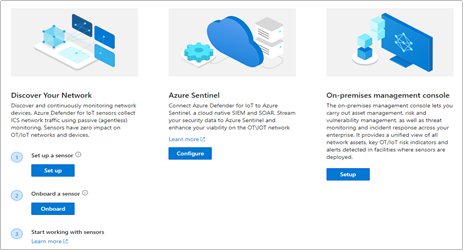
Intended audience: Security and OT engineering enthusiasts, looking to secure unmanaged critical networks used by IoT/OT devices such as Building Management Systems, Manufacturing, Critical Infrastructure and more! Introduction You’ve read the product materials and would like to get started with securing your IoT/OT network – in this blog post, we will focus on setting up a sensor on your critical networks - without impacting IoT/OT stability or performance (If you missed it, you can read more about the capabilities of Azure Defender for IoT here). The goal of this article is to guide you through setting up a sensor to demonstrate the value of the system, as well as a quick start for securing unmanaged IoT/OT devices. Try it now at no charge Try Azure Defender for IoT - This version includes the agentless security provided via the integration of CyberX, a Microsoft company, plus the ability to connect to Azure Sentinel. Preparing your environment Azure Defender for IoT monitors unmanaged devices that are used in Operational Technology (OT) environments such as manufacturing, building management systems (BMS), life sciences, energy and water utilities, oil & gas, and logistics. In the most basic configuration, Setting up your environment can be taken in 4 easy steps: 1. Setup a sensor The software for the sensor may be installed on physical servers or as a virtual machine. The sensor installation files can be downloaded from the Azure Defender for IoT portal, on the “Getting Started” -> “Network Sensor” tab. Log into your Azure Account and download the ISO installer for the sensor. Install the ISO from USB on a VM or physical server (see Hardware Guide and Installation Guide) Make sure to make a note of the administrative login credentials presented during the installation process. If your setup includes multiple sensors, you can also download the optional “On-Premises Management Console” which allows you to manage and monitor large sensor deployments. More on this in the Installation Guide, Chapter 8 2. Monitor a SPAN port The sensor implements non-invasive passive monitoring with Network Traffic Analysis (NTA) and Layer 7 Deep Packet Inspection (DPI) to extract detailed IoT/OT information in real-time, even across diverse automation equipment from all major OT suppliers such as: Rockwell Automation, Schneider Electric, GE, Emerson, Siemens, Honeywell, ABB, Yokogawa, etc. Locate a managed LAN switch connected to IoT/OT devices. These switches can typically be set up with monitoring ports (also called SPAN or mirror ports). Utilizing this technique, the sensor will passively monitor the OT network, without creating any traffic which might impact or risk devices on the network. Connect the monitoring port to the sensor’s monitoring interface (typically the first available ethernet card) For more information and configuration examples, see the Network Deployment Guide, Chapter 5 - “Traffic Monitoring.” 3. Register and Activate the Sensor Once the sensor has been connected to the monitor port – it will immediately begin to analyze the network traffic. The next step is to login to the sensor and activate it with an activation file available for your account, in the Azure Defender for IoT portal. Log into your Azure Account select the “Onboard” sensor button (underlined below): Next, fill in the sensor name and subscription details. The button for "cloud-connected" will optionally send alert information into IoT Hub and Sentinel for further analysis. If you have an air-gapped or completely on-premises implementation with no connection to the cloud, disable the "cloud-connected" button below before you generate your license. Download the activation file. This will be used in the next step to activate the sensor. Login to the sensor’s IP address, with the administrative credentials shown during the installation process. On the next screen – upload the activation file from the previous step. For more information and detailed steps, see the Onboarding Guide. 4. Start Exploring Now you’ve successfully installed your first sensor and you can start using the system – view the asset inventory, zoom in on the network map or generate a risk report. Conclusion Thank you for reading this blog post. There will be more blog posts to follow, which will enable you to get the best of out your system, which will include: what to do when malware is detected, connecting to Azure Sentinel, or simulating attack vectors, so please check back with us soon. Learn more with these educational resources: Watch our Ignite session showing how Azure Defender for IoT and Azure Sentinel are combined to investigate multistage attacks that cross IT/OT boundaries, using the TRITON attack on a petrochemical facility as an example. Watch our Tech Community webinar describing MITRE ATT&CK for ICS, an OT-focused version of the well-known MITRE ATT&CK framework originally developed for IT networks. Watch our SANS webinar featuring the head of Microsoft’s datacenter security program, about securing building automation systems using continuous OT security monitoring. Stay tuned for an upcoming webinar during which we’ll do a technical walkthrough of how to deploy and use Azure Defender for IoT. Troubleshooting No traffic is monitored on the sensor. Check that the monitoring port is connected to the correct ethernet port. Make sure the port is indeed a SPAN port by monitoring bandwidth on the port. For more troubleshooting, see the Network Setup Guide, Appendix 1 I cannot find a device in the Asset Inventory Make sure the device is connected to the network. Search for its MAC address in the Asset Inventory – if it is active, it will appear on the list.2.4KViews4likes0Comments