restore
7 TopicsWhy PITR Restore for Azure SQL Hyperscale Can Take Longer Than Expected
Azure SQL Database Hyperscale is designed to deliver fast, storage‑optimized backup and restore operations. According to Microsoft documentation, most Point‑in‑Time Restore (PITR) operations for Hyperscale should complete within 10 minutes, regardless of database size, because the service uses metadata-based restore techniques rather than copying full data files. However, some real‑world scenarios can lead to unexpectedly long restore times, even when the source database is Hyperscale and even when no obvious configuration changes are made. This article explains one such scenario, outlines what happened, and provides guidance to avoid similar delays in the future. Expected Behavior for Hyperscale PITR Hyperscale databases use a unique architecture that separates compute and storage. Backups are taken from storage snapshots and do not require data copying during a typical PITR restore. From Microsoft Learn: “Most restores complete within minutes, even for large databases.” Ref: https://learn.microsoft.com/azure/azure-sql/database/hyperscale-automated-backups-overview?view=azuresql#backup-and-restore-performance This performance expectation applies as long as the Backup Storage Redundancy remains the same between the source DB and the target restore. Customer Scenario Overview A customer initiated PITR restore operations for Hyperscale DB: Source DB: Hyperscale (SLO: HS_PRMS_64) Target DB: Hyperscale (SLO: HS_PRMS_128) Same logical server Source DB Backup Storage Redundancy: Standard_RAGRS Customer enabled Zone Redundancy for the target database during restore The customer therefore expected the restore to finish within the normal Hyperscale window (~10 minutes). Instead, the restore took significantly longer. Why the Restore Took Longer Although the source database used Standard_RAGRS, enabling Zone Redundancy at restore time introduced a configuration change that affected the underlying Backup Storage Redundancy (BSR) for the newly restored database. 🔍 Key Point: Changing BSR Creates a Full "Size-of-Data" Restore When the target DB uses a different BSR type than the source DB, Azure SQL Database cannot perform a fast metadata-based restore. Instead, it must perform a full data copy, and the restore becomes proportional to the database size: More data → longer restore Effectively behaves like a physical data movement operation This overrides Hyperscale’s normally fast PITR workflow This behavior is documented here: https://learn.microsoft.com/azure/azure-sql/database/hyperscale-automated-backups-overview?view=azuresql#backup-and-restore-performance In the customer’s case: Customer-enabled Zone Redundancy changed the restore workflow. As a result, the system selected a backup storage redundancy configuration different than the source: Restore workflow chose: Standard_RAGZRS Source database actually used: Standard_RAGRS (non‑zone‑redundant) This mismatch triggered a size-of-data restore, leading to the observed delay. Summary of Root Cause ✔ Hyperscale PITR is fast only when BSR is unchanged ✔ Customer enabled Zone Redundant configuration during restore ✔ This resulted in a different Backup Storage Redundancy from the source ✔ Target restore had to perform a full data copy, not metadata-based restore ✔ Restore time scaled with database size → leading to long restore duration Key Takeaways 1. Do not change Backup Storage Redundancy during PITR unless necessary Any change (e.g., RAGRS → RAGZRS) converts the restore into a size‑of‑data operation. 2. Restores that involve cross‑region or cross‑redundancy conversions always take longer This applies equally to: PITR restore Restore to another server Restore with SLO changes Restore involving ZRS/RA‑GZRS transitions 3. Hyperscale PITR is extremely fast—when configuration is unchanged If the source and target BSR match, Hyperscale restores usually complete in minutes. 4. Enabling Zone Redundancy is valid, but do it after the restore If the customer wants ZRS for the restored DB: Perform PITR first (fast restore) Then update redundancy post‑restore (online operation) Conclusion While Hyperscale PITR restores are typically very fast, configuration changes during the restore—especially related to Backup Storage Redundancy—can trigger a full data copy and significantly increase restore duration. To get the best performance: Keep the same BSR when performing PITR Apply redundancy changes after the restore completes Use metadata-based restores whenever possible Understanding these nuances helps ensure predictable recovery times and aligns operational processes with Hyperscale’s architectural design.264Views0likes0CommentsAzure PostgreSQL Lesson Learned #10: Why PITR Networking Rules Matter
Co‑authored with angesalsaa Symptoms Customer attempted to restore a server configured with public access into a private virtual network. Restore operation failed with an error indicating unsupported configuration. Root Cause Azure enforces strict networking rules during PITR to maintain security and consistency: Public access servers can only be restored to public access. Private access servers can be restored to the same virtual network or a different virtual network, but not to public access. Why This Happens Networking mode is tied to the original server configuration. Mixing public and private access during restore could expose sensitive data or break connectivity assumptions. Contributing Factors Customer assumed PITR could switch networking modes. No prior review of Azure documentation on restore limitations. Specific Conditions We Observed Source server: Private access with VNet integration. Target restore: Attempted to switch to public access. Operational Checks Before initiating PITR: Confirm the source server’s networking mode (Public vs Private). Review restore options in the Azure portal → Restore. Mitigation Goal: Align restore strategy with networking rules. If source is Public: Restore only to Public access. If source is Private: Restore to same or different VNet (within the same region). Post-Resolution Customer successfully restored to a different VNet after adjusting expectations. Prevention & Best Practices Document networking mode for all PostgreSQL servers. Train teams on PITR limitations before disaster recovery drills. Avoid assumptions always check official guidance. Why This Matters Ignoring these rules can delay recovery during critical incidents. Knowing the constraints upfront ensures faster restores and compliance with security policies. Key Takeaways Issue: PITR does not allow switching between Public and Private access. Fix: Restore within the same networking category as the source server. References Backup and Restore in Azure Database for PostgreSQL Flexible Server157Views0likes0CommentsPreventing and recovering from accidental deletion of an Azure Database for MySQL flexible server
Accidental deletion of critical Azure resources, such as Azure Database for MySQL flexible servers, can disrupt operations. To help avoid such accidental deletions, you can use a couple of options, including Azure Resource Locks and Azure Policy. This post explains how to implement these mechanisms, and how to revive a dropped MySQL flexible server by using the Azure CLI.1.2KViews2likes1CommentRestore database across servers(Azure SQL Database and Azure SQL managed instance)- Azure Automation
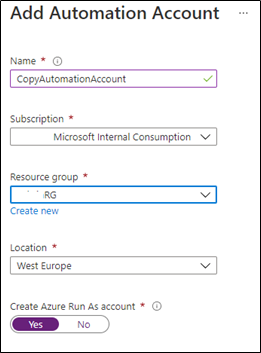
In this article, we consider the scenario where customers would like to restore their Azure SQL database and managed database from one Azure SQL server to another Azure SQL server, for example for development reasons. The article will provide you with the steps to achieve this by automating the job using Azure Automation13KViews5likes5CommentsRestore your Azure Database for PostgreSQL server into a different Azure subscription, the right way
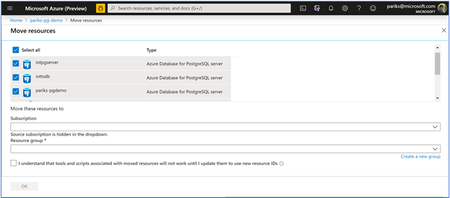
A challenge our customers often encounter is the inability to restore production databases across different Azure subscription. In this blog post, we share how to restore your Azure Database for PostgreSQL server into a different Azure subscription.5.5KViews0likes0Comments