poc
13 Topics
Part 3: Unified Security Intelligence - Orchestrating GenAI Threat Detection with Microsoft Sentinel
Why Sentinel for GenAI Security Observability? Before diving into detection rules, let's address why Microsoft Sentinel is uniquely positioned for GenAI security operations—especially compared to traditional or non-native SIEMs. Native Azure Integration: Zero ETL Overhead The problem with external SIEMs: To monitor your GenAI workloads with a third-party SIEM, you need to: Configure log forwarding from Log Analytics to external systems Set up data connectors or agents for Azure OpenAI audit logs Create custom parsers for Azure-specific log schemas Maintain authentication and network connectivity between Azure and your SIEM Pay data egress costs for logs leaving Azure The Sentinel advantage: Your logs are already in Azure. Sentinel connects directly to: Log Analytics workspace - Where your Container Insights logs already flow Azure OpenAI audit logs - Native access without configuration Azure AD sign-in logs - Instant correlation with identity events Defender for Cloud alerts - Platform-level AI threat detection included Threat intelligence feeds - Microsoft's global threat data built-in Microsoft Defender XDR - AI-driven cybersecurity that unifies threat detection and response across endpoints, email, identities, cloud apps and Sentinel There's no data movement, no ETL pipelines, and no latency from log shipping. Your GenAI security data is queryable in real-time. KQL: Built for Complex Correlation at Scale Why this matters for GenAI: Detecting sophisticated AI attacks requires correlating: Application logs (your code from Part 2) Azure OpenAI service logs (API calls, token usage, throttling) Identity signals (who authenticated, from where) Threat intelligence (known malicious IPs) Defender for Cloud alerts (platform-level anomalies) KQL's advantage: Kusto Query Language is designed for this. You can: Join across multiple data sources in a single query Parse nested JSON (like your structured logs) natively Use time-series analysis functions for anomaly detection and behavior patterns Aggregate millions of events in seconds Extract entities (users, IPs, sessions) automatically for investigation graphs Example: Correlating your app logs with Azure AD sign-ins and Defender alerts takes 10 lines of KQL. In a traditional SIEM, this might require custom scripts, data normalization, and significantly slower performance. User Security Context Flows Natively Remember the user_security_context you pass in extra_body from Part 2? That context: Automatically appears in Azure OpenAI's audit logs Flows into Defender for Cloud AI alerts Is queryable in Sentinel without custom parsing Maps to the same identity schema as Azure AD logs With external SIEMs: You'd need to: Extract user context from your application logs Separately ingest Azure OpenAI logs Write correlation logic to match them Maintain entity resolution across different data sources With Sentinel: It just works. The end_user_id, source_ip, and application_name are already normalized across Azure services. Built-In AI Threat Detection Sentinel includes pre-built detections for cloud and AI workloads: Azure OpenAI anomalous access patterns (out of the box) Unusual token consumption (built-in analytics templates) Geographic anomalies (using Azure's global IP intelligence) Impossible travel detection (cross-referencing sign-ins with AI API calls) Microsoft Defender XDR (correlation with endpoint, email, cloud app signals) These aren't generic "high volume" alerts—they're tuned for Azure AI services by Microsoft's security research team. You can use them as-is or customize them with your application-specific context. Entity Behavior Analytics (UEBA) Sentinel's UEBA automatically builds baselines for: Normal request volumes per user Typical request patterns per application Expected geographic access locations Standard model usage patterns Then it surfaces anomalies: "User_12345 normally makes 10 requests/day, suddenly made 500 in an hour" "Application_A typically uses GPT-3.5, suddenly switched to GPT-4 exclusively" "User authenticated from Seattle, made AI requests from Moscow 10 minutes later" This behavior modeling happens automatically—no custom ML model training required. Traditional SIEMs would require you to build this logic yourself. The Bottom Line For GenAI security on Azure: Sentinel reduces time-to-detection because data is already there Correlation is simpler because everything speaks the same language Investigation is faster because entities are automatically linked Cost is lower because you're not paying data egress fees Maintenance is minimal because connectors are native If your GenAI workloads are on Azure, using anything other than Sentinel means fighting against the platform instead of leveraging it. From Logs to Intelligence: The Complete Picture Your structured logs from Part 2 are flowing into Log Analytics. Here's what they look like: { "timestamp": "2025-10-21T14:32:17.234Z", "level": "INFO", "message": "LLM Request Received", "request_id": "a7c3e9f1-4b2d-4a8e-9c1f-3e5d7a9b2c4f", "session_id": "550e8400-e29b-41d4-a716-446655440000", "prompt_hash": "d3b07384d113edec49eaa6238ad5ff00", "security_check_passed": "PASS", "source_ip": "203.0.113.42", "end_user_id": "user_550e8400", "application_name": "AOAI-Customer-Support-Bot", "model_deployment": "gpt-4-turbo" } These logs are in the ContainerLogv2 table since our application “AOAI-Customer-Support-Bot” is running on Azure Kubernetes Services (AKS). Steps to Setup AKS to stream logs to Sentinel/Log Analytics From Azure portal, navigate to your AKS, then to Monitoring -> Insights Select Monitor Settings Under Container Logs Select the Sentinel-enabled Log Analytics workspace Select Logs and events Check the ‘Enable ContainerLogV2’ and ‘Enable Syslog collection’ options More details can be found at this link Kubernetes monitoring in Azure Monitor - Azure Monitor | Microsoft Learn Critical Analytics Rules: What to Detect and Why Rule 1: Prompt Injection Attack Detection Why it matters: Prompt injection is the GenAI equivalent of SQL injection. Attackers try to manipulate the model by overriding system instructions. Multiple attempts indicate intentional malicious behavior. What to detect: 3+ prompt injection attempts within 10 minutes from similar IP let timeframe = 1d; let threshold = 3; AlertEvidence | where TimeGenerated >= ago(timeframe) and EntityType == "Ip" | where DetectionSource == "Microsoft Defender for AI Services" | where Title contains "jailbreak" or Title contains "prompt injection" | summarize count() by bin (TimeGenerated, 1d), RemoteIP | where count_ >= threshold What the SOC sees: User identity attempting injection Source IP and geographic location Sample prompts for investigation Frequency indicating automation vs. manual attempts Severity: High (these are actual attempts to bypass security) Rule 2: Content Safety Filter Violations Why it matters: When Azure AI Content Safety blocks a request, it means harmful content (violence, hate speech, etc.) was detected. Multiple violations indicate intentional abuse or a compromised account. What to detect: Users with 3+ content safety violations in a 1 hour block during a 24 hour time period. let timeframe = 1d; let threshold = 3; ContainerLogV2 | where TimeGenerated >= ago(timeframe) | where isnotempty(LogMessage.end_user_id) | where LogMessage.security_check_passed == "FAIL" | extend source_ip=tostring(LogMessage.source_ip) | extend end_user_id=tostring(LogMessage.end_user_id) | extend session_id=tostring(LogMessage.session_id) | extend application_name = tostring(LogMessage.application_name) | extend security_check_passed = tostring (LogMessage.security_check_passed) | summarize count() by bin(TimeGenerated, 1h),source_ip,end_user_id,session_id,Computer,application_name,security_check_passed | where count_ >= threshold What the SOC sees: Severity based on violation count Time span showing if it's persistent vs. isolated Prompt samples (first 80 chars) for context Session ID for conversation history review Severity: High (these are actual harmful content attempts) Rule 3: Rate Limit Abuse Why it matters: Persistent rate limit violations indicate automated attacks, credential stuffing, or attempts to overwhelm the system. Legitimate users who hit rate limits don't retry 10+ times in minutes. What to detect: Users blocked by rate limiter 5+ times in 10 minutes let timeframe = 1h; let threshold = 5; AzureDiagnostics | where ResourceProvider == "MICROSOFT.COGNITIVESERVICES" | where OperationName == "Completions" or OperationName contains "ChatCompletions" | extend tokensUsed = todouble(parse_json(properties_s).usage.total_tokens) | summarize totalTokens = sum(tokensUsed), requests = count(), rateLimitErrors = countif(httpstatuscode_s == "429") by bin(TimeGenerated, 1h) | where count_ >= threshold What the SOC sees: Whether it's a bot (immediate retries) or human (gradual retries) Duration of attack Which application is targeted Correlation with other security events from same user/IP Severity: Medium (nuisance attack, possible reconnaissance) Rule 4: Anomalous Source IP for User Why it matters: A user suddenly accessing from a new country or VPN could indicate account compromise. This is especially critical for privileged accounts or after-hours access. What to detect: User accessing from an IP never seen in the last 7 days let lookback = 7d; let recent = 1h; let baseline = IdentityLogonEvents | where Timestamp between (ago(lookback + recent) .. ago(recent)) | where isnotempty(IPAddress) | summarize knownIPs = make_set(IPAddress) by AccountUpn; ContainerLogV2 | where TimeGenerated >= ago(recent) | where isnotempty(LogMessage.source_ip) | extend source_ip=tostring(LogMessage.source_ip) | extend end_user_id=tostring(LogMessage.end_user_id) | extend session_id=tostring(LogMessage.session_id) | extend application_name = tostring(LogMessage.application_name) | extend security_check_passed = tostring (LogMessage.security_check_passed) | extend full_prompt_sample = tostring (LogMessage.full_prompt_sample) | lookup baseline on $left.AccountUpn == $right.end_user_id | where isnull(knownIPs) or IPAddress !in (knownIPs) | project TimeGenerated, source_ip, end_user_id, session_id, Computer, application_name, security_check_passed, full_prompt_sample What the SOC sees: User identity and new IP address Geographic location change Whether suspicious prompts accompanied the new IP Timing (after-hours access is higher risk) Severity: Medium (environment compromise, reconnaissance) Rule 5: Coordinated Attack - Same Prompt from Multiple Users Why it matters: When 5+ users send identical prompts, it indicates a bot network, credential stuffing, or organized attack campaign. This is not normal user behavior. What to detect: Same prompt hash from 5+ different users within 1 hour let timeframe = 1h; let threshold = 5; ContainerLogV2 | where TimeGenerated >= ago(timeframe) | where isnotempty(LogMessage.prompt_hash) | where isnotempty(LogMessage.end_user_id) | extend source_ip=tostring(LogMessage.source_ip) | extend end_user_id=tostring(LogMessage.end_user_id) | extend prompt_hash=tostring(LogMessage.prompt_hash) | extend application_name = tostring(LogMessage.application_name) | extend security_check_passed = tostring (LogMessage.security_check_passed) | project TimeGenerated, prompt_hash, source_ip, end_user_id, application_name, security_check_passed | summarize DistinctUsers = dcount(end_user_id), Attempts = count(), Users = make_set(end_user_id, 100), IpAddress = make_set(source_ip, 100) by prompt_hash, bin(TimeGenerated, 1h) | where DistinctUsers >= threshold What the SOC sees: Attack pattern (single attacker with stolen accounts vs. botnet) List of compromised user accounts Source IPs for blocking Prompt sample to understand attack goal Severity: High (indicates organized attack) Rule 6: Malicious model detected Why it matters: Model serialization attacks can lead to serious compromise. When Defender for Cloud Model Scanning identifies issues with a custom or opensource model that is part of Azure ML Workspace, Registry, or hosted in Foundry, that may be or may not be a user oversight. What to detect: Model scan results from Defender for Cloud and if it is being actively used. What the SOC sees: Malicious model Applications leveraging the model Source IPs and users accessed the model Severity: Medium (can be user oversight) Advanced Correlation: Connecting the Dots The power of Sentinel is correlating your application logs with other security signals. Here are the most valuable correlations: Correlation 1: Failed GenAI Requests + Failed Sign-Ins = Compromised Account Why: Account showing both authentication failures and malicious AI prompts is likely compromised within a 1 hour timeframe l let timeframe = 1h; ContainerLogV2 | where TimeGenerated >= ago(timeframe) | where isnotempty(LogMessage.source_ip) | extend source_ip=tostring(LogMessage.source_ip) | extend end_user_id=tostring(LogMessage.end_user_id) | extend session_id=tostring(LogMessage.session_id) | extend application_name = tostring(LogMessage.application_name) | extend security_check_passed = tostring (LogMessage.security_check_passed) | extend full_prompt_sample = tostring (LogMessage.full_prompt_sample) | extend message = tostring (LogMessage.message) | where security_check_passed == "FAIL" or message contains "WARNING" | join kind=inner ( SigninLogs | where ResultType != 0 // 0 means success, non-zero indicates failure | project TimeGenerated, UserPrincipalName, ResultType, ResultDescription, IPAddress, Location, AppDisplayName ) on $left.end_user_id == $right.UserPrincipalName | project TimeGenerated, source_ip, end_user_id, application_name, full_prompt_sample, prompt_hash, message, security_check_passed Severity: High (High probability of compromise) Correlation 2: Application Logs + Defender for Cloud AI Alerts Why: Defender for Cloud AI Threat Protection detects platform-level threats (unusual API patterns, data exfiltration attempts). When both your code and the platform flag the same user, confidence is very high. let timeframe = 1h; ContainerLogV2 | where TimeGenerated >= ago(timeframe) | where isnotempty(LogMessage.source_ip) | extend source_ip=tostring(LogMessage.source_ip) | extend end_user_id=tostring(LogMessage.end_user_id) | extend session_id=tostring(LogMessage.session_id) | extend application_name = tostring(LogMessage.application_name) | extend security_check_passed = tostring (LogMessage.security_check_passed) | extend full_prompt_sample = tostring (LogMessage.full_prompt_sample) | extend message = tostring (LogMessage.message) | where security_check_passed == "FAIL" or message contains "WARNING" | join kind=inner ( AlertEvidence | where TimeGenerated >= ago(timeframe) and AdditionalFields.Asset == "true" | where DetectionSource == "Microsoft Defender for AI Services" | project TimeGenerated, Title, CloudResource ) on $left.application_name == $right.CloudResource | project TimeGenerated, application_name, end_user_id, source_ip, Title Severity: Critical (Multi-layer detection) Correlation 3: Source IP + Threat Intelligence Feeds Why: If requests come from known malicious IPs (C2 servers, VPN exit nodes used in attacks), treat them as high priority even if behavior seems normal. //This rule correlates GenAI app activity with Microsoft Threat Intelligence feed available in Sentinel and Microsoft XDR for malicious IP IOCs let timeframe = 10m; ContainerLogV2 | where TimeGenerated >= ago(timeframe) | where isnotempty(LogMessage.source_ip) | extend source_ip=tostring(LogMessage.source_ip) | extend end_user_id=tostring(LogMessage.end_user_id) | extend session_id=tostring(LogMessage.session_id) | extend application_name = tostring(LogMessage.application_name) | extend security_check_passed = tostring (LogMessage.security_check_passed) | extend full_prompt_sample = tostring (LogMessage.full_prompt_sample) | join kind=inner ( ThreatIntelIndicators | where IsActive == "true" | where ObservableKey startswith "ipv4-addr" or ObservableKey startswith "network-traffic" | project IndicatorIP = ObservableValue ) on $left.source_ip == $right.IndicatorIP | project TimeGenerated, source_ip, end_user_id, application_name, full_prompt_sample, security_check_passed Severity: High (Known bad actor) Workbooks: What Your SOC Needs to See Executive Dashboard: GenAI Security Health Purpose: Leadership wants to know: "Are we secure?" Answer with metrics. Key visualizations: Security Status Tiles (24 hours) Total Requests Success Rate Blocked Threats (Self detected + Content Safety + Threat Protection for AI) Rate Limit Violations Model Security Score (Red Team evaluation status of currently deployed model) ContainerLogV2 | where TimeGenerated > ago (1d) | extend security_check_passed = tostring (LogMessage.security_check_passed) | summarize SuccessCount=countif(security_check_passed == "PASS"), FailedCount=countif(security_check_passed == "FAIL") by bin(TimeGenerated, 1h) | extend TotalRequests = SuccessCount + FailedCount | extend SuccessRate = todouble(SuccessCount)/todouble(TotalRequests) * 100 | order by SuccessRate 1. Trend Chart: Pass vs. Fail Over Time Shows if attack volume is increasing Identifies attack time windows Validates that defenses are working ContainerLogV2 | where TimeGenerated > ago (14d) | extend security_check_passed = tostring (LogMessage.security_check_passed) | summarize SuccessCount=countif(security_check_passed == "PASS"), FailedCount=countif(security_check_passed == "FAIL") by bin(TimeGenerated, 1d) | render timechart 2. Top 10 Users by Security Events Bar chart of users with most failures ContainerLogV2 | where TimeGenerated > ago (1d) | where isnotempty(LogMessage.end_user_id) | extend end_user_id=tostring(LogMessage.end_user_id) | extend security_check_passed = tostring (LogMessage.security_check_passed) | where security_check_passed == "FAIL" | summarize FailureCount = count() by end_user_id | top 20 by FailureCount | render barchart Applications with most failures ContainerLogV2 | where TimeGenerated > ago (1d) | where isnotempty(LogMessage.application_name) | extend application_name=tostring(LogMessage.application_name) | extend security_check_passed = tostring (LogMessage.security_check_passed) | where security_check_passed == "FAIL" | summarize FailureCount = count() by application_name | top 20 by FailureCount | render barchart 3. Geographic Threat Map Where are attacks originating? Useful for geo-blocking decisions ContainerLogV2 | where TimeGenerated > ago (1d) | where isnotempty(LogMessage.application_name) | extend application_name=tostring(LogMessage.application_name) | extend source_ip=tostring(LogMessage.source_ip) | extend security_check_passed = tostring (LogMessage.security_check_passed) | where security_check_passed == "FAIL" | extend GeoInfo = geo_info_from_ip_address(source_ip) | project sourceip, GeoInfo.counrty, GeoInfo.city Analyst Deep-Dive: User Behavior Analysis Purpose: SOC analyst investigating a specific user or session Key components: 1. User Activity Timeline Every request from the user in time order ContainerLogV2 | where isnotempty(LogMessage.end_user_id) | project TimeGenerated, LogMessage.source_ip, LogMessage.end_user_id, LogMessage. session_id, Computer, LogMessage.application_name, LogMessage.request_id, LogMessage.message, LogMessage.full_prompt_sample | order by tostring(LogMessage_end_user_id), TimeGenerated Color-coded by security status AlertInfo | where DetectionSource == "Microsoft Defender for AI Services" | project TimeGenerated, AlertId, Title, Category, Severity, SeverityColor = case( Severity == "High", "🔴 High", Severity == "Medium", "🟠 Medium", Severity == "Low", "🟢 Low", "⚪ Unknown" ) 2. Session Analysis Table All sessions for the user ContainerLogV2 | where TimeGenerated > ago (1d) | where isnotempty(LogMessage.end_user_id) | extend end_user_id=tostring(LogMessage.end_user_id) | where end_user_id == "<username>" // Replace with actual username | extend application_name=tostring(LogMessage.application_name) | extend source_ip=tostring(LogMessage.source_ip) | extend session_id=tostri1ng(LogMessage.session_id) | extend security_check_passed = tostring (LogMessage.security_check_passed) | project TimeGenerated, session_id, end_user_id, application_name, security_check_passed Failed requests per session ContainerLogV2 | where TimeGenerated > ago (1d) | extend security_check_passed = tostring (LogMessage.security_check_passed) | where security_check_passed == "FAIL" | extend end_user_id=tostring(LogMessage.end_user_id) | extend session_id=tostring(LogMessage.session_id) | extend security_check_passed = tostring (LogMessage.security_check_passed) | summarize Failed_Sessions = count() by end_user_id, session_id | order by Failed_Sessions Session duration ContainerLogV2 | where TimeGenerated > ago (1d) | where isnotempty(LogMessage.session_id) | extend security_check_passed = tostring (LogMessage.security_check_passed) | where security_check_passed == "PASS" | extend end_user_id=tostring(LogMessage.end_user_id) | extend session_id=tostring(LogMessage.session_id) | extend application_name=tostring(LogMessage.application_name) | extend source_ip=tostring(LogMessage.source_ip) | summarize Start=min(TimeGenerated), End=max(TimeGenerated), count() by end_user_id, session_id, source_ip, application_name | extend DurationSeconds = datetime_diff("second", End, Start) 3. Prompt Pattern Detection Unique prompts by hash Frequency of each pattern Detect if user is fuzzing/testing boundaries Sample query for user investigation: ContainerLogV2 | where TimeGenerated > ago (14d) | where isnotempty(LogMessage.prompt_hash) | where isnotempty(LogMessage.full_prompt_sample) | extend prompt_hash=tostring(LogMessage.prompt_hash) | extend full_prompt_sample=tostring(LogMessage.full_prompt_sample) | extend application_name=tostring(LogMessage.application_name) | summarize count() by prompt_hash, full_prompt_sample | order by count_ Threat Hunting Dashboard: Proactive Detection Purpose: Find threats before they trigger alerts Key queries: 1. Suspicious Keywords in Prompts (e.g. Ignore, Disregard, system prompt, instructions, DAN, jailbreak, pretend, roleplay) let suspicious_prompts = externaldata (content_policy:int, content_policy_name:string, q_id:int, question:string) [ @"https://raw.githubusercontent.com/verazuo/jailbreak_llms/refs/heads/main/data/forbidden_question/forbidden_question_set.csv"] with (format="csv", has_header_row=true, ignoreFirstRecord=true); ContainerLogV2 | where TimeGenerated > ago (14d) | where isnotempty(LogMessage.full_prompt_sample) | extend full_prompt_sample=tostring(LogMessage.full_prompt_sample) | where full_prompt_sample in (suspicious_prompts) | extend end_user_id=tostring(LogMessage.end_user_id) | extend session_id=tostring(LogMessage.session_id) | extend application_name=tostring(LogMessage.application_name) | extend source_ip=tostring(LogMessage.source_ip) | project TimeGenerated, session_id, end_user_id, source_ip, application_name, full_prompt_sample 2. High-Volume Anomalies User sending too many requests by a IP or User. Assuming that Foundry Projects are configured to use Azure AD and not API Keys. //50+ requests in 1 hour let timeframe = 1h; let threshold = 50; AzureDiagnostics | where ResourceProvider == "MICROSOFT.COGNITIVESERVICES" | where OperationName == "Completions" or OperationName contains "ChatCompletions" | extend tokensUsed = todouble(parse_json(properties_s).usage.total_tokens) | summarize totalTokens = sum(tokensUsed), requests = count() by bin(TimeGenerated, 1h),CallerIPAddress | where count_ >= threshold 3. Rare Failures (Novel Attack Detection) Rare failures might indicate zero-day prompts or new attack techniques //10 or more failures in 24 hours ContainerLogV2 | where TimeGenerated >= ago (24h) | where isnotempty(LogMessage.security_check_passed) | extend security_check_passed=tostring(LogMessage.security_check_passed) | where security_check_passed == "FAIL" | extend application_name=tostring(LogMessage.application_name) | extend end_user_id=tostring(LogMessage.end_user_id) | extend source_ip=tostring(LogMessage.source_ip) | summarize FailedAttempts = count(), FirstAttempt=min(TimeGenerated), LastAttempt=max(TimeGenerated) by application_name | extend DurationHours = datetime_diff('hour', LastAttempt, FirstAttempt) | where DurationHours >= 24 and FailedAttempts >=10 | project application_name, FirstAttempt, LastAttempt, DurationHours, FailedAttempts Measuring Success: Security Operations Metrics Key Performance Indicators Mean Time to Detect (MTTD): let AppLog = ContainerLogV2 | extend application_name=tostring(LogMessage.application_name) | extend security_check_passed=tostring (LogMessage.security_check_passed) | extend session_id=tostring(LogMessage.session_id) | extend end_user_id=tostring(LogMessage.end_user_id) | extend source_ip=tostring(LogMessage.source_ip) | where security_check_passed=="FAIL" | summarize FirstLogTime=min(TimeGenerated) by application_name, session_id, end_user_id, source_ip; let Alert = AlertEvidence | where DetectionSource == "Microsoft Defender for AI Services" | extend end_user_id = tostring(AdditionalFields.AadUserId) | extend source_ip=RemoteIP | extend application_name=CloudResource | summarize FirstAlertTime=min(TimeGenerated) by AlertId, Title, application_name, end_user_id, source_ip; AppLog | join kind=inner (Alert) on application_name, end_user_id, source_ip | extend DetectionDelayMinutes=datetime_diff('minute', FirstAlertTime, FirstLogTime) | summarize MTTD_Minutes=round(avg (DetectionDelayMinutes),2) by AlertId, Title Target: <= 15 minutes from first malicious activity to alert Mean Time to Respond (MTTR): SecurityIncident | where Status in ("New", "Active") | where CreatedTime >= ago(14d) | extend ResponseDelay = datetime_diff('minute', LastActivityTime, FirstActivityTime) | summarize MTTR_Minutes = round (avg (ResponseDelay),2) by CreatedTime, IncidentNumber | order by CreatedTime, IncidentNumber asc Target: < 4 hours from alert to remediation Threat Detection Rate: ContainerLogV2 | where TimeGenerated > ago (1d) | extend security_check_passed = tostring (LogMessage.security_check_passed) | summarize SuccessCount=countif(security_check_passed == "PASS"), FailedCount=countif(security_check_passed == "FAIL") by bin(TimeGenerated, 1h) | extend TotalRequests = SuccessCount + FailedCount | extend SuccessRate = todouble(SuccessCount)/todouble(TotalRequests) * 100 | order by SuccessRate Context: 1-3% is typical for production systems (most traffic is legitimate) What You've Built By implementing the logging from Part 2 and the analytics rules in this post, your SOC now has: ✅ Real-time threat detection - Alerts fire within minutes of malicious activity ✅ User attribution - Every incident has identity, IP, and application context ✅ Pattern recognition - Detect both volume-based and behavior-based attacks ✅ Correlation across layers - Application logs + platform alerts + identity signals ✅ Proactive hunting - Dashboards for finding threats before they trigger rules ✅ Executive visibility - Metrics showing program effectiveness Key Takeaways GenAI threats need GenAI-specific analytics - Generic rules miss context like prompt injection, content safety violations, and session-based attacks Correlation is critical - The most sophisticated attacks span multiple signals. Correlating app logs with identity and platform alerts catches what individual rules miss. User context from Part 2 pays off - end_user_id, source_ip, and session_id enable investigation and response at scale Prompt hashing enables pattern detection - Detect repeated attacks without storing sensitive prompt content Workbooks serve different audiences - Executives want metrics; analysts want investigation tools; hunters want anomaly detection Start with high-fidelity rules - Content Safety violations and rate limit abuse have very low false positive rates. Add behavioral rules after establishing baselines. What's Next: Closing the Loop You've now built detection and visibility. In Part 4, we'll close the security operations loop with: Part 4: Platform Integration and Automated Response Building SOAR playbooks for automated incident response Implementing automated key rotation with Azure Key Vault Blocking identities in Entra Creating feedback loops from incidents to code improvements The journey from blind spot to full security operations capability is almost complete. Previous: Part 1: Securing GenAI Workloads in Azure: A Complete Guide to Monitoring and Threat Protection - AIO11Y | Microsoft Community Hub Part 2: Part 2: Building Security Observability Into Your Code - Defensive Programming for Azure OpenAI | Microsoft Community Hub Next: Part 4: Platform Integration and Automated Response (Coming soon)Agentless code scanning for GitHub and Azure DevOps (preview)
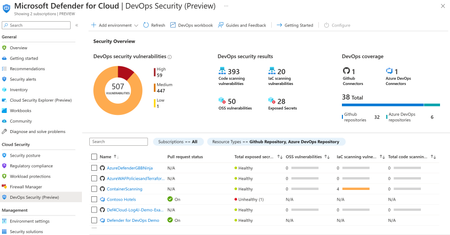
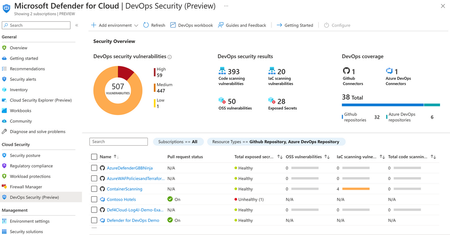
🚀 Start free preview ▶️ Watch a video on agentless code scanning Most security teams want to shift left. But for many developers, "shift left" sounds like "shift pain". Coordination. YAML edits with extra pipeline steps. Build slowdowns. More friction while they're trying to go fast. 🪛 Pipeline friction YAML edits with extra steps ⏱️ Build slowdowns More friction, less speed 🧩 Complex coordination Too many moving parts That's the tension we wanted to solve. With agentless code scanning in Defender for Cloud, you get broad visibility into code and infrastructure risks across GitHub and Azure DevOps - without touching your CI/CD pipelines or installing anything. ✨ Just connect your environment. We handle the rest. Already in preview, here's what's new Agentless code scanning was released in November 2024, and we're expanding the preview with capabilities to make it more actionable, customizable, and scalable: ✅ GitHub & Azure DevOps Connect your GitHub org and scan every repository automatically 🎯 Scoping controls Choose exactly which orgs, projects, and repos to scan 🔍 Scanner selection Enable code scanning, IaC scanning, or both 🧰 UI and REST API Manage at scale, programmatically or in-portal or Cloud portal 🎁 Available for free during the preview under Defender CSPM How agentless code scanning works Agentless code scanning runs entirely outside your pipelines. Once a connector has been created, Defender for Cloud automatically discovers your repositories, pulls the latest code, scans for security issues, and publishes findings as security recommendations - every day. Here's the flow: 1 Discover Repositories in GitHub or Azure DevOps are discovered using a built-in connector. 2 Retrieve The latest commit from the default branch is pulled immediately, then re-scanned daily. 3 Analyze Built-in scanners run in our environment: Code Scanning – looks for insecure patterns, bad crypto, and unsafe functions (e.g., `pickle.loads`, `eval()`) using Bandit and ESLint. Infrastructure as Code (IaC) – detects misconfigurations in Terraform, Bicep, ARM templates, CloudFormation, Kubernetes manifests, Dockerfiles, and more using Checkov and Template Analyzer. 4 Publish Findings appear as Security recommendations in Defender for Cloud, with full context: file path, line number, rule ID, and guidance to fix. Get started in under a minute 1 In Defender for Cloud, go to Environment settings → DevOps Security 2 Add a connector: Azure DevOps – requires Azure Security Admin and ADO Project Collection Admin GitHub – requires Azure Security Admin and GitHub Org Owner to install the Microsoft Security DevOps app 3 Choose your scanning scope and scanners 4 Click Save – and we'll run the first scan immediately s than a minute No pipeline configuration. No agent installed. No developer effort. Do I still need in-pipeline scanning? Short answer: yes - if you want depth and speed in the development workflow. Agentless scanning gives you fast, wide coverage. But Defender for Cloud also supports in-pipeline scanning using Microsoft Security DevOps (MSDO) command line application for Azure DevOps or GitHub Action. Each method has its own strengths. Here's how to think about when to use which - and why many teams choose both: When to use... ☁️ Agentless Scanning 🏗️ In-Pipeline Scanning Visibility Quickly assess all repos at org-level Scans and enforce every PR and commit Setup Requires only a connector Requires pipeline (YAML) edits Dev experience No impact on build time Inline feedback inside PRs and builds Granularity Repo-level control with code and IaC scanners Fine-tuned control per tool or branch Depth Default branch scans, no build context Full build artifact, container, and dependency scanning 💡 Best practice: start broad with agentless. Go deeper with in-pipeline scans where "break the build" makes sense. Already using GitHub Advanced Security (GHAS)? GitHub Advanced Security (GHAS) includes built-in scanning for secrets, CodeQL, and open-source dependencies - directly in GitHub and Azure DevOps. You don't need to choose. Defender for Cloud complements GHAS by: Surfaces GHAS findings inside Defender for Cloud's Security recommendations Adds broader context across code, infrastructure, and identity Requires no extra setup - findings flow in through the connector You get centralized visibility, even if your teams are split across tools. One console. Full picture. Core scenarios you can tackle today 🛡️ Catch IaC misconfigurations early Scan for critical misconfigurations in Terraform, ARM, Bicep, Dockerfiles, and Kubernetes manifests. Flag issues like public storage access or open network rules before they're deployed. 🎯 Bring code risk into context All findings appear in the same portal you use for VM and container security. No more jumping between tools - triage issues by risk, drill into the affected repository and file, and route them to the right owner. 🔍 Focus on what matters Customize which scanners run and where. Continuously scan production repositories. Skip forks. Run scoped PoCs. Keep pace as repositories grow - new ones are auto-discovered. What you'll see - and where All detected security issues show up as security recommendations in the recommendations and DevOps Security blades in Defender for Cloud. Every recommendation includes: ✅ Affected repository, branch, file path, and line number 🛠️ The scanner that found it 💡 Clear guidance to fix What's next We're not stopping here. These are already in development: 🔐 Secret scanning Identify leaked credentials alongside code and IaC findings 📦 Dependency scanning Open-source dependency scanning (SCA) 🌿 Multi-branch support Scan protected and non-default branches Follow updates in our Tech Community and release notes. Try it now - and help us shape what comes next Connect GitHub or Azure DevOps to Defender for Cloud (free during preview) and enable agentless code scanning View your discovered DevOps resources in the Inventory or DevOps Security blades Enable scanning and review recommendations Microsoft Defender for Cloud → Recommendations Shift left without slowing down. Start scanning smarter with agentless code scanning today. Helpful resources to learn more Learn more in the Defender for Cloud in the Field episode on agentless code scanning Overview of Microsoft Defender for Cloud DevOps security Agentless code scanning - configuration, capabilities, and limitations Set up in-pipeline scanning in: Azure DevOps GitHub action Other CI/CD pipeline tools (Jenkins, BitBucket Pipelines, Google Cloud Build, Bamboo, CircleCI, and more)Microsoft Defender for Cloud PoC Series – Microsoft Defender for SQL
[Post updated on 8/22/2024] by Yura Lee Introduction This article is a continuation of Microsoft Defender PoC Series which provides you guidelines on how to perform a proof of concept for a specific Microsoft Defender plan. For a more holistic approach where you need to validate Microsoft Defender for Cloud, please read How to Effectively Perform a Microsoft Defender for Cloud PoC article. There can be many security vulnerabilities in databases that are sometimes taken advantage of by malicious actors. According to the Github 2020 report, a vulnerability typically goes undetected for 218 weeks (just over four years) before being disclosed and fixed. Injection attacks, such as those on SQL and NoSQL, are among the most popular types of cyberattacks for web applications (as per OWASP Top 10). SQL Injection attacks, brute-force attacks, SQL shell OS attacks leading to crypto-mining and ransomware, can be detected and remediated by the Microsoft Defender for SQL plan. Microsoft Defender for SQL has two main capabilities that together will protect your SQL environments from cyberattacks. These capabilities are: Vulnerability Assessment, which is a service that helps you identify and remediate vulnerabilities in your database environments to improve your security posture Advanced Threat Protection, which detects suspicious activities related to your databases and alerts you with details and recommended actions. There are other types of databases that will be protected via the advanced threat protection feature. Planning So, what actually gets protected through Microsoft Defender for SQL? There are two Microsoft Defender plans that are comprised as part of Microsoft Defender for SQL: Microsoft Defender for Azure SQL database servers protects: Azure SQL Database Azure SQL Managed Instance Dedicated SQL pool in Azure Synapse. Microsoft Defender for SQL servers on machines extends the protections for your to fully support hybrid environments and protects SQL servers hosted in Azure, other cloud environments, and even on-premises machines. It does this by protecting: SQL Server on Virtual Machines, On-premises SQL servers of Azure Arc enabled SQL Server SQL Server running on Windows machines without Azure Arc There is a third plan called Microsoft Defender for open-source relational databases that brings threat protection for: Azure Database for PostgreSQL Azure Database for MySQL Azure Database for MariaDB The final plan, Defender for Cosmos DB provides advanced threat detection capabilities for: Azure Cosmos DB, NoSQL API. Preparation You will need to first enable Microsoft Defender for SQL, and for this you need to have the role of Security Admin. For more information about roles and privileges, visit this article. You can enable the three plans for Microsoft for SQL (for Azure SQL database servers, SQL servers on machines, and open-source relational databases) by following the instructions here. If you are conducting this PoC in partnership with the SOC Team, make sure they are familiar with the alerts that may appear once you enable this plan. Review all alerts available at our Alerts Reference Guide. From the readiness perspective, make sure to review the following resources to better understand Microsoft Defender for SQL: Microsoft Defender for SQL Documentation Defender for SQL and the Vulnerability Assessment | Defender for Cloud in the Field #1 Microsoft Defender for Cloud webinar: Microsoft Defender for SQL Anywhere (new!) Enhancements in Defender for SQL Vulnerability Assessment | Defender for Cloud in the Field #24 - YouTube Special Note for Defender for SQL servers on machines Microsoft Defender for SQL servers on machines requires Azure Montior Agent (AMA) installed, as well as a SQL Iaas extension for discovery and registration and it should report to a workspace to hold data collection rules (DCR). This workspace can be specified or you can allow MDC to create a default one for you. For machines that are not in Azure, all the above are required in addition to Arc installation. Read more about Arc-enabled servers here. Workspace configuration and automatic SQL server instance registration (recommended) can be done in Settings & monitoring. Make sure that Log analytics deployment is turned OFF, and AMA for SQL server on machines is turned ON. Implementation and Validation There are two ways to validate alerts. First, you can use the out of box sample alert feature to validate. To create these sample alerts, you will need to have the role Security Admin or Subscription Contributor. To create sample alerts for Defender for SQL, go to Microsoft Defender for Cloud in the Security alerts section, click Sample alerts. Select your subscription, choose Azure SQL Database and SQL Server on machines on the Microsoft Defender plans, and click Create sample alerts. The other way is to run simulations against the server itself. Instructions for this is available on Github, as part of MDC labs here. Prevention Microsoft Defender for SQL allows you to remediate SQL vulnerabilities and prevent SQL incidents and alerts using SQL vulnerability assessment. To configure it on your Azure SQL databases and Azure SQL Managed Instance, go to the Recommendations page in Microsoft Defender for Cloud, and select one of the following recommendations under the control Remediate security configurations: For Azure SQL databases, select the recommendation Vulnerability assessment should be enabled on your SQL servers. For Azure SQL Manage Instances, select the recommendation Vulnerability assessment should be enabled on your SQL managed instances. When Microsoft Defender for SQL is enabled on your SQL Server on machines, SQL vulnerability assessment does not require initial configuration, as it is included with SQL Server. In this article, we will demo SQL vulnerability assessment for Azure SQL database. Select the recommendation SQL servers should have vulnerability assessment configured. From here, select the unhealthy resource that you’d like to configure vulnerability assessment on, and click Fix. In the pane that appears, click Fix 1 resource. Next, to remediate vulnerability findings from your SQL databases and SQL Server on machines, go to the Recommendations page in Microsoft Defender for Cloud. Under the control Remediate security configurations, select one of the following recommendations: For Azure SQL databases and Azure SQL Manage Instances, select the recommendation SQL databases should have vulnerability findings resolved. For SQL Server on machine, select the recommendation SQL servers on machines should have vulnerability findings resolved. In this article, we will demo SQL databases should have vulnerability findings resolved. From here, select any of the unhealthy resources. Then select the finding you wish to remediate. In this example, we’ll be selecting Auditing should be enabled at the server level. Then select the database. Once again, click the finding you wish to remediate, which in our case is Auditing should be enabled at the server level. Select Click here to remediate. Alternatively, you may decide that this finding does not pose a security risk for your environment. In this case, you should create an acceptable baseline, which is essentially a customisation that tells the Vulnerability Assessment what is expected in your environment. To do this, select Approve as Baseline, and follow the subsequent instructions. Vulnerability Assessment recurring scans in your environment, and in upcoming scans after this, any results that match the baseline you established are considered as passes. Only reports on deviations from this baseline will appear as findings in the Vulnerability Assessment dashboard. This allows you to focus your attention only on the relevant issues. Learn more about this here. Continue remediating and/or setting baselines across all the findings and databases to improve your SQL security posture. Automations Instead of following the manual process above to remediate recommendations on SQL databases, you can use the automated ways to remediate recommendations related to SQL like, Vulnerability assessment should be enabled on your SQL servers, Enable auditing on SQL server, Enable transparent data encryption on SQL databases and many more like these in our Microsoft Defender for Cloud Github repository. This repository gives you access to numerous sample security playbooks that will help in automating remediation for a recommendation. You can also utilize workflow automation feature in Microsoft Defender for Cloud which can trigger Logic Apps on Security alerts, recommendations, and changes to regulatory compliance. For example, when Microsoft Defender for Cloud detects a brute force attack, you may want this to be automatically taken care off, you can use this playbook as a starting point. To understand how to remediate security alerts using Microsoft Defender, make sure you check out this chapter from SC-200 certification exam learning guide. You can also create an automatic response to a specific security alert using an ARM template, read more about it in our documentation. Further Resources How Microsoft Defender for SQL can protect SQL servers anywhere - YouTube (new!) Defender for Open-Source Relational Databases Multicloud | Defender for Cloud in the Field #51 (youtube.com) Latest Updates (new!) Microsoft Defender for Open-Source Relational Databases Now Supports Multicloud (AWS RDS) (new!)Microsoft Defender for Cloud Adds Full Coverage for Azure Open-Source Relational Databases - Microsoft Community Hub (new!) Better Together = Defender CSPM + Database Protections - Microsoft Community Hub (new!) Microsoft Defender for SQL is now available on the SQL Virtual Machine blade. - Microsoft Tech Community Conclusion By the end of this PoC you should be able to determine the value proposition of Microsoft Defender for SQL and the importance to have this level of threat detection to your workloads. Stay tuned for more Microsoft Defender for Cloud PoC Series! P.S. Subscribe to our Microsoft Defender for Cloud Newsletter to stay up to date on helpful tips and new releases and join our Tech Community where you can be one of the first to hear the latest Microsoft Defender for Cloud news, announcements and get your questions answered by Azure Security experts. Reviewers Special Thanks to Yuri Diogenes, Safeena Begum, David Trigano and Michael Makhlevich for reviewing this article.Microsoft Defender for Cloud PoC Series – Microsoft Defender for Key Vault
[Post updated on 06/27/2024] by Fernanda Vela Introduction This Microsoft Defender for Cloud PoC Series provides guidelines on how to perform a proof of concept for a specific Microsoft Defender plan. For a more holistic approach where you need to validate Microsoft Defender for Cloud, please read How to Effectively Perform a Microsoft Defender for Cloud PoC article. Azure Key Vault is used to store and access secrets, such as API keys, passwords, certificates, or cryptographic keys. Having critical data makes it a priority to maximize the threat protection of the vaults that can be provided with the security intelligence of Microsoft Defender for Key Vault. Planning As part of your Microsoft Defender for Key Vault PoC you need to identify the use case scenarios that you want to validate. Some common scenarios include access from an IP that was identified by Microsoft Threat Intelligence as suspicious, a user/service principal performing anomalous changes in policies, a user or service principal attempting to access to an anomalously high volume of key vaults in the last 24 hours, among others. You can use the Alerts identified by Microsoft Defender for Key Vault as your starting point to plan which actions you want to execute. Enabling this bundle at the subscription level will not affect the performance of your Azure Key Vaults since there are no agents and it is performed in Azure’s backend. To enable Microsoft Defender for Key Vault, you can do it at the subscription level. Go to the Azure portal Click on Microsoft Defender for Cloud Go to Environment Settings Select the subscription where you want to enable the plan In the Cloud Workload Protection section, you can enable/disable Key Vault As of June 2024, Defender for Key Vault is offered in two plans: Per-transaction model and Per-Key-Vault model. To determine which plan is best for you, we strongly encourage you to reference your bill and the pricing calculator. Preparation You need at least Security Admin role to enable Microsoft Defender for Key Vault. For more information about roles and privileges, visit this article. From the readiness perspective, make sure to review the following resources to better understand Azure Defender for Key Vault: Microsoft Defender for Key Vault | Azure Security Center in the Field #13 Microsoft Defender for Key Vault Documentation Implementation and validation You can use the sample alert feature to validate Microsoft Defender for Key Vault alerts, or you can simulate Microsoft Defender for Key Vault alerts by following the instructions in Validating Azure Key Vault threat detection in Microsoft Defender for Cloud. Understanding the alerts for Key Vault can help you identify suspicious activities and eliminate noise if necessary. When you receive an alert from Microsoft Defender for Key Vault, we recommend you investigate the alert, because even if you're familiar with the application or user that triggered the alert, it's important to verify the context of every alert. If you also have Defender CSPM enabled, you can take advantage of attack paths to see if there is a risk of a lateral movement in your environment that exploits vulnerabilities on servers to gain access to Key Vaults. To explore more of these use-case exercises, visit the Microsoft Defender for Cloud GitHub repository where there’s a lab on Defender CSPM. Conclusion By the end of this PoC you should be able to determine the value of this solution and the importance to have this level of threat detection to your workloads. P.S. Subscribe to our Microsoft Defender for Cloud Newsletter to stay up to date on helpful tips and new releases and join our Tech Community where you can be one of the first to hear the latest Microsoft Defender for Cloud news, announcements and get your questions answered by experts. Reviewers Walner Dort - Product Manager II, Microsoft Defender for Cloud CXE @Yuri Diogenes - Principal PM Manager, Microsoft Defender for Cloud CXEMicrosoft Defender for DevOps Azure DevOps Connector - Microsoft Defender for Cloud PoC Series
Introduction This article is a continuation of Microsoft Defender PoC Series which provides you guidelines on how to perform a proof of concept for a specific Microsoft Defender plan. For a more holistic approach where you need to validate Microsoft Defender for Cloud, please read How to Effectively Perform an Microsoft Defender for Cloud PoC article. There are two DevOps platforms currently covered by Defender for DevOps- GitHub and Azure DevOps. This article will go into detail about Azure DevOps Services. If you'd like to also learn about the GitHub connector with Microsoft Defender for DevOps, then check out this article here. Importance of Defender for DevOps Microsoft Defender for DevOps with Azure DevOps provides security teams with visibility into the security posture of their Azure DevOps environments, while also giving developers and DevOps teams a simplified remediation experience for pre-production vulnerabilities and misconfigurations. With Defender for DevOps, security administrators get full visibility in a single view from DevOps inventory and the security posture of pre-production application code. Based on the Microsoft Security DevOps extension, you can leverage a collection of static analysis tools to scan code for security issues in Azure DevOps using Azure Pipelines. These static analysis tools include ESLint which scans Javascript code for security issues, Bandit for scanning Python code, Infrastructure as Code (IaC) scanning for Terraform (among others) using Terrascan, IaC scanning for ARM and Bicep files using Template Analyzer, and AntiMalware scanning on Windows agents from Windows Defender (not open source, and requires Windows Defender to be enabled on the Windows agent in order to run). See more here. Teams can gather comprehensive code to cloud contextual insights within Defender for Cloud. Security admins can also help developers prioritize critical code fixes with Pull Request annotations. Planning & Pre-Requisites To start a POC (proof of concept) for Microsoft Defender for DevOps, you need to have the correct setup in Azure DevOps and in Microsoft Defender for Cloud. Create an Azure DevOps Trial subscription in the same tenant as your Azure subscription where you use Microsoft Defender for Cloud. See here. Then create an organization in Azure DevOps. Next, you need to have the necessary permissions: Project Collection Admin role enabled in Azure DevOps in order to enable the connector from within Azure DevOps, as here. Admin privileges in order to enable the Microsoft Security DevOps extension (the Microsoft Security Devops extension installs all the security scanning tools) as per here Defender for Cloud permissions here (Defender for DevOps specific): Azure Account- with permissions to sign into Azure portal Contributor role- on the relevant Azure subscription Security Administrator role- on the relevant subscription OAuth enabled in the Azure DevOps Organization Settings, which you can find by looking at the Organization Settings in Azure DevOps as shown the image below. If you are using the free version of Azure DevOps and you're trying to execute a pipeline, you will receive an error message when trying to execute the pipeline. This message will ask you to visit here and request increased parallelism in Azure DevOps. This can take 2-4 days. If you don’t want to wait this time, or your PoC schedule can’t afford this time, an alternative to create a pipeline is by using a Hosted Build Agent, which you can do by following these steps. Preparation For beginning the preparation of the POC, you will need to first create the Azure DevOps connector in Microsoft Defender for Cloud. Follow the guidance for enabling the Azure DevOps connector in Microsoft Defender for Cloud to authorize the connection. Note: You will need to have an Azure subscription and Azure DevOps organization in the same tenant to enable the Azure DevOps connector in Microsoft Defender for Cloud. Follow the guidance here to create a new organization in Azure DevOps. See the troubleshooting guide here. Then, switch over to Azure DevOps, by going to https://dev.azure.com/ . You will need to enable two extensions in Azure DevOps- the Microsoft Security DevOps extension to run the security scans, and the SARIF SAST Scans Tab extension to view the results of the Security DevOps extension in simplified manner in a new tab in the Azure DevOps build results. Next in the Azure DevOps organization, you should create a new Azure DevOps project. Then, you’ll be installing a new empty Git repository in that ADO project, which should include some sample code that you want to test. The two Microsoft Defender for DevOps extensions in Azure DevOps. You can run security scans via the Security DevOps extension on the Azure pipeline builds. For this reason, you need to configure a pipeline using YAML code. You can follow the guidance to create a new pipeline and to include the required YAML code to the Microsoft Security DevOps task and the dotnet dependencies here. This includes the yaml code with the necessary tasks for the build to run with the security scans. Note: In the yaml file, if you would like to break the build from succeeding if any security scanning tool in the Security DevOps extension has found issues in the Build, then include the necessary category and break: true to the Security DevOps task in the yaml file. Here is an example of a configuration that will break the build if a secret is detected by Microsoft Security DevOps. trigger: - main pool: vmImage: windows-latest steps: - task: MicrosoftSecurityDevOps@1 displayName: 'Security DevOps' inputs: break: true Note: There are dotnet dependencies when using the Microsoft Security DevOps task if using a self-hosted agent to be included in the yaml (see the docs here or the Github lab 14). The dotnet dependencies are not required if using the default Azure DevOps agents of windows-latest or ubuntu-latest. Implementation and Validation In order to validate the implementation was successful for Azure DevOps, developers can run the Azure Pipelines with the Microsoft Security DevOps extension as above, and see the security scan results during the Azure pipeline build runs. Your security team can manage secrets, code scanning findings and infrastructure as code findings found in Azure DevOps directly from Microsoft Defender for Cloud. The other validation in Azure DevOps for developers involves seeing secrets at the pull request stage as pull request annotations, before they’re merged into the main branch, usually the main/master repository. For DevOps teams, it’s useful for them to be able to see the security scan results, such as secrets, during the Azure pipeline build runs, as they are used to interacting in Azure DevOps. To validate this, go to the Pipelines in Azure DevOps. Select your pipeline that you enabled with the Security DevOps extension, and click Run pipeline. After a few minutes, you will see if your run has succeeded or failed. Click on the pipeline run, and see the Summary of the run. Notice the Errors tab and the Warnings tab, which include security issues found in the repo. Beside Summary, go to the Scans tab, which appears due to the SARIF SANS Scans Tab extension you enabled. This scans tab will show the security scan findings per scanning tools. This is one view of the security scans that your developers can see from Azure DevOps. However, Defender for DevOps crucially allows customers to manage the secrets, code scanning finding results and infrastructure as code findings found in Azure DevOps directly from Microsoft Defender for Cloud. This means that your security team can view these ADO security issues across the Azure DevOps organizations, projects and repos from one centralised location of Microsoft Defender for Cloud. To see the credentials in Microsoft Defender for Cloud, go to the portal.azure.com and to Microsoft Defender for Cloud. Go to Recommendations. Under Remediate vulnerabilities, select the recommendation Code repositories should have secret scanning findings resolved. See the secrets found under Findings. Select the secret to get more information about it, including the Build URL and the Repo URL in Azure DevOps. Pull Request Annotations The other task you can do is to see pull request annotations which contain the secrets and Infrastructure As Code security issues found in the Azure DevOps repos. See here to enable ADO pull request annotations in MDC and in ADO In Microsoft Defender for Cloud, go to DevOps Security in the side bar. Tick the box beside the Azure DevOps project. and Configure pull request annotations. Select Configure at the top. In the new screen, turn on pull request annotations. Now pull request annotations are enabled for all branches in that repository. Then you need to enable pull request annotations in Azure DevOps, by following the guidance here. See the process for validating pull request annotations in Azure DevOps for secrets here. See the pull request annotations then in Azure DevOps, by going under Repos, in Pull Requests. Click on the pull request to see the high severity pull request annotations showing Secret Access Keys discovered. Now, the developers can take action on these secrets (by removing them from the repository, and having them in a key vault such as Azure Key Vault). The guidance for this can be found here and in the recommendation in Microsoft Defender for Cloud. Workbook In Microsoft Defender for Cloud, you can view workbooks which are essentially reports specific to Defender for Cloud. To see these, go to Microsoft Defender for Cloud, and from the left-hand navigation blade, under the General section, select Workbooks. From here, under the Defender for Cloud section, you can select the workbook DevOps Security Workbook, specifically focused on allowing you to focus on Defender for DevOps, to see an overview of security findings from Azure DevOps. There are several tabs that you click through. See more information about this workbook here. Further Resources MDC Ninja Training: Become an Azure Security Center Ninja (microsoft.com) module 9 is DfD MDC Labs: https://aka.ms/MDFCLabs added DfD in module 14...working on module 15 in progress for the GitHub connector the latest episode of Defender for Cloud in the Field features DfD: https://www.youtube.com/watch?v=wYCOyFUMRPk DfD Interactive Guide: Unify DevOps security management with Microsoft Defender for Cloud (cloudguides.com) DfD Ignite On-Demand session: https://ignite.microsoft.com/en-US/sessions/418befd8-a7ee-4f46-a6a8-8b522b120135?source=sessions Blogs Pre-Deployment Protection for Infrastructure as Code - Microsoft Community Hub DevOps Security Workbook - Microsoft Community Hub Compliance for Exposed Secrets Discovered by Defender for DevOps - Microsoft Community Hub Automate Defender for DevOps Recommendation Remediation - Microsoft Community Hub Automate SecOps to Developer Communication with Defender for DevOps - Microsoft Community Hub Integrate security into your developer workflow with GitHub Advanced Security for Azure DevOps - Azure DevOps Blog (microsoft.com) Download (free) a special Appendix about Defender for DevOps from the latest Microsoft Defender for Cloud book published by Microsoft Press Defender for DevOps Documentation Microsoft Defender for DevOps - the benefits and features | Microsoft Learn Quickstart: Connect your GitHub repositories to Microsoft Defender for Cloud | Microsoft Learn Quickstart: Connect your Azure DevOps repositories to Microsoft Defender for Cloud | Microsoft Learn Configure the Microsoft Security DevOps GitHub action | Microsoft Learn Configure the Microsoft Security DevOps Azure DevOps extension | Microsoft Learn Discover misconfigurations in Infrastructure as Code - Defender for Cloud | Microsoft Learn Detect exposed secrets in code - Defender for Cloud | Microsoft Learn Tutorial Enable pull request annotations in GitHub or in Azure DevOps | Microsoft Learn Conclusion By the end of this article, you should have been able to understand the value proposition of Microsoft Defender for DevOps and now have the knowledge of how to run a PoC for it on Azure DevOps. Thanks to the following teammates for reviewing this article: Charles Oxyer, Microsoft Defender for DevOps Product Manager Yuri Diogenes, Principal Microsoft Defender for Cloud Product Manager P.S. Subscribe to our Microsoft Defender for Cloud Newsletter to stay up to date on helpful tips and new releases and join our Tech Community where you can be one of the first to hear the latest Microsoft Defender for Cloud news, announcements and get your questions answered by Azure Security experts.
New blog post | Microsoft Defender for DevOps Azure DevOps Connector - Microsoft Defender for Cloud
This article is a continuation of Microsoft Defender PoC Series which provides you guidelines on how to perform a proof of concept for a specific Microsoft Defender plan. For a more holistic approach where you need to validate Microsoft Defender for Cloud, please read How to Effectively Perform an Microsoft Defender for Cloud PoC article. There are two DevOps platforms currently covered by Defender for DevOps- GitHub and Azure DevOps. This article will go into detail about Azure DevOps Services. Microsoft Defender for DevOps Azure DevOps Connector - Microsoft Defender for Cloud PoC Series - Microsoft Community Hub