pipelines
17 Topics
🎉 Announcing General Availability of AI & RAG Connectors in Logic Apps (Standard)
We’re excited to share that a comprehensive set of AI and Retrieval-Augmented Generation (RAG) capabilities is now Generally Available in Azure Logic Apps (Standard). This release brings native support for document processing, semantic retrieval, embeddings, and grounded reasoning directly into the Logic Apps workflow engine. 🔌 Available AI Connectors in Logic Apps Standard Logic Apps (Standard) had previously previewed four AI-focused connectors that open the door for a new generation of intelligent automation across the enterprise. Whether you're processing large volumes of documents, enriching operational data with intelligence, or enabling employees to interact with systems using natural language, these connectors provide the foundation for building solutions that are smarter, faster, and more adaptable to business needs. These are now in GA. They allow teams to move from routine workflow automation to AI-assisted decisioning, contextual responses, and multi-step orchestration that reflects real business intent. Below is the full set of built-in connectors and their actions as they appear in the designer. 1. Azure OpenAI Actions Get an embedding Get chat completions Get chat completions using Prompt Template Get completion Get multiple chat completions Get multiple embeddings What this unlocks Bring natural language reasoning and structured AI responses directly into workflows. Common scenarios include guided decisioning, user-facing assistants, classification and routing, or preparing embeddings for semantic search and RAG workflows. 2. Azure AI Search Actions Delete a document Delete multiple documents Get agentic retrieval output (Preview) Index a document Index multiple documents Merge document Search vectors Search vectors with natural language What this unlocks Add vector, hybrid semantic, and natural language search directly to workflow logic. Ideal for retrieving relevant content from enterprise data, powering search-driven workflows, and grounding AI responses with context from your own documents. 3. Azure AI Document Intelligence Action Analyze document What this unlocks Document Intelligence serves as the entry point for document-heavy scenarios. It extracts structured information from PDFs, images, and forms, allowing workflows to validate documents, trigger downstream processes, or feed high-quality data into search and embeddings pipelines. 4. AI Operations Actions Chunk text with metadata Parse document with metadata What this unlocks Transform unstructured files into enriched, structured content. Enables token-aware chunking, page-level metadata, and clean preparation of content for embeddings and semantic search at scale. 🤖 Advanced AI & Agentic Workflows with AgentLoop Logic Apps (Standard) also supports AgentLoop (also Generally Available), allowing AI models to use workflow actions as tools and iterate until the task is complete. Combined with chunking, embeddings, and natural language search, this opens the door to advanced agentic scenarios such as document intelligence agents, RAG-based assistants, and iterative evaluators. Conclusion With these capabilities now built into Logic Apps Standard, teams can bring AI directly into their integration workflows without additional infrastructure or complexity. Whether you’re streamlining document-heavy processes, enabling richer search experiences, or exploring more advanced agentic patterns, these capabilities provide a strong foundation to start building today.
GitHub App authentication for Azure Pipelines causes webhooks to dissapear
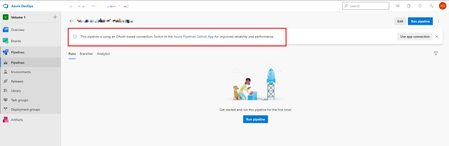
Greetings, we are using GitHub as the code repository service together with Azure DevOps Pipelines for CI/CD. All the pipelines need to have their triggers authenticated to GitHub in order for the pipelines to trigger Authentication works either with personal OAuth Service Connections or via the Azure Pipelines App for GitHub The recommended way is using the Pipelines App The problem: when I authenticate the pipeline trigger via the GitHub Azure Pipelines App, the webhooks from the repository which the pipeline is pointing to dissapear and the automatic triggering stops working! To make the issue even more ridiculous - we have 5 pipelines but only with 4 of them this happens! One is working completely fine with with the recommended GitHub App authentication. What I tried: Recreating service connections in Azure DevOps Reinstalling the Azure Pipelines GitHub App Recreating the pipelines Nothing worked, I am forced to use OAuth which is always throwing a warning to switch to app authentication because it's better performing and more reliable. Quite ridiculous to recommend a certain way of doing things, then making it work less reliable than the not-recommended way. Anyone has any ideas? Thanks in advance.2.1KViews1like1CommentSetting up Code Coverage data in Azure DevOps Pipeline, C# .NET 9
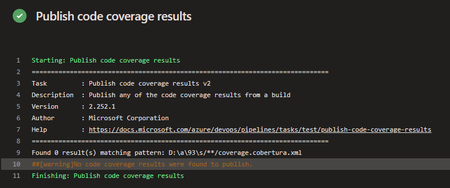
Hello everyone, I would like some assistance with my Azure DevOps pipeline. I am trying to set up Tasks in my Azure DevOps pipeline to collect Code Coverage results, after running UTs using the VsTest Task, to then have a Powershell Task in the Pipeline write to a SQL db the contents of those metrics. The main issue I am encountering is actually finding the published results after the UTs successfully run. I have set up Tasks to publish the results, then find them & then insert, but the publish doesn't seem to actually publish to the directory I specify, or if it does publish, I cannot see where to. Here are the Tasks I currently have set-up. Task to run UTs: steps: - task: VSTest@2 displayName: 'VsTest - testAssemblies' inputs: testAssemblyVer2: | **\$(BuildConfiguration)\*\*test*.dll !**\obj\** runSettingsFile: '$/B3API/Main/B3API.Tests/codecoverage.runsettings' runInParallel: true runTestsInIsolation: false codeCoverageEnabled: true platform: '$(BuildPlatform)' configuration: '$(BuildConfiguration)' failOnMinTestsNotRun: true codecoverage.runsettings file: <?xml version="1.0" encoding="utf-8"?> <RunSettings> <DataCollectionRunSettings> <DataCollectors> <DataCollector friendlyName="Code Coverage"> <Configuration> <Format>cobertura</Format> </Configuration> </DataCollector> </DataCollectors> </DataCollectionRunSettings> </RunSettings> Task to publish results: steps: - task: PublishCodeCoverageResults@2 displayName: 'Publish code coverage results' inputs: summaryFileLocation: '$(System.DefaultWorkingDirectory)/**/coverage.cobertura.xml' pathToSources: '$(System.DefaultWorkingDirectory)/**/coverage' Task to find published file & store into variable: steps: - powershell: | $coverageFile = "$(System.DefaultWorkingDirectory)/**/coverage.cobertura.xml" [xml]$coverageData = Get-Content $coverageFile $coveragePercentage = $coverageData.coverage.@line-rate # Store the coverage data in a variable Write-Host "##vso[task.setvariable variable=coveragePercentage]$coveragePercentage" displayName: 'Store Coverage in variable' The main issue it the Task to publish, it does not publish the results, I think it is due to not finding them in the first place. Thank you for taking the time to read my post, any help would be greatly appreciated, thanks!312Views0likes3Comments
How to delete pipeline tags with special characters?
I want to delete specific tags attached to Azure pipeline builds, for example "hello: world". I've come to the conclusion that the ADO REST API endpoint for handling Tag deletions cannot parse special characters in the URL's slug i.e. colons and whitespaces. According to thehttps://learn.microsoft.com/en-us/rest/api/azure/devops/build/tags/delete-build-tag?view=azure-devops-rest-7.1, the tag should be specified in the URL slug, followed by query string parameters if applicable. I tried the following: 1. If I insert the tag directly into the URL it will look like this: https://dev.azure.com/organisation/project/_apis/build/builds/1234567/tags/hello: world?api-version=7.1 This returns: "Response status code does not indicate success: 400 (Bad Request)." 2. But if I encode my slug using `[System.Web.HttpUtility]::UrlEncode($tag)`, the URL looks like this: https://dev.azure.com/organisation/project/_apis/build/builds/1234567/tags/hello%3a+world?api-version=7.1 This returns "Response status code does not indicate success: 404 (Not Found)." So it seems the encoding might have worked, although it appears to be searching for a tag without decoding the URL first? Does anyone know if there is a way for deleting tags with special characters? I have over 1600+ tags that need to be deleted so manually doing this through the UI would not be a viable option. EDIT: I just realised the documentation has a small note saying: This API will not work for tags with special characters. To remove tags with special characters, use the PATCH method instead (in 6.0+) Tried the PATCH method instead of DELETE and still not working. And there's no examples provided in the docs.115Views0likes2CommentsDeploy Logic App Standard to storage account with private endpoints using Terraform
This blog provides examples on how to use Terraform and Azure DevOps to create standard Logic App to a storage account within private network. Here are the resources that will be created: VNET and subnets for Logic App and storage account Storage account and fileshare Private endpoints for storage file, blob, table and queue and the private DNS zones App service plan Application insight Standard Logic App with VNET intigration Private endpoint for Logic App and private DNS zone5.4KViews3likes1Comment
Deploy Logic App Standard with Application Routing Feature Based on Terraform and Azure Pipeline
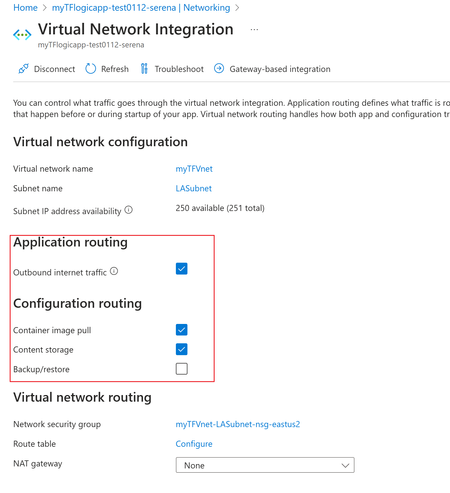
Due to Terraform's cross-cloud compatibility, automation, and efficient execution, among many other advantages, more and more customers use it to deploy integration solutions based on Azure Logic App standard. However, despite the extensive contributions from the community and individual contributors providing Terraform templates and supporting VNET integration solutions for Logic App standards, there are still very few terraform templates covering the "Application routing" and "Configuration routing" settings: This article shared a mature plan to deploy logic app standard then set the mentioned routing features automatically. It's based on Terraform template and Azure DevOps Pipeline. Code Reference: https://github.com/serenaliqing/LAStandardTerraformDeployment/tree/main/Terraform-Deployment-Demo About Terraform Template: Please kindly find the the template in directory Terraform/LAStandard.tf, it includes the terraform definitions for logic app standard, the backend storage account, application insights, virtual network and VNET integration settings. About VNET Routing Configuration Because there is no terraform examples available for VNET routing, we add VNET Settings by invoking "Patch" request to ARM RESTful API endpoint for interacting with logic app standard site: https://management.azure.com/subscriptions/<Your subscription id>/resourceGroups/$(deployRG)/providers/Microsoft.Web/sites/$(deployLA)?api-version=2022-03-01 We figured out the required request body in network trace as the following format: { "properties": { "vnetContentShareEnabled": false, "vnetImagePullEnabled": true, "vnetRouteAllEnabled": false, "vnetBackupRestoreEnabled": false } } Please find the YAML file in TerraformPipeline/logicappstandard-terraform.yml. Within the Yaml file , the "AzureCLI@2" task is used to send the request by Azure CLI command. task to send the patch request. Special Tips: To use the terraform task during Azure pipeline run, it's required to install terraform extension (which you can find in the following link): https://marketplace.visualstudio.com/items?itemName=ms-devlabs.custom-terraform-tasks Terraform tasks: Reference: Deploy Logic App Standard with Terraform and Azure DevOps pipelines https://registry.terraform.io/providers/hashicorp/azurerm/latest/docs/resources/app_service https://azure.microsoft.com/en-us/products/devops/pipelines481Views2likes0CommentsAzure DevOps git tag release pipeline
I'm wanting to get an Azure DevOps Pipeline (Classic) to run on a schedule against a Git Tag. This tag is set by a CD pipeline to mark when it has been deployed in the live environment. The scenario is that a "safe" release can be re-released on a regular schedule to ensure that it still matches what is expected (it's an Azure ARM release, and I want to tidy up any unauthorised changes made by lazy engineers). I cannot though find a way to achieve this. While you can filter on tags from builds in a release pipeline, that's not Git tags, but things manually set in ADO. I have tried using a build pipeline first (don't actually need one for this, but I can live with it) and using a branch filter to refs/tags/mytag, but it never seems to run. Can anybody help out here?1.6KViews0likes2Comments
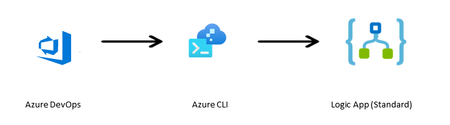
Deploy Workflows to Logic App Standard using AZ CLI Task in DevOps Pipeline with Append Option
The zipDeploy method used for Deploying Logic Apps Standard overwrites all/any existing files in the wwwroot folder. Set up DevOps for Standard logic apps - Azure Logic Apps | Microsoft Learn This tutorial is for using an Azure CLI task instead of the zipDeploy task, to give you flexibility on whether to overwrite the files/folder or not.3.7KViews2likes1Comment