office add-ins deployment
39 Topics
Feature Request for Enhanced Outlook Add-in Surfaces
Feature Request for Enhanced Outlook Add-in Surfaces Request Title: Expandable/Pop-out Outlook Add-ins with Inline Compose/Reply Integration Products/Platforms: Microsoft Outlook Add-ins (Office.js) across Classic Outlook for Windows, New Outlook for Windows, Outlook for Mac, and Outlook on the web (OWA) Request Type: New extensibility capabilities / UI host surfaces for Outlook add-ins Priority: High (end-user productivity + adoption + enterprise usability) Background We use an Outlook add-in to integrate additional productivity tools into the email workflow to help users save time, reduce context switching, and improve execution quality. This is a core enablement pattern for enterprise users who spend significant time in Outlook. Today, our add-in runs primarily in the task pane, which has notable limitations in flexibility and available space. The current experience is increasingly cluttered and not user-friendly, especially for workflows that require richer UI, multiple steps, or contextual data. Additionally, the add-in is not seamlessly integrated into the new message compose and reply experience (i.e., the workflow is not inline with the compose/reply window), which limits usability for scenarios that must occur at the moment a user is authoring a message. Problem Statement Current task pane constraints lead to: Limited UI real estate (narrow layout, heavy scrolling, cramped forms, poor readability) No user-friendly expand/enlarge options to fit different workflows and screen sizes Reduced usability during compose/reply, where users need the tool inline with message authoring Lower adoption and productivity because the add-in experience feels disconnected and cumbersome In practice, users need more space and tighter integration at the exact point of work (compose/reply), without leaving Outlook or juggling multiple windows. Requested Features We request Microsoft to support the following add-in UI capabilities, ideally consistently across Classic Windows, New Outlook, and OWA: A) Expandable / Resizable Task Pane Allow users to resize/expand the add-in pane (wider layout; optional full-height behavior) Support a compact vs expanded mode with user preference persistence Outcome: Richer workflows become usable without redesigning into cramped layouts. B) Pop-out Add-in Experience Provide a supported pop-out window for the add-in (while maintaining context to the current item) Ensure pop-out works smoothly with enterprise policies and does not break the add-in lifecycle Outcome: Users can work with complex UI without sacrificing mail reading/authoring space. C) Inline Add-in Integration with Compose and Reply Enable add-in UI to appear inline within the compose/reply window (not just as a separate side pane) Support contextual actions/data entry during authoring (e.g., insert content, validate, attach artifacts, update records) Ensure consistent behavior for new compose and reply experiences Outcome: The tool is available at the moment users need it while writing responses, driving adoption and reducing errors. D) Add-in as a Mail Tab Provide a supported extension point for an add-in to appear as a tab in Mail, similar to “Focused/Other” Tab hosts a larger workspace for add-in workflows (e.g., triage/queue/workbench views) Outcome: A first-class workspace in Mail for workflows that don’t fit the task pane model. Key Enterprise Use Cases Multi-step workflows triggered from emails (triage, intake, approvals, routing) Rich forms and guided actions that are impractical in a narrow pane Compose/reply-time actions: insert approved templates/snippets, validate recipients/content, capture metadata, create/update tasks/records Dedicated mail workbench views via a tab for operational roles Acceptance Criteria Cross-client consistency: Classic Windows, New Outlook, and OWA supported with minimal divergence Next Steps for Microsoft Confirm roadmap/feasibility for: expandable task pane, add-in pop-out, inline compose/reply surface, and mail tab surface Provide recommended implementation model/APIs and opportunities for preview/early access for enterprise validation Screenshots for ReferenceExpose Revision Display Mode (Inline vs. Balloons) via Office.js
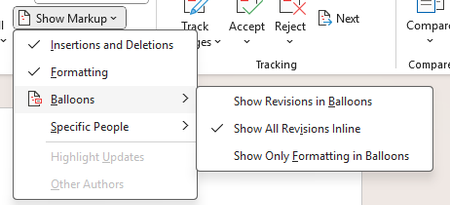
Currently, Office.js does not provide an API to retrieve the revision display mode used by Microsoft Word (inline or balloons) when change tracking is enabled. It would be highly valuable to expose this information through the Word JavaScript API, allowing add-ins to detect how tracked changes are displayed and adapt their behavior accordingly. This would enable more reliable handling of scenarios when change tracking is active. Use Case Add-ins that work with tracked changes need to understand whether revisions are shown inline or in balloons to ensure correct document manipulation and a consistent user experience across platforms (PC, Mac, iOS, and Office on the web).
Enhanced Document Control/Protection APIs in Office.js for Word Add-ins
We are developing a Word add-in using Office.js and JavaScript APIs. Our use case requires advanced document control features, which are currently challenging to achieve within the existing Office.js framework. Here’s our feature request: Proposed Functionality: Based on the defined custom properties on a document via add-ins, provide APIs/commands/hooks to disable or override Word's default 'Save,' 'Save As,' and 'Share' options to prevent users from saving or sharing the document locally. Introduce additional APIs for implementing custom protection mechanisms within the add-in. Current Challenges: Achieving this functionality appears possible through VSTO add-ins, but they are not compatible with Office.js solutions. VSTO/.NET commands require complex workarounds, such as creating a separate .NET server to communicate with Office.js, which adds development complexity and affects efficiency. Request: We would greatly appreciate the introduction of built-in, efficient APIs in Office.js to handle document protection and control scenarios seamlessly without relying on external frameworks or services. This would significantly enhance the capability of modern web-based add-ins and improve the development experience for Word add-in developers.
Identify multiple embedded instance of the same add-in in a file as one
Summary By default, when a file is opened in Excel with a JS add-in installed and then saved, the JS add-in is automatically embedded in the file. In the current design all embedded add-ins will be attempted to load when the file is opened even if the embedded add-ins are the same. As a result, when these files are shared with other users who already have the same JS add-in installed with a different version or deployment method, Excel displays two instances of the same add-in in the tabs, or occasionally shows an error in the task pane if the version it is embedded is an older one. We first became aware of this issue when a user reported seeing our JS add-in appear twice in the ribbon, which led to confusion. Upon inspecting the affected file’s XML web extensions, we identified two versions of the same add-in embedded: one deployed via OMEX and another via exCatalog. After further investigation and filing a ticket with Microsoft Support, it was confirmed that this behavior is by design under the current implementation. Why This Matters While we understand that this behavior is expected by design, it remains problematic for users—it can cause confusion and potential issues with custom functions or with the add-in itself. Also, it is not clear for As of the moment there are no easy workaround for users to remove the duplicate/additional instance of the same JS add-in embedded in the file, this will also need to be done for every file that is suffering from this issue (has multiple instance of the same add-in embedded in the file w/ different version/deployment method). Proposed Change/s Update current design to be able to identify if the embedded adds-in is the same through checking and comparing a unique id so even if they have different deployment/version tags it will not be loaded/attempted to be loaded in the task pane. Alternatives Considered Provide an option in Officejs API to prevent embedding/referencing add-in in a file Benefits Prevents users from seeing the same add-in appear twice in the file Eliminate propagating errors in the task pane from trying to render the same add-in with the old version tag [Alternative considered] Allow users/dev to be able to control which add-in gets embedded in the file134Views8likes2Comments
German Excel Support Pages – Surprised by Multiple Errors
Dear Microsoft Community, While studying the financial functions in Excel, I was surprised to notice that several German-language support pages contain errors — such as incorrect translations, English function names, non-working example formulas, wrong results, and some spelling mistakes. I enjoy working with this material and would be happy to assist in reviewing and correcting these pages on a paid, freelance basis. I realize this may not be the exact place for such an offer, so I would greatly appreciate it if someone could point me to the right contact person or department at Microsoft. Thank you very much for your help! TheoBring the new font options to Word for iPad
The https://learn.microsoft.com/en-us/javascript/api/requirement-sets/word/word-api-desktop-1.3-requirement-set?view=word-js-desktop-1.3 has introduced various useful options in the Font class, like: AllCaps Borders Kerning Scaling Underline color And many more. However, it's a pity that the WordApiDesktop 1.3 is supported only on Windows and macOS, while the previous two WordApiDesktop were also supported on iPadOS. While I would love to see all the new additions of the WordApiDesktop 1.3 to the iPad version, at least adding the new font properties would be really useful to improve text customization.
Add-in Manifest: allow wildcards for app domains
Currently all trusted app domains must be listed fully qualified in the manifest, e.g. <AppDomain>https://customer1.acme-eu.com</AppDomain> <AppDomain>https://customer2.acme-eu.com</AppDomain> <AppDomain>https://customer3.acme-us.com</AppDomain> <AppDomain>https://customer4.acme-us.com</AppDomain> Our company has several root domains for their customer tenants. In the example above acme-eu.com and acme-us.com. But as these customer tenant URLs (e.g. https://customer2.acme-eu.com) are sensitive data we can not put them in our delivered add-in manifest because all other customers would have the chance to see them. Currently our customers need to use the O365CentralizedAddInDeployment PowerShell command to configure additional domains before using our add-in which is extremely error prone and sometimes just not working. Many hours of support needs to be invested to get the configuration fixed. For example after every change in the configuration all users needs to manually clear their add-in cache in Excel. Having wildcards in the manifest would enormously help us and our customers: <AppDomain>https://*.acme-eu.com</AppDomain> <AppDomain>https://*.acme-us.com</AppDomain> During add-in submission Microsoft can validate that the used domains are trustful.883Views22likes6Comments
Set the file name for newly created the Excel file - Excel.createWorkbook()
Unable to set the file name for the newly created Excel file. I don't see any info on how to set the name for the Excel.createWorkbook() function which only accepts a base64 xlsx payload. The file opens up with a name called Book 1.PowerPoint add-in: hide / show slides
I am trying to add a sideload add-in doing some automation in PowerPoint. I couldn't find a command or property in the PowerPoint office add-in to hide/show slides, but I desperately need this functionality! I currently have to switch to a VBA script for this. However, I can't create a product that combines JavaScript and VBA. Thanks, Florian
Tags can't be exported / imported for slides using .exportBase64().
As can be seen in https://github.com/OfficeDev/office-js/issues/5989 https://github.com/OfficeDev/office-js/issues/6104 Tags on Powerpoint Slides/Shapes/Presentation currently are not exported or imported when running exportBase64 on a slide, essentially killing a very large part of the functionality that they would otherwise enable. It would be great if this could be added soon 🙏.