OT Security
10 Topics
Maximizing Cloud Connectivity Visibility
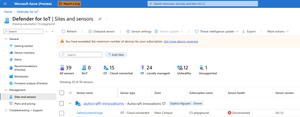
Overview Defender for IoT help you protect your operational technology (OT) network from cyber threats. By using network sensors to monitor your network, you gain real-time insight into your OT devices and are notified if suspicious or malicious events occur. The Defender for IoT cloud management is designed to augment your on-premises processing power while providing a source of centralized management for global security teams, raising the bar for OT defense. By connecting your OT sensors to the Azure portal, you can get: Holistic Insights: The Defender for IoT Azure portal becomes your watchtower, offering full visibility of your entire OT network. Health and security metrics converge in one place. Real-Time Empowerment: Updates and alerts arrive in real time for one place from all your sites around the world. Learn more- connecting your sensor to the cloud. Connecting your OT sensors to the cloud is not always straightforward. There are many factors that can affect the connectivity of your OT sensors, such as network configuration, proxy settings, DNS servers, or SSL certificates. If any of these factors are not configured correctly, your OT sensors may not be able to communicate with the cloud. This can result in missing or delayed alerts and cause reduced visibility and control over your OT network. To help you troubleshoot OT sensor connectivity issues, we have introduced a new capability in version 23.1.3 of the OT sensor software. It allows you to check the status of your sensor’s connection to the cloud and identify any errors or issues that may prevent it from communicating with the cloud. Ultimately, you received detailed steps to resolve this issue. This tool will help you- Streamlining troubleshooting Reducing resolution time Enhancing identification of connectivity issues In this blog post, we will show you how to use the Cloud connectivity troubleshooting tool which can help you identify the root cause and provide you with a step-by-step explanation to fix some common connectivity issues that you may encounter. How to Troubleshoot Sensor Connectivity Issues? As an IoT/ OT Security project manager working for a manufacturing company. You are responsible for maintaining the OT network security and ensuring that your OT sensors are connected to the cloud. One day, you notice that one of your sensors is not sending any data to the cloud. On the Site and Sensor page, you see that the sensor has disconnected health status - on the sensor's Overview page - As you wonder what is causing this connectivity issue, you contact the network team on site to investigate it. When it comes to finding a connectivity issue it’s complex and can take hours and days. Here is how the Cloud connectivity troubleshooting tool can help you in this scenario: Step 1- Access the Cloud connectivity troubleshooting page: From the sensor’s Overview page, select the Troubleshoot link in the error at the top of the page or Select System settings > Sensor management > Health and troubleshooting > Cloud connectivity troubleshooting Step 2- Identify the connectivity issue The Cloud connectivity troubleshooting pane opens on the right. If the sensor isn’t connected, a description of the issue and any mitigation instructions are listed. Step 3- Fix the connectivity issue The connectivity tool provides you with recommendations on how to fix your connectivity issues. In case you still can't fix the connectivity issue, please submit a support ticket and include the log files so the support engineer team can assist you as quickly as possible. Leran More What's new in Microsoft Defender for IoT? Connecting your sensor to the cloud418Views0likes0Comments
Latest Threat Intelligence (Mars 2024)
Microsoft Defender for IoT has released the March 2024 Threat Intelligence package. The package is available for download from the Microsoft Defender for IoT portal (click Updates, then Download file). Threat Intelligence updates reflect the combined impact of proprietary research and threat intelligence carried out by Microsoft security teams. Each package contains the latest CVEs (Common Vulnerabilities and Exposures), IOCs (Indicators of Compromise), and other indicators applicable to IoT/ICS/OT networks (published during the past month) researched and implemented by Microsoft Threat Intelligence Research - CPS. The CVE scores are aligned with the National Vulnerability Database (NVD). Starting with the August 2023 threat intelligence updates, CVSSv3 scores are shown if they are relevant; otherwise the CVSSv2 scores are shown. Guidance Customers are recommended to update their systems with the latest TI package in order to detect potential exposure risks and vulnerabilities in their networks and on their devices. Threat Intelligence packages are updated every month with the most up-to-date security information available, ensuring that Microsoft Defender for IoT can identify malicious actors and behaviors on devices. Update your system with the latest TI package The package is available for download from the Microsoft Defender for IoT portal (click Updates, then Download file), for more information, please review Update threat intelligence data | Microsoft Docs. MD5 Hash: d80ba2e326b666a5fa0fc69d9bf1f491 For cloud connected sensors, Microsoft Defender for IoT can automatically update new threat intelligence packages following their release, click here for more information.New Blog Post | Vulnerable SDK components lead to supply chain risks in IoT and OT environments
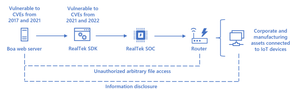
Read the full article here: Vulnerable SDK components lead to supply chain risks in IoT and OT environments - Microsoft Security Blog Vulnerabilities in network components, architecture files, and developer tools have become increasingly popular attack vectors to gain access into secure networks and devices. External tools and products that are managed by vendors and developers can pose a security risk, especially to targets in sensitive industries. Attacks on software and hardware supply chains, like Log4J and SolarWinds, have highlighted the importance of visibility across device components and proactively securing networks. A report published by Recorded Future in April 2022 detailed suspected electrical grid intrusion activity and implicated common IoT devices as the vector used to gain a foothold into operational technology (OT) networks and deploy malicious payloads. While investigating the attack activity, Microsoft researchers identified a vulnerable component on all the IP addresses published as IOCs and found evidence of a supply chain risk that may affect millions of organizations and devices. Original Post: New Blog Post | Vulnerable SDK components lead to supply chain risks in IoT and OT environments - Microsoft Community Hub1.2KViews1like0CommentsMicrosoft joins the Operational Technology Cybersecurity Coalition
Washington, DC – The Operational Technology Cybersecurity Coalition (OT Cyber Coalition) announced today that Microsoft, NetRise, and Schneider Electric have joined the Coalition in its commitment to ensuring the resiliency of our nation’s critical infrastructure through interoperable, standards-based cybersecurity solutions. “As leaders in the cybersecurity community, these new members add crucial knowledge about securing operational technology environments,” said Andrew Howell, Executive Director, OT Cyber Coalition. “We look forward to having their voices as part of the Coalition in our ongoing engagement efforts.” Microsoft, NetRise, and Schneider Electric join the Coalition as it continues to engage with industry and government to advocate for vendor-neutral, interoperable standards and help businesses of all sizes strengthen the nation’s collective defense. “We’re honored to be a member of the Operational Technology Cybersecurity Coalition and look forward to collaborating with industry partners to advance operational technology cybersecurity,” said Kevin Reifsteck, Director for Critical Infrastructure Protection, Microsoft. “Rapid digital transformation has increased cybersecurity risks to critical infrastructure, and partnerships like this are key to strengthening our country’s cybersecurity defenses.” “The OT Cyber Coalition is an important step forward in driving vendor transparency and collaboration in operational technology,” said Thomas Pace, CEO, NetRise. “We look forward to joining the Coalition and driving increased visibility to risk across the wide variety of technologies that encompass operational technology.” “We’re very pleased to be joining the OT Cyber Coalition,” said Trevor Rudolph, VP, Global Digital Policy & Regulation, Schneider Electric. “As a critical manufacturer in the OT space, we take the cybersecurity of OT products and systems very seriously. Schneider Electric is joining the Coalition because of the important role it plays in advocating for constructive OT cybersecurity policy directly with U.S. government officials.” ### About the OT Cyber Coalition The Operational Technology Cybersecurity Coalition is a diverse group of leading cybersecurity vendors dedicated to improving the cybersecurity of OT environments. Representing the entire OT lifecycle, the OT Cyber Coalition believes that the strongest, most effective approach to securing our nation’s critical infrastructure is one that is open, vendor-neutral, and allows for diverse solutions and information sharing without compromising cybersecurity defenses. The OT Cyber Coalition was founded by Claroty, Forescout, Honeywell, Nozomi Networks, and Tenable in 2022. For more information, visit https://www.otcybercoalition.org/.1.7KViews0likes0CommentsSentinel OT SOC | Solution Release 1.0.13
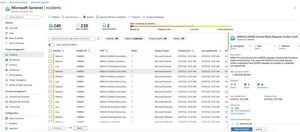
We are happy to announce the Public Preview of an updated solution package in Sentinel Content Hub for Microsoft Defender for IoT customers! Defender for IoT's built-in integration with Sentinel helps bridge the gap between IT & OT security challenge. In this release, we are introducing another upgrade that will streamline the SOC workflows to analyze, investigate, and respond efficiently and quickly to OT incidents: Streamline the SOC workflow by updating the alert status in Defender for IoT automatically when Microsoft Sentinel updates the incident status. After updating the solution, make sure that you also take the required steps to ensure that the new playbook works as expected. IoT/OT context for SOCs by displaying IoT/OT devices inside incidents created with Sentinel's solution package. Easily navigate between Sentinel incidents created by the solution package and Defender for IoT alerts through the MDIoT alert link in Sentinel's incident page. New SOC workflow for ‘No traffic on sensor detected’ use case. Additional information can be found here: documentation1.3KViews0likes0CommentsVideo | Better together: Microsoft Sentinel: IT/OT Threat Monitoring with Defender for IoT Solution
Better together: Microsoft Sentinel: IT/OT Threat Monitoring with Defender for IoT Solution Presenters: Dolev Zemer & Tiander Turpijn This webinar reviews how Microsoft Sentinel and Microsoft Defender for IoT are driving together a convergence of OT and Corporate cybersecurity disciplines in defense of critical infrastructure. This unified solution provides the foundation for building a SOC geared towards IoT/ OT monitoring. and is globally applicable for organizations defending both IT/OT-based networks. All past webinars are available at: https://www.youtube.com/MicrosoftSecurityCommunity Original Post: Video | Better together: Microsoft Sentinel: IT/OT Threat Monitoring with Defender for IoT Solution - Microsoft Tech Community862Views3likes0CommentsAzure Defender for IoT - Version 10.5.3 Release
Microsoft is excited to announce version 10.5.3 release of Azure Defender for IoT. To learn more, visit Azure Defender for IoT Release Notes | Microsoft Docs Download links available at Defender for IoT Management Portal - Microsoft Azure. What's New? In the on-premises Management Console, there is now a new ServiceNow Integration API has been introduced - "/external/v3/integration/" (Preview). Enhancements have been made to the network traffic analysis of multiple OT/ICS protocol dissectors. As part of automated maintenance, archived alerts that are over 90 days old will be automatically deleted. A number of enhancements have been made to the exporting of alert metadata based on customer feedback. MD5 Hash - 3f2318a31cf82d82c52151f58bfc4b62 About Defender for IoT Azure Defender for IoT provides agentless, network-layer security, provides security for diverse industrial equipment, and interoperates with Azure Sentinel and other SOC tools. Continuous asset discovery, vulnerability management, and threat detection for Internet of Things (IoT) devices, operational technology (OT) and Industrial Control Systems (ICS) can be deployed on-premises or in Azure-connected environments.774Views0likes0CommentsLatest Threat Intelligence (September 2025)
Microsoft Defender for IoT has released the September 2025 Threat Intelligence package. The package is available for download from the Microsoft Defender for IoT portal (click Updates, then Download file). Threat Intelligence updates reflect the combined impact of proprietary research and threat intelligence carried out by Microsoft security teams. Each package contains the latest CVEs (Common Vulnerabilities and Exposures), IOCs (Indicators of Compromise), and other indicators applicable to IoT/ICS/OT networks (published during the past month) researched and implemented by Microsoft Threat Intelligence Research - CPS. The CVE scores are aligned with the National Vulnerability Database (NVD). Starting with the August 2023 threat intelligence updates, CVSSv3 scores are shown if they are relevant; otherwise the CVSSv2 scores are shown. Guidance Customers are recommended to update their systems with the latest TI package in order to detect potential exposure risks and vulnerabilities in their networks and on their devices. Threat Intelligence packages are updated every month with the most up-to-date security information available, ensuring that Microsoft Defender for IoT can identify malicious actors and behaviors on devices. Update your system with the latest TI package The package is available for download from the Microsoft Defender for IoT portal (click Updates, then Download file), for more information, please review Update threat intelligence data | Microsoft Docs. MD5 Hash: 14bf7b135c8c6d61d39ba6c28991f300 For cloud connected sensors, Microsoft Defender for IoT can automatically update new threat intelligence packages following their release, click here for more information.Webinar: Sentinel IT/OT Threat Monitoring
Join us on Thursday 28.7 for a webinar on Sentinel IT/OT Threat Monitoring with Defender for IoT solution. Learn how Defender for IoT's built-in integration with Sentinel helps bridge the gap between IT and OT security. Registration is now open , for July 28 There has been a long-standing split between ICS/SCADA (OT) and Corporate (IT) cybersecurity. This split was often driven by significant differences in technology/tooling. Microsoft Defender for IoT's integration with Microsoft Sentinel drives convergency by providing a single pane for coverage of both D4IOT (OT) and Microsoft Sentinel (IT) alerting. This solution includes Workbooks and Analytics rules providing a guide OT detection and Analysis.3.4KViews0likes8CommentsTake Azure Defender for IoT for a Spin
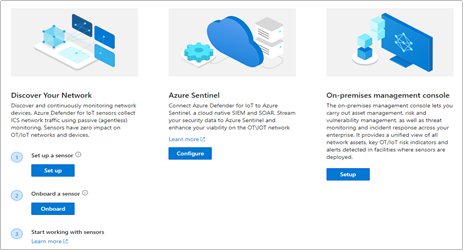
Intended audience: Security and OT engineering enthusiasts, looking to secure unmanaged critical networks used by IoT/OT devices such as Building Management Systems, Manufacturing, Critical Infrastructure and more! Introduction You’ve read the product materials and would like to get started with securing your IoT/OT network – in this blog post, we will focus on setting up a sensor on your critical networks - without impacting IoT/OT stability or performance (If you missed it, you can read more about the capabilities of Azure Defender for IoT here). The goal of this article is to guide you through setting up a sensor to demonstrate the value of the system, as well as a quick start for securing unmanaged IoT/OT devices. Try it now at no charge Try Azure Defender for IoT - This version includes the agentless security provided via the integration of CyberX, a Microsoft company, plus the ability to connect to Azure Sentinel. Preparing your environment Azure Defender for IoT monitors unmanaged devices that are used in Operational Technology (OT) environments such as manufacturing, building management systems (BMS), life sciences, energy and water utilities, oil & gas, and logistics. In the most basic configuration, Setting up your environment can be taken in 4 easy steps: 1. Setup a sensor The software for the sensor may be installed on physical servers or as a virtual machine. The sensor installation files can be downloaded from the Azure Defender for IoT portal, on the “Getting Started” -> “Network Sensor” tab. Log into your Azure Account and download the ISO installer for the sensor. Install the ISO from USB on a VM or physical server (see Hardware Guide and Installation Guide) Make sure to make a note of the administrative login credentials presented during the installation process. If your setup includes multiple sensors, you can also download the optional “On-Premises Management Console” which allows you to manage and monitor large sensor deployments. More on this in the Installation Guide, Chapter 8 2. Monitor a SPAN port The sensor implements non-invasive passive monitoring with Network Traffic Analysis (NTA) and Layer 7 Deep Packet Inspection (DPI) to extract detailed IoT/OT information in real-time, even across diverse automation equipment from all major OT suppliers such as: Rockwell Automation, Schneider Electric, GE, Emerson, Siemens, Honeywell, ABB, Yokogawa, etc. Locate a managed LAN switch connected to IoT/OT devices. These switches can typically be set up with monitoring ports (also called SPAN or mirror ports). Utilizing this technique, the sensor will passively monitor the OT network, without creating any traffic which might impact or risk devices on the network. Connect the monitoring port to the sensor’s monitoring interface (typically the first available ethernet card) For more information and configuration examples, see the Network Deployment Guide, Chapter 5 - “Traffic Monitoring.” 3. Register and Activate the Sensor Once the sensor has been connected to the monitor port – it will immediately begin to analyze the network traffic. The next step is to login to the sensor and activate it with an activation file available for your account, in the Azure Defender for IoT portal. Log into your Azure Account select the “Onboard” sensor button (underlined below): Next, fill in the sensor name and subscription details. The button for "cloud-connected" will optionally send alert information into IoT Hub and Sentinel for further analysis. If you have an air-gapped or completely on-premises implementation with no connection to the cloud, disable the "cloud-connected" button below before you generate your license. Download the activation file. This will be used in the next step to activate the sensor. Login to the sensor’s IP address, with the administrative credentials shown during the installation process. On the next screen – upload the activation file from the previous step. For more information and detailed steps, see the Onboarding Guide. 4. Start Exploring Now you’ve successfully installed your first sensor and you can start using the system – view the asset inventory, zoom in on the network map or generate a risk report. Conclusion Thank you for reading this blog post. There will be more blog posts to follow, which will enable you to get the best of out your system, which will include: what to do when malware is detected, connecting to Azure Sentinel, or simulating attack vectors, so please check back with us soon. Learn more with these educational resources: Watch our Ignite session showing how Azure Defender for IoT and Azure Sentinel are combined to investigate multistage attacks that cross IT/OT boundaries, using the TRITON attack on a petrochemical facility as an example. Watch our Tech Community webinar describing MITRE ATT&CK for ICS, an OT-focused version of the well-known MITRE ATT&CK framework originally developed for IT networks. Watch our SANS webinar featuring the head of Microsoft’s datacenter security program, about securing building automation systems using continuous OT security monitoring. Stay tuned for an upcoming webinar during which we’ll do a technical walkthrough of how to deploy and use Azure Defender for IoT. Troubleshooting No traffic is monitored on the sensor. Check that the monitoring port is connected to the correct ethernet port. Make sure the port is indeed a SPAN port by monitoring bandwidth on the port. For more troubleshooting, see the Network Setup Guide, Appendix 1 I cannot find a device in the Asset Inventory Make sure the device is connected to the network. Search for its MAC address in the Asset Inventory – if it is active, it will appear on the list.2.4KViews4likes0Comments