network watcher
9 TopicsAzure Networking 2025: Powering cloud innovation and AI at global scale
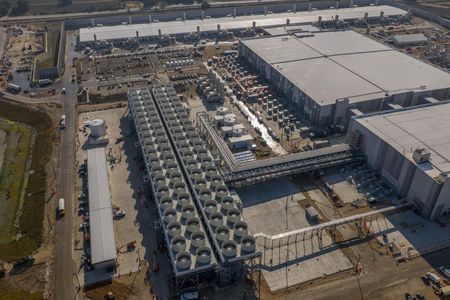
In 2025, Azure’s networking platform proved itself as the invisible engine driving the cloud’s most transformative innovations. Consider the construction of Microsoft’s new Fairwater AI datacenter in Wisconsin – a 315-acre campus housing hundreds of thousands of GPUs. To operate as one giant AI supercomputer, Fairwater required a single flat, ultra-fast network interconnecting every GPU. Azure’s networking team delivered: the facility’s network fabric links GPUs at 800 Gbps speeds in a non-blocking architecture, enabling 10× the performance of the world’s fastest supercomputer. This feat showcases how fundamental networking is to cloud innovation. Whether it’s uniting massive AI clusters or connecting millions of everyday users, Azure’s globally distributed network is the foundation upon which new breakthroughs are built. In 2025, the surge of AI workloads, data-driven applications, and hybrid cloud adoption put unprecedented demands on this foundation. We responded with bold network investments and innovations. Each new networking feature delivered in 2025, from smarter routing to faster gateways, was not just a technical upgrade but an innovation enabling customers to achieve more. Recapping the year’s major releases across Azure Networking services and key highlights how AI both drive and benefit from these advancements. Unprecedented connectivity for a hybrid and AI era Hybrid connectivity at scale: Azure’s network enhancements in 2025 focused on making global and hybrid connectivity faster, simpler, and ready for the next wave of AI-driven traffic. For enterprises extending on-premises infrastructure to Azure, Azure ExpressRoute private connectivity saw a major leap in capacity: Microsoft announced support for 400 Gbps ExpressRoute Direct ports (available in 2026) to meet the needs of AI supercomputing and massive data volumes. These high-speed ports – which can be aggregated into multi-terabit links – ensure that even the largest enterprises or HPC clusters can transfer data to Azure with dedicated, low-latency links. In parallel, Azure VPN Gateway performance reached new highs, with a generally available upgrade that delivers up to 20 Gbps aggregate throughput per gateway and 5 Gbps per individual tunnel. This is a 3× increase over previous limits, enabling branch offices and remote sites to connect to Azure even more seamlessly without bandwidth bottlenecks. Together, the ExpressRoute and VPN improvements give customers a spectrum of high-performance options for hybrid networking – from offices and datacenters to the cloud – supporting scenarios like large-scale data migrations, resilient multi-site architectures, and hybrid AI processing. Simplified global networking: Azure Virtual WAN (vWAN) continued to mature as the one-stop solution for managing global connectivity. Virtual WAN introduced forced tunneling for Secure Virtual Hubs (now in preview), which allows organizations to route all Internet-bound traffic from branch offices or virtual networks back to a central hub for inspection. This capability simplifies the implementation of a “backhaul to hub” security model – for example, forcing branches to use a central firewall or security appliance – without complex user-defined routing. Empowering multicloud and NVA integration: Azure recognizes that enterprise networks are diverse. Azure Route Server improvements enhanced interoperability with customer equipment and third-party network virtual appliances (NVAs). Notably, Azure Route Server now supports up to 500 virtual network connections (spokes) per route server, a significant scale boost that enables larger hub-and-spoke topologies and simplified Border Gateway Protocol (BGP) route exchange even in very large environments. This helps customers using SD-WAN appliances or custom firewalls in Azure to seamlessly learn routes from hundreds of VNet spokes – maintaining central routing control without manual configuration. Additionally, Azure Route Server introduced a preview of hub routing preference, giving admins the ability to influence BGP route selection (for example, preferring ExpressRoute over a VPN path, or vice versa). This fine-grained control means hybrid networks can be tuned for optimal performance and cost. Resilience and reliability by design Azure’s growth has been underpinned by making the network “resilient by default.” We shipped tools to help validate and improve network resiliency. ExpressRoute Resiliency Insights was released for general availability – delivering an intelligent assessment of an enterprise’s ExpressRoute setup. This feature evaluates how well your ExpressRoute circuits and gateways are architected for high availability (for example, using dual circuits in diverse locations, zone-redundant gateways, etc.) and assigns a resiliency index score as a percentage. It will highlight suboptimal configurations – such as routes advertised on only one circuit, or a gateway that isn’t zone-redundant – and provide recommendations for improvement. Moreover, Resiliency Insights includes a failover simulation tool that can test circuit redundancy by mimicking failures, so you can verify that your connections will survive real-world incidents. By proactively monitoring and testing resilience, Azure is helping customers achieve “always-on” connectivity even in the face of fiber cuts, hardware faults, or other disruptions. Security, governance, and trust in the network As enterprises entrust more core business to Azure, the platform’s networking services advanced on security and governance – helping customers achieve Zero Trust networks and high compliance with minimal complexity. Azure DNS now offers DNS Security Policies with Threat Intelligence feeds (GA). This capability allows organizations to protect their DNS queries from known malicious domains by leveraging continuously updated threat intel. For example, if a known phishing domain or C2 (command-and-control) hostname appears in DNS queries from your environment, Azure DNS can automatically block or redirect those requests. Because DNS is often the first line of detection for malware and phishing activities, this built-in filtering provides a powerful layer of defense that’s fully managed by Azure. It’s essentially a cloud-delivered DNS firewall using Microsoft’s vast threat intelligence – enabling all Azure customers to benefit from enterprise-grade security without deploying additional appliances. Network traffic governance was another focus. The introduction of forced tunneling in Azure Virtual WAN hubs (preview) shared above is a prime example where networking meets security compliance. Optimizing cloud-native and edge networks We previewed DNS intelligent traffic control features – such as filtering DNS queries to prevent data exfiltration and applying flexible recursion policies – which complement the DNS Security offering in safeguarding name resolution. Meanwhile, for load balancing across regions, Azure Traffic Manager’s behind-the-scenes upgrades (as noted earlier) improved reliability, and it’s evolving to integrate with modern container-based apps and edge scenarios. AI-powered networking: Both enabling and enabled by AI We are infusing AI into networking to make management and troubleshooting more intelligent. Networking functionality in Azure Copilot accelerates tasks like never before: it outlines the best practices instantly and troubleshooting that once required combing through docs and logs can be conversational. It effectively democratizes networking expertise, helping even smaller IT teams manage sophisticated networks by leveraging AI recommendations. The future of cloud networking in an AI world As we close out 2025, one message is clear: networking is strategic. The network is no longer a static utility – it is the adaptive circulatory system of the cloud, determining how far and fast customers can go. By delivering higher speeds, greater reliability, tighter security, and easier management, Azure Networking has empowered businesses to connect everything to anything, anywhere – securely and at scale. These advances unlock new scenarios: global supply chains running in real-time over a trusted network, multi-player AR/VR and gaming experiences delivered without lag, and AI models trained across continents. Looking ahead, AI-powered networking will become the norm. The convergence of AI and network tech means we will see more self-optimizing networks that can heal, defend, and tune themselves with minimal human intervention.1.1KViews3likes0CommentsAzure Networking Portfolio Consolidation
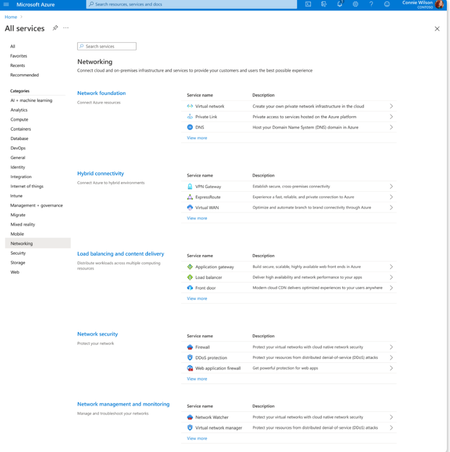
Overview Over the past decade, Azure Networking has expanded rapidly, bringing incredible tools and capabilities to help customers build, connect, and secure their cloud infrastructure. But we've also heard strong feedback: with over 40 different products, it hasn't always been easy to navigate and find the right solution. The complexity often led to confusion, slower onboarding, and missed capabilities. That's why we're excited to introduce a more focused, streamlined, and intuitive experience across Azure.com, the Azure portal, and our documentation pivoting around four core networking scenarios: Network foundations: Network foundations provide the core connectivity for your resources, using Virtual Network, Private Link, and DNS to build the foundation for your Azure network. Try it with this link: Network foundations Hybrid connectivity: Hybrid connectivity securely connects on-premises, private, and public cloud environments, enabling seamless integration, global availability, and end-to-end visibility, presenting major opportunities as organizations advance their cloud transformation. Try it with this link: Hybrid connectivity Load balancing and content delivery: Load balancing and content delivery helps you choose the right option to ensure your applications are fast, reliable, and tailored to your business needs. Try it with this link: Load balancing and content delivery Network security: Securing your environment is just as essential as building and connecting it. The Network Security hub brings together Azure Firewall, DDoS Protection, and Web Application Firewall (WAF) to provide a centralized, unified approach to cloud protection. With unified controls, it helps you manage security more efficiently and strengthen your security posture. Try it with this link: Network security This new structure makes it easier to discover the right networking services and get started with just a few clicks so you can focus more on building, and less on searching. What you’ll notice: Clearer starting points: Azure Networking is now organized around four core scenarios and twelve essential services, reflecting the most common customer needs. Additional services are presented within the context of these scenarios, helping you stay focused and find the right solution without feeling overwhelmed. Simplified choices: We’ve merged overlapping or closely related services to reduce redundancy. That means fewer, more meaningful options that are easier to evaluate and act on. Sunsetting outdated services: To reduce clutter and improve clarity, we’re sunsetting underused offerings such as white-label CDN services and China CDN. These capabilities have been rolled into newer, more robust services, so you can focus on what’s current and supported. What this means for you Faster decision-making: With clearer guidance and fewer overlapping products, it's easier to discover what you need and move forward confidently. More productive sales conversations: With this simplified approach, you’ll get more focused recommendations and less confusion among sellers. Better product experience: This update makes the Azure Networking portfolio more cohesive and consistent, helping you get started quickly, stay aligned with best practices, and unlock more value from day one. The portfolio consolidation initiative is a strategic effort to simplify and enhance the Azure Networking portfolio, ensuring better alignment with customer needs and industry best practices. By focusing on top-line services, combining related products, and retiring outdated offerings, Azure Networking aims to provide a more cohesive and efficient product experience. Azure.com Before: Our original Solution page on Azure.com was disorganized and static, displaying a small portion of services in no discernable order. After: The revised solution page is now dynamic, allowing customers to click deeper into each networking and network security category, displaying the top line services, simplifying the customer experience. Azure Portal Before: With over 40 networking services available, we know it can feel overwhelming to figure out what’s right for you and where to get started. After: To make it easier, we've introduced four streamlined networking hubs each built around a specific scenario to help you quickly identify the services that match your needs. Each offers an overview to set the stage, key services to help you get started, guidance to support decision-making, and a streamlined left-hand navigation for easy access to all services and features. Documentation For documentation, we looked at our current assets as well as created new assets that aligned with the changes in the portal experience. Like Azure.com, we found the old experiences were disorganized and not well aligned. We updated our assets to focus on our top-line networking services, and to call out the pillars. Our belief is these changes will allow our customers to more easily find the relevant and important information they need for their Azure infrastructure. Azure Network Hub Before the updates, we had a hub page organized around different categories and not well laid out. In the updated hub page, we provided relevant links for top-line services within all of the Azure networking scenarios, as well as a section linking to each scenario's hub page. Scenario Hub pages We added scenario hub pages for each of the scenarios. This provides our customers with a central hub for information about the top-line services for each scenario and how to get started. Also, we included common scenarios and use cases for each scenario, along with references for deeper learning across the Azure Architecture Center, Well Architected Framework, and Cloud Adoption Framework libraries. Scenario Overview articles We created new overview articles for each scenario. These articles were designed to provide customers with an introduction to the services included in each scenario, guidance on choosing the right solutions, and an introduction to the new portal experience. Here's the Load balancing and content delivery overview: Documentation links Azure Networking hub page: Azure networking documentation | Microsoft Learn Scenario Hub pages: Azure load balancing and content delivery | Microsoft Learn Azure network foundation documentation | Microsoft Learn Azure hybrid connectivity documentation | Microsoft Learn Azure network security documentation | Microsoft Learn Scenario Overview pages What is load balancing and content delivery? | Microsoft Learn Azure Network Foundation Services Overview | Microsoft Learn What is hybrid connectivity? | Microsoft Learn What is Azure network security? | Microsoft Lea Improving user experience is a journey and in coming months we plan to do more on this. Watch out for more blogs over the next few months for further improvements.3.1KViews4likes0Comments
Accelerate designing, troubleshooting & securing your network with Gen-AI powered tools, now GA.
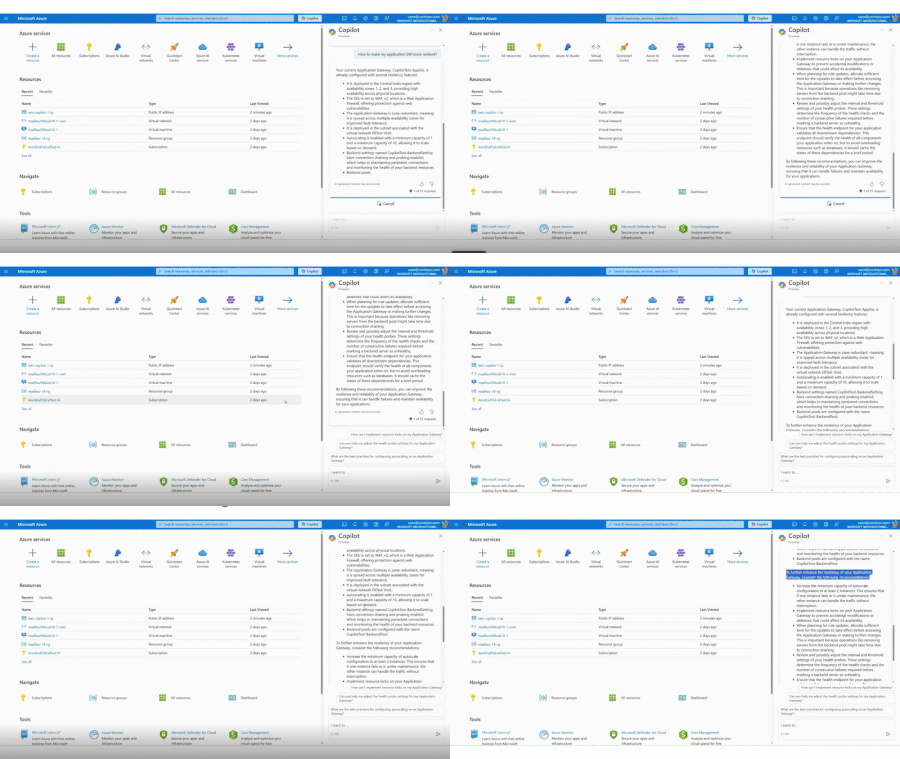
We are thrilled to announce the general availability of Azure Networking skills in Copilot, an extension of Copilot in Azure and Security Copilot designed to enhance cloud networking experience. Azure Networking Copilot is set to transform how organizations design, operate, and optimize their Azure Network by providing contextualized responses tailored to networking-specific scenarios and using your network topology.1.8KViews1like1Comment
Azure virtual network terminal access point (TAP) public preview announcement
What is virtual network TAP? Virtual network TAP allows customers continuously stream virtual machine network traffic to a network packet collector or analytics tool. Many security and performance monitoring tools rely on packet-level insights that are difficult to access in cloud environments. Virtual network TAP bridges this gap by integrating with our industry partners to offer: Enhanced security and threat detection: Security teams can inspect full packet data in real-time to detect and respond to potential threats. Performance monitoring and troubleshooting: Operations teams can analyze live traffic patterns to identify bottlenecks, troubleshoot latency issues, and optimize application performance. Regulatory compliance: Organizations subject to compliance frameworks such as Health Insurance Portability and Accountability Act (HIPAA), and General Data Protection Regulation (GDPR) can use virtual network TAP to capture network activity for auditing and forensic investigations. Why use virtual network TAP? Unlike traditional packet capture solutions that require deploying additional agents or network appliances, virtual network TAP leverages Azure's native infrastructure to enable seamless traffic mirroring without complex configurations and without impacting the performance of the virtual machine. A key advantage is that mirrored traffic does not count towards virtual machine’s network limits, ensuring complete visibility without compromising application performance. Additionally, virtual network TAP supports all Azure virtual machine SKU. Deploying virtual network TAP The portal is a convenient way to get started with Azure virtual network TAP. However, if you have a lot of Azure resources and want to automate the setup you may want to use a PowerShell, CLI, or REST API. Add a TAP configuration on a network interface that is attached to a virtual machine deployed in your virtual network. The destination is a virtual network IP address in the same virtual network as the monitored network interface or a peered virtual network. The collector solution for virtual network TAP can be deployed behind an Azure Internal Load balancer for high availability. You can use the same virtual network TAP resource to aggregate traffic from multiple network interfaces in the same or different subscriptions. If the monitored network interfaces are in different subscriptions, the subscriptions must be associated to the same Microsoft Entra tenant. Additionally, the monitored network interfaces and the destination endpoint for aggregating the TAP traffic can be in peered virtual networks in the same region. Partnering with industry leaders to enhance network monitoring in Azure To maximize the value of virtual network TAP, we are proud to collaborate with industry-leading security and network visibility partners. Our partners provide deep packet inspection, analytics, threat detection, and monitoring solutions that seamlessly integrate with virtual network TAP: Network packet brokers Partner Product Gigamon GigaVUE Cloud Suite for Azure Keysight CloudLens Security analytics, network/application performance management Partner Product Darktrace Darktrace /NETWORK Netscout Omnis Cyber Intelligence NDR Corelight Corelight Open NDR Platform LinkShadow LinkShadow NDR Fortinet FortiNDR Cloud FortiGate VM cPacket cPacket Cloud Suite TrendMicro Trend Vision One™ Network Security Extrahop RevealX Bitdefender GravityZone Extended Detection and Response for Network eSentire eSentire MDR Vectra Vectra NDR AttackFence AttackFence NDR Arista Networks Arista NDR See our partner blogs: Bitdefender + Microsoft Virtual Network TAP: Deepening Visibility, Strengthening Security Streamline Traffic Mirroring in the Cloud with Azure Virtual Network Terminal Access Point (TAP) and Keysight Visibility | Keysight Blogs eSentire | Unlocking New Possibilities for Network Monitoring and… LinkShadow Unified Identity, Data, and Network Platform Integrated with Microsoft Virtual Network TAP Extrahop and Microsoft Extend Coverage for Azure Workloads Resources | Announcing cPacket Partnership with Azure virtual network terminal access point (TAP) Gain Network Traffic Visibility with FortiGate and Azure virtual network TAP Get started with virtual network TAP To learn more and get started, visit our website. We look forward to seeing how you leverage virtual network TAP to enhance security, performance, and compliance in your cloud environment. Stay tuned for more updates as we continue to refine and expand on our feature set! If you have any questions please reach out to us at azurevnettap@microsoft.com.3KViews3likes7Comments
New and improved network topology experience in Network Watcher and Azure Monitor Network Insights
Azure Network Watcher provides network monitoring and troubleshooting capabilities to increase observability and actionable insights. Network Watcher supports four main scenarios: Connectivity Monitoring detects packet loss and latency, built-in health metrics and topology visualization help to locate issues, traffic monitoring tracks network communication pattern, and diagnostics suite enables troubleshooting. Efficient management and monitoring of cloud networks is crucial for peak performance, security, and reliability. The blog explains how the new topology experience can help you manage and monitor your cloud network infrastructure with enhanced visualization, simplified monitoring, valuable insights and contextual issue localization capabilities.4.1KViews3likes1Comment
Build an Azure Logic App to send an alert when the provisioning state changes for your Azure VWAN
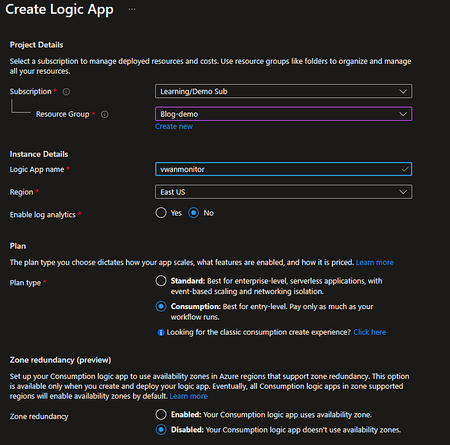
Have you ever thought about monitoring your VWAN provisioning state? In today’s dynamic cloud environment, it’s crucial to have a good monitoring system in place for your Azure resources especially your networking resources. In this blog, I am going to show you step-by-step how to create an Azure Logic App that will notify you whenever the provisioning status of your Azure Virtual WAN changes to another state other than “Succeeded”. Note: As of the time I am writing this blog, Microsoft doesn’t support alerts based on Metrics for Azure Virtual WAN. You can still retrieve information for the components that shape up the Virtual WAN for example, VPN site-site connections, BGP peers, virtual hubs, etc. However, you won’t be able to configure diagnostic logs for virtual WAN at this time. Good news — There’s an alternate way to be alerted via an Azure Logic App3.8KViews0likes0CommentsMonitor and troubleshoot Azure & hybrid networks with Azure Network Monitoring
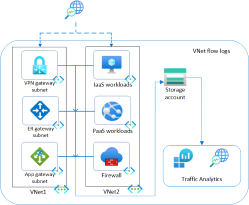
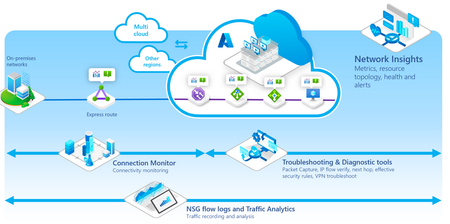
Azure Network Watcher and Network Insights portfolio encompasses an entire suite of tools to visualize, monitor, diagnose, and troubleshoot network issues across Azure and Hybrid cloud environments. The suite enables customers to observe health across resources and networks with comprehensive wide coverage, through a guided and intuitive drilled down experience with Network Insights. Moreover, users can detect and localize connectivity and performance issues across their Azure and Hybrid networks with synthetic monitoring in Connection Monitor. Additionally, Traffic Analytics allows customers to visualize and manage their networks for uncompromised security, compliance issues, and understand the flow of network traffic. Lastly, the Diagnostics suite offers fast troubleshooting with actionable insights, thus effectively assisting in reducing the meantime to resolve and mitigate network issues9.5KViews4likes2Comments