microsoft ai
26 TopicsBuilding with Azure OpenAI Sora: A Complete Guide to AI Video Generation
In this comprehensive guide, we'll explore how to integrate both Sora 1 and Sora 2 models from Azure OpenAI Service into a production web application. We'll cover API integration, request body parameters, cost analysis, limitations, and the key differences between using Azure AI Foundry endpoints versus OpenAI's native API. Table of Contents Introduction to Sora Models Azure AI Foundry vs. OpenAI API Structure API Integration: Request Body Parameters Video Generation Modes Cost Analysis per Generation Technical Limitations & Constraints Resolution & Duration Support Implementation Best Practices Introduction to Sora Models Sora is OpenAI's groundbreaking text-to-video model that generates realistic videos from natural language descriptions. Azure AI Foundry provides access to two versions: Sora 1: The original model focused primarily on text-to-video generation with extensive resolution options (480p to 1080p) and flexible duration (1-20 seconds) Sora 2: The enhanced version with native audio generation, multiple generation modes (text-to-video, image-to-video, video-to-video remix), but more constrained resolution options (720p only in public preview) Azure AI Foundry vs. OpenAI API Structure Key Architectural Differences Sora 1 uses Azure's traditional deployment-based API structure: Endpoint Pattern: https://{resource-name}.openai.azure.com/openai/deployments/{deployment-name}/... Parameters: Uses Azure-specific naming like n_seconds, n_variants, separate width/height fields Job Management: Uses /jobs/{id} for status polling Content Download: Uses /video/generations/{generation_id}/content/video Sora 2 adapts OpenAI's v1 API format while still being hosted on Azure: Endpoint Pattern: https://{resource-name}.openai.azure.com/openai/deployments/{deployment-name}/videos Parameters: Uses OpenAI-style naming like seconds (string), size (combined dimension string like "1280x720") Job Management: Uses /videos/{video_id} for status polling Content Download: Uses /videos/{video_id}/content Why This Matters? This architectural difference requires conditional request formatting in your code: const isSora2 = deployment.toLowerCase().includes('sora-2'); if (isSora2) { requestBody = { model: deployment, prompt, size: `${width}x${height}`, // Combined format seconds: duration.toString(), // String type }; } else { requestBody = { model: deployment, prompt, height, // Separate dimensions width, n_seconds: duration.toString(), // Azure naming n_variants: variants, }; } API Integration: Request Body Parameters Sora 1 API Parameters Standard Text-to-Video Request: { "model": "sora-1", "prompt": "Wide shot of a child flying a red kite in a grassy park, golden hour sunlight, camera slowly pans upward.", "height": "720", "width": "1280", "n_seconds": "12", "n_variants": "2" } Parameter Details: model (String, Required): Your Azure deployment name prompt (String, Required): Natural language description of the video (max 32000 chars) height (String, Required): Video height in pixels width (String, Required): Video width in pixels n_seconds (String, Required): Duration (1-20 seconds) n_variants (String, Optional): Number of variations to generate (1-4, constrained by resolution) Sora 2 API Parameters Text-to-Video Request: { "model": "sora-2", "prompt": "A serene mountain landscape with cascading waterfalls, cinematic drone shot", "size": "1280x720", "seconds": "12" } Image-to-Video Request (uses FormData): const formData = new FormData(); formData.append('model', 'sora-2'); formData.append('prompt', 'Animate this image with gentle wind movement'); formData.append('size', '1280x720'); formData.append('seconds', '8'); formData.append('input_reference', imageFile); // JPEG/PNG/WebP Video-to-Video Remix Request: Endpoint: POST .../videos/{video_id}/remix Body: Only { "prompt": "your new description" } The original video's structure, motion, and framing are reused while applying the new prompt Parameter Details: model (String, Optional): Your deployment name prompt (String, Required): Video description size (String, Optional): Either "720x1280" or "1280x720" (defaults to "720x1280") seconds (String, Optional): "4", "8", or "12" (defaults to "4") input_reference (File, Optional): Reference image for image-to-video mode remix_video_id (String, URL parameter): ID of video to remix Video Generation Modes 1. Text-to-Video (Both Models) The foundational mode where you provide a text prompt describing the desired video. Implementation: const response = await fetch(endpoint, { method: 'POST', headers: { 'Content-Type': 'application/json', 'api-key': apiKey, }, body: JSON.stringify({ model: deployment, prompt: "A train journey through mountains with dramatic lighting", size: "1280x720", seconds: "12", }), }); Best Practices: Include shot type (wide, close-up, aerial) Describe subject, action, and environment Specify lighting conditions (golden hour, dramatic, soft) Add camera movement if desired (pans, tilts, tracking shots) 2. Image-to-Video (Sora 2 Only) Generate a video anchored to or starting from a reference image. Key Requirements: Supported formats: JPEG, PNG, WebP Image dimensions must exactly match the selected video resolution Our implementation automatically resizes uploaded images to match Implementation Detail: // Resize image to match video dimensions const targetWidth = parseInt(width); const targetHeight = parseInt(height); const resizedImage = await resizeImage(inputReference, targetWidth, targetHeight); // Send as multipart/form-data formData.append('input_reference', resizedImage); 3. Video-to-Video Remix (Sora 2 Only) Create variations of existing videos while preserving their structure and motion. Use Cases: Change weather conditions in the same scene Modify time of day while keeping camera movement Swap subjects while maintaining composition Adjust artistic style or color grading Endpoint Structure: POST {base_url}/videos/{original_video_id}/remix?api-version=2024-08-01-preview Implementation: let requestEndpoint = endpoint; if (isSora2 && remixVideoId) { const [baseUrl, queryParams] = endpoint.split('?'); const root = baseUrl.replace(/\/videos$/, ''); requestEndpoint = `${root}/videos/${remixVideoId}/remix${queryParams ? '?' + queryParams : ''}`; } Cost Analysis per Generation Sora 1 Pricing Model Base Rate: ~$0.05 per second per variant at 720p Resolution Scaling: Cost scales linearly with pixel count Formula: const basePrice = 0.05; const basePixels = 1280 * 720; // Reference resolution const currentPixels = width * height; const resolutionMultiplier = currentPixels / basePixels; const totalCost = basePrice * duration * variants * resolutionMultiplier; Examples: 720p (1280×720), 12 seconds, 1 variant: $0.60 1080p (1920×1080), 12 seconds, 1 variant: $1.35 720p, 12 seconds, 2 variants: $1.20 Sora 2 Pricing Model Flat Rate: $0.10 per second per variant (no resolution scaling in public preview) Formula: const totalCost = 0.10 * duration * variants; Examples: 720p (1280×720), 4 seconds: $0.40 720p (1280×720), 12 seconds: $1.20 720p (720×1280), 8 seconds: $0.80 Note: Since Sora 2 currently only supports 720p in public preview, resolution doesn't affect cost, only duration matters. Cost Comparison Scenario Sora 1 (720p) Sora 2 (720p) Winner 4s video $0.20 $0.40 Sora 1 12s video $0.60 $1.20 Sora 1 12s + audio N/A (no audio) $1.20 Sora 2 (unique) Image-to-video N/A $0.40-$1.20 Sora 2 (unique) Recommendation: Use Sora 1 for cost-effective silent videos at various resolutions. Use Sora 2 when you need audio, image/video inputs, or remix capabilities. Technical Limitations & Constraints Sora 1 Limitations Resolution Options: 9 supported resolutions from 480×480 to 1920×1080 Includes square, portrait, and landscape formats Full list: 480×480, 480×854, 854×480, 720×720, 720×1280, 1280×720, 1080×1080, 1080×1920, 1920×1080 Duration: Flexible: 1 to 20 seconds Any integer value within range Variants: Depends on resolution: 1080p: Variants disabled (n_variants must be 1) 720p: Max 2 variants Other resolutions: Max 4 variants Concurrent Jobs: Maximum 2 jobs running simultaneously Job Expiration: Videos expire 24 hours after generation Audio: No audio generation (silent videos only) Sora 2 Limitations Resolution Options (Public Preview): Only 2 options: 720×1280 (portrait) or 1280×720 (landscape) No square formats No 1080p support in current preview Duration: Fixed options only: 4, 8, or 12 seconds No custom durations Defaults to 4 seconds if not specified Variants: Not prominently supported in current API documentation Focus is on single high-quality generations with audio Concurrent Jobs: Maximum 2 jobs (same as Sora 1) Job Expiration: 24 hours (same as Sora 1) Audio: Native audio generation included (dialogue, sound effects, ambience) Shared Constraints Concurrent Processing: Both models enforce a limit of 2 concurrent video jobs per Azure resource. You must wait for one job to complete before starting a third. Job Lifecycle: queued → preprocessing → processing/running → completed Download Window: Videos are available for 24 hours after completion. After expiration, you must regenerate the video. Generation Time: Typical: 1-5 minutes depending on resolution, duration, and API load Can occasionally take longer during high demand Resolution & Duration Support Matrix Sora 1 Support Matrix Resolution Aspect Ratio Max Variants Duration Range Use Case 480×480 Square 4 1-20s Social thumbnails 480×854 Portrait 4 1-20s Mobile stories 854×480 Landscape 4 1-20s Quick previews 720×720 Square 4 1-20s Instagram posts 720×1280 Portrait 2 1-20s TikTok/Reels 1280×720 Landscape 2 1-20s YouTube shorts 1080×1080 Square 1 1-20s Premium social 1080×1920 Portrait 1 1-20s Premium vertical 1920×1080 Landscape 1 1-20s Full HD content Sora 2 Support Matrix Resolution Aspect Ratio Duration Options Audio Generation Modes 720×1280 Portrait 4s, 8s, 12s ✅ Yes Text, Image, Video Remix 1280×720 Landscape 4s, 8s, 12s ✅ Yes Text, Image, Video Remix Note: Sora 2's limited resolution options in public preview are expected to expand in future releases. Implementation Best Practices 1. Job Status Polling Strategy Implement adaptive backoff to avoid overwhelming the API: const maxAttempts = 180; // 15 minutes max let attempts = 0; const baseDelayMs = 3000; // Start with 3 seconds while (attempts < maxAttempts) { const response = await fetch(statusUrl, { headers: { 'api-key': apiKey }, }); if (response.status === 404) { // Job not ready yet, wait longer const delayMs = Math.min(15000, baseDelayMs + attempts * 1000); await new Promise(r => setTimeout(r, delayMs)); attempts++; continue; } const job = await response.json(); // Check completion (different status values for Sora 1 vs 2) const isCompleted = isSora2 ? job.status === 'completed' : job.status === 'succeeded'; if (isCompleted) break; // Adaptive backoff const delayMs = Math.min(15000, baseDelayMs + attempts * 1000); await new Promise(r => setTimeout(r, delayMs)); attempts++; } 2. Handling Different Response Structures Sora 1 Video Download: const generations = Array.isArray(job.generations) ? job.generations : []; const genId = generations[0]?.id; const videoUrl = `${root}/${genId}/content/video`; Sora 2 Video Download: const videoUrl = `${root}/videos/${jobId}/content`; 3. Error Handling try { const response = await fetch(endpoint, fetchOptions); if (!response.ok) { const error = await response.text(); throw new Error(`Video generation failed: ${error}`); } // ... handle successful response } catch (error) { console.error('[VideoGen] Error:', error); // Implement retry logic or user notification } 4. Image Preprocessing for Image-to-Video Always resize images to match the target video resolution: async function resizeImage(file: File, targetWidth: number, targetHeight: number): Promise<File> { return new Promise((resolve, reject) => { const img = new Image(); const canvas = document.createElement('canvas'); const ctx = canvas.getContext('2d'); img.onload = () => { canvas.width = targetWidth; canvas.height = targetHeight; ctx.drawImage(img, 0, 0, targetWidth, targetHeight); canvas.toBlob((blob) => { if (blob) { const resizedFile = new File([blob], file.name, { type: file.type }); resolve(resizedFile); } else { reject(new Error('Failed to create resized image blob')); } }, file.type); }; img.onerror = () => reject(new Error('Failed to load image')); img.src = URL.createObjectURL(file); }); } 5. Cost Tracking Implement cost estimation before generation and tracking after: // Pre-generation estimate const estimatedCost = calculateCost(width, height, duration, variants, soraVersion); // Save generation record await saveGenerationRecord({ prompt, soraModel: soraVersion, duration: parseInt(duration), resolution: `${width}x${height}`, variants: parseInt(variants), generationMode: mode, estimatedCost, status: 'queued', jobId: job.id, }); // Update after completion await updateGenerationStatus(jobId, 'completed', { videoId: finalVideoId }); 6. Progressive User Feedback Provide detailed status updates during the generation process: const statusMessages: Record<string, string> = { 'preprocessing': 'Preprocessing your request...', 'running': 'Generating video...', 'processing': 'Processing video...', 'queued': 'Job queued...', 'in_progress': 'Generating video...', }; onProgress?.(statusMessages[job.status] || `Status: ${job.status}`); Conclusion Building with Azure OpenAI's Sora models requires understanding the nuanced differences between Sora 1 and Sora 2, both in API structure and capabilities. Key takeaways: Choose the right model: Sora 1 for resolution flexibility and cost-effectiveness; Sora 2 for audio, image inputs, and remix capabilities Handle API differences: Implement conditional logic for parameter formatting and status polling based on model version Respect limitations: Plan around concurrent job limits, resolution constraints, and 24-hour expiration windows Optimize costs: Calculate estimates upfront and track actual usage for better budget management Provide great UX: Implement adaptive polling, progressive status updates, and clear error messages The future of AI video generation is exciting, and Azure AI Foundry provides production-ready access to these powerful models. As Sora 2 matures and limitations are lifted (especially resolution options), we'll see even more creative applications emerge. Resources: Azure AI Foundry Sora Documentation OpenAI Sora API Reference Azure OpenAI Service Pricing This blog post is based on real-world implementation experience building LemonGrab, my AI video generation platform that integrates both Sora 1 and Sora 2 through Azure AI Foundry. The code examples are extracted from production usage.391Views0likes0Comments
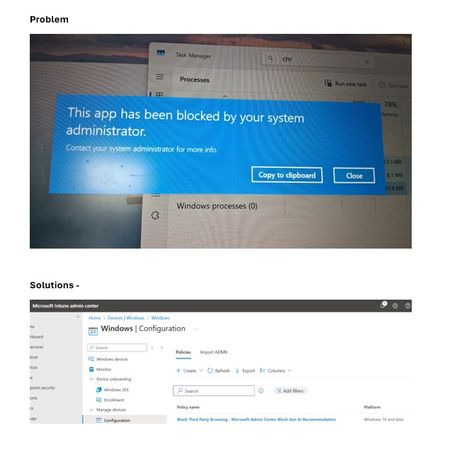
Are you unable to open Google Chrome or any other browser?
Cause & Solution: If you are using Microsoft Intune, the Microsoft AI system may have automatically created a rule that blocks third-party browsers such as Chrome and Firefox. To resolve this, you need to deactivate or delete the automatically generated rule under Windows Configuration Policies.100Views1like0Comments
How I can app for my Bonus card on Microsoft
Applying for your Bonus Card on Microsoft platforms is simple and convenient. You can access exclusive deals, track your savings, and manage your purchases seamlessly by integrating your Bonus Card with Microsoft services. Visit the official Microsoft Store or AppSource to download the Bonus Card application and start saving instantly. Stay connected with the latest offers by linking your card to Microsoft Rewards for additional benefits. http://www.bonusah.nlOn-device AI and security: What really matters for the enterprise
AI is evolving, and so is the way businesses run it. Traditionally, most AI workloads have been processed in the cloud. When a user gives an AI tool a prompt, that input is sent over the internet to remote servers, where the model processes it and sends back a result. This model supports large-scale services like Microsoft 365 Copilot, which integrates AI into apps like Word, Excel, and Teams. Now, a new capability is emerging alongside cloud-based AI. AI can also run directly on a PC—no internet connection or remote server required. This is known as on-device processing. It means the data and the model stay on the device itself, and the work is done locally. Modern CPUs and GPUs are beginning to support this kind of processing. But neural processing units (NPUs), now included in enterprise-grade PCs such as Microsoft Surface Copilot+ PCs, are specifically designed to run AI workloads efficiently. NPUs are designed to perform the types of operations AI needs at high speed while using less power. That makes them ideal for features that need to work instantly, in a sustained fashion in the background, or without an internet connection. A flexible approach to AI deployment NPUs can enable power-efficient on-device processing, fast response times with small models, consistent functionality in offline scenarios, and more control over how data is processed and stored. For organizations, it adds flexibility in choosing how and where to run AI—whether to support real-time interactions at the edge or meet specific data governance requirements. At the same time, cloud-based AI remains essential to how organizations deliver intelligent services across teams and workflows. Microsoft 365 Copilot, for example, is powered by cloud infrastructure and integrates deeply across productivity applications using enterprise-grade identity, access, and content protections. Both models serve different but complementary needs. On-device AI adds new options for responsiveness and control. Cloud-based AI enables broad integration and centralized scale. Together, they give businesses flexibility to align AI processing with the demands of the use case, whether for fast local inference or connected collaboration. For business and IT leaders, the question is not which model is better but how to use each effectively within a secure architecture. That starts with understanding where data flows, how it is protected, and what matters most at the endpoint. Understanding AI data flow and its security impact AI systems rely on several types of input such as user prompts, system context, and business content. When AI runs in the cloud, data is transmitted to remote servers for processing. When it runs on the device, processing happens locally. Both approaches have implications for security. With cloud AI, protection depends on the strength of the vendor’s infrastructure, encryption standards, and access controls. Security follows a shared responsibility model where the cloud provider secures the platform while the enterprise defines its policies for data access, classification, and compliance. Microsoft’s approach to data security and privacy in cloud AI services Although the purpose of this blog post is to talk about on-device AI and security, it’s worth a detour to briefly touch on how Microsoft approaches data governance across its cloud-based AI services. Ultimately, the goal is for employees to be able to use whatever tools work best for what they want to get done, and they may not differentiate between local and cloud AI services. That means having a trusted provider for both is important for long-term AI value and security in the organization. Microsoft’s generative AI solutions, including Azure OpenAI Service and Copilot services and capabilities, do not use your organization’s data to train foundation models without your permission. The Azure OpenAI Service is operated by Microsoft as an Azure service; Microsoft hosts the OpenAI models in Microsoft's Azure environment and the Service does not interact with any services operated by OpenAI (e.g. ChatGPT, or the OpenAI API). Microsoft 365 Copilot and other AI tools operate within a secured boundary, pulling from organization-specific content sources like OneDrive and Microsoft Graph while respecting existing access permissions. For more resources on data privacy and security in Microsoft cloud AI services, check out Microsoft Learn. Local AI security depends on a trusted endpoint When AI runs on the device, the data stays closer to its source. This reduces reliance on network connectivity and can help limit exposure in scenarios where data residency or confidentiality is a concern. But it also means the device must be secured at every level. Running AI on the device does not inherently make it more or less secure. It shifts the security perimeter. Now the integrity of the endpoint matters even more. Surface Copilot+ PCs are built with this in mind. As secured-core PCs, they integrate hardware-based protections that help guard against firmware, OS-level, and identity-based threats. TPM 2.0 and Microsoft Pluton security processors provide hardware-based protection for sensitive data Hardware-based root of trust verifies system integrity from boot-up Microsoft-developed firmware can reduce exposure to third-party supply chain risks and helps address emerging threats rapidly via Windows Update Windows Hello and Enhanced Sign-in Security (ESS) offer strong authentication at the hardware level These protections and others work together to create a dependable foundation for local AI workloads. When AI runs on a device like this, the same enterprise-grade security stack that protects the OS and applications also applies to AI processing. Why application design is part of the security equation Protecting the device is foundational—but it’s not the whole story. As organizations begin to adopt generative AI tools that run locally, the security conversation must also expand to include how those tools are designed, governed, and managed. The value of AI increases dramatically when it can work with rich, contextual data. But that same access introduces new risks if not handled properly. Local AI tools must be built with clear boundaries around what data they can access, how that access is granted, and how users and IT teams can control it. This includes opt-in mechanisms, permission models, and visibility into what’s being stored and why. Microsoft Recall (preview) on Copilot+ PCs is a case study in how thoughtful application design can make local AI both powerful and privacy conscious. It captures snapshots of the desktop embedded with contextual information, enabling employees to find almost anything that has appeared on their screen by describing it in their own words. This functionality is only possible because Recall has access to a wide range of on-device data—but that access is carefully managed. Recall runs entirely on the device. It is turned off by default—even when enabled by IT—and requires biometric sign-in with Windows Hello Enhanced Sign-in Security to activate. Snapshots are encrypted and stored locally, protected by Secured-core PC features and the Microsoft Pluton security processor. These safeguards ensure that sensitive data stays protected, even as AI becomes more deeply embedded in everyday workflows. IT admins can manage Recall through Microsoft Intune, with policies to enable or disable the feature, control snapshot retention, and apply content filters. Even when Recall is enabled, it remains optional for employees, who can pause snapshot saving, filter specific apps or websites, and delete snapshots at any time. This layered approach—secure hardware, secure OS, and secure app design—reflects Microsoft’s broader strategy for responsible local AI and aligns to the overall Surface security approach. It helps organizations maintain governance and compliance while giving users confidence that they are in control of their data and that the tools are designed to support them, not surveil them. This balance is essential to building trust in AI-powered workflows and ensuring that innovation doesn’t come at the expense of privacy or transparency. For more information, check out the related blog post. Choosing the right AI model for the use case Local AI processing complements cloud AI, offering additional options for how and where workloads run. Each approach supports different needs and use cases. What matters is selecting the right model for the task while maintaining consistent security and governance across the entire environment. On-device AI is especially useful in scenarios where organizations need to reduce data movement or ensure AI works reliably in disconnected environments In regulated industries such as finance, legal, or government, local processing can help support compliance with strict data-handling requirements In the field, mobile workers can use AI features such as document analysis or image recognition without relying on a stable connection For custom enterprise models, on-device execution through the Windows AI Foundry Local lets developers embed AI in apps while maintaining control over how data is used and stored These use cases reflect a broader trend. Businesses want more flexibility in how they deploy and manage AI. On-device processing makes that possible without requiring a tradeoff in security or integration. Security fundamentals matter most Microsoft takes a holistic view of AI security across cloud services, on-device platforms, and everything in between. Whether your AI runs in Azure or on a Surface device, the same principles apply. Protect identity, encrypt data, enforce access controls, and ensure transparency. This approach builds on the enterprise-grade protections already established across Microsoft’s technology stack. From the Secure Development Lifecycle to Zero Trust access policies, Microsoft applies rigorous standards to every layer of AI deployment. For business leaders, AI security extends familiar principles—identity, access, data protection—into new AI-powered workflows, with clear visibility and control over how data is handled across cloud and device environments. Securing AI starts with the right foundations AI is expanding from cloud-only services to include new capable endpoints. This shift gives businesses more ways to match the processing model to the use case without compromising security. Surface Copilot+ PCs support this flexibility by delivering local AI performance on a security-forward enterprise-ready platform. When paired with Microsoft 365 and Azure services, they offer a cohesive ecosystem that respects data boundaries and aligns with organizational policies. AI security is not about choosing between cloud or device. It is about enabling a flexible, secure ecosystem where AI can run where it delivers the most value—on the endpoint, in the cloud, or across both. This adaptability unlocks new ways to work, automate, and innovate, without increasing risk. Surface Copilot+ PCs are part of that broader strategy, helping organizations deploy AI with confidence and control—at scale, at speed, and at the edge of what’s next.1.3KViews1like0CommentsAI Agents in Production: From Prototype to Reality - Part 10
This blog post, the tenth and final installment in a series on AI agents, focuses on deploying AI agents to production. It covers evaluating agent performance, addressing common issues, and managing costs. The post emphasizes the importance of a robust evaluation system, providing potential solutions for performance issues, and outlining cost management strategies such as response caching, using smaller models, and implementing router models.1.3KViews3likes1CommentWebinar Series for Microsoft AI Agents
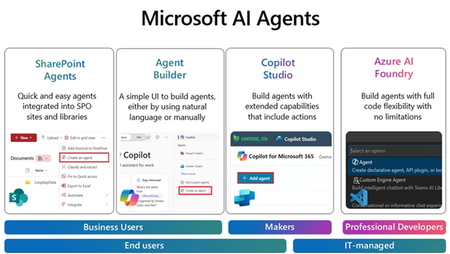
Join us for an exciting and insightful webinar series where we delve into the revolutionary world of Microsoft Copilot Agents in SharePoint, Agent builder, Copilot Studio and Azure AI Foundry! Discover how the integration of AI and intelligent agents is set to transform the future of business processes, making them more efficient, intelligent, and adaptive. In this webinar series, we will explore: The Power of Microsoft Copilot Agents: Learn how these advanced AI-driven agents can assist you in automating routine tasks, providing intelligent insights, and enhancing collaboration within your organization. Seamless Integration with Microsoft Graph: See how Copilot Agents work seamlessly with Microsoft Graph data to improve information retrieval, boost productivity, and automate mundane tasks. Real-World Applications: See real-world examples of how businesses are leveraging Copilot Agents to drive innovation and achieve their goals. Future Trends and Innovations: Get a glimpse into the future of AI in business processes and how it will continue to evolve and shape the way we work. Join us for the Webinars every week, at 11:30am PST/1:30pm CST/2:30 EST: (Click on the webinar name to join the live meeting on the actual date/time or use the .ics file at the bottom of the page to save the date on your calendar) April 2nd: Agents with SharePoint - Watch this Webinar recording for an overview of SharePoint Agents and its key capabilities to enable your organization with powerful Agents helping you search for information within seconds in large SharePoint libraries with 100's of documents. April 9th: Agents with Agent Builder - Watch this Webinar recording for an overview of Agent Builder and its key capabilities to enable organization with "No code" Agents that can be created by any business user within minutes. April 16th: Agents with Copilot Studio- Join us for an overview of Copilot Studio and its key capabilities to enable organization with "Low code" Agents that can help create efficiency with existing business processes. We will feature a few real-life demo examples and answer any questions. April 24th: Agents with Azure AI Foundry - Join us for an overview of Azure AI Foundry and its key capabilities to enable your organization with AI Agents. We will feature a demo of AI agents for prior authorization and provide resources to accelerate your next project. Don't miss this opportunity to stay ahead of the curve and unlock the full potential of AI and Copilot Agents in your organization. Register now and be part of the future of business transformation! Speakers: Jaspreet Dhamija, Sr. MW Copilot Specialist - Linkedin Michael Gannotti, Principal MW Copilot Specialist - LinkedIn Melissa Nelli, Sr. Biz Apps Technical Specialist - LinkedIn Matthew Anderson, Director Azure Apps - LinkedIn Marcin Jimenez, Sr. Cloud Solution Architect - LinkedIn Thank you!Expert Insights: Incorporating AI PCs into your business strategy
Device selection is often seen as a routine IT decision, but AI-capable hardware changes what’s possible. AI-capable devices enable new levels of efficiency, collaboration, and productivity. Choosing the right hardware shapes how businesses handle data, streamline workflows, and build a foundation for future success. David Stoeckel, Director of Program Management for Surface CXP Engineering at Microsoft, emphasizes a multi-faceted approach to evaluating Copilot+ PCs. "You have to think about it on three levels: the baseline capabilities of the device itself, the core components of Windows like captions and translation, and then the custom functionalities businesses can build on top of that," Stoeckel explained. This strategic framework allows enterprises to make choices that drive long-term, transformational impact. Real-time productivity: Not just faster, but smarter PCs with neural processing units (NPUs) can handle tasks such as transcription, translation, and video enhancement locally, supporting fluid experiences and new AI use cases. Industries with strict data controls, such as healthcare and finance, gain more flexibility in how they deploy AI. Copilot+ PCs from Microsoft Surface integrate these capabilities into thoughtfully engineered, enterprise-ready devices. They offer immediate benefits by handling complex tasks locally, reducing latency and enhancing real-time decision-making. This enables new types of computing that were previously impractical or impossible on local machines. For example, they can perform real-time transcription and translation on-device, opening doors for fields such as healthcare, finance, and government where data privacy concerns restrict the use of cloud-based solutions. As Stoeckel points out, "We see doctors using these devices to transcribe patient conversations locally, supporting data privacy without compromising on functionality. Or think of a financial consultant sitting with a client, capturing and developing strategies on the spot—no waiting for external servers to process requests.” These capabilities complement rather than replace cloud-based AI, supporting use cases in which it is unfeasible to send data to the cloud, or where keeping it local can accelerate time to value. Surface Copilot+ PCs handle such workloads directly, meeting specific compliance requirements while capitalizing on the latest advancements. Solving business challenges: putting the focus on AI-optimized workflows Surface Copilot+ PCs enable businesses to rethink workflows and tasks that require real-time data processing, predictive analytics, or highly customized experiences. The ability to run models on-device presents new opportunities to innovate. The NPU architecture in Surface Copilot+ PCs enables local processing of machine learning and predictive analytics models with low latency. This capability supports use cases like predictive maintenance in manufacturing and on-device fraud detection in financial services, where real-time data analysis can drive faster, more responsive decision-making. Stoeckel underscores the importance of custom development in this space: "The third pillar I mentioned—what software vendors and businesses build on top of the platform—has huge potential value. This is where companies can tailor capabilities to fit their unique workflows." Enterprises can use Copilot+ PCs to develop proprietary applications that offer competitive advantages, whether through faster decision-making, more personalized customer experiences, or highly specific data models built for niche use cases. Driving innovation with hybrid AI Cloud-based platforms remain critical to driving AI business value. Businesses rely on them for running large models and executing complex workflows. But some AI tasks benefit from running on-device, whether to maintain control over sensitive data, meet compliance requirements, or reduce dependency on cloud connectivity. Workloads like real-time transcription, predictive maintenance, and AI-driven personalization may also be more responsive when processed locally, depending on network conditions and infrastructure. A hybrid AI model gives organizations the flexibility to balance these needs. Copilot+ PCs allow businesses to run AI applications locally for real-time insights and personalized recommendations while relying on the cloud for intensive processing and the latest models. This approach lets organizations deploy AI in the way that best aligns with their security, performance, and operational priorities. With Copilot+ PCs, companies can refine AI-powered workflows, deciding where to process data based on business requirements rather than technical limitations. This flexibility supports both immediate productivity and long-term advancement. The future: seamless integration and innovation without limits Stoeckel expects the line between cloud and local AI to fade. "In the future, the interaction between what's done locally on the device and what's done in the cloud will be seamless. You'll have the flexibility to choose where to run workloads based on cost, performance, and privacy requirements," he says. As AI infrastructure evolves, businesses will have more freedom to fine-tune where and how they process data. Some workloads will always benefit from cloud scale, while others will run more efficiently on-device. This flexibility will shape how companies build and deploy AI-driven solutions. Why choose Surface as the foundation of your AI device strategy? Surface devices enhance AI value through thoughtfully designed experiences that enrich every interaction. Depending on the device, this can include precision inking, vibrant touchscreens, and customizable touchpads for natural input. High-quality cameras and microphones work with AI to improve collaboration, while precision-engineered keyboards make typing more comfortable and ergonomic. Security empowers organizations to run AI workloads with confidence, protecting data while driving performance. With Surface Copilot+ PCs, Secured-core PC technology strengthens defenses against firmware attacks, while hardware-based protection using Microsoft Pluton or TPM safeguards sensitive information. Strong and seamless authentication options like biometrics and NFC help ensure only authorized users can access applications and data. Device strategy will separate leaders from followers Choosing the right devices has always shaped business productivity, but with AI workloads running on-device, this decision now carries far greater weight. Copilot+ PCs from Surface provide a foundation for businesses to process data faster, maintain security, and integrate AI into daily workflows without cloud dependence. Whether improving collaboration, automating routine tasks, or enabling real-time decision-making, these devices support a shift toward AI-powered work. Organizations that think strategically about hardware today will be in the strongest position to drive innovation and efficiency in the years ahead. In the end, AI PCs are a catalyst for business transformation. For companies willing to explore their full potential, the opportunities are significant. By starting now, businesses can get ahead of the curve, building the infrastructure and workflows necessary to thrive in an increasingly AI-driven world. To learn more read the eBook: Drive business resilience with AI PCs.571Views0likes0Comments