Management
389 TopicsMicrosoft Clearinghouse server connection issues + phone line is dead end
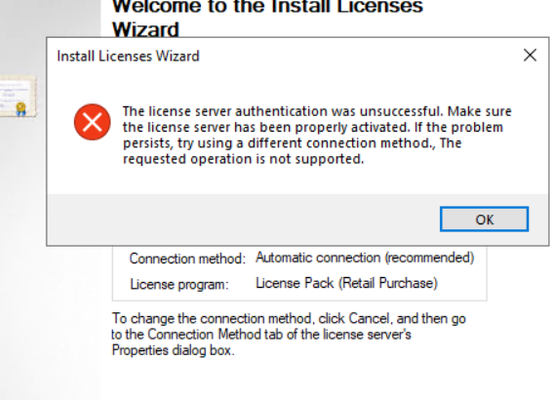
We see a rising number of customers having issues installing or reinstalling their RDS Licenses via automatic connection. According to volume licensing support reinstalling licensing should not work this way any longer and requires customers to contact the RDS activation hotline which is +49 800 5077777 for Germany. If you dial through the menu and reach the RDS Licensing support, for weeks it is not possible to get through speaking with any agent. Instead the phone computer asks for your phone number and to enter it via your phone (DTMF). Whatever the way you enter a number like +492212343434 or 02212343434 it ends up that the voice computer says the number cannot be recognized. I guess that the Microsoft Clearinghouse server has issues with TLS 1.2 and some ciphers but we cannot pin it down even with the networking guys. Here are some possible messages: Customer A: Cannot install licenses, the server is correctly activated and can also be reactived successfully Customer B: Cannot install licenses, server ist correctly activated but can only be reactivated via web. Interestingly activating or reactivating the RDS CAL Server itself works fine on some customers On Other customers even this is not successful anymore due to connection issues. I began to see this last year when customers began to use Windows Server 2019 RDS CAL Servers, while Windows Server 2016 and 2012 R2 were unaffected. We have tried to setup a fresh Windows Server but no help. So 3 things causing a combined issue and blocker: - the RDS CAL phone support is unavailable in Germany - Automatic activation installing new licenses does not work (but is required for RDS via CSP) - Automatic activation re-installing already activated licenses does no longer work according to VL Support as - Automatic activation for Activation / Reactivation of a Server does not work anymore for some customers due to connection issues6.9KViews0likes7Comments
Volume Activation role questions
We have a DC, running Server 2016 to decommission (call it old server). One of the roles it had was Volume Activation (VA). This is Active Directory based and the keys AD holds are both for clients (Win11) and servers (2016/19/22/25). I have removed the VA role from the server and tested with a server which I added to the domain and the OS activated successfully, so it looks like it is working. I noticed the _vlmcs SRV DNS record was not deleted and is still pointing to the old server. Since the old server is no longer having the VA role, is it safe to delete the DNS record for the _vlmcs SRV record? What else do I need to take into account? Thanks in advance37Views0likes0CommentsPublic network on NIC instead of domain network
On a Windows Server 2025 Standard Edition, I have 2 NICs: a 10Gbps NIC and 1Gbps NIC. Both NICs have a static IP address, but only the faster 10Gbps has a default gateway. The faster NIC correctly identifies as the domain network but the slower NIC says it is on a public network. The DNS settings and suffixes are the same for both cards. I have another Windows 2025 server with the same setup but both NICs identify as the domain network. Any ideas on how to fix this? Thanks.58Views0likes0CommentsDeploying Multiple NPS Servers
I have been working on ditching our password-based WiFi with WPA2-Enterprise. On DC1 I deployed internal CA, NPS, and group policies that auto-request certs and deploy wireless network settings. Cisco AP is pointed to DC1 as the radius server. NPS has been registered in AD and wireless network policy has been created. Test laptops get their cert and connect just fine. It's working. For redundancy, I installed NPS on DC2. This NPS instance has also been registered in AD, and I imported the NPS config from DC1 to DC2 NPS. Cisco AP has DC1 as first radius server and DC2 as second radius server. If I stop NPS on DC1 to force the Cisco AP to authenticate against DC2, test laptops won't authenticate and connect. What am I missing? They're configured exactly the same (except DC1 hosts the CA...I was under the assumption the CA is AD integrated).206Views0likes2CommentsHyper-V live mig failing from 2025 host to 2022 host
I'm having an issue with my one hyper-v cluster. I have 4 Server 2022 hosts, and 1 Server 2025 host. Live migration works INBOUND to the 2025 host, but live migrations fail OUTBOUND from the 2025 host. I have tried everything I can think of to make sure settings are ok. I have tried both setting it to use all networks, and the specific network. I've matched the live migration NIC settings to mirror what the 2022 hosts have. I've made sure the Hyper-V Live Migration settings all match. They use CredSSP and compression. Nothing seems to be working. Is there some really subtle 2025 bug that doesn't allow for live migrations to lower OS version hosts?89Views0likes0Comments
Windows Server 2016 and internet issues
Hello everyone, I'm relatively new here and hoping for some help. I'm IT at a school in Manhattan that has an old Dell tower running Windows Server 2016 in the basement that is not in use any more with the school as they have transferred over everything to digital. This was set up before my time working here and the person who set it up unfortunately did not leave any notes. We are ready to disconnect the machine as all of it's functions have been moved elsewhere. But, every time it is turned off or disconnected from our network patch, the internet in the entire building goes dead. I do not have previous experience with these kinds of servers and am trying to figure out what could possibly be causing this. I am concerned because the machine is old and feels like it's being held together by duct tape, and if it goes down, I hoping internet doesn't go with it. Looking for any advice or knowledge about these servers and what I can try to do to disconnect it.225Views0likes4Comments
Noob needs help with RDP Services
I am new to Windows server management. I setup a 2019 Server in a VM (Hyper-V). I installed the licenses we got for RDP from MS after installing the Remote Desktop Services. I am getting an error about Remote Desktop Licensing Mode is not configured. Tells me to use Server Manger to specify RD Connection Broker. Either I neglected to install it or configure it, not sure. Articles I find say go to Server Manager -> Remote Desktop Services -> Overview... BUT, that tells me I am logged in with a local account but must use a domain account to manage servers and collections. Again, not using a DC. This server is not part of a domain. We do not run AD internally only AzureAD online. We have 1 program we still run internally and users RDP to it. Should I remove the service and reinstall? What about the licenses I added already? How to I keep them? Any assistance will be greatly appreciated... J159Views0likes2Comments
Active Directory Unable to reset user passwords
I am managing a Windows Server 2025 Active Directory environment with client machines. I created a test user and enabled the option “User must change password at next logon.” I then provided a temporary password to the user, expecting them to get the prompt to change it on first login. However, when the user attempts to change the password, they receive the error: “The user must change password before signing in.” My goal is that when I provide a temporary password to a user: They get the prompt to change the password at next logon. When they change it, it should not throw the “user must change password before signing in” error. I need guidance on how to achieve this so users can reset their passwords successfully.164Views0likes1CommentUnable to manage DFS namespace from DFS MMC
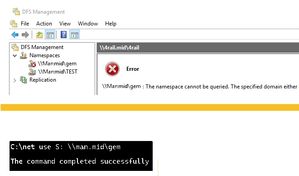
Error: The namespace cannot be queried. The specified domain either does not exist. Hi, I have an issue with DFS at our site. It has been working fine for years, but recently the ability to manage it using the DFS MMC no longer works. DFS is still working for the users fine and I can map to it manually, but the MMC tool no longer connects. I can create new namespaces fine though. The error is: " The namespace cannot be queried. The specified domain either does not exist or could not be contacted. " I can't risk recreating the namespace due to the impact on users, so anyone have any idea to fix this? Many thanks DB112Views0likes1CommentUnable to personalize display in Hyper-V VM
I have two physical servers running Windows Server 2025 Standard Edition, each with Hyper-V installed. On the first 2025 server, I have no issues adjusting video/personalization settings in running virtual machines. On the second server, I created a 2025 domain controller but I am unable to adjust any of the video settings ("remote resolution changes not allowed") even though enhanced sessions are enabled. How can I fix this on the second server? Thanks.51Views0likes0Comments