msignite
89 TopicsAnnouncing new hybrid deployment options for Azure Virtual Desktop
Today, we’re excited to announce the limited preview of Azure Virtual Desktop for hybrid environments, a new platform for bringing the power of cloud-native desktop virtualization to on-premises infrastructure.23KViews11likes31CommentsGenerally Available: Azure SQL Managed Instance Next-gen General Purpose
Overview Next-gen General Purpose is the evolution of General Purpose service tier that brings significantly improved performance and scalability to power up your existing Azure SQL Managed Instance fleet and helps you bring more mission-critical SQL workloads to Azure. We are happy to announce that Next-gen General Purpose is now Generally Available (GA) delivering even more scalability, flexibility, and value for organizations looking to modernize their data platform in a cost-effective way. The new #SQLMINextGen General Purpose tier delivers a built-in performance upgrade available to all customers at no extra cost. If you are an existing SQL MI General Purpose user, you get faster I/O, higher database density, and expanded storage - automatically. Summary Table: Key Improvements Capability Current GP Next-gen GP Improvement Average I/O Latency 5-10 ms 3-4 ms 2x lower Max Data IOPS 30-50k 80k 60% better Max Storage 16 TB 32 TB 2x better Max Databases/Instance 100 500 5x better Max vCores 80 128 40% better But that’s just the beginning. The new configuration sliders for additional IOPS and memory provide enhanced flexibility to tailor performance according to your requirements. Whether you require more resources for your application or seek to optimize resource utilization, you can adjust your instance settings to maximize efficiency and output. This release isn’t just about speed - It’s about giving you improved performance where it matters, and mechanisms to go further when you need them. Customer story - A recent customer case highlights how Hexure reduced processing time by up to 97.2% using Azure SQL Managed Instance on Next-gen General Purpose. What’s new in Next-gen General Purpose (Nov 2025)? 1. Improved baseline performance with the latest storage tech Azure SQL Managed Instance is built on Intel® Xeon® processors, ensuring a strong foundation for enterprise workloads. With the next-generation General Purpose tier, we’ve paired Intel’s proven compute power with advanced storage technology to deliver faster performance, greater scalability, and enhanced flexibility - helping you run more efficiently and adapt to growing business needs. The SQL Managed Instance General Purpose tier is designed with full separation of compute and storage layers. The Classic GP version uses premium page blobs for the storage layer, while the Next-generation GP tier has transitioned to Azure’s latest storage solution, Elastic SAN. Azure Elastic SAN is a cloud-native storage service that offers high performance and excellent scalability, making it a perfect fit for the storage layer of a data-intensive PaaS service like Azure SQL Managed Instance. Simplified Performance Management With ESAN as the storage layer, the performance quotas for the Next-gen General Purpose tier are no longer enforced for each database file. The entire performance quota for the instance is shared across all the database files, making performance management much easier (one fewer thing to worry about). This adjustment brings the General Purpose tier into alignment with the Business Critical service tier experience. 2. Resource flexibility and cost optimization The GA of Next-gen General Purpose comes together with the GA of a transformative memory slider, enabling up to 49 memory configurations per instance. This lets you right-size workloads for both performance and cost. Memory is billed only for the additional amount beyond the default allocation. Users can independently configure vCores, memory, and IOPS for optimal efficiency. To learn more about the new option for configuring additional memory, check the article: Unlocking More Power with Flexible Memory in Azure SQL Managed Instance. 3. Enhanced resource elasticity through decoupled compute and storage scaling operations With Next-gen GP, both storage and IOPS can be resized independently of the compute infrastructure, and these changes now typically finish within five minutes - a process known as an in-place upgrade. There are three distinct types of storage upgrade experiences depending on the kind of storage upgrade performed and whether failover occurs. In-place update: same storage (no data copy), same compute (no failover) Storage re-attach: Same storage (no data copy), changed compute (with failover) Data copy: Changed storage (data copy), changed compute (with failover) The following matrix describes user experience with management operations: Operation Data copying Failover Storage upgrade type IOPS scaling No No In-place Storage scaling* No* No In-place vCores scaling No Yes** Re-attach Memory scaling No Yes** Re-attach Maintenance Window change No Yes** Re-attach Hardware change No Yes** Re-attach Update policy change Yes Yes Data copy * If scale down is >5.5TB, seeding ** In case of update operations that do not require seeding and are not completed in place (examples are scaling vCores, scaling memory, changing hardware or maintenance window), failover duration of databases on the Next-gen General Purpose service tier scales with the number of databases, up to 10 minutes. While the instance becomes available after 2 minutes, some databases might be available after a delay. Failover duration is measured from the moment when the first database goes offline, until the moment when the last database comes online. Furthermore, resizing vCores and memory is now 50% faster following the introduction of the Faster scaling operations release. No matter if you have end-of-month peak periods, or there are ups and downs of usage during the weekdays and the weekend, with fast and reliable management operations, you can run multiple configurations over your instance and respond to peak usage periods in a cost-effective way. 4. Reserved instance (RI) pricing With Azure Reservations, you can commit to using Azure SQL resources for either one or three years, which lets you benefit from substantial discounts on compute costs. When purchasing a reservation, you'll need to choose the Azure region, deployment type, performance tier, and reservation term. Reservations are only available for products that have reached general availability (GA), and with this update, next-generation GP instances now qualify as well. What's even better is that classic and next-gen GP share the same SKU, just with different remote storage types. This means any reservations you've purchased automatically apply to Next-gen GP, whether you're upgrading an existing classic GP instance or creating a new one. What’s Next? The product group has received considerable positive feedback and welcomes continued input. The initial release will not include zonal redundancy; however, efforts are underway to address this limitation. Next-generation General Purpose (GP) represents the future of the service tier, and all existing classic GP instances will be upgraded accordingly. Once upgrade plans are finalized, we will provide timely communication regarding the announcement. Conclusion Now in GA, Next-gen General Purpose sets a new standard for cloud database performance and flexibility. Whether you’re modernizing legacy applications, consolidating workloads, or building for the future, these enhancements put more power, scalability, and control in your hands - without breaking the bank. If you haven’t already, try out the Next-gen General Purpose capabilities for free with Azure SQL Managed Instance free offer. For users operating SQL Managed Instance on the General Purpose tier, it is recommended to consider upgrading existing instances to leverage the advantages of next-gen upgrade – for free. Welcome to #SQLMINextGen. Boosted by default. Tuned by you. Learn more What is Azure SQL Managed Instance Try Azure SQL Managed Instance for free Next-gen General Purpose – official documentation Analyzing the Economic Benefits of Microsoft Azure SQL Managed Instance How 3 customers are driving change with migration to Azure SQL Accelerate SQL Server Migration to Azure with Azure Arc3.8KViews5likes3Comments
Microsoft Agent Pre-Purchase Plan: One Unified Path to Scale AI Agents
AI is now essential, and at Microsoft Ignite 2025, we introduced a new foundation for intelligent agents: Work IQ, Fabric IQ, and Foundry IQ. These three IQs represent the intelligence layer that gives agents deep context; understanding how people work, connecting to enterprise data, and orchestrating knowledge across platforms. Together with the launch of Microsoft Agent Factory, organizations now have a unified program to build, deploy, and manage agents powered by these IQs. Microsoft Agent Pre-Purchase Plan (P3) is designed to for organizations looking to confidently invest in AI agent development with a single, predictable budget. It empowers businesses to experiment, build, and scale sophisticated AI agents without the friction of fragmented licensing or unexpected costs. By unifying access to agentic services across Microsoft Foundry, Microsoft Copilot Studio*, Microsoft Fabric, and GitHub, Microsoft Agent P3 empowers organizations to harness the full potential of the IQ layer thus removing barriers and unlocking the value of truly intelligent, context-driven agents. What is Microsoft Agent Pre-Purchase Plan and how to does it work? Microsoft Agent P3 is a one-year pay-upfront option. Customers commit upfront to a lump-sum pool of Agent Commit Units (ACU) that can be used at any time during the one-year term. Every time you consume eligible services across Microsoft Foundry, Microsoft Copilot Studio*, Microsoft Fabric, and GitHub, the ACUs are automatically drawn down from your P3 balance. If you use up your balance before the year ends, you can add another P3 plan or switch to pay-as-you-go. If you don’t use all your credits by the end of the year, the remaining balance expires. Pricing* *Pricing as of November 2025, subject to change. **Example if Microsoft Copilot Studio generates a retail cost of $100 based on Copilot Credit and Microsoft Foundry usage, then 100 Agent CUs (ACUs) are consumed. What is covered by the Microsoft Agent Pre-Purchase Plan? * List as of February 2026, subject to change ** Currently in Private Preview *** Covers Copilot Credits enabled agentic services: Microsoft Copilot Studio, Dynamics 365 first-party agents, and Copilot. Microsoft reserves the right to update Copilot Credit eligible products. Customer Example Suppose a customer expects to consume 1,500,000 Copilot Credit with custom agents created in Microsoft Copilot Studio. Assuming the pay-as-you-go rate for Copilot Credit to be $0.01, then at the pay-as-you-go rate, this will cost $15,000. In addition, if they are using 5000 Microsoft Foundry Provisioned Throughput Units (PTU) and assuming the pay-as-you-go rate for PTU to be $1, then at the pay-as-you-go rate, this will cost $5,000. By purchasing Tier 1 (20,000 ACUs) Microsoft Agent P3 at the cost of $19,000, it will give a 5% saving compared to the pay-as-you-go rate for the same usage. How to purchase a Microsoft Agent Pre-Purchase Plan? Sign in to the Azure portal →Reservations → + Add → Microsoft Agent Pre-Purchase Plan. Select your subscription and scope Choose your tier and complete payment. What sets Microsoft Agent Pre-Purchase Plan apart? At the heart of Microsoft Agent Pre-Purchase Plan are four pillars that redefine how organizations consume AI services: One Plan: A single offer that spans Microsoft Foundry, Microsoft Copilot Studio*, Microsoft Fabric, and GitHub. No more siloed credits or SKU-level complexity, just one pool for all your AI workloads. Breadth of Services: Access to 30+ services, from Azure AI Search and Cognitive Services to orchestration tools and Copilot-enabled experiences. One Governance Path: Simplifies procurement and budget management. Procurement teams gain visibility and control without sacrificing agility. Predictable Savings: Get discounts and avoid surprises when you choose this plan. Conclusion The Microsoft Agent Pre-Purchase Plan is designed to make your AI journey simpler, smarter, and more cost-effective. By combining the strengths of Microsoft Foundry, Microsoft Copilot Studio*, Microsoft Fabric, and GitHub into a single, unified offer, the plan eliminates the need to choose one platform or manage multiple contracts. Organizations benefit from predictable budgeting, streamlined procurement, and the flexibility to innovate across more than 30+ agentic services—all with one pool of funds. Whether you’re just starting with AI or scaling enterprise-wide adoption, the Microsoft Agent Pre-Purchase Plan empowers you to unlock the full value of Microsoft’s agentic platform—driving innovation, efficiency, and business impact. And with support for agents built on Work IQ, Fabric IQ, and Foundry IQ, customers can be confident their solutions are grounded in the latest intelligence announced at Ignite. What’s next Read the Microsoft Agent P3 Offer MS Learn Doc Purchase Microsoft Agent P3 in your Azure Portal * Covers Copilot Credits enabled agentic services: Microsoft Copilot Studio, Dynamics 365 first-party agents, and Copilot. Microsoft reserves the right to update Copilot Credit eligible products2.8KViews0likes0Comments
Accelerating SCOM to Azure Monitor Migrations with Automated Analysis and ARM Template Generation
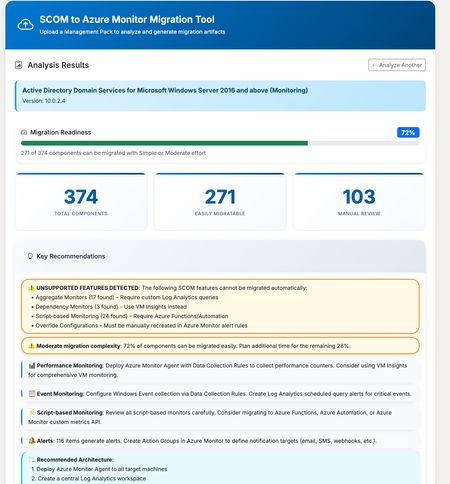
Accelerating SCOM to Azure Monitor Migrations with Automated Analysis and ARM Template Generation Azure Monitor has become the foundation for modern, cloud-scale monitoring on Azure. Built to handle massive volumes of telemetry across infrastructure, applications, and services, it provides a unified platform for metrics, logs, alerts, dashboards, and automation. As organizations continue to modernize their environments, Azure Monitor is increasingly the target state for enterprise monitoring strategies. With Azure Monitor increasingly becoming the destination platform, many organizations face a familiar challenge: migrating from System Center Operations Manager (SCOM). While both platforms serve the same fundamental purpose—keeping your infrastructure healthy and alerting you to problems—the migration path isn’t always straightforward. SCOM Management Packs contain years of accumulated monitoring logic: performance thresholds, event correlation rules, service discoveries, and custom scripts. Translating all of this into Azure Monitor’s paradigm of Log Analytics queries, alert rules, and Data Collection Rules can be a significant undertaking. To help with this challenge, members of the community have built and shared a tool that automates much of the analysis and artifact generation. The community-driven SCOM to Azure Monitor Migration Tool accepts Management Pack XML files and produces several outputs designed to accelerate migration planning and execution. The tool parses the Management Pack structure and identifies all monitors, rules, discoveries, and classes. Each component is analyzed for migration complexity: some translate directly to Azure Monitor equivalents, while others require custom implementation or may not have a direct equivalent. Results are organized into two clear categories: Auto-Migrated Components – Covered by the generated templates and ready for deployment Requires Manual Migration – Components that need custom implementation or review Instead of manually authoring Azure Resource Manager templates, the tool generates deployable infrastructure-as-code artifacts, including: Scheduled Query Alert rules mapped from SCOM monitors and rules Data Collection Rules for performance counters and Windows Events Custom Log DCRs for collecting script-generated log files Action Groups for notification routing Log Analytics workspace configuration (for new environments) For streamlined deployment, the tool offers a combined ARM template that deploys all resources in a single operation: Log Analytics workspace (create new or connect to an existing workspace) Action Groups with email notification All alert rules Data Collection Rules Monitoring Workbook One download, one deployment command — with configurable parameters for workspace settings, notification recipients, and custom log paths. The tool generates an Azure Monitor Workbook dashboard tailored to the Management Pack, including: Performance counter trends over time Event monitoring by severity with drill-down tables Service health overview (stopped services) Active alerts summary from Azure Resource Graph This provides immediate operational visibility once the monitoring configuration is deployed. Each migrated component includes the Kusto Query Language (KQL) equivalent of the original SCOM monitoring logic. These queries can be used as-is or refined to match environment-specific requirements. The workflow is designed to reduce the manual effort involved in migration planning: Export your Management Pack XML from SCOM Upload it to the tool Review the analysis — components are separated into auto-migrated and requires manual work Download the All-in-One ARM template (or individual templates) Customize parameters such as workspace name and action group recipients Deploy to your Azure subscription For a typical Management Pack, such as Windows Server Active Directory monitoring, you may see 120+ components that can be migrated directly, with an additional 15–20 components requiring manual review due to complex script logic or SCOM-specific functionality. The tool handles straightforward translations well: Performance threshold monitors become metric alerts or log-based alerts Windows Event collection rules become Data Collection Rule configurations Service monitors become scheduled query alerts against Heartbeat or Event tables Components that typically require manual attention: Complex PowerShell or VBScript probe actions Monitors that depend on SCOM-specific data sources Correlation rules spanning multiple data sources Custom workflows with proprietary logic The tool clearly identifies which category each component falls into, allowing teams to plan their migration effort with confidence. A Note on Validation This is a community tool, not an officially supported Microsoft product. Generated artifacts should always be reviewed and tested in a non-production environment before deployment. Every environment is different, and the tool makes reasonable assumptions that may require adjustment. Even so, starting with structured ARM templates and working KQL queries can significantly reduce time to deployment. Try It Out The tool is available at https://tinyurl.com/Scom2Azure.Upload a Management Pack, review the analysis, and see what your migration path looks like.265Views1like0CommentsAnnouncing the preview of Azure Local rack aware cluster
As of 1/22/2026, Azure Local rack aware cluster is now generally available! To learn more: Overview of Azure Local rack aware clustering - Azure Local | Microsoft Learn We are excited to announce the public preview of Azure Local rack aware cluster! We previously published a blog post with a sneak peek of Azure Local rack aware cluster and now, we're excited to share more details about its architecture, features, and benefits. Overview of Azure Local rack aware cluster Azure Local rack aware cluster is an advanced architecture designed to enhance fault tolerance and data distribution within an Azure Local instance. This solution enables you to cluster machines that are strategically placed across two physical racks in different rooms or buildings, connected by high bandwidth and low latency within the same location. Each rack functions as a local availability zone, spanning layers from the operating system to Azure Local management, including Azure Local VMs. The architecture leverages top-of-rack (ToR) switches to connect machines between rooms. This direct connection supports a single storage pool, with rack aware clusters distributing data copies evenly between the two racks. Even if an entire rack encounters an issue, the other rack maintains the integrity and accessibility of the data. This design is valuable for environments needing high availability, particularly where it is essential to avoid rack-level data loss or downtime from failures like fires or power outages. Key features Starting in Azure Local version 2510, this release includes the following key features for rack aware clusters: Rack-Level Fault Tolerance & High Availability Clusters span two physical racks in separate rooms, connected by high bandwidth and low latency. Each rack acts as a local availability zone. If one rack fails, the other maintains data integrity and accessibility. Support for Multiple Configurations Architecture supports 2 machines up to 8 machines, enabling scalable deployments for a wide range of workloads. Scale-Out by Adding Machines Easily expand cluster capacity by adding machines, supporting growth and dynamic workload requirements without redeployment. Unified Storage Pool with Even Data Distribution Rack aware clusters offer a unified storage pool with Storage Spaces Direct (S2D) volume replication, automatically distributing data copies evenly across both racks. This ensures smooth failover and reduces the risk of data loss. Azure Arc Integration and Management Experience Enjoy native integration with Azure Arc, enabling consistent management and monitoring across hybrid environments—including Azure Local VMs and AKS—while maintaining the familiar Azure deployment and operational experience. Deployment Options Deploy via Azure portal or ARM templates, with new inputs and properties in the Azure portal for rack aware clusters. Provision VMs in Local Availability Zones via the Azure Portal Provision Azure Local virtual machines directly into specific local availability zones using the Azure portal, allowing for granular workload placement and enhanced resilience. Upgrade Path from Preview to GA Deploy rack aware clusters with the 2510 public preview build and update to General Availability (GA) without redeployment—protecting your investment and ensuring operational continuity. Get started The preview of rack aware cluster is now available to all interested customers. We encourage you to try it out and share your valuable feedback. To get started, visit our documentation: Overview of Azure Local rack aware clustering (Preview) - Azure Local | Microsoft Learn Stay tuned for more updates as we work towards general availability in 2026. We look forward to seeing how you leverage Azure Local rack aware cluster to power your edge workloads!1.1KViews4likes4CommentsCloud Native Identity with Azure Files: Entra-only Secure Access for the Modern Enterprise
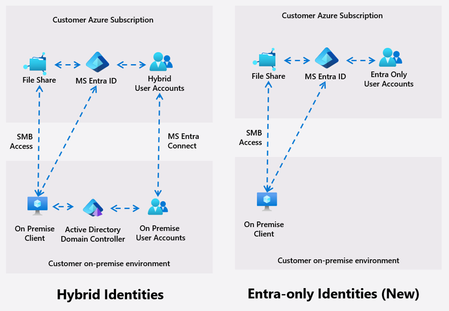
Azure Files introduces Entra only identities authentication for SMB shares, enabling cloud-only identity management without reliance on on-premises Active Directory. This advancement supports secure, seamless access to file shares from anywhere, streamlining cloud migration and modernization, and reducing operational complexity and costs.14KViews8likes15Comments
Moving the Logic Apps Designer Forward
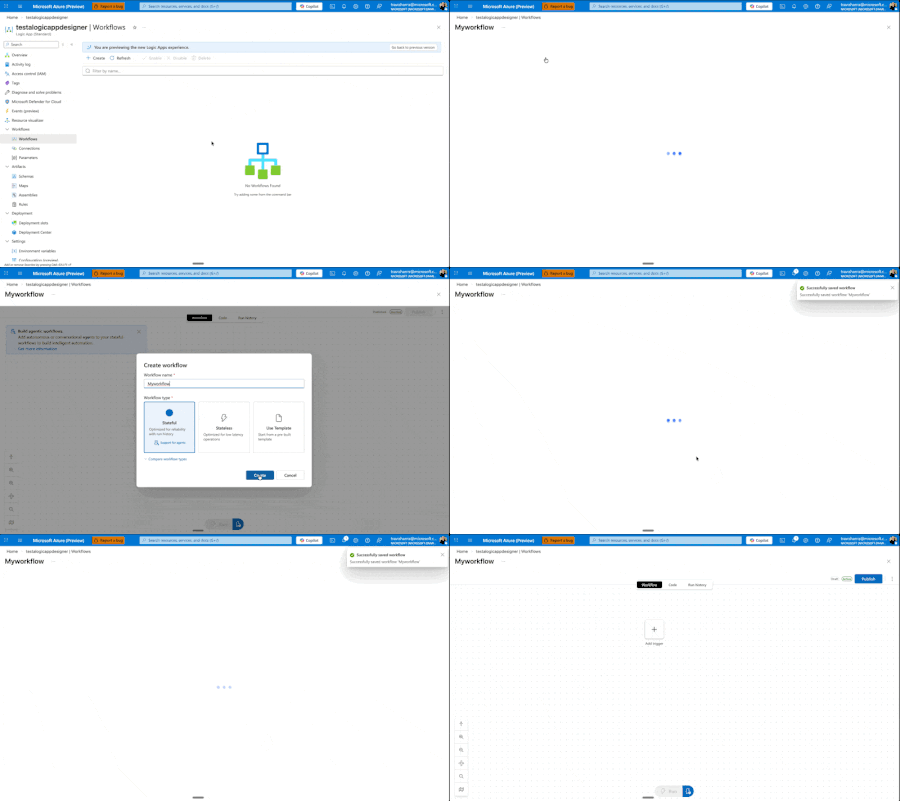
Today, we're excited to announce a major redesign of the Azure Logic Apps designer experience, now entering Public Preview for Standard workflows. While these improvements are currently Standard-only, our vision is to quickly extend them across all Logic Apps surfaces and SKUs. ⚠️ Important: As this is a Public Preview release, we recommend using these features for development and testing workflows rather than production workloads. We're actively stabilizing the experience based on your feedback. This Is Just the Beginning This is not us declaring victory and moving on. This is Phase I of a multi-phase journey, and I'm committed to sharing our progress through regular blog posts as we continue iterating. More importantly, we want to hear from you. Your feedback drives these improvements, and it will continue to shape what comes next. This redesign comes from listening to you—our customers—watching how you actually work, and adapting the designer to better fit your workflows. We've seen the pain points, heard the frustrations, and we're addressing them systematically. Our Roadmap: Three Phases Phase I: Perfecting the Development Loop (What we're releasing today) We're focused on making it cleaner and faster to edit your workflow, test it, and see the results. The development loop should feel effortless, not cumbersome. Phase II: Reimagining the Canvas Next, we'll rethink how the canvas works—introducing new shortcuts and workflows that make modifications easier and more intuitive. Phase III: Unified Experiences Across All Surfaces We'll ensure VS Code, Consumption, and Standard all deliver similarly powerful flows, regardless of where you're working. Beyond these phases, we have several standalone improvements planned: a better search experience, streamlined connection creation and management, and removing unnecessary overhead when creating new workflows. We're also tackling fundamental questions that shouldn't be barriers: What do stateful and stateless mean? Why can't you switch between them? Why do you have to decide upfront if something is an agent? You shouldn't. We're working toward making these decisions dynamic—something you can change directly in the designer as you build, not rigid choices you're locked into at creation time. We want to make it easier to add agentic capabilities to any workflow, whenever you need them. What's New in Phase I Let me walk you through what we're shipping at Ignite. Faster Onboarding: Get to Building Sooner We're removing friction from the very beginning. When you create a new workflow, you'll get to the designer before having to choose stateful, stateless, or agentic. Eventually, we want to eliminate that upfront choice entirely—making it a decision you can defer until after your workflow is created. This one still needs a bit more work, but it's coming soon. One View to Rule Them All We've removed the side panel. Workflows now exist in a single, unified view with all the tooling you need. No more context switching. You can easily hop between run history, code view, or visual editor, and change your settings inline—all without leaving your workflow. Draft Mode: Auto-Save Without the Risk Here's one of our biggest changes: draft mode with auto-save. We know the best practice is to edit locally in VS Code, store workflows in GitHub, and deploy properly to keep editing separate from production. But we also know that's not always possible or practical for everyone. It sucks to get your workflow into the perfect state, then lose everything if something goes wrong before you hit save. Now your workflow auto-saves every 10 seconds in draft mode. If you refresh the window, you're right back where you were—but your changes aren't live in production. There's now a separate Publish action that promotes your draft to production. This means you can work, test your workflow against the draft using the designer tools, verify everything works, and then publish to production—even when editing directly on the resource. Another benefit: draft saves won't restart your app. Your app keeps running. Restarts only happen when you publish. Smarter, Faster Search We've reorganized how browsing works—no more getting dropped into an endless list of connectors. You now get proper guidance as you explore and can search directly for what you need. Even better, we're moving search to the backend in the coming weeks, which will eliminate the need to download information about thousands of connectors upfront and deliver instant results. Our goal: no search should ever feel slow. Document Your Workflows with Notes You can now add sticky notes anywhere in your workflow. Drop a post-it note, add markdown (yes, even YouTube videos), and document your logic right on the canvas. We have plans to improve this with node anchoring and better stability features, but for now, you can visualize and explain your workflows more clearly than ever. Unified Monitoring and Run History Making the development loop smoother means keeping everything in one place. Your run history now lives on the same page as your designer. Switch between runs without waiting for full blade reloads. We've also added the ability to view both draft and published runs—a powerful feature that lets you test and validate your changes before they go live. We know there's a balance between developer and operator personas. Developers need quick iteration and testing capabilities, while operators need reliable monitoring and production visibility. This unified view serves both: developers can test draft runs and iterate quickly, while the clear separation between draft and published runs ensures operators maintain full visibility into what's actually running in production. New Timeline View for Better Debugging We experimented with a timeline concept in Agentic Apps to explain handoff—Logic Apps' first foray into cyclic graphs. But it was confusing and didn't work well with other Logic App types. We've refined it. On the left-hand side, you'll now see a hierarchical view of every action your Logic App ran, in execution order. This makes navigation and debugging dramatically easier when you're trying to understand exactly what happened during a run. What's Next This is Phase I. We're shipping these improvements, but we're not stopping here. As we move into Phase II and beyond, I'll continue sharing updates through blog posts like this one. How to Share Your Feedback We're actively listening and want to hear from you: Use the feedback button in the Azure Portal designer Join the discussion in GitHub/Community Forum – https://github.com/Azure/LogicAppsUX Comment below with your thoughts and suggestions Your input directly shapes our roadmap and priorities. Keep the feedback coming. It's what drives these changes, and it's what will shape the future of Azure Logic Apps. Let's build something great together.1.5KViews5likes3Comments
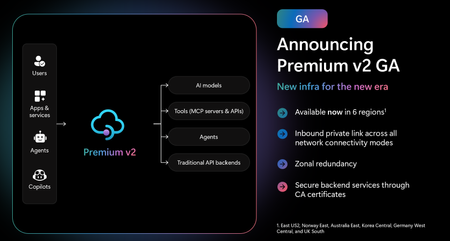
Announcing the General Availability (GA) of the Premium v2 tier of Azure API Management
Superior capacity, highest entity limits, unlimited included calls, and the most comprehensive set of features set the Premium v2 tier apart from other API Management tiers. Customers rely on the Premium v2 tier for running enterprise-wide API programs at scale, with high availability, and performance. The Premium v2 tier has a new architecture that eliminates management traffic from the customer VNet, making private networking much more secure and easier to setup. During the creation of a Premium v2 instance, you can choose between VNet injection or VNet integration (introduced in the Standard v2 tier) options. In addition, today we are also adding three new features to Premium v2: Inbound Private Link: You can now enable private endpoint connectivity to restrict inbound access to your Premium v2 instance. It can be enabled along with VNet injection or VNet integration or without a VNet. Availability zone support: Premium v2 now supports availability zones (zone redundancy) to enhance the reliability and resilience of your API gateway. Custom CA certificates: Azure API management v2 gateway can now validate TLS connections with the backend service using custom CA certificates. New and improved VNet injection Using VNet injection in Premium v2 no longer requires configuring routes or service endpoints. Customers can secure their API workloads without impacting API Management dependencies, while Microsoft can secure the infrastructure without interfering with customer API workloads. In short, the new VNet injection implementation enables both parties to manage network security and configuration settings independently and without affecting each other. You can now configure your APIs with complete networking flexibility: force tunnel all outbound traffic to on-premises, send all outbound traffic through an NVA, or add a WAF device to monitor all inbound traffic to your API Management Premium v2—all without constraints. Inbound Private Link Customers can now configure an inbound private endpoint for their API Management Premium v2 instance to allow your API consumers securely access the API Management gateway over Azure Private Link. The private endpoint uses an IP address from an Azure virtual network in which it's hosted. Network traffic between a client on your private network and API Management traverses over the virtual network and a Private Link on the Microsoft backbone network, eliminating exposure from the public internet. Further, you can configure custom DNS settings or an Azure DNS private zone to map the API Management hostname to the endpoint's private IP address. With a private endpoint and Private Link, you can: Create multiple Private Link connections to an API Management instance. Use the private endpoint to send inbound traffic on a secure connection. Apply different API Management policies based on whether traffic comes from the private endpoint. Limit incoming traffic only to private endpoints, preventing data exfiltration. Combine with inbound virtual network injection or outbound virtual network integration to provide end-to-end network isolation of your API Management clients and backend services. More details can be found here Today, only the API Management instance’s Gateway endpoint supports inbound private link connections. Each API management instance can support at most 100 Private Link connections. Availability zones Azure API Management Premium v2 now supports Availability Zones (AZ) redundancy to enhance the reliability and resilience of your API gateway. When deploying an API Management instance in an AZ-enabled region, users can choose to enable zone redundancy. This distributes the service's units, including Gateway, management plane, and developer portal, across multiple, physically separate AZs within that region. Learn how to enable AZs here. CA certificates If the API Management Gateway needs to connect to the backends secured with TLS certificates issued by private certificate authorities (CA), you need to configure custom CA certificates in the API Management instance. Custom CA certificates can be added and managed as Authorization Credentials in the Backend entities. The Backend entity has been extended with new properties allowing customers to specify a list of certificate thumbprints or subject name + issuer thumbprint pairs that Gateway should trust when establishing TLS connection with associated backend endpoint. More details can be found here. Region availability The Premium v2 tier is now generally available in six public regions (Australia East, East US2, Germany West Central, Korea Central, Norway East and UK South) with additional regions coming soon. For pricing information and regional availability, please visit the API Management pricing page. Learn more API Management v2 tiers FAQ API Management v2 tiers documentation API Management overview documentationOpen AI’s GPT-5.1-codex-max in Microsoft Foundry: Igniting a New Era for Enterprise Developers
Announcing GPT-5.1-codex-max: The Future of Enterprise Coding Starts Now We’re thrilled to announce the general availability of OpenAI's GPT-5.1-codex-max in Microsoft Foundry Models; a leap forward that redefines what’s possible for enterprise-grade coding agents. This isn’t just another model release; it’s a celebration of innovation, partnership, and the relentless pursuit of developer empowerment. At Microsoft Ignite, we unveiled Microsoft Foundry: a unified platform where businesses can confidently choose the right model for every job, backed by enterprise-grade reliability. Foundry brings together the best from OpenAI, Anthropic, xAI, Black Forest Labs, Cohere, Meta, Mistral, and Microsoft’s own breakthroughs, all under one roof. Our partnership with Anthropic is a testament to our commitment to giving developers access to the most advanced, safe, and high-performing models in the industry. And now, with GPT-5.1-codex-max joining the Foundry family, the possibilities for intelligent applications and agentic workflows have never been greater. GPT 5.1-codex-max is available today in Microsoft Foundry and accessible in Visual Studio Code via the Foundry extension . Meet GPT-5.1-codex-max: Enterprise-Grade Coding Agent for Complex Projects GPT-5.1-codex-max is engineered for those who build the future. Imagine tackling complex, long-running projects without losing context or momentum. GPT-5.1-codex-max delivers efficiency at scale, cross-platform readiness, and proven performance with top scores on SWE-Bench (77.9), the gold standard for AI coding. With GPT-5.1-codex-max, developers can focus on creativity and problem-solving, while the model handles the heavy lifting. GPT-5.1-codex-max isn’t just powerful; it’s practical, designed to solve real challenges for enterprise developers: Multi-Agent Coding Workflows: Automate repetitive tasks across microservices, maintaining shared context for seamless collaboration. Enterprise App Modernization: Effortlessly refactor legacy .NET and Java applications into cloud-native architectures. Secure API Development: Generate and validate secure API endpoints, with `compliance checks built-in for peace of mind. Continuous Integration Support: Integrate GPT-5.1-codex-max into CI/CD pipelines for automated code reviews and test generation, accelerating delivery cycles. These use cases are just the beginning. GPT-5.1-codex-max is your partner in building robust, scalable, and secure solutions. Foundry: Platform Built for Developers Who Build the Future Foundry is more than a model catalog—it’s an enterprise AI platform designed for developers who need choice, reliability, and speed. • Choice Without Compromise: Access the widest range of models, including frontier models from leading model providers. • Enterprise-Grade Infrastructure: Built-in security, observability, and governance for responsible AI at scale. • Integrated Developer Experience: From GitHub to Visual Studio Code, Foundry connects with tools developers love for a frictionless build-to-deploy journey. Start Building Smarter with GPT-5.1-codex-max in Foundry The future is here, and it’s yours to shape. Supercharge your coding workflows with GPT-5.1-codex-max in Microsoft Foundry today. Learn more about Microsoft Foundry: aka.ms/IgniteFoundryModels. Watch Ignite sessions for deep dives and demos: ignite.microsoft.com. Build faster, smarter, and with confidence on the platform redefining enterprise AI.4.9KViews3likes5CommentsAzure Networking 2025: Powering cloud innovation and AI at global scale
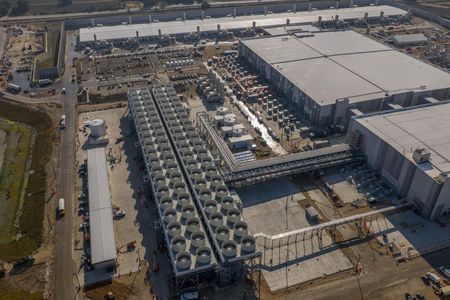
In 2025, Azure’s networking platform proved itself as the invisible engine driving the cloud’s most transformative innovations. Consider the construction of Microsoft’s new Fairwater AI datacenter in Wisconsin – a 315-acre campus housing hundreds of thousands of GPUs. To operate as one giant AI supercomputer, Fairwater required a single flat, ultra-fast network interconnecting every GPU. Azure’s networking team delivered: the facility’s network fabric links GPUs at 800 Gbps speeds in a non-blocking architecture, enabling 10× the performance of the world’s fastest supercomputer. This feat showcases how fundamental networking is to cloud innovation. Whether it’s uniting massive AI clusters or connecting millions of everyday users, Azure’s globally distributed network is the foundation upon which new breakthroughs are built. In 2025, the surge of AI workloads, data-driven applications, and hybrid cloud adoption put unprecedented demands on this foundation. We responded with bold network investments and innovations. Each new networking feature delivered in 2025, from smarter routing to faster gateways, was not just a technical upgrade but an innovation enabling customers to achieve more. Recapping the year’s major releases across Azure Networking services and key highlights how AI both drive and benefit from these advancements. Unprecedented connectivity for a hybrid and AI era Hybrid connectivity at scale: Azure’s network enhancements in 2025 focused on making global and hybrid connectivity faster, simpler, and ready for the next wave of AI-driven traffic. For enterprises extending on-premises infrastructure to Azure, Azure ExpressRoute private connectivity saw a major leap in capacity: Microsoft announced support for 400 Gbps ExpressRoute Direct ports (available in 2026) to meet the needs of AI supercomputing and massive data volumes. These high-speed ports – which can be aggregated into multi-terabit links – ensure that even the largest enterprises or HPC clusters can transfer data to Azure with dedicated, low-latency links. In parallel, Azure VPN Gateway performance reached new highs, with a generally available upgrade that delivers up to 20 Gbps aggregate throughput per gateway and 5 Gbps per individual tunnel. This is a 3× increase over previous limits, enabling branch offices and remote sites to connect to Azure even more seamlessly without bandwidth bottlenecks. Together, the ExpressRoute and VPN improvements give customers a spectrum of high-performance options for hybrid networking – from offices and datacenters to the cloud – supporting scenarios like large-scale data migrations, resilient multi-site architectures, and hybrid AI processing. Simplified global networking: Azure Virtual WAN (vWAN) continued to mature as the one-stop solution for managing global connectivity. Virtual WAN introduced forced tunneling for Secure Virtual Hubs (now in preview), which allows organizations to route all Internet-bound traffic from branch offices or virtual networks back to a central hub for inspection. This capability simplifies the implementation of a “backhaul to hub” security model – for example, forcing branches to use a central firewall or security appliance – without complex user-defined routing. Empowering multicloud and NVA integration: Azure recognizes that enterprise networks are diverse. Azure Route Server improvements enhanced interoperability with customer equipment and third-party network virtual appliances (NVAs). Notably, Azure Route Server now supports up to 500 virtual network connections (spokes) per route server, a significant scale boost that enables larger hub-and-spoke topologies and simplified Border Gateway Protocol (BGP) route exchange even in very large environments. This helps customers using SD-WAN appliances or custom firewalls in Azure to seamlessly learn routes from hundreds of VNet spokes – maintaining central routing control without manual configuration. Additionally, Azure Route Server introduced a preview of hub routing preference, giving admins the ability to influence BGP route selection (for example, preferring ExpressRoute over a VPN path, or vice versa). This fine-grained control means hybrid networks can be tuned for optimal performance and cost. Resilience and reliability by design Azure’s growth has been underpinned by making the network “resilient by default.” We shipped tools to help validate and improve network resiliency. ExpressRoute Resiliency Insights was released for general availability – delivering an intelligent assessment of an enterprise’s ExpressRoute setup. This feature evaluates how well your ExpressRoute circuits and gateways are architected for high availability (for example, using dual circuits in diverse locations, zone-redundant gateways, etc.) and assigns a resiliency index score as a percentage. It will highlight suboptimal configurations – such as routes advertised on only one circuit, or a gateway that isn’t zone-redundant – and provide recommendations for improvement. Moreover, Resiliency Insights includes a failover simulation tool that can test circuit redundancy by mimicking failures, so you can verify that your connections will survive real-world incidents. By proactively monitoring and testing resilience, Azure is helping customers achieve “always-on” connectivity even in the face of fiber cuts, hardware faults, or other disruptions. Security, governance, and trust in the network As enterprises entrust more core business to Azure, the platform’s networking services advanced on security and governance – helping customers achieve Zero Trust networks and high compliance with minimal complexity. Azure DNS now offers DNS Security Policies with Threat Intelligence feeds (GA). This capability allows organizations to protect their DNS queries from known malicious domains by leveraging continuously updated threat intel. For example, if a known phishing domain or C2 (command-and-control) hostname appears in DNS queries from your environment, Azure DNS can automatically block or redirect those requests. Because DNS is often the first line of detection for malware and phishing activities, this built-in filtering provides a powerful layer of defense that’s fully managed by Azure. It’s essentially a cloud-delivered DNS firewall using Microsoft’s vast threat intelligence – enabling all Azure customers to benefit from enterprise-grade security without deploying additional appliances. Network traffic governance was another focus. The introduction of forced tunneling in Azure Virtual WAN hubs (preview) shared above is a prime example where networking meets security compliance. Optimizing cloud-native and edge networks We previewed DNS intelligent traffic control features – such as filtering DNS queries to prevent data exfiltration and applying flexible recursion policies – which complement the DNS Security offering in safeguarding name resolution. Meanwhile, for load balancing across regions, Azure Traffic Manager’s behind-the-scenes upgrades (as noted earlier) improved reliability, and it’s evolving to integrate with modern container-based apps and edge scenarios. AI-powered networking: Both enabling and enabled by AI We are infusing AI into networking to make management and troubleshooting more intelligent. Networking functionality in Azure Copilot accelerates tasks like never before: it outlines the best practices instantly and troubleshooting that once required combing through docs and logs can be conversational. It effectively democratizes networking expertise, helping even smaller IT teams manage sophisticated networks by leveraging AI recommendations. The future of cloud networking in an AI world As we close out 2025, one message is clear: networking is strategic. The network is no longer a static utility – it is the adaptive circulatory system of the cloud, determining how far and fast customers can go. By delivering higher speeds, greater reliability, tighter security, and easier management, Azure Networking has empowered businesses to connect everything to anything, anywhere – securely and at scale. These advances unlock new scenarios: global supply chains running in real-time over a trusted network, multi-player AR/VR and gaming experiences delivered without lag, and AI models trained across continents. Looking ahead, AI-powered networking will become the norm. The convergence of AI and network tech means we will see more self-optimizing networks that can heal, defend, and tune themselves with minimal human intervention.998Views3likes0Comments