linux and open source
8 Topics
Docker Engine v29 on Linux: Why data-root No Longer Prevents OS Disk Growth (and How to Fix It)
Scope Applies to Linux hosts only Does not apply to Windows or Docker Desktop Problem Summary After upgrading to Docker Engine v29 or reimaging Linux nodes with this version, you may observe unexpected growth on the OS disk, even when Docker is configured with a custom data-root pointing to a mounted data disk. This commonly affects cloud environments (VMSS, Azure Batch, self‑managed Linux VMs) where the OS disk is intentionally kept small and container data is expected to reside on a separate data disk. What Changed in Docker Engine v29 (Linux) Starting with Docker Engine 29.0, containerd’s image store becomes the default storage backend on fresh installations. Docker explicitly documents this behavior: “The containerd image store is the default storage backend for Docker Engine 29.0 and later on fresh installations.” Docker containerd image store documentation Key points on Linux: Docker now delegates image and snapshot storage to containerd containerd uses its own content store and snapshotters Docker’s traditional data-root setting no longer controls all container storage Docker Engine v29 was released on 11 November 2025, and this behavior is by design, not a regression. Where Disk Usage Goes on Linux Docker’s daemon documentation clarifies the split: Legacy storage (pre‑v29 or upgraded installs): All data under /var/lib/docker Docker Engine v29 (containerd image store enabled): Images & snapshots → /var/lib/containerd Other Docker data (volumes, configs, metadata) → /var/lib/docker Crucially: “The data-root option does not affect image and container data stored in /var/lib/containerd when using the containerd image store.” Docker daemon data directory documentation This explains why OS disk usage continues to grow even when data-root is set to a data disk. Why the Old Configuration Worked Before On earlier Docker versions, Docker fully managed image and snapshot storage. Configuring: { "data-root": "/mnt/docker-data" } Was sufficient to redirect all container storage off the OS disk. With Docker Engine v29: containerd owns image and snapshot storage data-root only affects Docker‑managed data OS disk growth after upgrades or reimages is expected behavior This aligns fully with Docker’s documented design changes. Linux Workaround: Redirect containerd Storage To restore the intended behavior on Linux, keeping both Docker and containerd storage on the mounted data disk, containerd’s storage path must also be redirected. A practical workaround is to relocate /var/lib/containerd using a symbolic link. Example (Linux) sudo systemctl stop docker.socket docker containerd || true; sudo mkdir -p /mnt/docker-data /mnt/containerd; sudo rm -rf /var/lib/containerd; sudo ln -s /mnt/containerd /var/lib/containerd; echo "{\"data-root\": \"/mnt/docker-data\"}" | sudo tee /etc/docker/daemon.json; sudo systemctl daemon-reload; sudo systemctl start containerd docker' What This Does Stops Docker and containerd Creates container storage directories on the mounted data disk Redirects /var/lib/containerd → /mnt/containerd Keeps Docker’s data-root at /mnt/docker-data Restarts services with a unified storage layout This workaround is effective because it explicitly accounts for containerd‑managed paths introduced in Docker Engine v29, restoring the behavior that existed prior to the change. Key Takeaways Docker Engine v29 introduces a fundamental storage architecture change on Linux data-root alone is no longer sufficient OS disk growth after upgrades or reimages is expected containerd storage must also be redirected The workaround aligns with Docker’s official documentation and design References Docker daemon data directory https://docs.docker.com/engine/daemon/ containerd image store (Docker Engine v29) https://docs.docker.com/engine/storage/containerd/ Docker Engine v29 release notes https://docs.docker.com/engine/release-notes/29/59Views0likes0CommentsApplying DevOps Principles on Lean Infrastructure. Lessons From Scaling to 102K Users.
Hi Azure Community, I'm a Microsoft Certified DevOps Engineer, and I want to share an unusual journey. I have been applying DevOps principles on traditional VPS infrastructure to scale to 102,000 users with 99.2% uptime. Why am I posting this in an Azure community? Because I'm planning migration to Azure in 2026, and I want to understand: What mistakes am I already making that will bite me during migration? THE CURRENT SETUP Platform: Social commerce (West Africa) Users: 102,000 active Monthly events: 2 million Uptime: 99.2% Infrastructure: Single VPS Stack: PHP/Laravel, MySQL, Redis Yes - one VPS. No cloud. No Kubernetes. No microservices. WHY I HAVEN'T USED AZURE YET Honest answer: Budget constraints in emerging market startup ecosystem. At our current scale, fully managed Azure services would significantly increase monthly burn before product-market expansion. The funding we raised needs to last through growth milestones. The trade: I manually optimize what Azure would auto-scale. I debug what Application Insights would catch. I do by hand what Azure Functions would automate. DEVOPS PRACTICES THAT KEPT US RUNNING Even on single-server infrastructure, core DevOps principles still apply: CI/CD Pipeline (GitHub Actions) • 3-5 deployments weekly • Zero-downtime deploys • Automated rollback on health check failures • Feature flags for gradual rollouts Monitoring & Observability • Custom monitoring (would love Application Insights) • Real-time alerting • Performance tracking and slow query detection • Resource usage monitoring Automation • Automated backups • Automated database optimization • Automated image compression • Automated security updates Infrastructure as Code • Configs in Git • Deployment scripts • Environment variables • Documented procedures Testing & Quality • Automated test suite • Pre-deployment health checks • Staging environment • Post-deployment verification KEY OPTIMIZATIONS Async Job Processing • Upload endpoint: 8 seconds → 340ms • 4x capacity increase Database Optimization • Feed loading: 6.4 seconds → 280ms • Strategic caching • Batch processing Image Compression • 3-8MB → 180KB (94% reduction) • Critical for mobile users Caching Strategy • Redis for hot data • Query result caching • Smart invalidation Progressive Enhancement • Server-rendered pages • 2-3 second loads on 4G WHAT I'M WORRIED ABOUT FOR AZURE MIGRATION This is where I need your help: Architecture Decisions • App Service vs Functions + managed services? • MySQL vs Azure SQL? • When does cost/benefit flip for managed services? Cost Management • How do startups manage Azure costs during growth? • Reserved instances vs pay-as-you-go? • Which Azure services are worth the premium? Migration Strategy • Lift-and-shift first, or re-architect immediately? • Zero-downtime migration with 102K active users? • Validation approach before full cutover? Monitoring & DevOps • Application Insights - worth it from day one? • Azure DevOps vs GitHub Actions for Azure deployments? • Operational burden reduction with managed services? Development Workflow • Local development against Azure services? • Cost-effective staging environments? • Testing Azure features without constant bills? MY PLANNED MIGRATION PATH Phase 1: Hybrid (Q1 2026) • Azure CDN for static assets • Azure Blob Storage for images • Application Insights trial • Keep compute on VPS Phase 2: Compute Migration (Q2 2026) • App Service for API • Azure Database for MySQL • Azure Cache for Redis • VPS for background jobs Phase 3: Full Azure (Q3 2026) • Azure Functions for processing • Full managed services • Retire VPS QUESTIONS FOR THIS COMMUNITY Question 1: Am I making migration harder by waiting? Should I have started with Azure at higher cost to avoid technical debt? Question 2: What will break when I migrate? What works on VPS but fails in cloud? What assumptions won't hold? Question 3: How do I validate before cutting over? Parallel infrastructure? Gradual traffic shift? Safe patterns? Question 4: Cost optimization from day one? What to optimize immediately vs later? Common cost mistakes? Question 5: DevOps practices that transfer? What stays the same? What needs rethinking for cloud-native? THE BIGGER QUESTION Have you migrated from self-hosted to Azure? What surprised you? I know my setup isn't best practice by Azure standards. But it's working, and I've learned optimization, monitoring, and DevOps fundamentals in practice. Will those lessons transfer? Or am I building habits that cloud will expose as problematic? Looking forward to insights from folks who've made similar migrations. --- About the Author: Microsoft Certified DevOps Engineer and Azure Developer. CTO at social commerce platform scaling in West Africa. Preparing for phased Azure migration in 2026. P.S. I got the Azure certifications to prepare for this migration. Now I need real-world wisdom from people who've actually done it!112Views0likes0Comments
RHEL In-place upgrades and Azure Update Manager
Following the process in this article will cause a disconnection between the data plane and the control plane of the virtual machine (VM). Azure capabilities such as Auto guest patching, Auto OS image upgrades, Hotpatching, and Azure Update Manager won't be available. To utilize these features, it's recommended to create a new VM using your preferred operating system instead of performing an in-place upgrade. According to https://learn.microsoft.com/en-us/azure/virtual-machines/workloads/redhat/redhat-in-place-upgrade, Azure Update Manager will break if any RHEL in-place upgrades are performed due to data/control plane disconnect. As a Microsoft product, this dilemma seems to defeat the benefits of AUM if you're someone like me who uses Redhat 'pet' VMs (as opposed to 'cattle' VMs) for work, and would frankly like to centralize all operations within the lifecycle of a Linux box inside the Azure tenant (patching, upgrading, rollback, any possible automation/application deployment etc). Unfortunately it would seem that this issue is largely something outside of the Azure customer's control. So, to anyone with esoteric Azure knowledge: what gives? Why and how is there a data disconnect between the control planes? What does the process look like from a bird's eye view? Given that the issue exists in the first place I would imagine that there is some kind of developmental contradiction, otherwise a feature like this probably would have been figured out a while ago (or that it is, as I suspect, simply not high priority enough despite a solution which may already exist in development). Furthermore, for those who may have more intimate info on the matter, does any sort of discussion or planning of a solution for this issue exist? With kindness, MadDogOfShimano267Views0likes2CommentsHow to deploy n8n on Azure App Service and leverage the benefits provided by Azure.
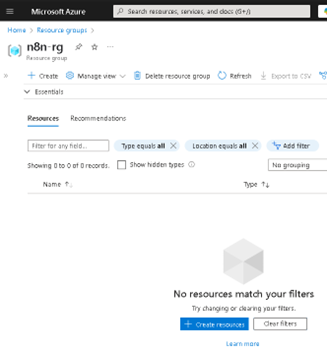
Lately, n8n has been gaining serious traction in the automation world—and it’s easy to see why. With its open-source core, visual workflow builder, and endless integration capabilities, it has become a favorite for developers and tech teams looking to automate processes without being locked into a single vendor. Given all the buzz, I thought it would be the perfect time to share a practical way to run n8n on Microsoft Azure using App Service. Why? Because Azure offers a solid, scalable, and secure platform that makes deployment easy, while still giving you full control over your container and configurations. Whether you're building a quick demo or setting up a production-ready instance, Azure App Service brings a lot of advantages to the table—like simplified scaling, integrated monitoring, built-in security features, and seamless CI/CD support. In this post, I’ll walk you through how to get your own n8n instance up and running on Azure—from creating the resource group to setting up environment variables and deploying the container. If you're into low-code automation and cloud-native solutions, this is a great way to combine both worlds. The first step is to create our Resource Group (RG); in my case, I will name it "n8n-rg". Now we proceed to create the App Service. At this point, it's important to select the appropriate configuration depending on your needs—for example, whether or not you want to include a database. If you choose to include one, Azure will handle the connections for you, and you can select from various types. In my case, I will proceed without a database. Proceed to configure the instance details. First, select the instance name, the 'Publish' option, and the 'Operating System'. In this case, it is important to choose 'Publish: Container', set the operating system to Linux, and most importantly select the region closest to you or your clients. Service Plan configuration. Here, you should select the plan based on your specific needs. Keep in mind that we are using a PaaS offering, which means that underlying compute resources like CPU and RAM are still being utilized. Depending on the expected workload, you can choose the most appropriate plan. Secondly—and very importantly—consider the features offered by each tier, such as redundancy, backup, autoscaling, custom domains, etc. In my case, I will use the Basic B1 plan. In the Database section, we do not select any option. Remember that this will depend on your specific requirements. In the Container section, under 'Image Source', select 'Other container registries'. For production environments, I recommend using Azure Container Registry (ACR) and pulling the n8n image from there. Now we will configure the Docker Hub options. This step is related to the previous one, as the available options vary depending on the image source. In our case, we will use the public n8n image from Docker Hub, so we select 'Public' and proceed to fill in the required fields: the first being the server, and the second the image name. This step is very important—use the exact same values to avoid issues. In the Networking section, we will select the values as shown in the image. This configuration will depend on your specific use case—particularly whether to enable Virtual Network (VNet) integration or not. VNet integration is typically used when the App Service needs to securely communicate with private resources (such as databases, APIs, or services) that reside within an Azure Virtual Network. Since this is a demo environment, we will leave the default settings without enabling VNet integration. In the 'Monitoring and Security' section, it is essential to enable these features to ensure traceability, observability, and additional security layers. This is considered a minimum requirement in production environments. At the very least, make sure to enable Application Insights by selecting 'Yes'. Finally, click on 'Create' and wait for the deployment process to complete. Now we will 'stop' our Web App, as we need to make some preliminary modifications. To do this, go to the main overview page of the Web App and click on 'Stop'. In the same Web App overview page, navigate through the left-hand panel to the 'Settings' section. Once there, click on it and select 'Environment Variables'. Environment variables are key-value pairs used to configure the behavior of your application without changing the source code. In the case of n8n, they are essential for defining authentication, webhook behavior, port configuration, timezone settings, and more. Environment variables within Azure specifically in Web Apps function the same way as they do outside of Azure. They allow you to configure your application's behavior without modifying the source code. In this case, we will add the following variables required for n8n to operate properly. Note: The variable APP_SERVICE_STORAGE should only be modified by setting it to true. Once the environment variables have been added, proceed to save them by clicking 'Apply' and confirming the changes. A confirmation dialog will appear to finalize the operation. Restart the Web App. This second startup may take longer than usual, typically around 5 to 7 minutes, as the environment initializes with the new configuration. Now, as we can see, the application has loaded successfully, and we can start using our own n8n server hosted on Azure. As you can observe, it references the host configured in the App Service. I hope you found this guide helpful and that it serves as a useful resource for deploying n8n on Azure App Service. If you have any questions or need further clarification, feel free to reach out—I'd be happy to help.7.2KViews4likes8Comments
Scaling Smart with Azure: Architecture That Works
Hi Tech Community! I’m Zainab, currently based in Abu Dhabi and serving as Vice President of Finance & HR at Hoddz Trends LLC a global tech solutions company headquartered in Arkansas, USA. While I lead on strategy, people, and financials, I also roll up my sleeves when it comes to tech innovation. In this discussion, I want to explore the real-world challenges of scaling systems with Microsoft Azure. From choosing the right architecture to optimizing performance and cost, I’ll be sharing insights drawn from experience and I’d love to hear yours too. Whether you're building from scratch, migrating legacy systems, or refining deployments, let’s talk about what actually works.209Views0likes1Comment
Former Employer Abuse
My former employer, Albert Williams, president of American Security Force Inc., keeps adding my outlook accounts, computers and mobile devices to the company's azure cloud even though I left the company more than a year ago. What can I do to remove myself from his grip? Does Microsoft have a solution against abusive employers?101Views0likes0CommentsWelcome to the Linux and Open Source Discussion Space!
Welcome to our new Linux and Open Source Discussion Space! This is a place where you can ask questions, share your knowledge, and engage with others who are passionate about Linux and open source. Let's get the conversation started! -Henry402Views1like0Comments
CNCF project Akri usage survey and latest update
We are looking to improve Akri and want to learn more about your experience with it! Please help us with a 3 minutes survey if you have tried/evaluated Akri for leaf device discovery. For more information about Akri, visit the Akri GitHub or check our presentation at KubeCon 2024. To learn what’s new for Akri, check our latest release: v0.12.20.285Views0likes0Comments