iot security
17 Topics
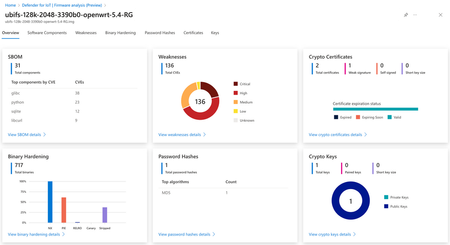
New Blog | Analyze IoT/OT device firmware with Microsoft Defender for IoT
Consider an organization that has thousands of endpoints on their network that are running 10-year old, unpatched SSH servers. Or when a critical vulnerability like log4shell is discovered, having no easy way to know which of those endpoints are exploitable. This is the situation organizations find themselves in when it comes to IoT and OT devices. This problem is so important that the US National Cybersecurity Strategy released a report in March 2023 indicating the IoT security threat as a strategic objective. Read the full blog here: Analyze IoT/OT device firmware with Microsoft Defender for IoT957Views2likes0Comments
Is Raspberry PI Bullseye also supported by Defender for IoT agent installation?
Hello, As Azure IoT Edge is https://azure.microsoft.com/en-us/updates/azure-iot-edge-supports-debian-bullseye-arm32v7/ on a Raspberry PI, I was hoping to install the Defender for IoT agent on this device. But when I follow the Debian installation steps, I get an exception: sudo apt-get install defender-iot-micro-agent Reading package lists... Done Building dependency tree... Done Reading state information... Done Some packages could not be installed. This may mean that you have requested an impossible situation or if you are using the unstable distribution that some required packages have not yet been created or been moved out of Incoming. The following information may help to resolve the situation: The following packages have unmet dependencies: defender-iot-micro-agent : Depends: libcurl3 but it is not installable E: Unable to correct problems, you have held broken packages. Unfortunately, I'm not able to install libcurl3: sudo apt install libcurl3 Reading package lists... Done Building dependency tree... Done Reading state information... Done Package libcurl3 is not available, but is referred to by another package. This may mean that the package is missing, has been obsoleted, or is only available from another source However the following packages replace it: libcurl4 E: Package 'libcurl3' has no installation candidate Because libcurl3 is mandatory instead of optional, I'm not able to let the installer ignore it. Is there some solution? Thanks, SanderSolved(Updated 21-DEC) Security Advisory - Apache Log4j CVE-2021-44228, CVE-2021-45046, CVE-2021-45105
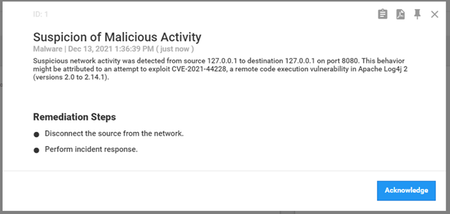
Microsoft is investigating the remote code execution vulnerability related to Apache Log4j (a logging tool used by many Java-based applications) disclosed on 9 Dec 2021. Mitre has designated this vulnerability as CVE-2021-44228 with a severity rating of 10.0. This was followed by vulnerabilities disclosed on Dec 14 th 2021 (CVE-2021-45046) potentially affecting non-standard configurations and Dec 16 th 2021 (CVE-2021-45105). For the latest status of Microsoft’s investigation, please see Microsoft’s Response to CVE-2021-4428 Apache Log4j 2. This advisory will continue to be updated as new information becomes available. (Last Updated 21-DEC-2021) The advisory was updated to reflect that version 10.5.5 has been released with the latest Apache Log4j 2.17.0 and validated to mitigate CVE-2021-44228, CVE-2021-45046 and CVE-2021-45105. We strongly recommend our customers implement the following mitigation steps based on an internal analysis of possible attack vectors. Mitigation Guidance for Microsoft Defender for IoT For Defender for IoT security appliances (OT network sensors and on-premises management console): Deploy the latest software release As of version 10.5.4, all components that were affected by CVE-2021-44228, CVE-2021-45046 and CVE-2021-45105 have been upgraded and secured. Customers are strongly encouraged to apply this update as soon as possible. Manual Workaround The workarounds described below will mitigate CVE-2021-44228, CVE-2021-45046 and CVE-2021-45105, and can be used until upgrading to version 10.5.4 or above. > OT Network Sensor Using SSH, login as an administrator with full privileges. Execute the following: echo "find /var/cyberx/components/ -name \"start.sh\" -exec grep -L Dlog4j2.formatMsgNoLookups=true {} \; | xargs -I '{}' sed -i '/java_args.append(\"-Dlog4j.configurationFile=.*)/a java_args.append(\"-Dlog4j2.formatMsgNoLookups=true\")' {} && sed -i 's/args = \[\x27java\x27, \x27-Dlog4j\.configurationFile=\/var\/cyberx\/properties\/log4j2-active-tool\.xml\x27, \x27-jar\x27,/args = \[\x27java\x27, \x27-Dlog4j\.configurationFile=\/var\/cyberx\/properties\/log4j2-active-tool\.xml\x27, \x27-Dlog4j2\.formatMsgNoLookups=true\x27, \x27-jar\x27,/' /usr/local/bin/cyberx-xsense-cip-query-controllers && monit restart all" | sudo at now + 1 minutes > On Premises Management Console Using SSH, login as an administrator with full privileges. Execute the following: echo "find /var/cyberx/components/ -name \"start.sh\" -exec grep -L Dlog4j2.formatMsgNoLookups=true {} \; | xargs -I '{}' sed -i '/java_args.append(\"-Dlog4j.configurationFile=.*)/a java_args.append(\"-Dlog4j2.formatMsgNoLookups=true\")' {} && monit restart all" | sudo at now + 1 minutes If you need further assistance Please open a support ticket to contact our support team. The Defender for IoT cloud service does not use log4j and is not vulnerable to any active attack vector caused by CVE-2021-44228 and CVE-2021-45046. Latest Threat Intelligence Update for Monitoring CVE-2021-44228, CVE-2021-45046, CVE-2021-45105 Microsoft has released a dedicated Threat Intelligence update package for detecting Log4j exploit attempts on the network (example below). The package is available for download from the Microsoft Defender for IoT portal (Click Updates, then Download file). MD5 Hash - 512081a7ce19e436c9ff7ed672024354 Update your system with the latest TI package: Microsoft Defender for IoT now pushes new threat intelligence packages to cloud-connected sensors upon release, click here for more information. Starting with sensor version 10.3, users can automatically receive up-to-date threat intelligence packages through Microsoft Defender for IoT. Working with automatic updates reduces operational effort and ensures greater security. Enable automatic updating on the Defender for IoT portal by onboarding your cloud-connected sensor with the toggle for Automatic Threat Intelligence Updates turned on. Additionally, the package can be downloaded from the Microsoft Defender for IoT portal, under Updates: To update a package on a single sensor: Go to the Microsoft Defender for IoT Updates page. Download and save the Threat Intelligence package. Sign into the sensor console. On the side menu, select System Settings. Select Threat Intelligence Data, and then select Update. Upload the new package. To update a package on multiple sensors simultaneously: Go to the Microsoft Defender for IoT Updates page. Download and save the Threat Intelligence package. Sign into the management console. On the side menu, select System Settings. In the Sensor Engine Configuration section, select the sensors that should receive the updated packages. In the Select Threat Intelligence Data section, select the plus sign (+). Upload the package. For more information, please review Update threat intelligence data | Microsoft Docs For further information Follow the MSRC blog for more information, which is updated with information and protection details as they become available. For a more in-depth analysis of the vulnerability, exploitation, detections, and mitigations, consult the RiskIQ (acquired by Microsoft in August 2021) analysis. Microsoft’s Response to CVE-2021-44228 Apache Log4j 2 – Microsoft Security Response Center Guidance for preventing, detecting, and hunting for CVE-2021-44228 Log4j 2 exploitation - Microsoft Security Blog Log4j – Apache Log4j Security Vulnerabilities CVE - CVE-2021-44228 (mitre.org)20KViews1like0CommentsAzure Security Center for IoT Webinar: End-to-End Security
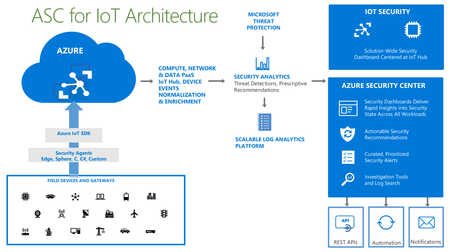
Discover how you can implement end-to-end security for your IoT solution: from your devices, to the edge, and to IoT Hub. Monitor the health of your IoT devices in near real-time. Find and eliminate threats and manage your security posture using ASC for IoT. The webinar will take place on November 19, 2019. Details and registration at https://aka.ms/SecurityWebinars.1.1KViews2likes0Comments
Latest Threat Intelligence (September 2025)
Microsoft Defender for IoT has released the September 2025 Threat Intelligence package. The package is available for download from the Microsoft Defender for IoT portal (click Updates, then Download file). Threat Intelligence updates reflect the combined impact of proprietary research and threat intelligence carried out by Microsoft security teams. Each package contains the latest CVEs (Common Vulnerabilities and Exposures), IOCs (Indicators of Compromise), and other indicators applicable to IoT/ICS/OT networks (published during the past month) researched and implemented by Microsoft Threat Intelligence Research - CPS. The CVE scores are aligned with the National Vulnerability Database (NVD). Starting with the August 2023 threat intelligence updates, CVSSv3 scores are shown if they are relevant; otherwise the CVSSv2 scores are shown. Guidance Customers are recommended to update their systems with the latest TI package in order to detect potential exposure risks and vulnerabilities in their networks and on their devices. Threat Intelligence packages are updated every month with the most up-to-date security information available, ensuring that Microsoft Defender for IoT can identify malicious actors and behaviors on devices. Update your system with the latest TI package The package is available for download from the Microsoft Defender for IoT portal (click Updates, then Download file), for more information, please review Update threat intelligence data | Microsoft Docs. MD5 Hash: 14bf7b135c8c6d61d39ba6c28991f300 For cloud connected sensors, Microsoft Defender for IoT can automatically update new threat intelligence packages following their release, click here for more information.Webinar: Sentinel IT/OT Threat Monitoring
Join us on Thursday 28.7 for a webinar on Sentinel IT/OT Threat Monitoring with Defender for IoT solution. Learn how Defender for IoT's built-in integration with Sentinel helps bridge the gap between IT and OT security. Registration is now open , for July 28 There has been a long-standing split between ICS/SCADA (OT) and Corporate (IT) cybersecurity. This split was often driven by significant differences in technology/tooling. Microsoft Defender for IoT's integration with Microsoft Sentinel drives convergency by providing a single pane for coverage of both D4IOT (OT) and Microsoft Sentinel (IT) alerting. This solution includes Workbooks and Analytics rules providing a guide OT detection and Analysis.3.5KViews0likes8CommentsDefender for IoT Automating processes
Hello, I am trying to automate some processes we are performing using Defender for IoT, running on a virtual machine in Azure. Part of the tasks can be performed using the Defender For IoT Cli, another part can be done using the API functionalities. However, there are some tasks that I cannot yet find a way how to perform. A good example of such a task is playing pcap files. You can upload the pcap files to the desired location using a script. Is it possible to play the files using a script/ some other way? Any input will be much appreciated. Thank you for your time. Kind regards, Vanina1.9KViews0likes2CommentsTake Azure Defender for IoT for a Spin
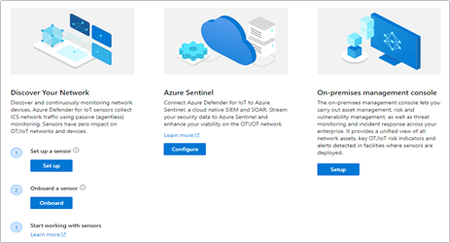
Intended audience: Security and OT engineering enthusiasts, looking to secure unmanaged critical networks used by IoT/OT devices such as Building Management Systems, Manufacturing, Critical Infrastructure and more! Introduction You’ve read the product materials and would like to get started with securing your IoT/OT network – in this blog post, we will focus on setting up a sensor on your critical networks - without impacting IoT/OT stability or performance (If you missed it, you can read more about the capabilities of Azure Defender for IoT here). The goal of this article is to guide you through setting up a sensor to demonstrate the value of the system, as well as a quick start for securing unmanaged IoT/OT devices. Try it now at no charge Try Azure Defender for IoT - This version includes the agentless security provided via the integration of CyberX, a Microsoft company, plus the ability to connect to Azure Sentinel. Preparing your environment Azure Defender for IoT monitors unmanaged devices that are used in Operational Technology (OT) environments such as manufacturing, building management systems (BMS), life sciences, energy and water utilities, oil & gas, and logistics. In the most basic configuration, Setting up your environment can be taken in 4 easy steps: 1. Setup a sensor The software for the sensor may be installed on physical servers or as a virtual machine. The sensor installation files can be downloaded from the Azure Defender for IoT portal, on the “Getting Started” -> “Network Sensor” tab. Log into your Azure Account and download the ISO installer for the sensor. Install the ISO from USB on a VM or physical server (see Hardware Guide and Installation Guide) Make sure to make a note of the administrative login credentials presented during the installation process. If your setup includes multiple sensors, you can also download the optional “On-Premises Management Console” which allows you to manage and monitor large sensor deployments. More on this in the Installation Guide, Chapter 8 2. Monitor a SPAN port The sensor implements non-invasive passive monitoring with Network Traffic Analysis (NTA) and Layer 7 Deep Packet Inspection (DPI) to extract detailed IoT/OT information in real-time, even across diverse automation equipment from all major OT suppliers such as: Rockwell Automation, Schneider Electric, GE, Emerson, Siemens, Honeywell, ABB, Yokogawa, etc. Locate a managed LAN switch connected to IoT/OT devices. These switches can typically be set up with monitoring ports (also called SPAN or mirror ports). Utilizing this technique, the sensor will passively monitor the OT network, without creating any traffic which might impact or risk devices on the network. Connect the monitoring port to the sensor’s monitoring interface (typically the first available ethernet card) For more information and configuration examples, see the Network Deployment Guide, Chapter 5 - “Traffic Monitoring.” 3. Register and Activate the Sensor Once the sensor has been connected to the monitor port – it will immediately begin to analyze the network traffic. The next step is to login to the sensor and activate it with an activation file available for your account, in the Azure Defender for IoT portal. Log into your Azure Account select the “Onboard” sensor button (underlined below): Next, fill in the sensor name and subscription details. The button for "cloud-connected" will optionally send alert information into IoT Hub and Sentinel for further analysis. If you have an air-gapped or completely on-premises implementation with no connection to the cloud, disable the "cloud-connected" button below before you generate your license. Download the activation file. This will be used in the next step to activate the sensor. Login to the sensor’s IP address, with the administrative credentials shown during the installation process. On the next screen – upload the activation file from the previous step. For more information and detailed steps, see the Onboarding Guide. 4. Start Exploring Now you’ve successfully installed your first sensor and you can start using the system – view the asset inventory, zoom in on the network map or generate a risk report. Conclusion Thank you for reading this blog post. There will be more blog posts to follow, which will enable you to get the best of out your system, which will include: what to do when malware is detected, connecting to Azure Sentinel, or simulating attack vectors, so please check back with us soon. Learn more with these educational resources: Watch our Ignite session showing how Azure Defender for IoT and Azure Sentinel are combined to investigate multistage attacks that cross IT/OT boundaries, using the TRITON attack on a petrochemical facility as an example. Watch our Tech Community webinar describing MITRE ATT&CK for ICS, an OT-focused version of the well-known MITRE ATT&CK framework originally developed for IT networks. Watch our SANS webinar featuring the head of Microsoft’s datacenter security program, about securing building automation systems using continuous OT security monitoring. Stay tuned for an upcoming webinar during which we’ll do a technical walkthrough of how to deploy and use Azure Defender for IoT. Troubleshooting No traffic is monitored on the sensor. Check that the monitoring port is connected to the correct ethernet port. Make sure the port is indeed a SPAN port by monitoring bandwidth on the port. For more troubleshooting, see the Network Setup Guide, Appendix 1 I cannot find a device in the Asset Inventory Make sure the device is connected to the network. Search for its MAC address in the Asset Inventory – if it is active, it will appear on the list.2.4KViews4likes0CommentsAzure Security Center for IoT Webinar
Interested in learning about Azure Security Center for IoT? Check out our upcoming webinar. Details and registration at https://aka.ms/ASCIoTWebinar. Azure Security Center for IoT is a new solution that allows organizations to easily protect their IoT deployments with threat protection driven by Microsoft’s unique threat intelligence. You can find more information about it at https://docs.microsoft.com/en-us/azure/asc-for-iot/overview. The webinar will take place on Monday, August 5, 2019 at 08:00 PT / 11:00 ET / 15:00 GMT. Afterward, the recording will be posted to https://aka.ms/ASCIoTRecordings. We hope you’ll join us!3.6KViews7likes3Comments