identity management
618 Topics
Introducing the Entra Helpdesk Portal: A Zero-Trust, Dockerized ITSM Interface for Tier 1 Support
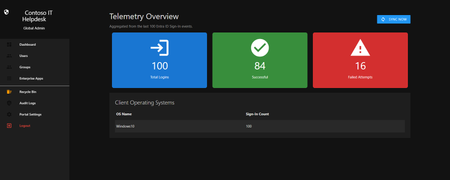
Hello everyone, If you manage identity in Microsoft Entra ID at an enterprise scale, you know the struggle: delegating day-to-day operational tasks (like password resets, session revocations, and MFA management) to Tier 1 and Tier 2 support staff is inherently risky. The native Azure/Entra portal is incredibly powerful, but it’s complex and lacks mandatory ITSM enforcement. Giving a helpdesk technician the "Helpdesk Administrator" role grants them access to a portal where a single misclick can cause a major headache. To solve this, I’ve developed the Entra Helpdesk Portal (Community Edition)—an open-source, containerized application designed to act as an isolated "airlock" between your support team and your Entra ID tenant. Why This Adds Value to Your Tenant Instead of having technicians log into the Azure portal, they log into this clean, Material Design web interface. It leverages a backend Service Principal (using MSAL and the Graph API) to execute commands on their behalf. Strict Zero Trust: Logging in via Microsoft SSO isn’t enough. The app intercepts the token and checks the user’s UPN against a hardcoded ALLOWED_ADMINS whitelist in your Docker environment file. Mandatory ITSM Ticketing: You cannot enforce ticketing in the native Azure Portal. In this app, every write action prompts a modal requiring a valid ticket number (e.g., INC-123456). Local Audit Logging: All actions, along with the actor, timestamp, and ticket number, are written to an immutable local SQLite database (audit.db) inside the container volume. Performance: Heavy Graph API reads are cached in-memory with a Time-To-Live (TTL) and smart invalidation. Searching for users or loading Enterprise Apps takes milliseconds. What Can It Do? Identity Lifecycle: Create users, auto-generate secure 16-character passwords, revoke sign-in sessions, reset passwords, and delete specific MFA methods to force re-registration. Diagnostics: View a user's last 5 sign-in logs, translating Microsoft error codes into plain English. Group Management: Add/remove members to Security and M365 groups. App/SPN Management: Lazy-load raw requiredResourceAccess Graph API payloads to audit app permissions, and instantly rotate client secrets. Universal Restore: Paste the Object ID of any soft-deleted item into the Recycle Bin tab to instantly resurrect it. How Easy Is It to Setup? I wanted this to be universally deployable, so I compiled it as a multi-architecture Docker image (linux/amd64 and linux/arm64). It will run on a massive Windows Server or a simple Raspberry Pi. Setup takes less than 5 minutes: Create an App Registration in Entra ID and grant it the necessary Graph API Application Permissions (e.g., User.ReadWrite.All, AuditLog.Read.All). Create a docker-compose.yml file. Define your feature toggles. You can literally turn off features (like User Deletion) by setting an environment variable to false. version: '3.8' services: helpdesk-portal: image: jahmed22/entra-helpdesk:latest container_name: entra_helpdesk restart: unless-stopped ports: - "8000:8000" environment: # CORE IDENTITY - TENANT_ID=your_tenant_id_here - CLIENT_ID=your_client_id_here - CLIENT_SECRET=your_client_secret_here - BASE_URL=https://entradesk.jahmed.cloud - ALLOWED_ADMINS=email address removed for privacy reasons # CUSTOMIZATION & FEATURE FLAGS - APP_NAME=Entra Help Desk - ENABLE_PASSWORD_RESET=true - ENABLE_MFA_MANAGEMENT=true - ENABLE_USER_DELETION=false - ENABLE_GROUP_MANAGEMENT=true - ENABLE_APP_MANAGEMENT=true volumes: - entra_helpdesk_data:/app/static/uploads - entra_helpdesk_db:/app volumes: entra_helpdesk_data: entra_helpdesk_db: 4.Run docker compose up -d and you are done! I built this to give back to the community and help secure our Tier 1 operations. If you are interested in testing it out in your dev tenants or want to see the full architecture breakdown, you can read the complete documentation on my website here I’d love to hear your thoughts, feedback, or any feature requests you might have!22Views0likes0Comments
Cloud Kerberos Trust with 1 AD and 6 M365 Tenants?
Hi, we would like to enable Cloud Kerberos Trust on hybrid joined devices ( via Entra connect sync) In our local AD wie have 6 OUs and users and devices from each OU have a seperate SCP to differnt M365 Tenants. I found this Article to configure the Cloud Kerberos Trust . Set-AzureADKerberosServer 1 2 The Set-AzureADKerberosServer PowerShell cmdlet is used to configure a Microsoft Entra (formerly Azure AD) Kerberos server object. This enables seamless Single Sign-On (SSO) for on-premises resources using modern authentication methods like FIDO2 security keys or Windows Hello for Business. Steps to Configure the Kerberos Server 1. Prerequisites Ensure your environment meets the following: Devices must run Windows 10 version 2004 or later. Domain Controllers must run Windows Server 2016 or later. Install the AzureADHybridAuthenticationManagement module: [Net.ServicePointManager]::SecurityProtocol = [Net.ServicePointManager]::SecurityProtocol -bor [Net.SecurityProtocolType]::Tls12 Install-Module -Name AzureADHybridAuthenticationManagement -AllowClobber 2. Create the Kerberos Server Object Run the following PowerShell commands to create and publish the Kerberos server object: Prompt for All Credentials: $domain = $env:USERDNSDOMAIN $cloudCred = Get-Credential -Message 'Enter Azure AD Hybrid Identity Administrator credentials' $domainCred = Get-Credential -Message 'Enter Domain Admin credentials' Set-AzureADKerberosServer -Domain $domain -CloudCredential $cloudCred -DomainCredential $domainCred As I understand the process, a object is created in local AD when running Set-AzureADKerberosServer What happens, if I run the command multiple times, for each OU/Tenant. Does this ovveride the object, or does it create a new objects?Solved182Views0likes3Comments
Challenges with custom data provided resource reviews
I was thrilled to see the ability to review disconnected applications in Entra, and even more thrilled to see that the permission and its description are available to the reviewer, which addresses a significant gap present in group-based reviews. However, the current decision-tracking approach does not adequately replicate the closed-loop remediation model typically found in traditional IGA access reviews for integrated applications. Requiring reviewers to upload confirmation that revocations have been completed is problematic. This approach does not mitigate the core risk: access may remain in place due to fulfillment errors or be incorrectly retained, and the reviewer may unknowingly validate an inaccurate state. This can lead to a compliance incident or audit finding. A more effective solution would allow reviewers to upload a current export of access data, enabling the review system to reconcile intended revocations against the actual state. Any discrepancies could then be flagged for remediation where revocations were missed or have failed, or for validation where access was revoked and immediately reinstated (e.g., due to reviewer misjudgement), ideally supported by corresponding ticketing or justification. There are currently a lot of gaps in Entra ID access reviews, and while this new feature arguably resolved the worst one, I think it's headed down the wrong path. I am curious about other people's thoughts.30Views0likes0CommentsEntra ID Object Drift – Are We Measuring Tenant Health Correctly?
In many enterprise environments: Secure Score is green. Compliance dashboards look healthy. Yet directory object inconsistency silently accumulates. Stale devices. Hybrid join remnants. Intune orphan records. Over time, this becomes governance debt. In large tenants this often leads to inaccurate compliance reporting and Conditional Access targeting issues. I recently wrote a breakdown of: • Entra ID drift patterns • Hybrid join inconsistencies • Intune orphan objects • Lifecycle-based cleanup architecture Curious how others approach object hygiene at scale. Full article: https://www.modernendpoint.tech/entra-id-cleanup-patterns/?utm_source=techcommunity&utm_medium=social&utm_campaign=entra_cleanup_launch&utm_content=discussion One pattern I keep seeing is duplicate device identities after re-enrollment or Autopilot reset. Curious how others handle lifecycle cleanup in large Entra ID environments.167Views0likes3CommentsPriority between CIDR and FQDN rules in Microsoft Entra Private Access (GSA)
Hello Question about prioritization between CIDR and FQDN rules in Microsoft Entra Private Access (GSA) Question: Hello everyone, I have a question about how rules are prioritized in Microsoft Entra Private Access (Global Secure Access). In my environment, I configured the following: I created an Enterprise Application using a broad CIDR range (10.10.0.0/16) to represent the entire data center. Within the same environment, I created other Enterprise Applications using specific FQDNs ( app01.company.local, app02.company.local) with specific ports. All rules are in the same Forwarding Profile. I noticed that in the GSA client rules tab there is a “Priority” field, and apparently the rules are evaluated from top to bottom. My question is: When there is an overlap between a broad CIDR rule and a more specific FQDN-based rule, which one takes precedence? Is there some internal technical criterion (DNS resolution first, longest prefix match,), or is the evaluation purely based on the order displayed? Is there a risk that the CIDR rule will capture traffic before the FQDN rule and impact granular access control? I want to make sure my architecture is correct before expanding its use to production. Could someone clarify the actual technical behavior of this prioritization?Solved138Views0likes3Comments
Can External ID (CIAM) federate to an Azure AD/Entra ID tenant using SAML?
What I'm trying to achieve I'm setting up SAML federation FROM my External ID tenant (CIAM) TO a partner's Entra ID tenant (regular organizational tenant) for a hybrid CIAM/B2B setup where: Business users authenticate via their corporate accounts (OIDC or SAML) Individual customers use username/password or social providers (OIDC) Tenant details / Terminology: CIAM tenant: External ID tenant for customer-facing applications IdP tenant: Example Partner's organizational Entra ID tenant with business accounts Custom domain: mycustomdomain.com (example domain for the IdP tenant) Configuration steps taken Step 1: IdP Tenant (Entra ID) - Created SAML App Set up Enterprise App with SAML SSO Entity ID: https://login.microsoftonline.com/<CIAM_TENANT_ID>/ Reply URL: https://<CIAM_TENANT_ID>.ciamlogin.com/login.srf NameID: Persistent format Claim mapping: emailaddress → user.mail Step 2: CIAM Tenant (External ID) - Added SAML IdP (Initially imported from the SAML metadata URL from the above setup) Federating domain: mycustomdomain.com Issuer URI: https://sts.windows.net/<IDP_TENANT_ID>/ Passive endpoint: https://login.microsoftonline.com/mycustomdomain.com/saml2 DNS TXT record added: DirectFedAuthUrl=https://login.microsoftonline.com/mycustomdomain.com/saml2 Step 3: Attached to User Flow Added SAML IdP to user flow under "Other identity providers" Saved configuration and waited for propagation The problem It doesn't work. When testing via "Run user flow": No SAML button appears (should display "Sign in with mycustomdomain") Entering email address removed for privacy reasons doesn't trigger federation The SAML provider appears configured but never shows up in the actual flow Also tried using the tenant GUID in the passive endpoint instead of the domain - same result My question Is SAML federation from External ID to regular Entra ID tenants actually possible? I know OIDC federation to Microsoft tenants is (currently, august 2025) explicitly blocked (microsoftonline.com domains are rejected). Is SAML similarly restricted? The portal lets me configure everything without throwing any errors, but it never actually works. Am I missing something in my configuration? The documentation for this use case is limited and I've had to piece together the setup from various sources. Or is this a fundamental limitation where External ID simply can't federate to ANY Microsoft tenant regardless of the protocol used?281Views1like2CommentsDisplay On-prem Password Policy on SSPR Page
Hi All We are beginning to rollout SSPR with on-prem writeback. So far so good. Is there a way we can display our on-prem password policy requirements on the SSPR screen? I have seen the MS docs, but can't really make any sense of them so any help would be greatly appreciated. SK210Views1like3Comments
Multitenant organization (MTO): user licenses
Hello everyone, As described https://learn.microsoft.com/en-us/microsoft-365/enterprise/set-up-multi-tenant-org, I have created an MTO. It seems to have worked because I can see users from tenant A in tenant B. Everything looks correct, as the users have #EXT# in their usernames, their type is “Member”, and their identity is “ExternalAzureAD”. BUT they are all unlicensed. My question: is there a way to synchronize the licenses of the users, or do I really have to purchase the same license twice for a single user? Specifically, I am interested in the following licenses: Microsoft 365 Business Premium (access to Teams, SharePoint, Exchange Online shared mailboxes, etc.) Dynamics 365 licenses (e.g., Business Central). Thank you very much for your assistance, and warm regards, Nico2.8KViews0likes4Comments
Orphaned TPM-bound Entra Workplace Join device — no tenant access, backend deletion required
I have a personal Windows device that remains stuck in a TPM-protected Workplace Join to a former Microsoft Entra ID tenant. I no longer have tenant access and am not an admin. Local remediation completed: - dsregcmd /leave executed as SYSTEM - All MS-Organization / AAD certificates removed - Device still reports WorkplaceJoined : YES Azure Support ticket creation fails with: AADSTS160021 – interaction_required Application requested a user session which does not exist. Tenant inaccessible / user not present in tenant. This is an orphaned Entra ID device object. Requesting guidance or escalation for backend deletion. Tenant ID: 99f9b903-8447-4711-a2df-c5bd1ad1adf7 Device ID: f47987f4-a20b-4c34-a5f7-40ab0f593c6c58Views0likes0CommentsGrant Just-in-Time Admin Access with Microsoft Entra PIM
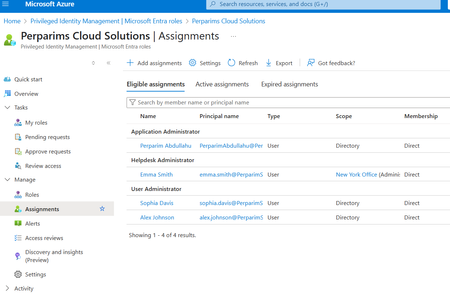
In my lab, I worked with Microsoft Entra Privileged Identity Management (PIM) to grant Just-in-Time admin access. Instead of permanent assignments, users become eligible for roles and must activate them only when needed. Steps I tested: - Configured roles as eligible rather than permanent - Required MFA and approval for role activation - Verified access automatically expired after the time window This approach reduces standing privileges and aligns with Zero Trust by securing privileged access. Curious — does your org still keep permanent Global Admins, or have you moved to JIT with PIM?159Views0likes1Comment