iis windows server 2022
3 Topics
HTTPS Reverse Proxy on IIS 10 – External Access Fails (Timeout) Although Local Requests Work
Hello everyone, I’m currently facing an issue with an IIS 10 reverse proxy configuration on Windows Server, and I would really appreciate your guidance. Environment Windows Server IIS 10 Application Request Routing (ARR) + URL Rewrite enabled Backend application running on: http://localhost:8080/ http://localhost:8080/login Public domain: https://lojistik.abc.com.tr What I want to achieve I want users to access the backend web application through the following URL: https://lojistik.abc.com.tr/LMYS/login Internally, IIS should proxy this to: http://localhost:8080/login What works The backend application is accessible without issues: http://localhost:8080/login From the server itself, reverse proxy works: Invoke-WebRequest "https://lojistik.abc.com.tr/LMYS/login" → StatusCode: 200 (success) What does NOT work From any client machine, the following request results in a timeout: https://lojistik.abc.com.tr/LMYS/login Browser shows connection timeout. No entry appears in IIS logs for external requests to /LMYS/.... Tests performed ▪ netstat -ano | findstr :443 on the server → Port 443 is listening ▪ DNS resolves correctly: lojistik.abc.com.tr → 10.6.130.90 ▪ Reverse proxy rule on IIS is correctly configured under the HTTPS binding site: Pattern: ^LMYS(/.*)?$ Rewrite to: http://localhost:8080{R:1} ▪ ARR Server Proxy is enabled. Key observation Requests from the server itself succeed (reverse proxy returns 200), but external clients always time out, which suggests that the HTTPS traffic is not reaching IIS at all (likely blocked or not NAT-forwarded on the network path). Question What could cause HTTPS (port 443) traffic to reach IIS locally, but external requests to the same port to hang indefinitely? Any guidance would be greatly appreciated. Thank you in advance. Best regards,85Views0likes0CommentsHow to fix Error System.Web.HttpApplication does not implement IHttpModule in IIS
Hi, I need some help with error "Error System.Web.HttpApplication does not implement IHttpModule" with some steps for diagnose cause this error. Note: MY_SERVER has a single web site called "SitioNuevoVacio2" Context I have a web site called "SitioNuevoVacio2" this contains a single html file called "index.html" with following source code... <html> <body> -- empty web site -- </body> </html> when I browse "SitioNuevoVacio2", I get these error messages: " Server Error in '/' Application. ________________________________________ System.Web.HttpApplication does not implement IHttpModule. Description: An unhandled exception occurred during the execution of the current web request. Please review the stack trace for more information about the error and where it originated in the code. Exception Details: System.Configuration.ConfigurationErrorsException: System.Web.HttpApplication does not implement IHttpModule. Source Error: An unhandled exception was generated during the execution of the current web request. Information regarding the origin and location of the exception can be identified using the exception stack trace below. Stack Trace: [ConfigurationErrorsException: System.Web.HttpApplication does not implement IHttpModule.] System.Web.Configuration.Common.ModulesEntry..ctor(String name, String typeName, String propertyName, ConfigurationElement configElement) +11874417 System.Web.HttpApplication.BuildIntegratedModuleCollection(List`1 moduleList) +221 System.Web.HttpApplication.GetModuleCollection(IntPtr appContext) +1103 System.Web.HttpApplication.RegisterEventSubscriptionsWithIIS(IntPtr appContext, HttpContext context, MethodInfo[] handlers) +122 System.Web.HttpApplication.InitSpecial(HttpApplicationState state, MethodInfo[] handlers, IntPtr appContext, HttpContext context) +173 System.Web.HttpApplicationFactory.GetSpecialApplicationInstance(IntPtr appContext, HttpContext context) +255 System.Web.Hosting.PipelineRuntime.InitializeApplication(IntPtr appContext) +347 [HttpException (0x80004005): System.Web.HttpApplication does not implement IHttpModule.] System.Web.HttpRuntime.FirstRequestInit(HttpContext context) +552 System.Web.HttpRuntime.EnsureFirstRequestInit(HttpContext context) +122 System.Web.HttpRuntime.ProcessRequestNotificationPrivate(IIS7WorkerRequest wr, HttpContext context) +732 ________________________________________ Version Information: Microsoft .NET Framework Version:4.0.30319; ASP.NET Version:4.8.9195.0 " And Event viewer has this warning: " Event code: 3008 Event message: A configuration error has occurred. Event time: 9/10/2024 8:56:20 a. m. Event time (UTC): 9/10/2024 1:56:20 p. m. Event ID: 5bffbb78122e470a85ffaa557e38532d Event sequence: 1 Event occurrence: 1 Event detail code: 0 Application information: Application domain: /LM/W3SVC/3/ROOT-2-133729557801407411 Trust level: Full Application Virtual Path: / Application Path: C:\inetpub\wwwroot\SitioNuevoVacio2\ Machine name: MY_SERVER Process information: Process ID: 9424 Process name: w3wp.exe Account name: IIS APPPOOL\DefaultAppPool Exception information: Exception type: ConfigurationErrorsException Exception message: System.Web.HttpApplication does not implement IHttpModule. at System.Web.Configuration.Common.ModulesEntry..ctor(String name, String typeName, String propertyName, ConfigurationElement configElement) at System.Web.HttpApplication.BuildIntegratedModuleCollection(List`1 moduleList) at System.Web.HttpApplication.GetModuleCollection(IntPtr appContext) at System.Web.HttpApplication.RegisterEventSubscriptionsWithIIS(IntPtr appContext, HttpContext context, MethodInfo[] handlers) at System.Web.HttpApplication.InitSpecial(HttpApplicationState state, MethodInfo[] handlers, IntPtr appContext, HttpContext context) at System.Web.HttpApplicationFactory.GetSpecialApplicationInstance(IntPtr appContext, HttpContext context) at System.Web.Hosting.PipelineRuntime.InitializeApplication(IntPtr appContext) Request information: Request URL: http://localhost:8085/ Request path: / User host address: ::1 User: Is authenticated: False Authentication Type: Thread account name: MY_SERVER\SomeUser Thread information: Thread ID: 12 Thread account name: MY_SERVER\SomeUser Is impersonating: False Stack trace: at System.Web.Configuration.Common.ModulesEntry..ctor(String name, String typeName, String propertyName, ConfigurationElement configElement) at System.Web.HttpApplication.BuildIntegratedModuleCollection(List`1 moduleList) at System.Web.HttpApplication.GetModuleCollection(IntPtr appContext) at System.Web.HttpApplication.RegisterEventSubscriptionsWithIIS(IntPtr appContext, HttpContext context, MethodInfo[] handlers) at System.Web.HttpApplication.InitSpecial(HttpApplicationState state, MethodInfo[] handlers, IntPtr appContext, HttpContext context) at System.Web.HttpApplicationFactory.GetSpecialApplicationInstance(IntPtr appContext, HttpContext context) at System.Web.Hosting.PipelineRuntime.InitializeApplication(IntPtr appContext) " I searched in the web and some post suggest check your source code in these files: - web.config - global.asax and find any reference to custom HttpModule, but "SitioNuevoVacio2" only has a single page. I don't know what to do, any suggestions? Technical Specs - SO: windows server 2022 standard 21H2 - IIS: Version 10.0.20438.1 - .NET Framework Version:4.0.30319 - ASP.NET Version:4.8.9195.0 TRY 1. List of 12 Handlers manually created... 1. PageHandlerFactory-ISAPI-4.0_32bit • Request path: *.aspx • Type: C:\\Windows\\Microsoft.NET\\Framework\\v4.0.30319\\aspnet_isapi.dll • Name: PageHandlerFactory-ISAPI-4.0_32bit • Module: IsapiModule • Script Processor: C:\\Windows\\Microsoft.NET\\Framework\\v4.0.30319\\aspnet_isapi.dll • Entry Type: Local 2. PageHandlerFactory-ISAPI-4.0_64bit • Request path: *.aspx • Type: C:\\Windows\\Microsoft.NET\\Framework64\\v4.0.30319\\aspnet_isapi.dll • Name: PageHandlerFactory-ISAPI-4.0_64bit • Module: IsapiModule • Script Processor: C:\\Windows\\Microsoft.NET\\Framework64\\v4.0.30319\\aspnet_isapi.dll • Entry Type: Local 3. PageHandlerFactory-Integrated-4.0 • Request path: *.aspx • Type: System.Web.UI.PageHandlerFactory • Name: PageHandlerFactory-Integrated-4.0 • Module: ManagedPipelineHandler • Entry Type: Local 4. SimpleHandlerFactory-ISAPI-4.0_32bit • Request path: *.ashx • Type: C:\\Windows\\Microsoft.NET\\Framework\\v4.0.30319\\aspnet_isapi.dll • Name: SimpleHandlerFactory-ISAPI-4.0_32bit • Module: IsapiModule • Script Processor: C:\\Windows\\Microsoft.NET\\Framework\\v4.0.30319\\aspnet_isapi.dll • Entry Type: Local 5. SimpleHandlerFactory-ISAPI-4.0_64bit • Request path: *.ashx • Type: C:\\Windows\\Microsoft.NET\\Framework64\\v4.0.30319\\aspnet_isapi.dll • Name: SimpleHandlerFactory-ISAPI-4.0_64bit • Module: IsapiModule • Script Processor: C:\\Windows\\Microsoft.NET\\Framework64\\v4.0.30319\\aspnet_isapi.dll • Entry Type: Local 6. SimpleHandlerFactory-Integrated-4.0 • Request path: *.ashx • Type: System.Web.UI.SimpleHandlerFactory • Name: SimpleHandlerFactory-Integrated-4.0 • Module: ManagedPipelineHandler • Entry Type: Local 7. WebServiceHandlerFactory-ISAPI-4.0_32bit • Request path: *.asmx • Type: C:\\Windows\\Microsoft.NET\\Framework\\v4.0.30319\\aspnet_isapi.dll • Name: WebServiceHandlerFactory-ISAPI-4.0_32bit • Module: IsapiModule • Script Processor: C:\\Windows\\Microsoft.NET\\Framework\\v4.0.30319\\aspnet_isapi.dll • Entry Type: Local 8. WebServiceHandlerFactory-ISAPI-4.0_64bit • Request path: *.asmx • Type: C:\\Windows\\Microsoft.NET\\Framework64\\v4.0.30319\\aspnet_isapi.dll • Name: WebServiceHandlerFactory-ISAPI-4.0_64bit • Module: IsapiModule • Script Processor: C:\\Windows\\Microsoft.NET\\Framework64\\v4.0.30319\\aspnet_isapi.dll • Entry Type: Local 9. WebServiceHandlerFactory-Integrated-4.0 • Request path: *.asmx • Type: System.Web.Services.Protocols.WebServiceHandlerFactory • Name: WebServiceHandlerFactory-Integrated-4.0 • Module: ManagedPipelineHandler • Entry Type: Local 10. ScriptHandlerFactory-ISAPI-4.0_32bit • Request path: *.axd • Type: C:\\Windows\\Microsoft.NET\\Framework\\v4.0.30319\\aspnet_isapi.dll • Name: ScriptHandlerFactory-ISAPI-4.0_32bit • Module: IsapiModule • Script Processor: C:\\Windows\\Microsoft.NET\\Framework\\v4.0.30319\\aspnet_isapi.dll • Entry Type: Local 11. ScriptHandlerFactory-ISAPI-4.0_64bit • Request path: *.axd • Type: C:\\Windows\\Microsoft.NET\\Framework64\\v4.0.30319\\aspnet_isapi.dll • Name: ScriptHandlerFactory-ISAPI-4.0_64bit • Module: IsapiModule • Script Processor: C:\\Windows\\Microsoft.NET\\Framework64\\v4.0.30319\\aspnet_isapi.dll • Entry Type: Local 12. ScriptHandlerFactory-Integrated-4.0 • Request path: *.axd • Type: System.Web.Handlers.ScriptHandlerFactory • Name: ScriptHandlerFactory-Integrated-4.0 • Module: ManagedPipelineHandler • Entry Type: Local 2. Check, download, install, update and reboot last windows updates. 3. Compare Handlers and Modules between IIS developer server with MY_SERVER note: IIS developer server works fine when I publish "SitioNuevoVacio2" EXPECT After made those verifications and changes IIS works fine and see index.html "SitioNuevoVacio2"Solved924Views0likes8Comments
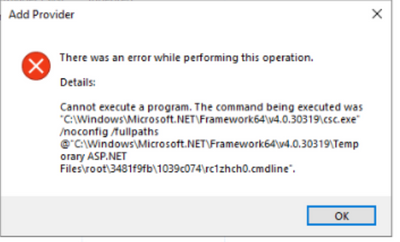
IIS Server Error cannot execute the command while adding new Role Provider - Sharepoint 2019
Hi, I have installed the Windows Server 2022 with SharePoint Server 2019, I have created one web application and trying to configure the Form-Based Authentication from the IIS Manager, whenever I am trying to add the new Role Provider from the IIS server below error occurs every time Its only happening for SharePoint web application506Views0likes0Comments