GenAI
37 TopicsFrom Concept to Code: Building Production-Ready Multi-Agent Systems with Microsoft Foundry
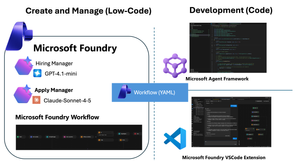
We have reached a critical inflection point in AI development. Within the Microsoft Foundry ecosystem, the core value proposition of "Agents" is shifting decisively—moving from passive content generation to active task execution and process automation. These are no longer just conversational interfaces. They are intelligent entities capable of connecting models, data, and tools to actively execute complex business logic. To support this evolution, Microsoft has introduced a powerful suite of capabilities: the Microsoft Agent Framework for sophisticated orchestration, the Agent V2 SDK, and integrated Microsoft Foundry VSCode Extensions. These innovations provide the tooling necessary to bridge the gap between theoretical research and secure, scalable enterprise landing. But how do you turn these separate components into a cohesive business solution? That is the challenge we address today. This post dives into the practical application of these tools, demonstrating how to connect the dots and transform complex multi-agent concepts into deployed reality. The Scenario: Recruitment through an "Agentic Lens" Let’s ground this theoretical discussion with a real-world scenario that perfectly models a multi-agent environment: The Recruitment Process. By examining recruitment through an agentic lens, we can identify distinct entities with specific mandates: The Recruiter Agent: Tasked with setting boundary conditions (job requirements) and preparing data retrieval mechanisms (interview questions). The Applicant Agent: Objective is to process incoming queries and synthesize the best possible output to meet the recruiter's acceptance criteria. Phase 1: Design Achieving Orchestration via Microsoft Foundry Workflows To bridge the gap between our scenario and technical reality, we start with Foundry Workflows. Workflows serves as the visual integration environment within Foundry. It allows you to build declarative pipelines that seamlessly combine deterministic business logic with the probabilistic nature of autonomous AI agents. By adopting this visual, low-code paradigm, you eliminate the need to write complex orchestration logic from scratch. Workflows empowers you to coordinate specialized agents intuitively, creating adaptive systems that solve complex business problems collaboratively. Visually Orchestrating the Cycle Microsoft Foundry provides an intuitive, web-based drag-and-drop interface. This canvas allows you to integrate specialized AI agents alongside standard procedural logic blocks, transforming abstract ideas into executable processes without writing extensive glue code. To translate our recruitment scenario into a functional workflow, we follow a structured approach: Agent Prerequisites: We pre-configure our specialized agents within Foundry. We create a Recruiter Agent (prompted to generate evaluation criteria) and an Applicant Agent (prompted to synthesize responses). Orchestrating the Interaction: We drag these nodes onto the board and define the data flow. The process begins with the Recruiter generating questions, piping that output directly as input for the Applicant agent. Adding Business Logic: A true workflow requires decision-making. We introduce control flow logic, such as IF/ELSE conditional blocks, to evaluate the recruiter's questions based on predefined criteria. This allows the workflow to branch dynamically—if satisfied, the candidate answers the questions; if not, the questions are regenerated. Alternative: YAML Configuration For developers who prefer a code-first approach or wish to rapidly replicate this logic across environments, Foundry allows you to export the underlying YAML. kind: workflow trigger: kind: OnConversationStart id: trigger_wf actions: - kind: SetVariable id: action-1763742724000 variable: Local.LatestMessage value: =UserMessage(System.LastMessageText) - kind: InvokeAzureAgent id: action-1763736666888 agent: name: HiringManager input: messages: =System.LastMessage output: autoSend: true messages: Local.LatestMessage - kind: Question variable: Local.Input id: action-1763737142539 entity: StringPrebuiltEntity skipQuestionMode: SkipOnFirstExecutionIfVariableHasValue prompt: Boss, can you confirm this ? - kind: ConditionGroup conditions: - condition: =Local.Input="Yes" actions: - kind: InvokeAzureAgent id: action-1763744279421 agent: name: ApplyAgent input: messages: =Local.LatestMessage output: autoSend: true messages: Local.LatestMessage - kind: EndConversation id: action-1763740066007 id: if-action-1763736954795-0 id: action-1763736954795 elseActions: - kind: GotoAction actionId: action-1763736666888 id: action-1763737425562 id: "" name: HRDemo description: "" Simulating the End-to-End Process Once constructed, Foundry provides a robust, built-in testing environment. You can trigger the workflow with sample input data to simulate the end-to-end cycle. This allows you to debug hand-offs and interactions in real-time before writing a single line of application code. Phase 2: Develop From Cloud Canvas to Local Code with VSCode Foundry Workflows excels at rapid prototyping. However, a visual UI is rarely sufficient for enterprise-grade production. The critical question becomes: How do we integrate these visual definitions into a rigorous Software Development Lifecycle (SDLC)? While the cloud portal is ideal for design, enterprise application delivery happens in the local IDE. The Microsoft Foundry VSCode Extension bridges this gap. This extension allows developers to: Sync: Pull down workflow definitions from the cloud to your local machine. Inspect: Review the underlying logic in your preferred environment. Scaffold: Rapidly generate the underlying code structures needed to run the flow. This accelerates the shift from "understanding" the flow to "implementing" it. Phase 3: Deploy Productionizing Intelligence with the Microsoft Agent Framework Once the multi-agent orchestration has been validated locally, the final step is transforming it into a shipping application. This is where the Microsoft Agent Framework shines as a runtime engine. It natively ingests the declarative Workflow definitions (YAML) exported from Foundry. This allows artifacts from the prototyping phase to be directly promoted to application deployment. By simply referencing the workflow configuration libraries, you can "hydrate" the entire multi-agent system with minimal boilerplate. Here is the code required to initialize and run the workflow within your application. Note - Check the source code https://github.com/microsoft/Agent-Framework-Samples/tree/main/09.Cases/MicrosoftFoundryWithAITKAndMAF Summary: The Journey from Conversation to Action Microsoft Foundry is more than just a toolbox; it is a comprehensive solution designed to bridge the chasm between theoretical AI research and secure, scalable enterprise applications. In this post, we walked through the three critical stages of modern AI development: Design (Low-Code): Leveraging Foundry Workflows to visually orchestrate specialized agents (Recruiter vs. Applicant) mixed with deterministic business rules. Develop (Local SDLC): Utilizing the VSCode Extension to break down the barriers between the cloud canvas and the local IDE, enabling seamless synchronization and debugging. Deploy (Native Runtime): Using the Microsoft Agent Framework to ingest declarative YAML, realizing the promise of "Configuration as Code" and eliminating tedious logic rewriting. By following this path, developers can move beyond simple content generation and build adaptive, multi-agent systems that drive real business value. Learning Resoures What's Microsoft Foundry (https://learn.microsoft.com/azure/ai-foundry/what-is-azure-ai-foundry?view=foundry) Work with Declarative (Low-code) Agent workflows in Visual Studio Code (preview) (https://learn.microsoft.com/azure/ai-foundry/agents/how-to/vs-code-agents-workflow-low-code?view=foundry) Microsoft Agent Framework(https://github.com/microsoft/agent-framework) Microsoft Foundry VSCode Extension(https://marketplace.visualstudio.com/items?itemName=TeamsDevApp.vscode-ai-foundry)7.1KViews1like0CommentsBuild AI Agents with MCP Tool Use in Minutes with AI Toolkit for VSCode
We’re excited to announce Agent Builder, the newest evolution of what was formerly known as Prompt Builder, now reimagined and supercharged for intelligent app development. This powerful tool in AI Toolkit enables you to create, iterate, and optimize agents—from prompt engineering to tool integration—all in one seamless workflow. Whether you're designing simple chat interactions or complex task-performing agents with tool access, Agent Builder simplifies the journey from idea to integration. Why Agent Builder? Agent Builder is designed to empower developers and prompt engineers to: 🚀 Generate starter prompts with natural language 🔁 Iterate and refine prompts based on model responses 🧩 Break down tasks with prompt chaining and structured outputs 🧪 Test integrations with real-time runs and tool use such as MCP servers 💻 Generate production-ready code for rapid app development And a lot of features are coming soon, stay tuned for: 📝 Use variables in prompts �� Run agent with test cases to test your agent easily 📊 Evaluate the accuracy and performance of your agent with built-in or your custom metrics ☁️ Deploy your agent to cloud Build Smart Agents with Tool Use (MCP Servers) Agents can now connect to external tools through MCP (Model Control Protocol) servers, enabling them to perform real-world actions like querying a database, accessing APIs, or executing custom logic. Connect to an Existing MCP Server To use an existing MCP server in Agent Builder: In the Tools section, select + MCP Server. Choose a connection type: Command (stdio) – run a local command that implements the MCP protocol HTTP (server-sent events) – connect to a remote server implementing the MCP protocol If the MCP server supports multiple tools, select the specific tool you want to use. Enter your prompts and click Run to test the agent's interaction with the tool. This integration allows your agents to fetch live data or trigger custom backend services as part of the conversation flow. Build and Scaffold a New MCP Server Want to create your own tool? Agent Builder helps you scaffold a new MCP server project: In the Tools section, select + MCP Server. Choose MCP server project. Select your preferred programming language: Python or TypeScript. Pick a folder to create your server project. Name your project and click Create. Agent Builder generates a scaffolded implementation of the MCP protocol that you can extend. Use the built-in VS Code debugger: Press F5 or click Debug in Agent Builder Test with prompts like: System: You are a weather forecast professional that can tell weather information based on given location. User: What is the weather in Shanghai? Agent Builder will automatically connect to your running server and show the response, making it easy to test and refine the tool-agent interaction. AI Sparks from Prototype to Production with AI Toolkit Building AI-powered applications from scratch or infusing intelligence into existing systems? AI Sparks is your go-to webinar series for mastering the AI Toolkit (AITK) from foundational concepts to cutting-edge techniques. In this bi-weekly, hands-on series, we’ll cover: 🚀SLMs & Local Models – Test and deploy AI models and applications efficiently on your own terms locally, to edge devices or to the cloud 🔍 Embedding Models & RAG – Supercharge retrieval for smarter applications using existing data. 🎨 Multi-Modal AI – Work with images, text, and beyond. 🤖 Agentic Frameworks – Build autonomous, decision-making AI systems. Watch on Demand Share your feedback Get started with the latest version, share your feedback, and let us know how these new features help you in your AI development journey. As always, we’re here to listen, collaborate, and grow alongside our amazing user community. Thank you for being a part of this journey—let’s build the future of AI together! Join our Microsoft Azure AI Foundry Discord channel to continue the discussion 🚀Serverless MCP Agent with LangChain.js v1 — Burgers, Tools, and Traces 🍔
AI agents that can actually do stuff (not just chat) are the fun part nowadays, but wiring them cleanly into real APIs, keeping things observable, and shipping them to the cloud can get... messy. So we built a fresh end‑to‑end sample to show how to do it right with the brand new LangChain.js v1 and Model Context Protocol (MCP). In case you missed it, MCP is a recent open standard that makes it easy for LLM agents to consume tools and APIs, and LangChain.js, a great framework for building GenAI apps and agents, has first-class support for it. You can quickly get up speed with the MCP for Beginners course and AI Agents for Beginners course. This new sample gives you: A LangChain.js v1 agent that streams its result, along reasoning + tool steps An MCP server exposing real tools (burger menu + ordering) from a business API A web interface with authentication, sessions history, and a debug panel (for developers) A production-ready multi-service architecture Serverless deployment on Azure in one command ( azd up ) Yes, it’s a burger ordering system. Who doesn't like burgers? Grab your favorite beverage ☕, and let’s dive in for a quick tour! TL;DR key takeaways New sample: full-stack Node.js AI agent using LangChain.js v1 + MCP tools Architecture: web app → agent API → MCP server → burger API Runs locally with a single npm start , deploys with azd up Uses streaming (NDJSON) with intermediate tool + LLM steps surfaced to the UI Ready to fork, extend, and plug into your own domain / tools What will you learn here? What this sample is about and its high-level architecture What LangChain.js v1 brings to the table for agents How to deploy and run the sample How MCP tools can expose real-world APIs Reference links for everything we use GitHub repo LangChain.js docs Model Context Protocol Azure Developer CLI MCP Inspector Use case You want an AI assistant that can take a natural language request like “Order two spicy burgers and show me my pending orders” and: Understand intent (query menu, then place order) Call the right MCP tools in sequence, calling in turn the necessary APIs Stream progress (LLM tokens + tool steps) Return a clean final answer Swap “burgers” for “inventory”, “bookings”, “support tickets”, or “IoT devices” and you’ve got a reusable pattern! Sample overview Before we play a bit with the sample, let's have a look at the main services implemented here: Service Role Tech Agent Web App ( agent-webapp ) Chat UI + streaming + session history Azure Static Web Apps, Lit web components Agent API ( agent-api ) LangChain.js v1 agent orchestration + auth + history Azure Functions, Node.js Burger MCP Server ( burger-mcp ) Exposes burger API as tools over MCP (Streamable HTTP + SSE) Azure Functions, Express, MCP SDK Burger API ( burger-api ) Business logic: burgers, toppings, orders lifecycle Azure Functions, Cosmos DB Here's a simplified view of how they interact: There are also other supporting components like databases and storage not shown here for clarity. For this quickstart we'll only interact with the Agent Web App and the Burger MCP Server, as they are the main stars of the show here. LangChain.js v1 agent features The recent release of LangChain.js v1 is a huge milestone for the JavaScript AI community! It marks a significant shift from experimental tools to a production-ready framework. The new version doubles down on what’s needed to build robust AI applications, with a strong focus on agents. This includes first-class support for streaming not just the final output, but also intermediate steps like tool calls and agent reasoning. This makes building transparent and interactive agent experiences (like the one in this sample) much more straightforward. Quickstart Requirements GitHub account Azure account (free signup, or if you're a student, get free credits here) Azure Developer CLI Deploy and run the sample We'll use GitHub Codespaces for a quick zero-install setup here, but if you prefer to run it locally, check the README. Click on the following link or open it in a new tab to launch a Codespace: Create Codespace This will open a VS Code environment in your browser with the repo already cloned and all the tools installed and ready to go. Provision and deploy to Azure Open a terminal and run these commands: # Install dependencies npm install # Login to Azure azd auth login # Provision and deploy all resources azd up Follow the prompts to select your Azure subscription and region. If you're unsure of which one to pick, choose East US 2 . The deployment will take about 15 minutes the first time, to create all the necessary resources (Functions, Static Web Apps, Cosmos DB, AI Models). If you're curious about what happens under the hood, you can take a look at the main.bicep file in the infra folder, which defines the infrastructure as code for this sample. Test the MCP server While the deployment is running, you can run the MCP server and API locally (even in Codespaces) to see how it works. Open another terminal and run: npm start This will start all services locally, including the Burger API and the MCP server, which will be available at http://localhost:3000/mcp . This may take a few seconds, wait until you see this message in the terminal: 🚀 All services ready 🚀 When these services are running without Azure resources provisioned, they will use in-memory data instead of Cosmos DB so you can experiment freely with the API and MCP server, though the agent won't be functional as it requires a LLM resource. MCP tools The MCP server exposes the following tools, which the agent can use to interact with the burger ordering system: Tool Name Description get_burgers Get a list of all burgers in the menu get_burger_by_id Get a specific burger by its ID get_toppings Get a list of all toppings in the menu get_topping_by_id Get a specific topping by its ID get_topping_categories Get a list of all topping categories get_orders Get a list of all orders in the system get_order_by_id Get a specific order by its ID place_order Place a new order with burgers (requires userId , optional nickname ) delete_order_by_id Cancel an order if it has not yet been started (status must be pending , requires userId ) You can test these tools using the MCP Inspector. Open another terminal and run: npx -y @modelcontextprotocol/inspector Then open the URL printed in the terminal in your browser and connect using these settings: Transport: Streamable HTTP URL: http://localhost:3000/mcp Connection Type: Via Proxy (should be default) Click on Connect, then try listing the tools first, and run get_burgers tool to get the menu info. Test the Agent Web App After the deployment is completed, you can run the command npm run env to print the URLs of the deployed services. Open the Agent Web App URL in your browser (it should look like https://<your-web-app>.azurestaticapps.net ). You'll first be greeted by an authentication page, you can sign in either with your GitHub or Microsoft account and then you should be able to access the chat interface. From there, you can start asking any question or use one of the suggested prompts, for example try asking: Recommend me an extra spicy burger . As the agent processes your request, you'll see the response streaming in real-time, along with the intermediate steps and tool calls. Once the response is complete, you can also unfold the debug panel to see the full reasoning chain and the tools that were invoked: Tip: Our agent service also sends detailed tracing data using OpenTelemetry. You can explore these either in Azure Monitor for the deployed service, or locally using an OpenTelemetry collector. We'll cover this in more detail in a future post. Wrap it up Congratulations, you just finished spinning up a full-stack serverless AI agent using LangChain.js v1, MCP tools, and Azure’s serverless platform. Now it's your turn to dive in the code and extend it for your use cases! 😎 And don't forget to azd down once you're done to avoid any unwanted costs. Going further This was just a quick introduction to this sample, and you can expect more in-depth posts and tutorials soon. Since we're in the era of AI agents, we've also made sure that this sample can be explored and extended easily with code agents like GitHub Copilot. We even built a custom chat mode to help you discover and understand the codebase faster! Check out the Copilot setup guide in the repo to get started. You can quickly get up speed with the MCP for Beginners course and AI Agents for Beginners course. If you like this sample, don't forget to star the repo ⭐️! You can also join us in the Azure AI community Discord to chat and ask any questions. Happy coding and burger ordering! 🍔AI Toolkit Extension Pack for Visual Studio Code: Ignite 2025 Update
Unlock the Latest Agentic App Capabilities The Ignite 2025 update delivers a major leap forward for the AI Toolkit extension pack in VS Code, introducing a unified, end-to-end environment for building, visualizing, and deploying agentic applications to Microsoft Foundry, and the addition of Anthropic’s frontier Claude models in the Model Catalog! This release enables developers to build and debug locally in VS Code, then deploy to the cloud with a single click. Seamlessly switch between VS Code and the Foundry portal for visualization, orchestration, and evaluation, creating a smooth roundtrip workflow that accelerates innovation and delivers a truly unified AI development experience. Download the http://aka.ms/aitoolkit today and start building next-generation agentic apps in VS Code! What Can You Do with the AI Toolkit Extension Pack? Access Anthropic models in the Model Catalog Following the Microsoft, NVIDIA and Anthropic strategic partnerships announcement today, we are excited to share that Anthropic’s frontier Claude models including Claude Sonnet 4.5, Claude Opus 4.1, and Claude Haiku 4.5, are now integrated into the AI Toolkit, providing even more choices and flexibility when building intelligent applications and AI agents. Build AI Agents Using GitHub Copilot Scaffold agent applications using best-practice patterns, tool-calling examples, tracing hooks, and test scaffolds, all powered by Copilot and aligned with the Microsoft Agent Framework. Generate agent code in Python or .NET, giving you flexibility to target your preferred runtime. Build and Customize YAML Workflows Design YAML-based workflows in the Foundry portal, then continue editing and testing directly in VS Code. To customize your YAML-based workflows, instantly convert it to Agent Framework code using GitHub Copilot. Upgrade from declarative design to code-first customization without starting from scratch. Visualize Multi-Agent Workflows Envision your code-based agent workflows with an interactive graph visualizer that reveals each component and how they connect Watch in real-time how each node lights up as you run your agent. Use the visualizer to understand and debug complex agent graphs, making iteration fast and intuitive. Experiment, Debug, and Evaluate Locally Use the Hosted Agents Playground to quickly interact with your agents on your development machine. Leverage local tracing support to debug reasoning steps, tool calls, and latency hotspots—so you can quickly diagnose and fix issues. Define metrics, tasks, and datasets for agent evaluation, then implement metrics using the Foundry Evaluation SDK and orchestrate evaluations runs with the help of Copilot. Seamless Integration Across Environments Jump from Foundry Portal to VS Code Web for a development environment in your preferred code editor setting. Open YAML workflows, playgrounds, and agent templates directly in VS Code for editing and deployment. How to Get Started Install the AI Toolkit extension pack from the VS Code marketplace. Check out documentation. Get started with building workflows with Microsoft Foundry in VS Code 1. Work with Hosted (Pro-code) Agent workflows in VS Code 2. Work with Declarative (Low-code) Agent workflows in VS Code Feedback & Support Try out the extensions and let us know what you think! File issues or feedback on our GitHub repo for Foundry extension and AI Toolkit extension. Your input helps us make continuous improvements.2.1KViews4likes0Comments
Orchestrating Multi-Agent Intelligence: MCP-Driven Patterns in Agent Framework
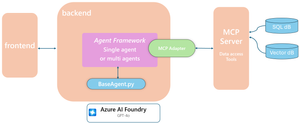
Building reliable AI systems requires modular, stateful coordination and deterministic workflows that enable agents to collaborate seamlessly. The Microsoft Agent Framework provides these foundations, with memory, tracing, and orchestration built in. This implementation demonstrates four multi-agentic patterns — Single Agent, Handoff, Reflection, and Magentic Orchestration — showcasing different interaction models and collaboration strategies. From lightweight domain routing to collaborative planning and self-reflection, these patterns highlight the framework’s flexibility. At the core is Model Context Protocol (MCP), connecting agents, tools, and memory through a shared context interface. Persistent session state, conversation thread history, and checkpoint support are handled via Cosmos DB when configured, with an in-memory dictionary as a default fallback. This setup enables dynamic pattern swapping, performance comparison, and traceable multi-agent interactions — all within a unified, modular runtime. Business Scenario: Contoso Customer Support Chatbot Contoso’s chatbot handles multi-domain customer inquiries like billing anomalies, promotion eligibility, account locks, and data usage questions. These require combining structured data (billing, CRM, security logs, promotions) with unstructured policy documents processed via vector embeddings. Using MCP, the system orchestrates tool calls to fetch real-time structured data and relevant policy content, ensuring policy-aligned, auditable responses without exposing raw databases. This enables the assistant to explain anomalies, recommend actions, confirm eligibility, guide account recovery, and surface risk indicators—reducing handle time and improving first-contact resolution while supporting richer multi-agent reasoning. Architecture & Core Concepts The Contoso chatbot leverages the Microsoft Agent Framework to deliver a modular, stateful, and workflow-driven architecture. At its core, the system consists of: Base Agent: All agent patterns—single agent, reflection, handoff and magentic orchestration—inherit from a common base class, ensuring consistent interfaces for message handling, tool invocation, and state management. Backend: A FastAPI backend manages session routing, agent execution, and workflow orchestration. Frontend: A React-based UI (or Streamlit alternative) streams responses in real-time and visualizes agent reasoning and tool calls. Modular Runtime and Pattern Swapping One of the most powerful aspects of this implementation is its modular runtime design. Each agentic pattern—Single, Reflection, Handoff, and Magnetic—plugs into a shared execution pipeline defined by the base agent and MCP integration. By simply updating the .env configuration (e.g., agent_module=handoff), developers can swap in and out entire coordination strategies without touching the backend, frontend, or memory layers. This makes it easy to compare agent styles side by side, benchmark reasoning behaviors, and experiment with orchestration logic—all while maintaining a consistent, deterministic runtime. The same MCP connectors, FastAPI backend, and Cosmos/in-memory state management work seamlessly across every pattern, enabling rapid iteration and reliable evaluation. # Dynamic agent pattern loading agent_module_path = os.getenv("AGENT_MODULE") agent_module = __import__(agent_module_path, fromlist=["Agent"]) Agent = getattr(agent_module, "Agent") # Common MCP setup across all patterns async def _create_tools(self, headers: Dict[str, str]) -> List[MCPStreamableHTTPTool] | None: if not self.mcp_server_uri: return None return [MCPStreamableHTTPTool( name="mcp-streamable", url=self.mcp_server_uri, headers=headers, timeout=30, request_timeout=30, )] Memory & State Management State management is critical for multi-turn conversations and cross-agent workflows. The system supports two out-of-the-box options: Persistent Storage (Cosmos DB) Acts as the durable, enterprise-ready backend. Stores serialized conversation threads and workflow checkpoints keyed by tenant and session ID. Ensures data durability and auditability across restarts. In-Memory Session Store Default fallback when Cosmos DB credentials are not configured. Maintains ephemeral state per session for fast prototyping or lightweight use cases. All patterns leverage the same thread-based state abstraction, enabling: Session isolation: Each user session maintains its own state and history. Checkpointing: Multi-agent workflows can snapshot shared and executor-local state at any point, supporting pause/resume and fault recovery. Model Context Protocol (MCP): Acts as the connector between agents and tools, standardizing how data is fetched and results are returned to agents, whether querying structured databases or unstructured knowledge sources. Core Principles Across all patterns, the framework emphasizes: Modularity: Components are interchangeable—agents, tools, and state stores can be swapped without disrupting the system. Stateful Coordination: Multi-agent workflows coordinate through shared and local state, enabling complex reasoning without losing context. Deterministic Workflows: While agents operate autonomously, the workflow layer ensures predictable, auditable execution of multi-agent tasks. Unified Execution: From single-agent Q&A to complex Magentic orchestrations, every agent follows the same execution lifecycle and integrates seamlessly with MCP and the state store. Multi-Agent Patterns: Workflow and Coordination With the architecture and core concepts established, we can now explore the agentic patterns implemented in the Contoso chatbot. Each pattern builds on the base agent and MCP integration but differs in how agents orchestrate tasks and communicate with one another to handle multi-domain customer queries. In the sections that follow, we take a deeper dive into each pattern’s workflow and examine the under-the-hood communication flows between agents: Single Agent – A simple, single-domain agent handling straightforward queries. Reflection Agent – Allows agents to introspect and refine their outputs. Handoff Pattern – Routes conversations intelligently to specialized agents across domains. Magentic Orchestration – Coordinates multiple specialist agents for complex, parallel tasks. For each pattern, the focus will be on how agents communicate and coordinate, showing the practical orchestration mechanisms in action. Single Intelligent Agent The Single Agent Pattern represents the simplest orchestration style within the framework. Here, a single autonomous agent handles all reasoning, decision-making, and tool interactions directly — without delegation or multi-agent coordination. When a user submits a request, the single agent processes the query using all tools, memory, and data sources available through the Model Context Protocol (MCP). It performs retrieval, reasoning, and response composition in a single, cohesive loop. Communication Flow: User Input → Agent: The user submits a question or command. Agent → MCP Tools: The agent invokes one or more tools (e.g., vector retrieval, structured queries, or API calls) to gather relevant context and data. Agent → User: The agent synthesizes the tool outputs, applies reasoning, and generates the final response to the user. Session Memory: Throughout the exchange, the agent stores conversation history and extracted entities in the configured memory store (in-memory or Cosmos DB). Key Communication Principles: Single Responsibility: One agent performs both reasoning and action, ensuring fast response times and simpler state management. Direct Tool Invocation: The agent has direct access to all registered tools through MCP, enabling flexible retrieval and action chaining. Stateful Execution: The session memory preserves dialogue context, allowing the agent to maintain continuity across user turns. Deterministic Behavior: The workflow is fully predictable — input, reasoning, tool call, and output occur in a linear sequence. Reflection pattern The Reflection Pattern introduces a lightweight, two-agent communication loop designed to improve the quality and reliability of responses through structured self-review. In this setup, a Primary Agent first generates an initial response to the user’s query. This draft is then passed to a Reviewer Agent, whose role is to critique and refine the response—identifying gaps, inaccuracies, or missed context. Finally, the Primary Agent incorporates this feedback and produces a polished final answer for the user. This process introduces one round of reflection and improvement without adding excessive latency, balancing quality with responsiveness. Communication Flow: User Input → Primary Agent: The user submits a query. Primary Agent → Reviewer Agent: The primary generates an initial draft and passes it to the reviewer. Reviewer Agent → Primary Agent: The reviewer provides feedback or suggested improvements. Primary Agent → User: The primary revises its response and sends the refined version back to the user. Key Communication Principles: Two-Stage Dialogue: Structured interaction between Primary and Reviewer ensures each output undergoes quality assurance. Focused Review: The Reviewer doesn’t recreate answers—it critiques and enhances, reducing redundancy. Stateful Context: Both agents operate over the same shared memory, ensuring consistency between draft and revision. Deterministic Flow: A single reflection round guarantees predictable latency while still improving answer quality. Transparent Traceability: Each step—initial draft, feedback, and final output—is logged, allowing developers to audit reasoning or assess quality improvements over time. In practice, this pattern enables the system to reason about its own output before responding, yielding clearer, more accurate, and policy-aligned answers without requiring multiple independent retries. Handoff Pattern When a user request arrives, the system first routes it through an Intent Classifier (or triage agent) to determine which domain specialist should handle the conversation. Once identified, control is handed off directly to that Specialist Agent, which uses its own tools, domain knowledge, and state context to respond. This specialist continues to handle the user interaction as long as the conversation stays within its domain. If the user’s intent shifts — for example, moving from billing to security — the conversation is routed back to the Intent Classifier, which re-assigns it to the correct specialist agent. This pattern reduces latency and maintains continuity by minimizing unnecessary routing. Each handoff is tracked through the shared state store, ensuring seamless context carry-over and full traceability of decisions. Key Communication Principles: Dynamic Routing: The Intent Classifier routes user input to the right specialist domain. Domain Persistence: The specialist remains active while the user stays within its domain. Context Continuity: Conversation history and entities persist across agents through the shared state store. Traceable Handoffs: Every routing decision is logged for observability and auditability. Low Latency: Responses are faster since domain-appropriate agents handle queries directly. In practice, this means a user could begin a conversation about billing, continue seamlessly, and only be re-routed when switching topics — without losing any conversational context or history. Magentic Pattern The Magentic Pattern is designed for open-ended, multi-faceted tasks that require multiple agents to collaborate. It introduces a Manager (Planner) Agent, which interprets the user’s goal, breaks it into subtasks, and orchestrates multiple Specialist Agents to execute those subtasks. The Manager creates and maintains a Task Ledger, which tracks the status, dependencies, and results of each specialist’s work. As specialists perform their tool calls or reasoning, the Manager monitors their progress, gathers intermediate outputs, and can dynamically re-plan, dispatch additional tasks, or adjust the overall workflow. When all subtasks are complete, the Manager synthesizes the combined results into a coherent final response for the user. Key Communication Principles: Centralized Orchestration: The Manager coordinates all agent interactions and workflow logic. Parallel and Sequential Execution: Specialists can work simultaneously or in sequence based on task dependencies. Task Ledger: Acts as a transparent record of all task assignments, updates, and completions. Dynamic Re-planning: The Manager can modify or extend workflows in real time based on intermediate findings. Shared Memory: All agents access the same state store for consistent context and result sharing. Unified Output: The Manager consolidates results into one response, ensuring coherence across multi-agent reasoning. In practice, Magentic orchestration enables complex reasoning where the system might combine insights from multiple agents — e.g., billing, product, and security — and present a unified recommendation or resolution to the user. Choosing the Right Agent for Your Use Case Selecting the appropriate agent pattern hinges on the complexity of the task and the level of coordination required. As use cases evolve from straightforward queries to intricate, multi-step processes, the need for specialized orchestration increases. Below is a decision matrix to guide your choice: Feature / Requirement Single Agent Reflection Agent Handoff Pattern Magentic Orchestration Handles simple, domain-bound tasks ✔ ✔ ✖ ✖ Supports review / quality assurance ✖ ✔ ✖ ✔ Multi-domain routing ✖ ✖ ✔ ✔ Open-ended / complex workflows ✖ ✖ ✖ ✔ Parallel agent collaboration ✖ ✖ ✖ ✔ Direct tool access ✔ ✔ ✔ ✔ Low latency / fast response ✔ ✔ ✔ ✖ Easy to implement / low orchestration ✔ ✔ ✖ ✖ Dive Deeper: Explore, Build, and Innovate We've explored various agent patterns, from Single Agent to Magentic Orchestration, each tailored to different use cases and complexities. To see these patterns in action, we invite you to explore our Github repo. Clone the repo, experiment with the examples, and adapt them to your own scenarios. Additionally, beyond the patterns discussed here, the repository also features a Human-in-the-Loop (HITL) workflow designed for fraud detection. This workflow integrates human oversight into AI decision-making, ensuring higher accuracy and reliability. For an in-depth look at this approach, we recommend reading our detailed blog post: Building Human-in-the-loop AI Workflows with Microsoft Agent Framework | Microsoft Community Hub Engage with these resources, and start building intelligent, reliable, and scalable AI systems today! This repository and content is developed and maintained by James Nguyen, Nicole Serafino, Kranthi Kumar Manchikanti, Heena Ugale, and Tim Sullivan.Why your LLM-powered app needs concurrency
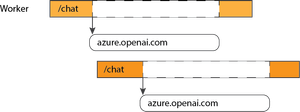
As part of the Python advocacy team, I help maintain several open-source sample AI applications, like our popular RAG chat demo. Through that work, I’ve learned a lot about what makes LLM-powered apps feel fast, reliable, and responsive. One of the most important lessons: use an asynchronous backend framework. Concurrency is critical for LLM apps, which often juggle multiple API calls, database queries, and user requests at the same time. Without async, your app may spend most of its time waiting — blocking one user’s request while another sits idle. The need for concurrency Why? Let’s imagine we’re using a synchronous framework like Flask. We deploy that to a server with gunicorn and several workers. One worker receives a POST request to the "/chat" endpoint, which in turn calls the Azure OpenAI Chat Completions API. That API call can take several seconds to complete — and during that time, the worker is completely tied up, unable to handle any other requests. We could scale out by adding more CPU cores, workers, or threads, but that’s often wasteful and expensive. Without concurrency, each request must be handled serially: When your app relies on long, blocking I/O operations — like model calls, database queries, or external API lookups — a better approach is to use an asynchronous framework. With async I/O, the Python runtime can pause a coroutine that’s waiting for a slow response and switch to handling another incoming request in the meantime. With concurrency, your workers stay busy and can handle new requests while others are waiting: Asynchronous Python backends In the Python ecosystem, there are several asynchronous backend frameworks to choose from: Quart: the asynchronous version of Flask FastAPI: an API-centric, async-only framework (built on Starlette) Litestar: a batteries-included async framework (also built on Starlette) Django: not async by default, but includes support for asynchronous views All of these can be good options depending on your project’s needs. I’ve written more about the decision-making process in another blog post. As an example, let's see what changes when we port a Flask app to a Quart app. First, our handlers now have async in front, signifying that they return a Python coroutine instead of a normal function: async def chat_handler(): request_message = (await request.get_json())["message"] When deploying these apps, I often still use the Gunicorn production web server—but with the Uvicorn worker, which is designed for Python ASGI applications. Alternatively, you can run Uvicorn or Hypercorn directly as standalone servers. Asynchronous API calls To fully benefit from moving to an asynchronous framework, your app’s API calls also need to be asynchronous. That way, whenever a worker is waiting for an external response, it can pause that coroutine and start handling another incoming request. Let's see what that looks like when using the official OpenAI Python SDK. First, we initialize the async version of the OpenAI client: openai_client = openai.AsyncOpenAI( base_url=os.environ["AZURE_OPENAI_ENDPOINT"] + "/openai/v1", api_key=token_provider ) Then, whenever we make API calls with methods on that client, we await their results: chat_coroutine = await openai_client.chat.completions.create( deployment_id=os.environ["AZURE_OPENAI_CHAT_DEPLOYMENT"], messages=[{"role": "system", "content": "You are a helpful assistant."}, {"role": "user", "content": request_message}], stream=True, ) For the RAG sample, we also have calls to Azure services like Azure AI Search. To make those asynchronous, we first import the async variant of the credential and client classes in the aio module: from azure.identity.aio import DefaultAzureCredential from azure.search.documents.aio import SearchClient Then, like with the OpenAI async clients, we must await results from any methods that make network calls: r = await self.search_client.search(query_text) By ensuring that every outbound network call is asynchronous, your app can make the most of Python’s event loop — handling multiple user sessions and API requests concurrently, without wasting worker time waiting on slow responses. Sample applications We’ve already linked to several of our samples that use async frameworks, but here’s a longer list so you can find the one that best fits your tech stack: Repository App purpose Backend Frontend azure-search-openai-demo RAG with AI Search Python + Quart React rag-postgres-openai-python RAG with PostgreSQL Python + FastAPI React openai-chat-app-quickstart Simple chat with Azure OpenAI models Python + Quart plain JS openai-chat-backend-fastapi Simple chat with Azure OpenAI models Python + FastAPI plain JS deepseek-python Simple chat with Azure AI Foundry models Python + Quart plain JS1.2KViews4likes0CommentsManaging Token Consumption with GitHub Copilot for Azure
Introduction AI Engineers often face challenges that require creative solutions. One such challenge is managing the consumption of tokens when using large language models. For example, you may observe heavy token consumption from a single client app or user, and determine that with that kind of usage pattern, the shared quota for other client applications relying on the same OpenAI backend will be depleted quickly. To prevent this, we need a solution that doesn't involve spending hours reading documentation or watching tutorials. Enter GitHub Copilot for Azure. GitHub Copilot for Azure Instead of diving into extensive documentation, we can leverage GitHub Copilot for Azure directly within VS Code. By invoking Copilot using azure, we can describe our issue in natural language. For our example, we might say: "Some users of my app are consuming too many tokens, which will affect tokens left for my other services. I need to limit the number of tokens a user can consume." Refer to video above for more context. azure GitHub Copilot in Action GitHub Copilot pools relevant ideas from https://learn.microsoft.com/ and suggests Azure services that can help. We can engage in a chat conversation, with follow-up questions like, "What happens if a user exceeds their token limit?" etcetera. This response from GitHub Copilot accurately describes the specific feature we need, along with the expected outcome/ behavior of user requests being blocked from accessing the backend, and users will receive a "too many requests" warning—exactly what we need. At this point, it felt like I was having a 1:1 chat with docs 🙃 Implementation To implement this, we ask GitHub Copilot for an example on enforcing the Azure token limit policy. It references the docs on Learn and provides a policy statement. Since we're not fully conversant with the product, we continue using Copilot to help with the implementation. Although GitHub Copilot chat cannot directly update our code, we can switch to GitHub Copilot Edits, provide some custom instructions in natural language, and watch as GitHub Copilot makes the necessary changes, which we review and accept/ decline. Testing and Deployment After implementing the policy, we redeploy our application using the Azure Developer CLI (azd) and restart our application and API to test. We now see that if a user sends another prompt after hitting the applied token limit, their request is terminated with a warning that the allocated limit is exceeded, along with instructions on what to do next. Conclusion Managing token consumption effectively is just one of the many ways GitHub Copilot for Azure can assist developers. Download and install the extension today to try it out yourself. If you have any scenarios you'd like to see us cover, drop them in the comments, and we'll feature them. See you in the next blog!Quest 1 – I Want to Build a Local Gen AI Prototype
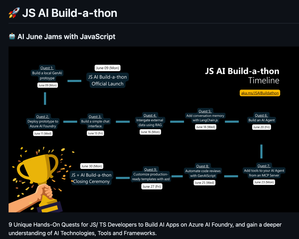
In this quest, you’ll build a local Gen AI app prototype using JavaScript or TypeScript. You’ll explore open-source models via GitHub, test them in a visual playground, and use them in real code — all from the comfort of VS Code with the AI Toolkit. It’s fast, hands-on, and sets you up to build real AI apps, starting with a sketch.JS AI Build-a-thon Setup in 5 Easy Steps
🔥 TL;DR — You’re 5 Steps Away from an AI Adventure Set up your project repo, follow the quests, build cool stuff, and level up. Everything’s automated, community-backed, and designed to help you actually learn AI — using the skills you already have. Let’s build the future. One quest at a time. 👉 Join the Build-a-thon | Chat on DiscordUse Copilot and MCP to query Microsoft Learn Docs
Are you ready to take your Azure development workflow to the next level? In this post, we’ll walk through how to use GitHub Copilot in Agent Mode—paired with MCP (Model Context Protocol) servers—to get trusted, grounded answers from Microsoft Learn Docs, right inside your coding workspace. Whether you’re tired of switching tabs to search documentation or want to ensure your AI assistant’s answers are always accurate, this guide will show you how to streamline your workflow and boost your productivity.