data sync
6 TopicsAzure SQL Database Data Sync Retirement: Migration Scenarios and Recommended Alternatives
Azure SQL Database Data Sync has long been used to keep data consistent across multiple Azure SQL databases. However, as the service moves toward retirement, many customers are now asking an important question: How do we replace Azure SQL Data Sync with a supported, future‑proof solution—without significant data loss or downtime? In this article, we’ll walk through: What Data Sync retirement means in practice Typical migration challenges A real-world customer scenario Recommended alternatives A step‑by‑step migration approach from DEV to PROD Useful references and documentation Why Azure SQL Data Sync Retirement Matters Azure SQL Data Sync relies on: Triggers Metadata tables Hub-and-spoke topology While functional, this architecture introduces complexity, performance overhead, and operational risks, especially as data volumes and workloads grow. Microsoft’s long-term direction favors scalable, resilient, and observable data integration services, such as Azure Data Factory (ADF) and event-driven replication patterns. If you are currently using Data Sync, planning a migration early is strongly recommended. Official guidance: https://learn.microsoft.com/azure/azure-sql/database/sql-data-sync-data-sql-server-sql-database Sample Customer Scenario Let’s consider a real scenario commonly seen in the field: 4 Azure SQL Databases Subscription: Contoso-DEV Current topology: Azure SQL Data Sync Target state: Consolidate all data into one Azure SQL Database Environment flow: DEV → UAT → PROD Database tiers: Standard (S0 / S1) Size: Below 250 GB per database Key requirements: Minimal data loss Quick replication Azure-native and supported replacement Clear operational model Migration Design Considerations Before selecting a tool, several factors must be evaluated: ✅ Latency tolerance (near real-time vs scheduled sync) ✅ Write patterns (conflicts, bidirectional vs unidirectional) ✅ Schema compatibility ✅ Operational overhead ✅ Long-term supportability For most consolidation scenarios, unidirectional replication (many → one) provides the best balance of simplicity and reliability. Diagram 1: Current State – Azure SQL Data Sync (Before Retirement) This diagram represents the existing topology, where multiple databases are synchronized using Azure SQL Data Sync into a single consolidated database. Characteristics Trigger‑based synchronization Additional metadata tables Limited observability Service approaching retirement Diagram 2: Target State – Azure Data Factory Based Consolidation This diagram shows the recommended replacement architecture using Azure Data Factory. Advantages No triggers or sync metadata tables Parallel ingestion Built‑in retry, monitoring, and alerting Fully supported and future‑proof Diagram 3: Incremental Replication Logic (ADF) This diagram explains how minimal data loss is achieved using incremental replication. Key Points No continuous connection required Typical RPO: 1–5 minutes Safe restart after failures Diagram 4: DEV → PROD Migration Flow This diagram highlights the recommended rollout approach starting with POC in DEV. Best Practices Build once, reuse across environments Parameterize connection strings Enable monitoring before PROD cutover Recommended Alternatives to Azure SQL Data Sync ✅ Option 1: Azure Data Factory (ADF) – Primary Recommendation Azure Data Factory provides a fully supported and scalable replacement for Data Sync when consolidating databases. Architecture Overview One pipeline per source database Initial full load Incremental replication using: Change Tracking, or CDC (if applicable), or Watermark columns (ModifiedDate / identity) Why ADF? Microsoft’s strategic data integration platform Built-in monitoring and retry logic Parallel ingestion Schema mapping and transformation support 📌 Best fit when: You need consolidation Near real‑time (minutes) is acceptable You want a future‑proof design 📘 References: https://learn.microsoft.com/azure/data-factory/copy-activity-overview https://learn.microsoft.com/azure/data-factory/incremental-copy-overview https://learn.microsoft.com/azure/data-factory/connector-azure-sql-database ⚠️ Option 2: SQL Transactional Replication (Limited Use) Transactional replication can still work in narrow scenarios, but: Adds operational complexity Limited flexibility for schema changes Not recommended for new designs 📘 Reference: https://learn.microsoft.com/azure/azure-sql/database/replication-to-sql-database 🧭 Option 3: Azure SQL Managed Instance Link (Future‑Facing) If your long-term roadmap includes Azure SQL Managed Instance, the MI Link feature enables near real-time replication. However: Not applicable if your target remains Azure SQL Database Requires infrastructure change 📘 Reference: https://learn.microsoft.com/azure/azure-sql/managed-instance/link-feature Recommended Migration Approach (DEV → PROD) Phase 1 – Assessment Review schema overlaps and key conflicts Identify identity and primary key strategies Confirm availability of: Change Tracking ModifiedDate / watermark columns 📘 Change Tracking: https://learn.microsoft.com/sql/relational-databases/track-changes/about-change-tracking-sql-server Phase 2 – Initial Seeding (DEV) Use ADF Copy Activity for full loads Ingest each source DB into: Dedicated schemas, or Logical partitions Validate: Row counts Referential integrity Performance impact Phase 3 – Incremental Replication Enable incremental pipelines Recommended frequency: every 1–5 minutes Use parallelism for scalability Simulate Data Sync behavior without triggers Phase 4 – Cutover Optional short write freeze Final delta sync Application validation Promote pipelines to PROD Data Loss and Performance Expectations Metric Expected Outcome RPO Minutes (configurable) Downtime Near‑zero Performance impact Predictable and controllable Observability Built‑in via ADF monitoring Final Recommendation Summary ✅ Azure Data Factory with initial full load + incremental replication ✅ Azure-native, strategic, and supported ✅ Ideal for Data Sync retirement scenarios ✅ Scales from DEV to PROD with minimal redesign Azure SQL Data Sync retirement is an opportunity—not a setback. With services like Azure Data Factory, customers can move toward: Better observability Cleaner architectures Easier production operations Long-term platform alignment If you are still relying on Azure SQL Data Sync, now is the right time to assess, plan, and migrate. Helpful Resources Azure SQL Data Sync overview https://learn.microsoft.com/azure/azure-sql/database/sql-data-sync-data-sql-server-sql-database Azure Data Factory incremental copy https://learn.microsoft.com/azure/data-factory/incremental-copy-overview Azure SQL change tracking https://learn.microsoft.com/sql/relational-databases/track-changes/about-change-tracking-sql-server288Views0likes0CommentsAzure SQL Database Data Sync Retirement: Migration Scenarios and Recommended Alternatives
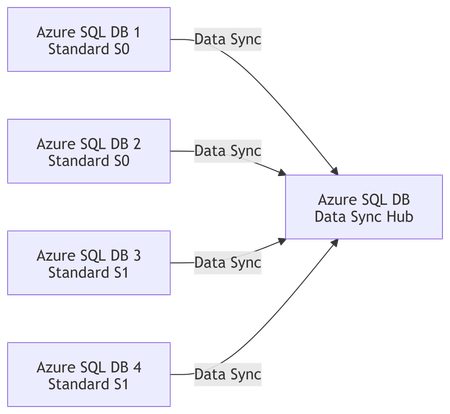
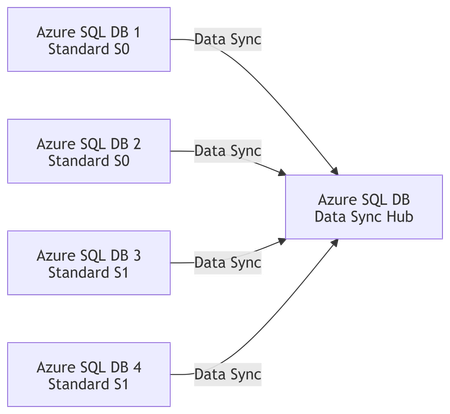
Why Azure SQL Data Sync Retirement Matters Azure SQL Data Sync relies on: Triggers Metadata tables Hub-and-spoke topology While functional, this architecture introduces complexity, performance overhead, and operational risks, especially as data volumes and workloads grow. Microsoft’s long-term direction favors scalable, resilient, and observable data integration services, such as Azure Data Factory (ADF) and event-driven replication patterns. If you are currently using Data Sync, planning a migration early is strongly recommended. Official guidance: https://learn.microsoft.com/azure/azure-sql/database/sql-data-sync-data-sql-server-sql-database Sample Customer Scenario Let’s consider a real scenario commonly seen in the field: 4 Azure SQL Databases Subscription: Contoso-DEV Current topology: Azure SQL Data Sync Target state: Consolidate all data into one Azure SQL Database Environment flow: DEV → UAT → PROD Database tiers: Standard (S0 / S1) Size: Below 250 GB per database Key requirements: Minimal data loss Quick replication Azure-native and supported replacement Clear operational model Migration Design Considerations Before selecting a tool, several factors must be evaluated: ✅ Latency tolerance (near real-time vs scheduled sync) ✅ Write patterns (conflicts, bidirectional vs unidirectional) ✅ Schema compatibility ✅ Operational overhead ✅ Long-term supportability For most consolidation scenarios, unidirectional replication (many → one) provides the best balance of simplicity and reliability. Diagram 1: Current State – Azure SQL Data Sync (Before Retirement) This diagram represents the existing topology, where multiple databases are synchronized using Azure SQL Data Sync into a single consolidated database. Characteristics Trigger‑based synchronization Additional metadata tables Limited observability Service approaching retirement Diagram 2: Target State – Azure Data Factory Based Consolidation This diagram shows the recommended replacement architecture using Azure Data Factory. Advantages No triggers or sync metadata tables Parallel ingestion Built‑in retry, monitoring, and alerting Fully supported and future‑proof Diagram 3: Incremental Replication Logic (ADF) This diagram explains how minimal data loss is achieved using incremental replication. Key Points No continuous connection required Typical RPO: 1–5 minutes Safe restart after failures Diagram 4: DEV → PROD Migration Flow This diagram highlights the recommended rollout approach starting with POC in DEV. Best Practices Build once, reuse across environments Parameterize connection strings Enable monitoring before PROD cutover Recommended Alternatives to Azure SQL Data Sync ✅ Option 1: Azure Data Factory (ADF) – Primary Recommendation Azure Data Factory provides a fully supported and scalable replacement for Data Sync when consolidating databases. Architecture Overview One pipeline per source database Initial full load Incremental replication using: Change Tracking, or CDC (if applicable), or Watermark columns (ModifiedDate / identity) Why ADF? Microsoft’s strategic data integration platform Built-in monitoring and retry logic Parallel ingestion Schema mapping and transformation support 📌 Best fit when: You need consolidation Near real‑time (minutes) is acceptable You want a future‑proof design 📘 References: https://learn.microsoft.com/azure/data-factory/copy-activity-overview https://learn.microsoft.com/azure/data-factory/incremental-copy-overview https://learn.microsoft.com/azure/data-factory/connector-azure-sql-database ⚠️ Option 2: SQL Transactional Replication (Limited Use) Transactional replication can still work in narrow scenarios, but: Adds operational complexity Limited flexibility for schema changes Not recommended for new designs 📘 Reference: https://learn.microsoft.com/azure/azure-sql/database/replication-to-sql-database 🧭 Option 3: Azure SQL Managed Instance Link (Future‑Facing) If your long-term roadmap includes Azure SQL Managed Instance, the MI Link feature enables near real-time replication. However: Not applicable if your target remains Azure SQL Database Requires infrastructure change 📘 Reference: https://learn.microsoft.com/azure/azure-sql/managed-instance/link-feature Recommended Migration Approach (DEV → PROD) Phase 1 – Assessment Review schema overlaps and key conflicts Identify identity and primary key strategies Confirm availability of: Change Tracking ModifiedDate / watermark columns 📘 Change Tracking: https://learn.microsoft.com/sql/relational-databases/track-changes/about-change-tracking-sql-server Phase 2 – Initial Seeding (DEV) Use ADF Copy Activity for full loads Ingest each source DB into: Dedicated schemas, or Logical partitions Validate: Row counts Referential integrity Performance impact Phase 3 – Incremental Replication Enable incremental pipelines Recommended frequency: every 1–5 minutes Use parallelism for scalability Simulate Data Sync behavior without triggers Phase 4 – Cutover Optional short write freeze Final delta sync Application validation Promote pipelines to PROD Data Loss and Performance Expectations Metric Expected Outcome RPO Minutes (configurable) Downtime Near‑zero Performance impact Predictable and controllable Observability Built‑in via ADF monitoring Final Recommendation Summary ✅ Azure Data Factory with initial full load + incremental replication ✅ Azure-native, strategic, and supported ✅ Ideal for Data Sync retirement scenarios ✅ Scales from DEV to PROD with minimal redesign Azure SQL Data Sync retirement is an opportunity—not a setback. With services like Azure Data Factory, customers can move toward: Better observability Cleaner architectures Easier production operations Long-term platform alignment If you are still relying on Azure SQL Data Sync, now is the right time to assess, plan, and migrate. Helpful Resources Azure SQL Data Sync overview https://learn.microsoft.com/azure/azure-sql/database/sql-data-sync-data-sql-server-sql-database Azure Data Factory incremental copy https://learn.microsoft.com/azure/data-factory/incremental-copy-overview Azure SQL change tracking https://learn.microsoft.com/sql/relational-databases/track-changes/about-change-tracking-sql-serverLesson Learned #432: Resolving DataSync Failures in Azure SQL Database Caused by Custom Triggers
Azure SQL Database provides a robust DataSync service to synchronize data across multiple Azure SQL databases or between on-premises SQL Server and Azure SQL databases. While generally reliable, some exceptions can disrupt the smooth flow of data synchronization. One such error occurs when custom-defined triggers interfere with DataSync's internal processes, resulting in a failure like the one described below: Sync failed with the exception 'An unexpected error occurred when applying batch file sync_XXX\\XX-XXX-XYZ-afb1-XXXX.batch. See the inner exception for more details.Inner exception: Index was outside the bounds of the array. For more information, provide tracing ID ‘NNNN-3414-XYZ-ZZZ-NNNNNNNX’ to customer support.'Lesson Learned #369:Size NNN from table 'XYZ' cannot fit within the specified batch size of 24576KB
Today we had a new case where our client encountered the following error message when synchronizing tables using DataSync "The row of size 42530KB from table 'dbo.XYZ' cannot fit within the specified batch size of 24576KB". Following, I would like to share a possible workaround for it, moving the data to blob storage and reducing the size of the database and backups.1.4KViews0likes0Comments