Connectors
55 Topics
🎉 Announcing General Availability of AI & RAG Connectors in Logic Apps (Standard)
We’re excited to share that a comprehensive set of AI and Retrieval-Augmented Generation (RAG) capabilities is now Generally Available in Azure Logic Apps (Standard). This release brings native support for document processing, semantic retrieval, embeddings, and grounded reasoning directly into the Logic Apps workflow engine. 🔌 Available AI Connectors in Logic Apps Standard Logic Apps (Standard) had previously previewed four AI-focused connectors that open the door for a new generation of intelligent automation across the enterprise. Whether you're processing large volumes of documents, enriching operational data with intelligence, or enabling employees to interact with systems using natural language, these connectors provide the foundation for building solutions that are smarter, faster, and more adaptable to business needs. These are now in GA. They allow teams to move from routine workflow automation to AI-assisted decisioning, contextual responses, and multi-step orchestration that reflects real business intent. Below is the full set of built-in connectors and their actions as they appear in the designer. 1. Azure OpenAI Actions Get an embedding Get chat completions Get chat completions using Prompt Template Get completion Get multiple chat completions Get multiple embeddings What this unlocks Bring natural language reasoning and structured AI responses directly into workflows. Common scenarios include guided decisioning, user-facing assistants, classification and routing, or preparing embeddings for semantic search and RAG workflows. 2. Azure AI Search Actions Delete a document Delete multiple documents Get agentic retrieval output (Preview) Index a document Index multiple documents Merge document Search vectors Search vectors with natural language What this unlocks Add vector, hybrid semantic, and natural language search directly to workflow logic. Ideal for retrieving relevant content from enterprise data, powering search-driven workflows, and grounding AI responses with context from your own documents. 3. Azure AI Document Intelligence Action Analyze document What this unlocks Document Intelligence serves as the entry point for document-heavy scenarios. It extracts structured information from PDFs, images, and forms, allowing workflows to validate documents, trigger downstream processes, or feed high-quality data into search and embeddings pipelines. 4. AI Operations Actions Chunk text with metadata Parse document with metadata What this unlocks Transform unstructured files into enriched, structured content. Enables token-aware chunking, page-level metadata, and clean preparation of content for embeddings and semantic search at scale. 🤖 Advanced AI & Agentic Workflows with AgentLoop Logic Apps (Standard) also supports AgentLoop (also Generally Available), allowing AI models to use workflow actions as tools and iterate until the task is complete. Combined with chunking, embeddings, and natural language search, this opens the door to advanced agentic scenarios such as document intelligence agents, RAG-based assistants, and iterative evaluators. Conclusion With these capabilities now built into Logic Apps Standard, teams can bring AI directly into their integration workflows without additional infrastructure or complexity. Whether you’re streamlining document-heavy processes, enabling richer search experiences, or exploring more advanced agentic patterns, these capabilities provide a strong foundation to start building today.Logic Apps Aviators Newsletter - December 2025
In this issue: Ace Aviator of the Month News from our product group Community Playbook News from our community Ace Aviator of the Month December’s Ace Aviator: Daniel Jonathan What's your role and title? What are your responsibilities? I’m an Azure Integration Architect at Cnext, helping organizations modernize and migrate their integrations to Azure Integration Services. I design and build solutions using Logic Apps, Azure Functions, Service Bus, and API Management. I also work on AI solutions using Semantic Kernel and LangChain to bring intelligence into business processes. Can you give us some insights into your day-to-day activities and what a typical day in your role looks like? My day usually begins by attending customer requests and handling recent deployments. Most of my time goes into designing integration patterns, building Logic Apps, mentoring the team, and helping customers with technical solutions. Lately, I’ve also been integrating AI capabilities into workflows. What motivates and inspires you to be an active member of the Aviators/Microsoft community? The community is open, friendly, and full of knowledge. I enjoy sharing ideas, writing posts, and helping others solve real-world challenges. It’s great to learn and grow together. Looking back, what advice do you wish you had been given earlier that you'd now share with those looking to get into STEM/technology? Start small and stay consistent. Learn the basics well—like messaging, retries, and error handling—before diving into complex tools. Keep learning and share what you know. What has helped you grow professionally? Hands-on experience, teamwork, and continuous learning. Working across different projects taught me how to design reliable and scalable systems. Exploring AI with Semantic Kernel and LangChain has also helped me think beyond traditional integrations. If you had a magic wand that could create a feature in Logic Apps, what would it be and why? I’d add an “Overview Page” in Logic Apps containing the HTTP URLs for each workflow, so developers can quickly access to test from one place. It would save time and make working with multiple workflows much easier. News from our product group Logic Apps Community Day 2025 Playlist Did you miss or want to catch up on individual sessions from Logic Apps Community Day 2025? Here is the full playlist – choose your favorite sessions and have fun! The future of integration is here and it's agentic Missed Kent Weare and Divya Swarnkar session at Ignite? It is here for you to watch on demand. Enterprise integration is being reimagined. It’s no longer just about connecting systems, but about enabling adaptive, agentic workflows that unify apps, data, and systems. In this session, discover how to modernize integration, migrate from BizTalk, and adopt AI-driven patterns that deliver agility and intelligence. Through customer stories and live demos, see how to bring these workflows to life with Agent Loop in Azure Logic Apps. Public Preview: Azure Logic Apps Connectors as MCP Tools in Microsoft Foundry Unlock secure enterprise connectivity with Azure Logic Apps connectors as MCP tools in Microsoft Foundry. Agents can now use hundreds of connectors natively—no custom code required. Learn how to configure and register MCP servers for seamless integration. Announcing AI Foundry Agent Service Connector v2 (Preview) AI Foundry Agent Service Connector v2 (Preview) is here! Azure Logic Apps can now securely invoke Foundry agents, enabling low-code AI integration, multi-agent workflows, and faster time-to-value. Explore new operations for orchestration and monitoring. Announcing the General Availability of the XML Parse and Compose Actions in Azure Logic Apps XML Parse and Compose Actions are now GA in Azure Logic Apps! Easily handle XML with XSD schemas, streamline workflows, and support internationalization. Learn best practices for arrays, encoding, and safe transport of content. Clone a Consumption Logic App to a Standard Workflow Clone your Consumption Logic Apps into Standard workflows with ease! This new feature accelerates migration, preserves design, and unlocks advanced capabilities for modern integration solutions. Announcing the HL7 connector for Azure Logic Apps Standard and Hybrid (Public Preview) Connect healthcare systems effortlessly! The new HL7 connector for Azure Logic Apps (Standard & Hybrid) enables secure, standardized data exchange and automation using HL7 protocols—now in Public Preview. Announcing Foundry Control Plane support for Logic Apps Agent Loop (Preview) Foundry Control Plane now supports Logic Apps Agent Loop (Preview)! Manage, govern, and observe agents at scale with built-in integration—no extra steps required. Ensure trust, compliance, and scalability in the agentic era. Announcing General Availability of Agent Loop in Azure Logic Apps Agent Loop transforms Logic Apps into a multi-agent automation platform, enabling AI agents to collaborate with workflows and humans. Build secure, enterprise-ready agentic solutions for business automation at scale. Agent Loop Ignite Update - New Set of AI Features Arrive in Public Preview We are releasing a broad set of Agent Loop new and powerful AI-first capabilities in Public Preview that dramatically expand what developers can build: run agents in the Consumption SKU ,bring your own models through APIM AI Gateway, call any tool through MCP, deploy agents directly into Teams, secure RAG with document-level permissions, onboard with Okta, and build in a completely redesigned workflow designer. Announcing MCP Server Support for Logic Apps Agent Loop Agent Loop in Azure Logic Apps now supports Model Context Protocol (MCP), enabling secure, standardized tool integration. Bring your own MCP connector, use Azure-managed servers, or build custom connectors for enterprise workflows. Enabling API Key Authentication for Logic Apps MCP Servers Logic Apps MCP Servers now support API Key authentication alongside OAuth2 and Anonymous options. Configure keys via host.json or Azure APIs, retrieve and regenerate keys easily, and connect MCP clients securely for agentic workflows. Announcing Public Preview of Agent Loop in Azure Logic Apps Consumption Agent Loop now brings AI-powered automation to Logic Apps Consumption with a frictionless, pay-as-you-go model. Build autonomous and conversational agents using 1,400+ connectors—no dedicated infrastructure required. Ideal for rapid prototyping and enterprise workflows. Moving the Logic Apps Designer Forward Major redesign of Azure Logic Apps designer enters Public Preview for Standard workflows. Phase I focuses on faster onboarding, unified views, draft mode with auto-save, improved search, and enhanced debugging. Feedback will shape future phases for a seamless development experience. Announcing the General Availability of the RabbitMQ Connector RabbitMQ Connector for Azure Logic Apps is now generally available, enabling reliable message exchange for Standard and Hybrid workflows. It supports triggers, publishing, and advanced routing, with global rollout underway for robust, scalable integration scenarios. Duplicate Detection in Logic App Trigger Prevent duplicate processing in Logic Apps triggers with a REST API-based solution. It checks recent runs using clientTrackingId to avoid reprocessing items caused by edits or webhook updates. Works with Logic App Standard and adaptable for Consumption or Power Automate. Announcing the BizTalk Server 2020 Cumulative Update 7 BizTalk Server 2020 Cumulative Update 7 is out, adding support for Visual Studio 2022, Windows Server 2022, SQL Server 2022, and Windows 11. Includes all prior fixes. Upgrade from older versions or consider migrating to Azure Logic Apps for modernization. News from our community Logic Apps Local Development Series Post by Daniel Jonathan Last month I shared an article from Daniel about debugging XSLT in VS Code. This month, I bumped into not one, but five articles in a series about Build, Test and Run Logic Apps Standard locally – definitely worth the read! Working with sessions in Agentic Workflows Post by Simon Stender Build AI-powered chat experiences with session-based agentic workflows in Azure Logic Apps. Learn how they enable dynamic, stateful interactions, integrate with APIs and apps, and avoid common pitfalls like workflows stuck in “running” forever. Integration Love Story with Mimmi Gullberg Video by Ahmed Bayoumy and Robin Wilde Meet Mimmi Gullberg, Green Cargo’s new integration architect driving smarter, sustainable rail logistics. With experience from BizTalk to Azure, she blends tech and business insight to create real value. Her mantra: understand the problem first, then choose the right tools—Logic Apps, Functions, or AI. Integration Love Story with Jenny Andersson Video by Ahmed Bayoumy and Robin Wilde Discover Jenny Andesson’s inspiring journey from skepticism to creativity in tech. In this episode, she shares insights on life as an integration architect, tackling system challenges, listening to customers, and how AI is shaping the future of integration. You Can Get an XPath value in Logic Apps without returning an array Post by Luis Rigueira Working with XML in Azure Logic Apps? The xpath() function always returns an array—even for a single node. Or does it? Found how to return just the values you want on this Friday Fact from Luis Rigueira. Set up Azure Standard Logic App Connectors as MCP Server Video by Srikanth Gunnala Expose your Azure Logic Apps integrations as secure tools for AI assistants. Learn how to turn connectors like SAP, SQL, and Jira into MCP tools, protect them with Entra ID/OAuth, and test in GitHub Copilot Chat for safe, action-ready AI workflows. Making Logic Apps Speak Business Post by Al Ghoniem Stop forcing Logic Apps to look like business diagrams. With Business Process Tracking, you can keep workflows technically sound while giving business users clear, stage-based visibility into processes—decoupled, visual, and KPI-driven.363Views0likes0CommentsIntroducing Logic Apps MCP servers (Public Preview)
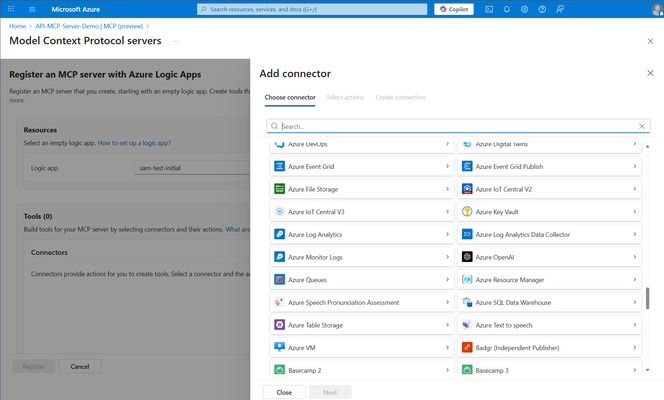
Using Logic Apps (Standard) as MCP servers transforms the way organizations build and manage agents by turning connectors into modular, reusable MCP tools. This approach allows each connector—whether it's for data access, messaging, or workflow orchestration—to act as a specialized capability within the MCP framework. By dynamically composing these tools into Logic Apps, developers can rapidly construct agents that are both scalable and adaptable to complex enterprise scenarios. The benefits include reduced development overhead, enhanced reusability, and a streamlined path to integrating diverse systems—all while maintaining the flexibility and power of the Logic Apps platform. Starting today, we now support creating Logic Apps MCP Servers in the following ways: Registering Logic Apps connectors as MCP servers using Azure API Center Using this approach provides a streamlined experience when building MCP servers based upon Azure Logic Apps connectors. This new experience includes selecting a managed connector and one or more of its actions to create an MCP server and its related tools. This experience also automates the creation of Logic Apps workflows and wires up Easy Auth authentication for you in a matter of minutes. Beyond the streamlined experience that we provide, customers also benefit from any MCP server created using this experience to be registered within their API Center enterprise catalogue. For admins this means they can manage their MCP servers across the enterprise. For developers, it offers a centralized catalog where MCP servers can be discovered and quickly onboarded in Agent solutions. To get started, please refer to our product documentation or our demo videos. Enabling Logic Apps as remote MCP server For customers who have existing Logic Apps (Standard) investments or who want additional control over how their MCP tools are created we are also offering the ability to enable a Logic App as an MCP server. For a Logic App to be eligible to become an MCP server, it must have the following characteristics: One or more workflows that have an HTTP Request trigger and a corresponding HTTP Response action It is recommended that your trigger has a description and your request payload has schema that includes meaningful descriptions Your host.json file has been configured to enable MCP capabilities You have created an App registration in Microsoft Entra and have configured Easy Auth in your Logic App To get started, please refer to our product documentation or our demo videos. Feedback Both of these capabilities are now available, in public preview, worldwide. If you have any questions or feedback on these MCP capabilities, we would love to hear from you. Please fill out the following form and I will follow-up with you.
Announcing Public Preview of API Management WordPress plugin to build customized developer portals
Azure API Management WordPress plugin enables our customers to leverage the power of WordPress to build their own unique developer portal. API managers and administrators can bring up a new developer portal in a matter of few minutes and customize the theme, layout, add stylesheet or localize the portal into different languages.🎙️ Announcement: Logic Apps connectors in Azure AI Search for Integrated Vectorization
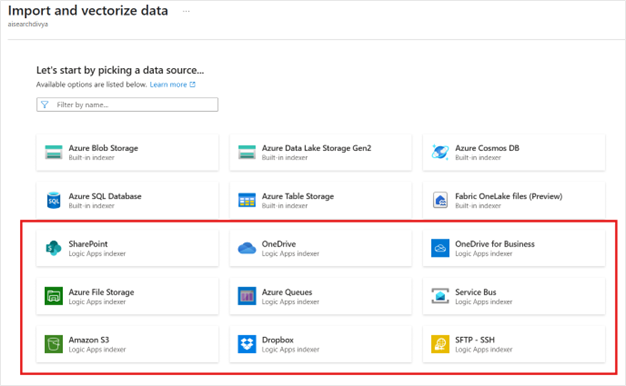
We’re excited to announce that Azure Logic Apps connectors are now supported within AI Search as data sources for ingestion into Azure AI Search vector stores. This unlocks the ability to ingest unstructured documents from a variety of systems—including SharePoint, Amazon S3, Dropbox and many more —into your vector index using a low-code experience. This new capability is powered by Logic Apps templates, which orchestrate the entire ingestion pipeline—from extracting documents to embedding generation and indexing—so you can build Retrieval-Augmented Generation (RAG) applications with ease. Grounding AI with RAG: Why Document Ingestion Matters Retrieval-Augmented Generation (RAG) has become a cornerstone technique for building grounded and trustworthy AI systems. Instead of generating answers from the model’s pretraining alone, RAG applications fetch relevant information from external knowledge bases—giving LLMs access to accurate and up-to-date enterprise data. To power RAG, enterprises need a scalable way to ingest and index documents into a vector store. Whether you're working with policy documents, legal contracts, support tickets, or financial reports, getting this content into a searchable, semantic format is step one. Simplified Ingestion with Integrated Vectorization Azure AI Search’s Integrated Vectorization capability automates the process of turning raw content into semantically indexed vectors: Chunking: Documents are split into meaningful text segments Embedding: Each chunk is transformed into a vector using an embedding model like text-embedding-3-small or a custom model Indexing: Vectors and associated metadata are written into a searchable vector store Projection: Metadata is preserved to enable filtering, ranking, and hybrid queries This eliminates the need to build or maintain custom pipelines, making it significantly easier to adopt RAG in production environments. Ingest from Anywhere: Logic Apps + AI Search With today’s release, we’re extending ingestion to a variety of new data sources by integrating Logic Apps connectors directly with AI Search. This allows you to retrieve unstructured content from enterprise systems and seamlessly ingest it into the vector store. Here’s how the ingestion process works with Logic Apps: Connect to Source Systems Using prebuilt connectors, Logic Apps can fetch content from various data sources including Sharepoint document libraries, messages from Service Bur or Azure Queues, files from OneDrive or SFTP Server and more. You can trigger ingestion on demand or at schedule. Parse and Chunk Documents Next, Logic Apps uses built-in AI-powered document parsing actions to extract raw text. This is followed by the “Chunk Document” action, which: Tokenizes the document based on language model-friendly units Splits the content into semantically coherent chunks This ensures optimal chunk size for downstream embedding and retrieval. Note – Currently we default to a chunk size of 5000 in the workflows created for document ingestion. We’ll be updating the default chunk size to a smaller number in our next release. Meanwhile, you can update it in the workflow if you need a smaller chunk size. Generate Embeddings with Azure OpenAI The chunked text is then passed to the Azure OpenAI connector, where the text-embedding-3-small or another configured embedding model is used to generate high-dimensional vector representations. These vectors capture the semantic meaning of the content and are key to enabling accurate retrieval in RAG applications. Write to Azure AI Search Finally, the embeddings, along with any relevant metadata (e.g., document title, tags, timestamps), are written into the AI Search index. The index schema is created for you ——and can include fields for filtering, sorting, and semantic ranking. Logic Apps Templates: Fast Start, Flexible Design To help you get started, we’ve created Logic Apps templates specifically for RAG ingestion. These templates: Include all the steps mentioned above Are customizable if you want to update the default configuration Whether you’re ingesting thousands of PDFs from SharePoint or syncing files from Amazon S3 bucket, these templates provide a production-grade foundation for building your pipeline. Getting Started Here is step by step detailed documentation to get started using Integrated Vectorization with Logic Apps data sources 👉 Get started with Logic Apps data sources for AI Search ingestion 👉 Learn more about Integrated Vectorization in Azure AI Search We'd Love Your Feedback We're just getting started. Tell us: What other data sources would you like to ingest? What enhancements would make ingestion easier for your use case? Are there specific industry templates or formats we should support? 👉 Reply to this post or share your ideas through our feedback form We’re building this with you—so your feedback helps shape the future of AI-powered automation and RAG.955Views1like0Comments🤖 AI Procurement assistant using prompt templates in Standard Logic Apps
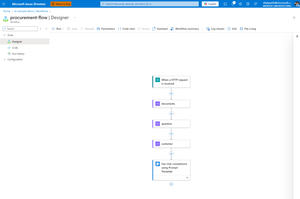
📘 Introduction Answering procurement-related questions doesn't have to be a manual process. With the new Chat Completions using Prompt Template action in Logic Apps (Standard), you can build an AI-powered assistant that understands context, reads structured data, and responds like a knowledgeable teammate. 🏢 Scenario: AI assistant for IT procurement Imagine an employee wants to know: "When did we last order laptops for new hires in IT?" Instead of forwarding this to the procurement team, a Logic App can: Accept the question Look up catalog details and past orders Pass all the info to a prompt template Generate a polished, AI-powered response 🧠 What Are Prompt Templates? Prompt Templates are reusable text templates that use Jinja2 syntax to dynamically inject data at runtime. In Logic Apps, this means you can: Define a prompt with placeholders like {{ customer.orders }} Automatically populate it with outputs from earlier actions Generate consistent, structured prompts with minimal effort ✨ Benefits of Using Prompt Templates in Logic Apps Consistency: Centralized prompt logic instead of embedding prompt strings in each action. Reusability: Easily apply the same prompt across multiple workflows. Maintainability: Tweak prompt logic in one place without editing the entire flow. Dynamic control: Logic Apps inputs (e.g., values from a form, database, or API) flow right into the template. This allows you to create powerful, adaptable AI-driven flows without duplicating effort — making it perfect for scalable enterprise automation. 💡 Try it Yourself Grab the sample prompt template and sample inputs from our GitHub repo and follow along. 👉 Sample logic app 🧰 Prerequisites To get started, make sure you have: A Logic App (Standard) resource in Azure An Azure OpenAI resource with a deployed GPT model (e.g., GPT-3.5 or GPT-4) 💡 You’ll configure your OpenAI API connection during the workflow setup. 🔧 Build the Logic App workflow Here’s how to build the flow in Logic Apps using the Prompt Template action. This setup assumes you're simulating procurement data with test inputs. 📌 Step 0: Start by creating a Stateful Workflow in your Logic App (Standard) resource. Choose "Stateful" when prompted during workflow creation. This allows the run history and variables to be preserved for testing. 📸 Creating a new Stateful Logic App (Standard) workflow Here’s how to build the flow in Logic Apps using the Prompt Template action. This setup assumes you're simulating procurement data with test inputs. 📌 Trigger: "When an HTTP request is received" 📌 Step 1: Add three Compose actions to store your test data. documents: This stores your internal product catalog entries [ { "id": "1", "title": "Dell Latitude 5540 Laptop", "content": "Intel i7, 16GB RAM, 512GB SSD, standard issue for IT new hire onboarding" }, { "id": "2", "title": "Docking Station", "content": "Dell WD19S docking stations for dual monitor setup" } ] 📸 Compose action for documents input question: This holds the employee’s natural language question. [ { "role": "user", "content": "When did we last order laptops for new hires in IT?" } ] 📸 Compose action for question input customer: This includes employee profile and past procurement orders { "firstName": "Alex", "lastName": "Taylor", "department": "IT", "employeeId": "E12345", "orders": [ { "name": "Dell Latitude 5540 Laptop", "description": "Ordered 15 units for Q1 IT onboarding", "date": "2024/02/20" }, { "name": "Docking Station", "description": "Bulk purchase of 20 Dell WD19S docking stations", "date": "2024/01/10" } ] } 📸 Compose action for customer input 📌 Step 2: Add the "Chat Completions using Prompt Template" action 📸 OpenAI connector view 💡Tip: Always prefer the in-app connector (built-in) over the managed version when choosing the Azure OpenAI operation. Built-in connectors allow better control over authentication and reduce latency by running natively inside the Logic App runtime. 📌 Step 3: Connect to Azure OpenAI Navigate to your Azure OpenAI resource and click on Keys and Endpoint for connecting using key-based authentication 📸 Create Azure OpenAI connection 📝 Prompt template: Building the message for chat completions Once you've added the Get chat completions using Prompt Template action, here's how to set it up: 1. Deployment Identifier Enter the name of your deployed Azure OpenAI model here (e.g., gpt-4o). 📌 This should match exactly with what you configured in your Azure OpenAI resource. 2. Prompt Template This is the structured instruction that the model will use. Here’s the full template used in the action — note that the variable names exactly match the Compose action names in your Logic App: documents, question, and customer. system: You are an AI assistant for Contoso's internal procurement team. You help employees get quick answers about previous orders and product catalog details. Be brief, professional, and use markdown formatting when appropriate. Include the employee’s name in your response for a personal touch. # Product Catalog Use this documentation to guide your response. Include specific item names and any relevant descriptions. {% for item in documents %} Catalog Item ID: {{item.id}} Name: {{item.title}} Description: {{item.content}} {% endfor %} # Order History Here is the employee's procurement history to use as context when answering their question. {% for item in customer.orders %} Order Item: {{item.name}} Details: {{item.description}} — Ordered on {{item.date}} {% endfor %} # Employee Info Name: {{customer.firstName}} {{customer.lastName}} Department: {{customer.department}} Employee ID: {{customer.employeeId}} # Question The employee has asked the following: {% for item in question %} {{item.role}}: {{item.content}} {% endfor %} Based on the product documentation and order history above, please provide a concise and helpful answer to their question. Do not fabricate information beyond the provided inputs. 📸 Prompt template action view 3. Add your prompt template variables Scroll down to Advanced parameters → switch the dropdown to Prompt Template Variable. Then: Add a new item for each Compose action and reference it dynamically from previous outputs: documents question customer 📸 Prompt template variable references 🔍 How the template works Template element What it does {{ customer.firstName }} {{ customer.lastName }} Displays employee name {{ customer.department }} Adds department context {{ question[0].content }} Injects the user’s question from the Compose action named question {% for doc in documents %} Loops through catalog data from the Compose action named documents {% for order in customer.orders %} Loops through employee’s order history from customer Each of these values is dynamically pulled from your Logic App Compose actions — no code, no external services needed. You can apply the exact same approach to reference data from any connector, like a SharePoint list, SQL row, email body, or even AI Search results. Just map those outputs into the Prompt Template and let Logic Apps do the rest. ✅ Final Output When you run the flow, the model might respond with something like: "The last order for Dell Latitude 5540 laptops was placed on February 20, 2024 — 15 units were procured for IT new hire onboarding." This is based entirely on the structured context passed in through your Logic App — no extra fine-tuning required. 📸 Output from run history 💬 Feedback Let us know what other kinds of demos and content you would like to see using this form1.1KViews1like3CommentsConcurrency support for Service Bus built-in connector in Logic Apps Standard
In this post, we'll cover the recent enhancements in the built-on or InApp Service Bus connector in Logic Apps Standard. Specifically, we'll cover the support for concurrency for Service Bus trigger...7.7KViews0likes16Comments