Conduct
3 TopicsMy name shows up as null null, why is this and how do I fix it?
Applies To: All users where their name shows as "null null" Roles Required: Any Occasionally when users register with the Microsoft Tech Community, their First and last names will show up as null null. This typically happens for one of a handful of reasons: The first and last name fields of the identity provider have not been filled in. A recently created account in AAD sometimes has not yet fully propagated to the Microsoft Graph API. An error occurred during registration. How to fix it? For issue 1, the fix is to either go to your Microsoft Account page and enter the missing details or contact your Office 365 / Microsoft 365 admin and request they complete these details for you. Which of these options is appropriate for you will depend on if you're using a personal account or an account provided by your employer. Once these details have been updated then use this login link, it will force the system to try to refresh your profile data from the Microsoft Graph. For issue 2, the only option is to wait a minimum of 8 hours and then use this link to login. Finally for issue 3, try using this login link to force a refresh and if it still doesn't work - see below. Further help Ok, so you have tried all of the above and it is still not working? then you can email the Microsoft Tech Community Team and we will usually get back to you with in 1 business day*. When you do contact us please provide the following information: Name: e-mail address you are trying to register with: Link to your profile: Any additional details or comments: *The Microsoft Tech Community Team are not available during US Holidays.16KViews1like0CommentsTagging users - etiquette
So, there’s been some discussion and confusion about tagging other users in forum posts. While we do not have any absolute rules about this, I’d like to clarify a few things about when and when it is not appropriate to tag a user. If you respond to a post, you will automatically tag the original poster. While you can remove this tag, it’s not the same as intentionally adding a tag and doesn’t really apply to this etiquette document. When you do decide to tag a user, think about why you are doing so. Here are a few tips along those lines: If you are responding to a thread that already includes that user, they will see the response regardless of a tag. If you are in a space managed by Microsoft employees, such as Edge Insiders, no need to tag them as they are already monitoring that space, and probably your post. If you need to reach members of our Tech Community team, it’s much more efficient to email us at techcommunity@microsoft.com which is our official support mechanism, than to tag us in posts. If the product has a support channel located elsewhere, better to reach out to that support channel as tagging a Microsoft employee will not guarantee you a timely answer. If a user indicates they would rather not be tagged, please respect their decision and don’t tag them in the future. We do not have a rule against tagging other users but we recommend doing so with caution, Give users the chance to respond, as a tag can come across as “poke, are you still there?” Think of tagging as a last resort or emergency mechanism if you have an inquiry without a response for a long period of time (over a week) or a time-sensitive emergency. If you have any questions or concerns about these guidelines, feel free to reach out to our team at techcommunity@microsoft.com.1.4KViews2likes0CommentsI'm having trouble with Microsoft Tech Community. What's the best way to reach out?
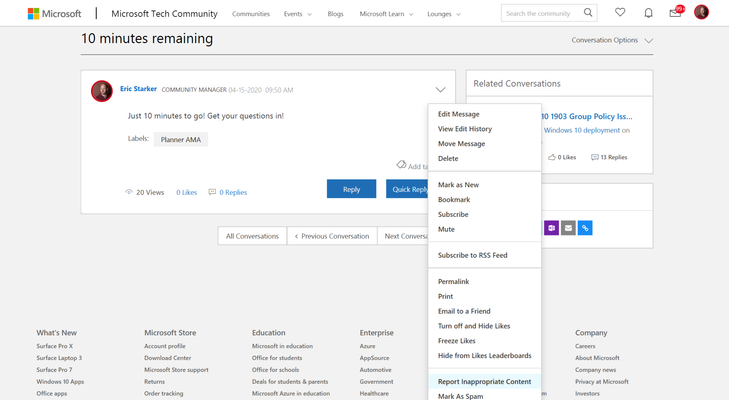
While our aim is to provide you with a perfect, trouble-free, smooth experience in the Microsoft Tech Community, realistically, we know that's not always possible. So what's the best way to reach out? Here are a few scenarios and the best way to handle each one. Someone posted a spam message. On the right side of the message, there's a drop-down arrow with options. Click "Report Inappropriate Content," and offer the context (indicating it's spam). Our team reviews these posts on a daily basis and will consider and remove any messages we confirm to be spam. Someone is being abusive or rude. Similarly as per above, "Report Inappropriate Content" is your best bet in this scenario. Please note we have a Code of Conduct if you have any doubt about whether content is appropriate. I'm having technical issues with the community. Reach out to techcommunity@microsoft.com and we'll be able to help you. I have general questions about Tech Community. If you have questions about the Tech Community or elements of it, we recommend posting in our Community Discussion space. I have some ideas on how to improve Tech Community. We have a Community Ideas board where we track suggestions and feedback. This is the best place to submit it as we'll take into consideration suggestions based on amount of upvotes and interest. What not to do: Please don't escalate any conflict. If someone is being abusive or rude, please report it and let us handle it. Please do not tag individual Microsoft employees in posts or comments. If a Tech Community thread has gone dormant for a significant period of time unanswered (a thread which requires one), feel free to reach out to techcommunity@microsoft.com and we can do our best to reach out to the appropriate team. Thanks! Feel free to reach out if you have any questions.1.1KViews0likes0Comments