community
574 Topics
Phone link issue with full connectivity
How to fix 'some features may not be working right now in link to windows' full connectivity in Phone Link On PC go to ctrl alt delete > task manager > details > PhoneExperienceHost.exe and end task. Start Phone Link app Restart Phone and PC13Views0likes0Comments
Backup and restore the Azure Database for MySQL flexible server
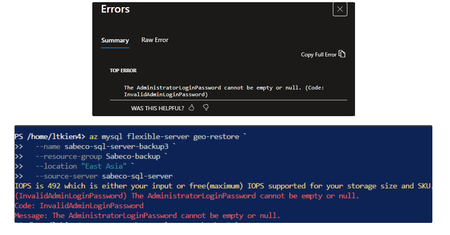
Hi everyone, I’m running into an issue while performing a geo-restore for an Azure MySQL Flexible Server using Azure CLI and Portal. When executing the az mysql flexible-server geo-restore command, the restore process fails with the error “InvalidAdminLoginPassword: The AdministratorLoginPassword cannot be empty or null”. I don’t see any administrator password configuration option in the Azure Portal, and there is also no auto-populated argument in the CLI. According to the official documentation, geo-restore uses the source server as the restore point, so the administrator login configuration is expected to be derived from the source server. Are there any recommended best practices for handling admin credentials securely during geo-restore? Thanks in advance for your insights. I used this official doc as a reference, https://learn.microsoft.com/en-us/azure/mysql/flexible-server/how-to-restore-server-portal5Views0likes0CommentsExam Discount for MCT-Benefit is Not Auto-Applying – Looking for Community Insight
Hi everyone, I’m an active MCT, and I’m trying to understand how exam discounts are being applied at Pearson VUE. A fellow MCT shared a checkout screenshot where a “ESI 50% Discount (DAC – auto-applied)” appeared during exam booking. However, when I try to book a Microsoft exam using my own profile (same Microsoft account used for MCT, Learn, and Pearson), no discount appears at checkout. Things I’ve already verified: Active MCT status. Same E-Mail used across MCT Portal, Microsoft Learn, and Pearson VUE. Logged in directly via Microsoft sign-in. Tested multiple role-based exams. Checked during checkout (before payment). Questions to the community: Is this ESI 50% discount tied strictly to specific tenants / Enterprise agreements, rather than MCT alone? Have other MCTs seen this discount auto-apply without any announcement or promo code? Does this depend on region, exam type, or timing of MCT renewal? Is there any known sync delay or backend requirement beyond standard MCT activation? I’m trying to understand whether this is: Expected behavior (ESI vs MCT entitlement), or A missing entitlement / sync issue specific to my account Appreciate any insights from trainers who’ve seen this recently. Thanks in advance DilanSolved176Views0likes5Comments
New Year greetings and appreciation to the Microsoft engineering teams
Dear Microsoft Team, I would like to express my sincere New Year greetings and my deep appreciation for your work in the field of information technologies. As a long‑time user of Microsoft products and services, I see how much dedication, intelligence, and responsibility stand behind your engineering decisions. Your work shapes the digital world in which millions of people live, work, and create every day. Thank you for your continuous pursuit of improvement, for your commitment to quality, and for the technologies that empower people around the world. Please accept my warmest wishes for the new year — for clarity, inspiration, and continued success in everything you build. With respect and gratitude, Hermann Thomas Germany36Views0likes2Comments
STOCKHISTORY function
The STOCKHISTORY function intermittently returns #CONNECT! errors in Microsoft Excel 365. The same formulas sometimes return valid historical monetary data and other times return #CONNECT! without any changes to the workbook. Recalculating, refreshing, or reopening Excel may temporarily resolve the issue. The problem affects multiple symbols simultaneously, suggesting a service-side or backend problem rather than a formula syntax issue. Example formula: STOCKHISTORY("EUR/USD", start_date, end_date). Is this a known issue or a service degradation? Are there any recommended workarounds? Is there any known issue preventing access from Spain or Office 365 accounts? It was working without problems until two days ago.30Views0likes1CommentNeujahrsgrüße und Wertschätzung an die Microsoft‑Ingenieurteams
Liebes Microsoft‑Team, ich möchte Ihnen meine aufrichtigen Neujahrsgrüße und meine große Wertschätzung für Ihre Arbeit im Bereich der Informationstechnologien aussprechen. Als langjähriger Nutzer von Microsoft‑Produkten und ‑Diensten sehe ich, wie viel Engagement, Intelligenz und Verantwortung hinter Ihren technischen Entscheidungen stehen. Ihre Arbeit prägt die digitale Welt, in der Millionen von Menschen täglich leben, arbeiten und kreativ tätig sind. Vielen Dank für Ihren ständigen Anspruch an Verbesserung, für Ihre Verpflichtung zu Qualität und für Technologien, die Menschen weltweit stärken. Bitte nehmen Sie meine besten Wünsche für das neue Jahr entgegen — für Klarheit, Inspiration und weiteren Erfolg in allem, was Sie entwickeln. Mit Respekt und Dankbarkeit, Hermann Thomas Deutschland26Views0likes1Comment
Designing patch management in a fully restricted intranet (no internet access on user machines)
Hello, I am designing a Windows patch management solution for a restricted intranet environment where direct access to Microsoft Update / Windows Update endpoints from client machines is strictly prohibited. Environment constraints: Windows 10 / Windows 11 (Enterprise) Client endpoints have no internet access Access to Microsoft Update endpoints is blocked by policy Only explicitly approved servers may ever have outbound access Feature upgrades are controlled and infrequent Goals: Centralized control of Windows OS updates (security + cumulative) Ability to stage, approve, and deploy updates in waves (rings) Support for air-gapped or near air-gapped operation Use Windows’ native servicing stack (no unsupported installers) Integrate with a custom in-house endpoint agent for orchestration/reporting Questions: 1. Since Windows Update for Business (WUfB) requires direct access to Microsoft Update endpoints, is WSUS the only supported option for environments where endpoints cannot access Microsoft servers? 2. Is the following architecture considered supported and best practice? A WSUS server (or staging WSUS) with controlled/temporary internet access Offline export/import of update metadata and content using wsusutil Internal WSUS serving all client machines 3. Are there official Microsoft recommendations for: Disconnected WSUS synchronization Offline approval and transport of updates Highly regulated or air-gapped environments? 4. Can WSUS + Group Policy be used to effectively replicate WUfB concepts such as: Update rings Deferrals Deadlines Pausing updates? 5. Are there any modern alternatives (beyond classic WSUS) that are supported in environments where Microsoft CDN access is completely blocked? 6. For enterprises building custom orchestration layers: Is it recommended to rely solely on WSUS for Windows OS updates And restrict custom repositories to third-party application patching only? Any guidance, official documentation, or architectural recommendations would be greatly appreciated. Thank you.38Views0likes1Comment
Introduction – Microsoft Certified Trainer and Solution Architect
Hello everyone, I’m Patrizio Tardiolo Bonifazi, a Microsoft Certified Trainer (MCT), Solution Architect, and Senior Engineer. I work extensively with Microsoft Azure, Microsoft 365, Microsoft Graph, Power Platform, Microsoft Teams Premium, Microsoft Entra ID, and DevOps practices, combining hands-on engineering with training delivery. I joined the Microsoft Tech Community to learn from others, share real-world experiences, and contribute with practical insights and best practices. Nice to meet you all!31Views0likes1Comment