BizTalk Server
44 Topics
Legacy SQL Adapter (Deprecated)
BizTalk Legacy SQL Adapter was announced deprecated long ago and was removed from the CD image in BizTalk Server 2020 release. Many of our customers who are now moving to 2020 release, find an additional work item to upgrade to using WCF-SQL Adapter in place of Legacy SQL. Here is a stop-gap-approach to deal with this change.4.1KViews6likes1CommentBizTalk Patterns part 2 – Sync Async
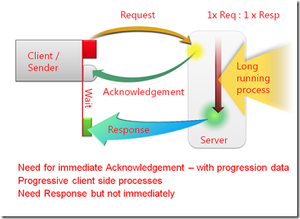
Developing a BizTalk Server solution can be challenging, and especially complex for those who are unfamiliar with it. Developing with BizTalk Server, like any software development effort is like playing chess. There are some great opening moves in chess, and there are some great patterns out there to start a solution. Besides being an outstanding communications tool, design patterns help make the design process faster. This allows solution providers to take the time to concentrate on the business implementation. More importantly, patterns help formalize the design to make it reusable. Reusability not only applies to the components themselves, but also to the stages the design must go through to morph itself into the final solution. The ability to apply a patterned repeatable solution is worth the little time spent learning formal patterns, or to even formalize your own. This entry looks at how architectural design considerations associated to BizTalk Server regarding messaging and orchestration can be applied using patterns, across all industries. The aim is to provide a technical deep-dive using BizTalk Server anchored examples to demonstrate best practices and patterns regarding parallel processing, and correlation. Repost of https://docs.microsoft.com/en-us/archive/blogs/appfabriccat/biztalk-patterns-part-2sync-async4.4KViews3likes0CommentsMicrosoft BizTalk Server Product Lifecycle Update
For more than 25 years, Microsoft BizTalk Server has supported mission-critical integration workloads for organizations around the world. From business process automation and B2B messaging to connectivity across industries such as financial services, healthcare, manufacturing, and government, BizTalk Server has played a foundational role in enterprise integration strategies. To help customers plan confidently for the future, Microsoft is sharing an update to the BizTalk Server product lifecycle and long-term support timelines. BizTalk Server 2020 will be the final version of BizTalk Server. Guidance to support long-term planning for mission-critical workloads This announcement does not change existing support commitments. Customers can continue to rely on BizTalk Server for many years ahead, with a clear and predictable runway to plan modernization at a pace that aligns with their business and regulatory needs. Lifecycle Phase End Date What’s Included Mainstream Support April 11, 2028 Security + non-security updates and Customer Service & Support (CSS) support Extended Support April 9, 2030 CSS support, Security updates, and paid support for fixes (*) End of Support April 10, 2030 No further updates or support (*) Paid Extended Support will be available for BizTalk Server 2020 between April 2028 and April 2030 for customers requiring hotfixes for non-security updates. CSS will continue providing their typical support. BizTalk Server 2016 is already out of mainstream support, and we recommend those customers evaluate a direct modernization path to Azure Logic Apps. Continued Commitment to Enterprise Integration Microsoft remains fully committed to supporting mission-critical integration, including hybrid connectivity, future-ready orchestration, and B2B/EDI modernization. Azure Logic Apps, part of Azure Integration Services — which includes API Management, Service Bus, and Event Grid — delivers the comprehensive integration platform for the next decade of enterprise connectivity. Host Integration Server: Continued Support for Mainframe Workloads Host Integration Server (HIS) has long provided essential connectivity for organizations with mainframe and midrange systems. To ensure continued support for those workloads, Host Integration Server 2028 will ship as a standalone product with its own lifecycle, decoupled from BizTalk Server. This provides customers with more flexibility and a longer planning horizon. Recognizing Mainframe modernization customers might be looking to integrate with their mainframes from Azure, Microsoft provides Logic Apps connectors for mainframe and midrange systems, and we are keen on adding more connectors in this space. Let us know about your HIS plans, and if you require specific features for Mainframe and midranges integration from Logic Apps at: https://aka.ms/lamainframe Azure Logic Apps: The Successor to BizTalk Server Azure Logic Apps, part of Azure Integration Services, is the modern integration platform that carries forward what customers value in BizTalk while unlocking new innovation, scale, and intelligence. With 1,400+ out-of-box connectors supporting enterprise, SaaS, legacy, and mainframe systems, organizations can reuse existing BizTalk maps, schemas, rules, and custom code to accelerate modernization while preserving prior investments including B2B/EDI and healthcare transactions. Logic Apps delivers elastic scalability, enterprise-grade security and compliance, and built-in cost efficiency without the overhead of managing infrastructure. Modern DevOps tooling, Visual Studio Code support, and infrastructure-as-code (ARM/Bicep) ensure consistent, governed deployments with end-to-end observability using Azure Monitor and OpenTelemetry. Modernizing Logic Apps also unlocks agentic business processes, enabling AI-driven routing, predictive insights, and context-aware automation without redesigning existing integrations. Logic Apps adapts to business and regulatory needs, running fully managed in Azure, hybrid via Arc-enabled Kubernetes, or evaluated for air-gapped environments. Throughout this lifecycle transition, customers can continue to rely on the BizTalk investments they have made while moving toward a platform ready for the next decade of integration and AI-driven business. Charting Your Modernization Path Microsoft remains fully committed to supporting customers through this transition. We recognize that BizTalk systems support highly customized and mission-critical business operations. Modernization requires time, planning, and precision. We hope to provide: Proven guidance and recommended design patterns A growing ecosystem of tooling supporting artifact reuse Unified Support engagements for deep migration assistance A strong partner ecosystem specializing in BizTalk modernization Potential incentive programs to help facilitate migration for eligible customers (details forthcoming) Customers can take a phased approach — starting with new workloads while incrementally modernizing existing BizTalk deployments. We’re Here to Help Migration resources are available today: Overview: https://aka.ms/btmig Best practices: https://aka.ms/BizTalkServerMigrationResources Video series: https://aka.ms/btmigvideo Feature request survey: https://aka.ms/logicappsneeds We encourage customers to engage their Microsoft accounts team early to assess readiness, identify modernization opportunities, and explore assistance programs. Your Modernization Journey Starts Now BizTalk Server has played a foundational role in enterprise integration success for more than two decades. As you plan ahead, Microsoft is here to partner with you every step of the way, ensuring operational continuity today while unlocking innovation tomorrow. To begin your transition, please contact your Microsoft account team or visit our migration hub. Thank you for your continued trust in Microsoft and BizTalk Server. We look forward to partnering closely with you as you plan the future of your integration platforms. Frequently Asked Questions Do I need to migrate now? No. BizTalk Server 2020 is fully supported through April 11, 2028, with paid Extended Support available through April 9, 2030, for non-security hotfixes. CSS will continue providing their typical support. You have a long and predictable runway to plan your transition. Will there be a new BizTalk Server version? No. BizTalk Server 2020 is the final version of the product. What happens after April 9, 2030? BizTalk Server will reach End of Support, and security updates or technical assistance will no longer be provided. Workloads will continue running but without Microsoft servicing. Is paid support available past 2028? Yes. Paid extended support will be available through April 2030 for BizTalk Server 2020 customers looking for non-security hotfixes. CSS will continue to provide the typical support. What about BizTalk Server 2016 or earlier versions? Those versions are already out of mainstream support. We strongly encourage moving directly to Logic Apps rather than upgrading to BizTalk Server 2020. Will Host Integration Server continue? Yes. Host Integration Server (HIS) 2028 will be released as a standalone product with its own lifecycle and support commitments. Can I reuse BizTalk Server artifacts in Logic Apps? Yes. Most of BizTalk maps, schemas, rules, assemblies, and custom code can be reused with minimal effort using Microsoft and partner migration tooling. We welcome feature requests here: https://aka.ms/logicappsneeds Does modernization require moving fully to the cloud? No. Logic Apps supports hybrid deployments for scenarios requiring local processing or regulatory compliance, and fully disconnected environments are under evaluation. More information of the Hybrid deployment model here: https://aka.ms/lahybrid. Does modernization unlock AI capabilities? Yes. Logic Apps enables AI-driven automations through Agent Loop, improving routing, decisioning, and operational intelligence. Where do I get planning support? Your Microsoft account team can assist with assessment and planning. Migration resources are also linked in this announcement to help you get started. Microsoft CorporationAnnouncing the BizTalk Server 2020 Cumulative Update 7
The BizTalk Server product team has released the Cumulative Update 7 for BizTalk Server 2020. The Cumulative Update 7 contains all released functional and security fixes for customer-reported issues for BizTalk Server 2020. Also, CU7 includes support for the following new Microsoft platforms: Microsoft Visual Studio 2022 Microsoft Windows Server 2022 Microsoft SQL Server 2022 Microsoft Windows 11 BizTalk Server 2016 is currently out of support with its end of life in 2027. If you are running BizTalk 2016, or earlier versions of the product, you must upgrade to BizTalk Server 2020 CU6 or strongly consider migrating to Azure Logic Apps. Please fill this survey: https://aka.ms/biztalklogicapps. More Information about the CU7: This is an optional update only if you require VS 2022. If you don’t need VS2022, you can continue running on BizTalk Server CU6. CU7 requires that you re-create BizTalk groups for BizTalk Server instances that already were part of a BizTalk group before the installation. Existing BizTalk groups can't have different instances at different cumulative update level. We will provide support to our CU6 and CU7 customers. You can obtain the software from the Microsoft 365 admin center or the Visual Studio Subscriber site. For more information about the BizTalk Server 2020 CU7, read the Microsoft Knowledgebase article posted to https://aka.ms/BTS2020CU7KB .802Views3likes2CommentsAn Automated Tool for Collecting PSSDiag BizTalk Traces Using Event Logs
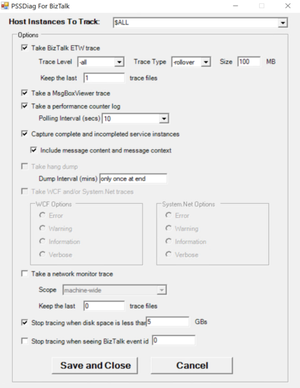
Often, users encounter intermittent event log errors from BizTalk that require further investigation using a BizTalk PSSDiag trace. However, since the timing of the next occurrence is unpredictable, troubleshooting becomes challenging. In such scenarios, a tool is needed to continuously collect PSSDiag traces until the error reoccurs, at which point the tool can automatically stop tracing and save the output. To address this need, I’ve developed a tool that automates this process based on user requirements. PSSDiag for BizTalk is a specialized diagnostic data collection tool tailored for troubleshooting BizTalk Server environments. Built as an extension of PSSDiag (Product Support Services Diagnostics), a widely used tool for diagnosing Microsoft SQL Server issues, it collects a comprehensive set of logs and diagnostic data specific to BizTalk. This includes information crucial for identifying and resolving performance, connectivity, or configuration issues. The tool runs from a console interface, and data collection can be stopped manually by pressing Ctrl+C. I have developed a console application PSSDiagCollector that launches PSSDiag to monitor the event log and automatically stops the PSSDiag collection once a specific event is detected. You can download the tool from this GitHub repository: https://github.com/huidongl/PSSDiagCollector The PSSDiagCollector.exe must be saved in the same folder as PSSDiagForBizTalk. Users can open a command prompt, navigate to the PSSDiagForBizTalk directory, and run PSSDiagCollector from there. The command can specify the Event ID, Event Source, or Event Type to capture, as well as the number of events required to stop the collection. Additionally, users can set a delay (in seconds) before stopping the trace. Detailed instructions for using the tool to collect PSSDiag BizTalk traces can be found in the repository. Run the following command to begin the collection: PSSDiagCollector.exe -eid <EventID> -c <EventCount> -p <PauseDuration> -es "<EventSource>" -lc "<LogCategory>" For example: PSSDiagCollector.exe -eid 7195 -c 3 -p 30 -es "BizTalk Server" -lc "Application" Please make sure to configure the Trace Type, Keep the last _ trace files in the Initialize.exe before running this tool to avoid the trace file being filled up.291Views2likes0Comments