best practices
1695 TopicsGive your Foundry Agent Custom Tools with MCP Servers on Azure Functions
This blog post is for developers who have an MCP server deployed to Azure Functions and want to connect it to Microsoft Foundry agents. It walks through why you'd want to do this, the different authentication options available, and how to get your agent calling your MCP tools. Connect your MCP server on Azure Functions to Foundry Agent If you've been following along with this blog series, you know that Azure Functions is a great place to host remote MCP servers. You get scalable infrastructure, built-in auth, and serverless billing. All the good stuff. But hosting an MCP server is only half the picture. The real value comes when something actually uses those tools. Microsoft Foundry lets you build AI agents that can reason, plan, and take actions. By connecting your MCP server to an agent, you're giving it access to your custom tools, whether that's querying a database, calling an API, or running some business logic. The agent discovers your tools, decides when to call them, and uses the results to respond to the user. It's the agentic AI pattern in action. Why connect MCP servers to Foundry agents? You might already have an MCP server that works great with VS Code, VS, Cursor, or other MCP clients. Connecting that same server to a Foundry agent means you can reuse those tools in a completely different context, i.e. in an enterprise AI agent that your team or customers interact with. No need to rebuild anything. Your MCP server stays the same; you're just adding another consumer. Prerequisites Before proceeding, make sure you have the following: 1. An MCP server deployed to Azure Functions. If you don't have one yet, you can deploy one quickly by following one of the samples: Python TypeScript .NET 2. A Foundry project with a deployed model and a Foundry agent Authentication options Depending on where you are in development, you can pick what makes sense and upgrade later. Here's a summary: Method When to use Key-based Development, or when Entra auth isn't required. Microsoft Entra Production, using project managed identity. OAuth identity passthrough Production, when each user must authenticate individually. Unauthenticated Development only, or tools that access only public information. Connect your MCP server to your Foundry agent If your server uses key-based auth or is unauthenticated, it should be relatively straightforward to set up the connection from a Foundry agent. The Microsoft Entra and OAuth identity passthrough are options that require extra steps to set up. Check out detailed step-by-step instructions for each authentication method. At a high level, the process looks like this: Enable built-in MCP authentication : When you deploy a server to Azure Functions, key-based auth is the default. You'll need to disable that and enable built-in MCP auth instead. If you deployed one of the sample servers in the Prerequisite section, this step is already done for you. Get your MCP server endpoint URL: For MCP extension-based servers, it's https://<FUNCTION_APP_NAME>.azurewebsites.net/runtime/webhooks/mcp Get your credentials based on your chosen auth method: a managed identity configuration, OAuth credentials Add the MCP server as a tool in the Foundry portal by navigating to your agent, adding a new MCP tool, and providing the endpoint and credentials. Microsoft Entra connection required fields OAuth Identity required fields Once the server is configured as a tool, test it in the Agent Builder playground by sending a prompt that triggers one of your MCP tools. Closing thoughts What I find exciting about this is the composability. You build your MCP server once and it works everywhere: VS Code, VS, Cursor, ChatGPT, and now Foundry agents. The MCP protocol is becoming the universal interface for tool use in AI, and Azure Functions makes it easy to host these servers at scale and with security. Are you building agents with Foundry? Have you connected your MCP servers to other clients? I'd love to hear what tools you're exposing and how you're using them. Share with us your thoughts! What's next In the next blog post, we'll go deeper into other MCP topics and cover new MCP features and developments in Azure Functions. Stay tuned!201Views0likes0Comments
MCP Apps on Azure Functions: Quick Start with TypeScript
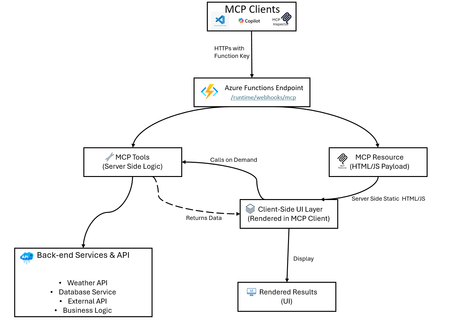
Azure Functions makes hosting MCP apps simple: build locally, create a secure endpoint, and deploy fast with Azure Developer CLI (azd). This guide shows you how using a weather app example. What Are MCP Apps? MCP Apps let MCP servers return interactive HTML interfaces such as data visualizations, forms, dashboards that render directly inside MCP-compatible hosts (Visual Studio Code Copilot, Claude, ChatGPT, etc.). Learn more about MCP Apps in the official documentation. Having an interactive UI removes many restrictions that plain texts have, such as if your scenario has: Interactive Data: Replacing lists with clickable maps or charts for deep exploration. Complex Setup: Use one-page forms instead of long, back-and-forth questioning. Rich Media: Embed native viewers to pan, zoom, or rotate 3D models and documents. Live Updates: Maintain real-time dashboards that refresh without new prompts. Workflow Management: Handle multi-step tasks like approvals with navigation buttons and persistent state. MCP App Hosting as a Feature Azure Functions provides an easy abstraction to help you build MCP servers without having to learn the nitty-gritty of the MCP protocol. When hosting your MCP App on Functions, you get: MCP tools (server logic): Handle client requests, call backend services, return structured data - Azure Functions manages the MCP protocol details for you MCP resources (UI payloads such as app widgets): Serve interactive HTML, JSON documents, or formatted content - just focus on your UI logic Secure HTTPS access: Built-in authentication using Azure Functions keys, plus built-in MCP authentication with OAuth support for enterprise-grade security Easy deployment with Bicep and azd: Infrastructure as Code for reliable deployments Local development: Test and debug locally before deploying Auto-scaling: Azure Functions handles scaling, retries, and monitoring automatically The weather app in this repo is an example of this feature, not the only use case. Architecture Overview Example: The classic Weather App The sample implementation includes: A GetWeather MCP tool that fetches weather by location (calls Open-Meteo geocoding and forecast APIs) A Weather Widget MCP resource that serves interactive HTML/JS code (runs in the client; fetches data via GetWeather tool) A TypeScript service layer that abstracts API calls and data transformation (runs on the server) Bidirectional communication: client-side UI calls server-side tools, receives data, renders locally Local and remote testing flow for MCP clients (via MCP Inspector, VS Code, or custom clients) How UI Rendering Works in MCP Apps In the Weather App example: Azure Functions serves getWeatherWidget as a resource → returns weather-app.ts compiled to HTML/JS Client renders the Weather Widget UI User interacts with the widget or requests are made internally The widget calls the getWeather tool → server processes and returns weather data The widget renders the weather data on the client side This architecture keeps the UI responsive locally while using server-side logic and data on demand. Quick Start Checkout repository: https://github.com/Azure-Samples/remote-mcp-functions-typescript Run locally: npm install npm run build func start Local endpoint: http://0.0.0.0:7071/runtime/webhooks/mcp Deploy to Azure: azd provision azd deploy Remote endpoint: https://.azurewebsites.net/runtime/webhooks/mcp TypeScript MCP Tools Snippet (Get Weather service) In Azure Functions, you define MCP tools using app.mcpTool(). The toolName and description tell clients what this tool does, toolProperties defines the input arguments (like location as a string), and handler points to your function that processes the request. app.mcpTool("getWeather", { toolName: "GetWeather", description: "Returns current weather for a location via Open-Meteo.", toolProperties: { location: arg.string().describe("City name to check weather for") }, handler: getWeather, }); Resource Trigger Snippet (Weather App Hook) MCP resources are defined using app.mcpResource(). The uri is how clients reference this resource, resourceName and description provide metadata, mimeType tells clients what type of content to expect, and handler is your function that returns the actual content (like HTML for a widget). app.mcpResource("getWeatherWidget", { uri: "ui://weather/index.html", resourceName: "Weather Widget", description: "Interactive weather display for MCP Apps", mimeType: "text/html;profile=mcp-app", handler: getWeatherWidget, }); Sample repos and references Complete sample repository with TypeScript implementation: https://github.com/Azure-Samples/remote-mcp-functions-typescript Official MCP extension documentation: https://learn.microsoft.com/azure/azure-functions/functions-bindings-mcp?pivots=programming-language-typescript Java sample: https://github.com/Azure-Samples/remote-mcp-functions-java .NET sample: https://github.com/Azure-Samples/remote-mcp-functions-dotnet Python sample: https://github.com/Azure-Samples/remote-mcp-functions-python MCP Inspector: https://github.com/modelcontextprotocol/inspector Final Takeaway MCP Apps are just MCP servers but they represent a paradigm shift by transforming the AI from a text-based chatbot into a functional interface. Instead of forcing users to navigate complex tasks through back-and-forth conversations, these apps embed interactive UIs and tools directly into the chat, significantly improving the user experience and the usefulness of MCP servers. Azure Functions allows developers to quickly build and host an MCP app by providing an easy abstraction and deployment experience. The platform also provides built-in features to secure and scale your MCP apps, plus a serverless pricing model so you can just focus on the business logic.196Views1like0CommentsAgents League: Meet the Winners
Agents League brought together developers from around the world to build AI agents using Microsoft's developer tools. With 100+ submissions across three tracks, choosing winners was genuinely difficult. Today, we're proud to announce the category champions. 🎨 Creative Apps Winner: CodeSonify View project CodeSonify turns source code into music. As a genuinely thoughtful system, its functions become ascending melodies, loops create rhythmic patterns, conditionals trigger chord changes, and bugs produce dissonant sounds. It supports 7 programming languages and 5 musical styles, with each language mapped to its own key signature and code complexity directly driving the tempo. What makes CodeSonify stand out is the depth of execution. CodeSonify team delivered three integrated experiences: a web app with real-time visualization and one-click MIDI export, an MCP server exposing 5 tools inside GitHub Copilot in VS Code Agent Mode, and a diff sonification engine that lets you hear a code review. A clean refactor sounds harmonious. A messy one sounds chaotic. The team even built the MIDI generator from scratch in pure TypeScript with zero external dependencies. Built entirely with GitHub Copilot assistance, this is one of those projects that makes you think about code differently. 🧠 Reasoning Agents Winner: CertPrep Multi-Agent System View project CertPrep Multi-Agent System team built a production-grade 8-agent system for personalized Microsoft certification exam preparation, supporting 9 exam families including AI-102, AZ-204, AZ-305, and more. Each agent has a distinct responsibility: profiling the learner, generating a week-by-week study schedule, curating learning paths, tracking readiness, running mock assessments, and issuing a GO / CONDITIONAL GO / NOT YET booking recommendation. The engineering behind the scene here is impressive. A 3-tier LLM fallback chain ensures the system runs reliably even without Azure credentials, with the full pipeline completing in under 1 second in mock mode. A 17-rule guardrail pipeline validates every agent boundary. Study time allocation uses the Largest Remainder algorithm to guarantee no domain is silently zeroed out. 342 automated tests back it all up. This is what thoughtful multi-agent architecture looks like in practice. 💼 Enterprise Agents Winner: Whatever AI Assistant (WAIA) View project WAIA is a production-ready multi-agent system for Microsoft 365 Copilot Chat and Microsoft Teams. A workflow agent routes queries to specialized HR, IT, or Fallback agents, transparently to the user, handling both RAG-pattern Q&A and action automation — including IT ticket submission via a SharePoint list. Technically, it's a showcase of what serious enterprise agent development looks like: a custom MCP server secured with OAuth Identity Passthrough, streaming responses via the OpenAI Responses API, Adaptive Cards for human-in-the-loop approval flows, a debug mode accessible directly from Teams or Copilot, and full OpenTelemetry integration visible in the Foundry portal. Franck also shipped end-to-end automated Bicep deployment so the solution can land in any Azure environment. It's polished, thoroughly documented, and built to be replicated. Thank you To every developer who submitted and shipped projects during Agents League: thank you 💜 Your creativity and innovation brought Agents League to life! 👉 Browse all submissions on GitHubAn AI led SDLC: Building an End-to-End Agentic Software Development Lifecycle with Azure and GitHub.
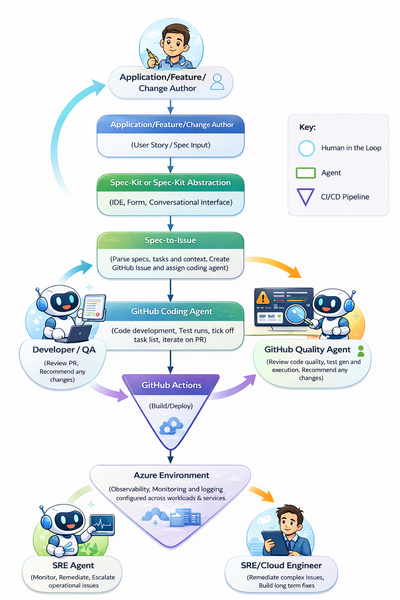
This is due to the inevitable move towards fully agentic, end-to-end SDLCs. We may not yet be at a point where software engineers are managing fleets of agents creating the billion-dollar AI abstraction layer, but (as I will evidence in this article) we are certainly on the precipice of such a world. Before we dive into the reality of agentic development today, let me examine two very different modules from university and their relevance in an AI-first development environment. Manual Requirements Translation. At university I dedicated two whole years to a unit called “Systems Design”. This was one of my favourite units, primarily focused on requirements translation. Often, I would receive a scenario between “The Proprietor” and “The Proprietor’s wife”, who seemed to be in a never-ending cycle of new product ideas. These tasks would be analysed, broken down, manually refined, and then mapped to some kind of early-stage application architecture (potentially some pseudo-code and a UML diagram or two). The big intellectual effort in this exercise was taking human intention and turning it into something tangible to build from (BA’s). Today, by the time I have opened Notepad and started to decipher requirements, an agent can already have created a comprehensive list, a service blueprint, and a code scaffold to start the process (*cough* spec-kit *cough*). Manual debugging. Need I say any more? Old-school debugging with print()’s and breakpoints is dead. I spent countless hours learning to debug in a classroom and then later with my own software, stepping through execution line by line, reading through logs, and understanding what to look for; where correlation did and didn’t mean causation. I think back to my year at IBM as a fresh-faced intern in a cloud engineering team, where around 50% of my time was debugging different issues until it was sufficiently “narrowed down”, and then reading countless Stack Overflow posts figuring out the actual change I would need to make to a PowerShell script or Jenkins pipeline. Already in Azure, with the emergence of SRE agents, that debug process looks entirely different. The debug process for software even more so… #terminallastcommand WHY IS THIS NOT RUNNING? #terminallastcommand Review these logs and surface errors relating to XYZ. As I said: breakpoints are dead, for now at least. Caveat – Is this a good thing? One more deviation from the main core of the article if you would be so kind (if you are not as kind skip to the implementation walkthrough below). Is this actually a good thing? Is a software engineering degree now worthless? What if I love printf()? I don’t know is my answer today, at the start of 2026. Two things worry me: one theoretical and one very real. To start with the theoretical: today AI takes a significant amount of the “donkey work” away from developers. How does this impact cognitive load at both ends of the spectrum? The list that “donkey work” encapsulates is certainly growing. As a result, on one end of the spectrum humans are left with the complicated parts yet to be within an agent’s remit. This could have quite an impact on our ability to perform tasks. If we are constantly dealing with the complex and advanced, when do we have time to re-root ourselves in the foundations? Will we see an increase in developer burnout? How do technical people perform without the mundane or routine tasks? I often hear people who have been in the industry for years discuss how simple infrastructure, computing, development, etc. were 20 years ago, almost with a longing to return to a world where today’s zero trust, globally replicated architectures are a twinkle in an architect’s eye. Is constantly working on only the most complex problems a good thing? At the other end of the spectrum, what if the performance of AI tooling and agents outperforms our wildest expectations? Suddenly, AI tools and agents are picking up more and more of today’s complicated and advanced tasks. Will developers, architects, and organisations lose some ability to innovate? Fundamentally, we are not talking about artificial general intelligence when we say AI; we are talking about incredibly complex predictive models that can augment the existing ideas they are built upon but are not, in themselves, innovators. Put simply, in the words of Scott Hanselman: “Spicy auto-complete”. Does increased reliance on these agents in more and more of our business processes remove the opportunity for innovative ideas? For example, if agents were football managers, would we ever have graduated from Neil Warnock and Mick McCarthy football to Pep? Would every agent just augment a ‘lump it long and hope’ approach? We hear about learning loops, but can these learning loops evolve into “innovation loops?” Past the theoretical and the game of 20 questions, the very real concern I have is off the back of some data shared recently on Stack Overflow traffic. We can see in the diagram below that Stack Overflow traffic has dipped significantly since the release of GitHub Copilot in October 2021, and as the product has matured that trend has only accelerated. Data from 12 months ago suggests that Stack Overflow has lost 77% of new questions compared to 2022… Stack Overflow democratises access to problem-solving (I have to be careful not to talk in past tense here), but I will admit I cannot remember the last time I was reviewing Stack Overflow or furiously searching through solutions that are vaguely similar to my own issue. This causes some concern over the data available in the future to train models. Today, models can be grounded in real, tested scenarios built by developers in anger. What happens with this question drop when API schemas change, when the technology built for today is old and deprecated, and the dataset is stale and never returning to its peak? How do we mitigate this impact? There is potential for some closed-loop type continuous improvement in the future, but do we think this is a scalable solution? I am unsure. So, back to the question: “Is this a good thing?”. It’s great today; the long-term impacts are yet to be seen. If we think that AGI may never be achieved, or is at least a very distant horizon, then understanding the foundations of your technical discipline is still incredibly important. Developers will not only be the managers of their fleet of agents, but also the janitors mopping up the mess when there is an accident (albeit likely mopping with AI-augmented tooling). An AI First SDLC Today – The Reality Enough reflection and nostalgia (I don’t think that’s why you clicked the article), let’s start building something. For the rest of this article I will be building an AI-led, agent-powered software development lifecycle. The example I will be building is an AI-generated weather dashboard. It’s a simple example, but if agents can generate, test, deploy, observe, and evolve this application, it proves that today, and into the future, the process can likely scale to more complex domains. Let’s start with the entry point. The problem statement that we will build from. “As a user I want to view real time weather data for my city so that I can plan my day.” We will use this as the single input for our AI led SDLC. This is what we will pass to promptkit and watch our app and subsequent features built in front of our eyes. The goal is that we will: - Spec-kit to get going and move from textual idea to requirements and scaffold. - Use a coding agent to implement our plan. - A Quality agent to assess the output and quality of the code. - GitHub Actions that not only host the agents (Abstracted) but also handle the build and deployment. - An SRE agent proactively monitoring and opening issues automatically. The end to end flow that we will review through this article is the following: Step 1: Spec-driven development - Spec First, Code Second A big piece of realising an AI-led SDLC today relies on spec-driven development (SDD). One of the best summaries for SDD that I have seen is: “Version control for your thinking”. Instead of huge specs that are stale and buried in a knowledge repository somewhere, SDD looks to make them a first-class citizen within the SDLC. Architectural decisions, business logic, and intent can be captured and versioned as a product evolves; an executable artefact that evolves with the project. In 2025, GitHub released the open-source Spec Kit: a tool that enables the goal of placing a specification at the centre of the engineering process. Specs drive the implementation, checklists, and task breakdowns, steering an agent towards the end goal. This article from GitHub does a great job explaining the basics, so if you’d like to learn more it’s a great place to start (https://github.blog/ai-and-ml/generative-ai/spec-driven-development-with-ai-get-started-with-a-new-open-source-toolkit/). In short, Spec Kit generates requirements, a plan, and tasks to guide a coding agent through an iterative, structured development process. Through the Spec Kit constitution, organisational standards and tech-stack preferences are adhered to throughout each change. I did notice one (likely intentional) gap in functionality that would cement Spec Kit’s role in an autonomous SDLC. That gap is that the implement stage is designed to run within an IDE or client coding agent. You can now, in the IDE, toggle between task implementation locally or with an agent in the cloud. That is great but again it still requires you to drive through the IDE. Thinking about this in the context of an AI-led SDLC (where we are pushing tasks from Spec Kit to a coding agent outside of my own desktop), it was clear that a bridge was needed. As a result, I used Spec Kit to create the Spec-to-issue tool. This allows us to take the tasks and plan generated by Spec Kit, parse the important parts, and automatically create a GitHub issue, with the option to auto-assign the coding agent. From the perspective of an autonomous AI-led SDLC, Speckit really is the entry point that triggers the flow. How Speckit is surfaced to users will vary depending on the organisation and the context of the users. For the rest of this demo I use Spec Kit to create a weather app calling out to the OpenWeather API, and then add additional features with new specs. With one simple prompt of “/promptkit.specify “Application feature/idea/change” I suddenly had a really clear breakdown of the tasks and plan required to get to my desired end state while respecting the context and preferences I had previously set in my Spec Kit constitution. I had mentioned a desire for test driven development, that I required certain coverage and that all solutions were to be Azure Native. The real benefit here compared to prompting directly into the coding agent is that the breakdown of one large task into individual measurable small components that are clear and methodical improves the coding agents ability to perform them by a considerable degree. We can see an example below of not just creating a whole application but another spec to iterate on an existing application and add a feature. We can see the result of the spec creation, the issue in our github repo and most importantly for the next step, our coding agent, GitHub CoPilot has been assigned automatically. Step 2: GitHub Coding Agent - Iterative, autonomous software creation Talking of coding agents, GitHub Copilot’s coding agent is an autonom ous agent in GitHub that can take a scoped development task and work on it in the background using the repository’s context. It can make code changes and produce concrete outputs like commits and pull requests for a developer to review. The developer stays in control by reviewing, requesting changes, or taking over at any point. This does the heavy lifting in our AI-led SDLC. We have already seen great success with customers who have adopted the coding agent when it comes to carrying out menial tasks to save developers time. These coding agents can work in parallel to human developers and with each other. In our example we see that the coding agent creates a new branch for its changes, and creates a PR which it starts working on as it ticks off the various tasks generated in our spec. One huge positive of the coding agent that sets it apart from other similar solutions is the transparency in decision-making and actions taken. The monitoring and observability built directly into the feature means that the agent’s “thinking” is easily visible: the iterations and steps being taken can be viewed in full sequence in the Agents tab. Furthermore, the action that the agent is running is also transparently available to view in the Actions tab, meaning problems can be assessed very quickly. Once the coding agent is finished, it has run the required tests and, even in the case of a UI change, goes as far as calling the Playwright MCP server and screenshotting the change to showcase in the PR. We are then asked to review the change. In this demo, I also created a GitHub Action that is triggered when a PR review is requested: it creates the required resources in Azure and surfaces the (in this case) Azure Container Apps revision URL, making it even smoother for the human in the loop to evaluate the changes. Just like any normal PR, if changes are required comments can be left; when they are, the coding agent can pick them up and action what is needed. It’s also worth noting that for any manual intervention here, use of GitHub Codespaces would work very well to make minor changes or perform testing on an agent’s branch. We can even see the unit tests that have been specified in our spec how been executed by our coding agent. The pattern used here (Spec Kit -> coding agent) overcomes one of the biggest challenges we see with the coding agent. Unlike an IDE-based coding agent, the GitHub.com coding agent is left to its own iterations and implementation without input until the PR review. This can lead to subpar performance, especially compared to IDE agents which have constant input and interruption. The concise and considered breakdown generated from Spec Kit provides the structure and foundation for the agent to execute on; very little is left to interpretation for the coding agent. Step 3: GitHub Code Quality Review (Human in the loop with agent assistance.) GitHub Code Quality is a feature (currently in preview) that proactively identifies code quality risks and opportunities for enhancement both in PRs and through repository scans. These are surfaced within a PR and also in repo-level scoreboards. This means that PRs can now extend existing static code analysis: Copilot can action CodeQL, PMD, and ESLint scanning on top of the new, in-context code quality findings and autofixes. Furthermore, we receive a summary of the actual changes made. This can be used to assist the human in the loop in understanding what changes have been made and whether enhancements or improvements are required. Thinking about this in the context of review coverage, one of the challenges sometimes in already-lean development teams is the time to give proper credence to PRs. Now, with AI-assisted quality scanning, we can be more confident in our overall evaluation and test coverage. I would expect that use of these tools alongside existing human review processes would increase repository code quality and reduce uncaught errors. The data points support this too. The Qodo 2025 AI Code Quality report showed that usage of AI code reviews increased quality improvements to 81% (from 55%). A similar study from Atlassian RovoDev 2026 study showed that 38.7% of comments left by AI agents in code reviews lead to additional code fixes. LLM’s in their current form are never going to achieve 100% accuracy however these are still considerable, significant gains in one of the most important (and often neglected) parts of the SDLC. With a significant number of software supply chain attacks recently it is also not a stretch to imagine that that many projects could benefit from "independently" (use this term loosely) reviewed and summarised PR's and commits. This in the future could potentially by a specialist/sub agent during a PR or merge to focus on identifying malicious code that may be hidden within otherwise normal contributions, case in point being the "near-miss" XZ Utils attack. Step 4: GitHub Actions for build and deploy - No agents here, just deterministic automation. This step will be our briefest, as the idea of CI/CD and automation needs no introduction. It is worth noting that while I am sure there are additional opportunities for using agents within a build and deploy pipeline, I have not investigated them. I often speak with customers about deterministic and non-deterministic business process automation, and the importance of distinguishing between the two. Some processes were created to be deterministic because that is all that was available at the time; the number of conditions required to deal with N possible flows just did not scale. However, now those processes can be non-deterministic. Good examples include IVR decision trees in customer service or hard-coded sales routines to retain a customer regardless of context; these would benefit from less determinism in their execution. However, some processes remain best as deterministic flows: financial transactions, policy engines, document ingestion. While all these flows may be part of an AI solution in the future (possibly as a tool an agent calls, or as part of a larger agent-based orchestration), the processes themselves are deterministic for a reason. Just because we could have dynamic decision-making doesn’t mean we should. Infrastructure deployment and CI/CD pipelines are one good example of this, in my opinion. We could have an agent decide what service best fits our codebase and which region we should deploy to, but do we really want to, and do the benefits outweigh the potential negatives? In this process flow we use a deterministic GitHub action to deploy our weather application into our “development” environment and then promote through the environments until we reach production and we want to now ensure that the application is running smoothly. We also use an action as mentioned above to deploy and surface our agents changes. In Azure Container Apps we can do this in a secure sandbox environment called a “Dynamic Session” to ensure strong isolation of what is essentially “untrusted code”. Often enterprises can view the building and development of AI applications as something that requires a completely new process to take to production, while certain additional processes are new, evaluation, model deployment etc many of our traditional SDLC principles are just as relevant as ever before, CI/CD pipelines being a great example of that. Checked in code that is predictably deployed alongside required services to run tests or promote through environments. Whether you are deploying a java calculator app or a multi agent customer service bot, CI/CD even in this new world is a non-negotiable. We can see that our geolocation feature is running on our Azure Container Apps revision and we can begin to evaluate if we agree with CoPilot that all the feature requirements have been met. In this case they have. If they hadn't we'd just jump into the PR and add a new comment with "@copilot" requesting our changes. Step 5: SRE Agent - Proactive agentic day two operations. The SRE agent service on Azure is an operations-focused agent that continuously watches a running service using telemetry such as logs, metrics, and traces. When it detects incidents or reliability risks, it can investigate signals, correlate likely causes, and propose or initiate response actions such as opening issues, creating runbook-guided fixes, or escalating to an on-call engineer. It effectively automates parts of day two operations while keeping humans in control of approval and remediation. It can be run in two different permission models: one with a reader role that can temporarily take user permissions for approved actions when identified. The other model is a privileged level that allows it to autonomously take approved actions on resources and resource types within the resource groups it is monitoring. In our example, our SRE agent could take actions to ensure our container app runs as intended: restarting pods, changing traffic allocations, and alerting for secret expiry. The SRE agent can also perform detailed debugging to save human SREs time, summarising the issue, fixes tried so far, and narrowing down potential root causes to reduce time to resolution, even across the most complex issues. My initial concern with these types of autonomous fixes (be it VPA on Kubernetes or an SRE agent across your infrastructure) is always that they can very quickly mask problems, or become an anti-pattern where you have drift between your IaC and what is actually running in Azure. One of my favourite features of SRE agents is sub-agents. Sub-agents can be created to handle very specific tasks that the primary SRE agent can leverage. Examples include alerting, report generation, and potentially other third-party integrations or tooling that require a more concise context. In my example, I created a GitHub sub-agent to be called by the primary agent after every issue that is resolved. When called, the GitHub sub-agent creates an issue summarising the origin, context, and resolution. This really brings us full circle. We can then potentially assign this to our coding agent to implement the fix before we proceed with the rest of the cycle; for example, a change where a port is incorrect in some Bicep, or min scale has been adjusted because of latency observed by the SRE agent. These are quick fixes that can be easily implemented by a coding agent, subsequently creating an autonomous feedback loop with human review. Conclusion: The journey through this AI-led SDLC demonstrates that it is possible, with today’s tooling, to improve any existing SDLC with AI assistance, evolving from simply using a chat interface in an IDE. By combining Speckit, spec-driven development, autonomous coding agents, AI-augmented quality checks, deterministic CI/CD pipelines, and proactive SRE agents, we see an emerging ecosystem where human creativity and oversight guide an increasingly capable fleet of collaborative agents. As with all AI solutions we design today, I remind myself that “this is as bad as it gets”. If the last two years are anything to go by, the rate of change in this space means this article may look very different in 12 months. I imagine Spec-to-issue will no longer be required as a bridge, as native solutions evolve to make this process even smoother. There are also some areas of an AI-led SDLC that are not included in this post, things like reviewing the inner-loop process or the use of existing enterprise patterns and blueprints. I also did not review use of third-party plugins or tools available through GitHub. These would make for an interesting expansion of the demo. We also did not look at the creation of custom coding agents, which could be hosted in Microsoft Foundry; this is especially pertinent with the recent announcement of Anthropic models now being available to deploy in Foundry. Does today’s tooling mean that developers, QAs, and engineers are no longer required? Absolutely not (and if I am honest, I can’t see that changing any time soon). However, it is evidently clear that in the next 12 months, enterprises who reshape their SDLC (and any other business process) to become one augmented by agents will innovate faster, learn faster, and deliver faster, leaving organisations who resist this shift struggling to keep up.16KViews6likes1CommentAccelerate Agent Development: Hacks for Building with Microsoft Sentinel data lake
As a Senior Product Manager | Developer Architect on the App Assure team working to bring Microsoft Sentinel and Security Copilot solutions to market, I interact with many ISVs building agents on Microsoft Sentinel data lake for the first time. I’ve written this article to walk you through one possible approach for agent development – the process I use when building sample agents internally at Microsoft. If you have questions about this, or other methods for building your agent, App Assure offers guidance through our Sentinel Advisory Service. Throughout this post, I include screenshots and examples from Gigamon’s Security Posture Insight Agent. This article assumes you have: An existing SaaS or security product with accessible telemetry. A small ISV team (2–3 engineers + 1 PM). Focus on a single high value scenario for the first agent. The Composite Application Model (What You Are Building) When I begin designing an agent, I think end-to-end, from data ingestion requirements through agentic logic, following the Composite application model. The Composite Application Model consists of five layers: Data Sources – Your product’s raw security, audit, or operational data. Ingestion – Getting that data into Microsoft Sentinel. Sentinel data lake & Microsoft Graph – Normalization, storage, and correlation. Agent – Reasoning logic that queries data and produces outcomes. End User – Security Copilot or SaaS experiences that invoke the agent. This separation allows for evolving data ingestion and agent logic simultaneously. It also helps avoid downstream surprises that require going back and rearchitecting the entire solution. Optional Prerequisite You are enrolled in the ISV Success Program, so you can earn Azure Credits to provision Security Compute Units (SCUs) for Security Copilot Agents. Phase 1: Data Ingestion Design & Implementation Choose Your Ingestion Strategy The first choice I face when designing an agent is how the data is going to flow into my Sentinel workspace. Below I document two primary methods for ingestion. Option A: Codeless Connector Framework (CCF) This is the best option for ISVs with REST APIs. To build a CCF solution, reference our documentation for getting started. Option B: CCF Push (Public Preview) In this instance, an ISV pushes events directly to Sentinel via a CCF Push connector. Our MS Learn documentation is a great place to get started using this method. Additional Note: In the event you find that CCF does not support your needs, reach out to App Assure so we can capture your requirements for future consideration. Azure Functions remains an option if you’ve documented your CCF feature needs. Phase 2: Onboard to Microsoft Sentinel data lake Once my data is flowing into Sentinel, I onboard a single Sentinel workspace to data lake. This is a one-time action and cannot be repeated for additional workspaces. Onboarding Steps Go to the Defender portal. Follow the Sentinel Data lake onboarding instructions. Validate that tables are visible in the lake. See Running KQL Queries in data lake for additional information. Phase 3: Build and Test the Agent in Microsoft Foundry Once my data is successfully ingested into data lake, I begin the agent development process. There are multiple ways to build agents depending on your needs and tooling preferences. For this example, I chose Microsoft Foundry because it fit my needs for real-time logging, cost efficiency, and greater control. 1. Create a Microsoft Foundry Instance Foundry is used as a tool for your development environment. Reference our QuickStart guide for setting up your Foundry instance. Required Permissions: Security Reader (Entra or Subscription) Azure AI Developer at the resource group After setup, click Create Agent. 2. Design the Agent A strong first agent: Solves one narrow security problem. Has deterministic outputs. Uses explicit instructions, not vague prompts. Example agent responsibilities: To query Sentinel data lake (Sentinel data exploration tool). To summarize recent incidents. To correlate ISVs specific signals with Sentinel alerts and other ISV tables (Sentinel data exploration tool). 3. Implement Agent Instructions Well-designed agent instructions should include: Role definition ("You are a security investigation agent…"). Data sources it can access. Step by step reasoning rules. Output format expectations. Sample Instructions can be found here: Agent Instructions 4. Configure the Microsoft Model Context Protocol (MCP) tooling for your agent For your agent to query, summarize and correlate all the data your connector has sent to data lake, take the following steps: Select Tools, and under Catalog, type Sentinel, and then select Microsoft Sentinel Data Exploration. For more information about the data exploration tool collection in MCP server, see our documentation. I always test repeatedly with real data until outputs are consistent. For more information on testing and validating the agent, please reference our documentation. Phase 4: Migrate the Agent to Security Copilot Once the agent works in Foundry, I migrate it to Security Copilot. To do this: Copy the full instruction set from Foundry Provision a SCU for your Security Copilot workspace. For instructions, please reference this documentation. Make note of this process as you will be charged per hour per SCU Once you are done testing you will need to deprovision the capacity to prevent additional charges Open Security Copilot and use Create From Scratch Agent Builder as outlined here. Add Sentinel data exploration MCP tools (these are the same instructions from the Foundry agent in the previous step). For more information on linking the Sentinel MCP tools, please refer to this article. Paste and adapt instructions. At this stage, I always validate the following: Agent Permissions – I have confirmed the agent has the necessary permissions to interact with the MCP tool and read data from your data lake instance. Agent Performance – I have confirmed a successful interaction with measured latency and benchmark results. This step intentionally avoids reimplementation. I am reusing proven logic. Phase 5: Execute, Validate, and Publish After setting up my agent, I navigate to the Agents tab to manually trigger the agent. For more information on testing an agent you can refer to this article. Now that the agent has been executed successfully, I download the agent Manifest file from the environment so that it can be packaged. Click View code on the Agent under the Build tab as outlined in this documentation. Publishing to the Microsoft Security Store If I were publishing my agent to the Microsoft Security Store, these are the steps I would follow: Finalize ingestion reliability. Document required permissions. Define supported scenarios clearly. Package agent instructions and guidance (by following these instructions). Summary Based on my experience developing Security Copilot agents on Microsoft Sentinel data lake, this playbook provides a practical, repeatable framework for ISVs to accelerate their agent development and delivery while maintaining high standards of quality. This foundation enables rapid iteration—future agents can often be built in days, not weeks, by reusing the same ingestion and data lake setup. When starting on your own agent development journey, keep the following in mind: To limit initial scope. To reuse Microsoft managed infrastructure. To separate ingestion from intelligence. What Success Looks Like At the end of this development process, you will have the following: A Microsoft Sentinel data connector live in Content Hub (or in process) that provides a data ingestion path. Data visible in data lake. A tested agent running in Security Copilot. Clear documentation for customers. A key success factor I look for is clarity over completeness. A focused agent is far more likely to be adopted. Need help? If you have any issues as you work to develop your agent, please reach out to the App Assure team for support via our Sentinel Advisory Service . Or if you have any other tips, please comment below, I’d love to hear your feedback.286Views1like0CommentsMicrosoft Defender for Cloud Customer Newsletter
What's new in Defender for Cloud? Kubernetes gated deployment is now generally available for AKS automatic clusters. Use help to deploy the Defender for Containers sensor to use this feature. More information can be found here. Grouped recommendations are converted into individual ones to list each finding separately. While grouped recommendations are still available, new individual recommendations are now marked as preview and are not yet part of the Secure Score. This new format will allow for better prioritization, actionable context and better governance and tracking. For more details, please refer to this documentation. Check out other updates from last month here! Check out monthly news for the rest of the MTP suite here! Blogs of the month In March, our team published the following blog posts we would like to share: Defending Container Runtime from Malware with Defender for Containers Modern Database Protection: From Visibility to Threat Detection with Defender for Cloud New innovations in Microsoft Defender to strengthen multi-cloud, containers, and AI model security Defending the AI Era: New Microsoft Capabilities to Protect AI Defender for Cloud in the field Revisit the malware automated remediation announcement since this feature is now in GA! Automated remediation for malware in storage Visit our YouTube page GitHub Community Check out the new Module 28 in the MDC Lab: Defending Container Runtime from Malware with Microsoft Defender for Containers Defending Container Runtime from Malware Visit our GitHub page Customer journey Discover how other organizations successfully use Microsoft Defender for Cloud to protect their cloud workloads. This month we are featuring ManpowerGroup, a global workforce solutions leader, deployed Microsoft 365 E5, and Microsoft Security to modernize and future-proof their cyber security platform. ManpowerGroup leverages Entra ID, Defender for Endpoint, Defender for Identity, Defender for O365, Defender for Cloud, Microsoft Security Copilot and Purview to transform itself as an AI Frontier Firm. Join our community! We offer several customer connection programs within our private communities. By signing up, you can help us shape our products through activities such as reviewing product roadmaps, participating in co-design, previewing features, and staying up-to-date with announcements. Sign up at aka.ms/JoinCCP. We greatly value your input on the types of content that enhance your understanding of our security products. Your insights are crucial in guiding the development of our future public content. We aim to deliver material that not only educates but also resonates with your daily security challenges. Whether it’s through in-depth live webinars, real-world case studies, comprehensive best practice guides through blogs, or the latest product updates, we want to ensure our content meets your needs. Please submit your feedback on which of these formats do you find most beneficial and are there any specific topics you’re interested in https://aka.ms/PublicContentFeedback. Note: If you want to stay current with Defender for Cloud and receive updates in your inbox, please consider subscribing to our monthly newsletter: https://aka.ms/MDCNewsSubscribe141Views0likes0CommentsExpanding the Reach of AI-enabled Cloud PCs for Frontier Firms
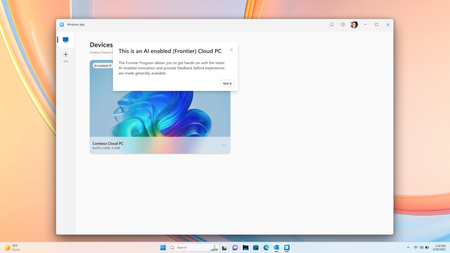
Co-Authored by Lakshmi Rayasam Over the past several months, we’ve been focused on a clear goal: making AI-enabled Cloud PCs easier to adopt, easier to deploy, and available to more customers—wherever they are. Following the momentum from Ignite, releasing Improved Search & Click to Do, we’ve continued to evolve the AI-enabled Cloud PC experience in Frontier Preview, prioritizing scale, accessibility, and product market fit. The latest set of enhancements removes deployment blockers and expands where—and how—customers can get started. We’ve also added a new refreshing AI-enabled end-user experience explaining the value of Frontier while users hover over the AI-enabled (Frontier) tag. Note: Future availability of these features is dependent on the results of this Frontier Preview and is subject to change Removing the need for Windows Insiders AI‑enabled Cloud PCs now work with standard Windows 11 retail builds, eliminating the need for Windows Insider participation. This change alone unlocks broader enterprise deployment scenarios and removes a major barrier for production use. AI-enabled Cloud PCs are just one toggle away as IT admins can join our Frontier Program and enable AI-enabled Cloud PCs via a newly introduced policy setting within the Devices – Onboarding: Windows 365 > User Settings blade, and further filter access based on Microsoft Entra ID group access. Note: After enrolling the latest Windows 11 25H2 (OS Build 26200.7840 or higher) you must reboot your Cloud PC. Expanded regional availability To meet customers where they operate, we’ve expanded AI‑enabled Cloud PCs to additional Azure regions:‑ Japan East Germany West Central South Central US Canada Central This expansion improves latency, supports data residency needs, and enables more global customers to participate in the Frontier Preview. 128GB disk support for Windows 365 Enterprise We’ve added support for 128GB disk size Windows 365 Enterprise licenses, offering greater flexibility for customers who don’t require larger footprints while still enabling AI‑driven workflows. These right‑sized deployments and makes it easier to scale across broader user populations. Together, these updates directly address the most common Ignite feedback and are expected to unlock large‑scale deployments, including enterprise pilots transitioning into sustained usage. What Comes Next Following the March rollout, our CY26 focus shifts to closing parity gaps using cloud‑based models, in close partnership with Windows platform teams. Initial work centers on enabling Text Actions for Click‑to‑Do via a cloud models within Frontier Preview—one of the most requested capabilities from customers.‑‑‑ In parallel, we’ll continue investing in foundational improvements that increase perceived feature depth and usage signals, including cost optimization, reliability enhancements, and productivity scenarios that compound value across the Cloud PC experience.239Views1like2CommentsAzure Default Outbound Access Changes: Guidance for Windows 365 ANC Customers
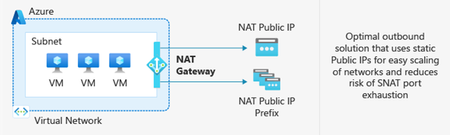
Editor’s note, March 27, 2026: An earlier version of this post listed Azure Load Balancer (SLB) as a supported outbound access method option for Windows 365 ANC. This has been updated. SLB is not a supported outbound access method for ANC. After March 31, 2026, newly created Azure Virtual Networks (VNets) will no longer have default outbound internet access enabled by default. Windows 365 customers choosing Azure Network Connection as a deployment option must configure outbound connectivity explicitly when setting up new VNets. This post explains what’s changing, who’s impacted, and the recommended actions, including Azure Private Subnets and Microsoft Hosted Network. What is Default Outbound Access (DOA)? Default Outbound Access is Azure’s legacy behavior that allowed all resources in a virtual network to reach the public internet without configuring a specific internet egress path. This allowed telemetry, Windows activation, and other service dependencies to reach external endpoints even when no explicit outbound connectivity method was configured. What’s changing? After March 31, 2026, as detailed in Azure’s communications, Azure will no longer enable DOA by default for new virtual networks, instead the VNet will be configured for Private Subnet option, allowing you to designate subnets without internet access for improved isolation and compliance. These changes encourage more intentional, secure network configurations while offering flexibility for different workload needs. Disabling Private Subnet option will allow administrators to restore DOA capabilities to the VNet, although Microsoft strongly recommends using Azure NAT Gateway. Impact on Windows 365 Azure Network Connection Customers For Windows 365 Azure Network Connection (ANC) deployments using virtual networks created after March 31, 2026, new VNets will default to private subnets. Outbound internet access must be explicitly configured for the VNet; otherwise, Cloud PC provisioning will fail. Existing virtual networks are not affected and will continue using their current internet access configuration. Note on Microsoft-hosted network: For Microsoft-hosted network deployments, which is the Microsoft recommended deployment model for Windows 365, Microsoft fully provides and manages the underlying connectivity in Azure on your behalf. There is no impact or change needed for those deployments. What You Should Do To prepare for Azure’s Default Outbound Access changes and ensure your Windows 365 ANC deployments remain secure and functional: Recommendations Transition to Microsoft-hosted network (MHN) if possible. MHN provides secure, cost-effective connectivity with outbound internet access by default, reducing operational overhead and ensuring compliance with Azure’s updated standards. Update deployment plans to ensure either an explicit NAT, such as a NAT Gateway or Default Outbound access (not recommended) is enabled by disabling the Private Subnet option. Test connectivity to ensure all services dependent on outbound access continue to function as expected, and that the ANC does not enter a failed state. Supported Outbound Access Methods To maintain connectivity, choose one of these supported methods: NAT Gateway (recommended) Note: Direct RDP Shortpath (UDP over STUN) cannot be established through a NAT Gateway because its symmetric NAT policy prevents direct UDP connectivity over public networks. Azure Firewall or third-party Network Virtual Appliance (NVA). Note, it is not recommended to route RDP or other long-lived connections through Azure Firewall or any other network virtual appliance which allows for automatic scale-in. A direct method such as NAT Gateway should be used. Unsupported Outbound Access Methods Azure Standard Load Balancer Azure’s Standard Load Balancer is not supported as an outbound access method for ANC. Instead, using NAT Gateway is recommended. More information about the pros and cons for each method can be found at Default Outbound Access. Resources: Azure updates | Microsoft Azure Default Outbound Access in Azure Transition to an explicit method of public connectivity | Microsoft Learn Deploy Microsoft Hosted Network (MHN) QuickStart: Create a NAT Gateway Optimizing RDP Connectivity for Windows 365 | Microsoft Community Hub Quick FAQ Does this affect existing VNets? No. Only new VNets created after March 31, 2026, are affected. Existing VNets will continue to operate as normal. Do Microsoft Hosted Network deployments require changes? No. MHN already includes managed egress. What if I do nothing on a new VNet? ANC checks will fail because the VNet does not have internet access. Configure NAT Gateway or another supported method. What are the required endpoints? Please see here for a list of the endpoints required. Why might peer-to-peer connectivity using STUN-based UDP hole punching not work when using NAT Gateway? NAT Gateway uses a type of network address translation that does not support STUN (Simple Traversal Underneath NAT) based connections. This will prevent STUN-based UDP hole punching, commonly used for establishing peer-to-peer connections, from working as expected. If your application relies on reliable UDP connectivity between peers, STUN may revert to TURN (Traversal Using Relays around NAT) in some instances. TURN relays traffic between endpoints, ensuring consistent connectivity even when direct peer-to-peer paths are blocked. This helps maintain smooth real-time experiences for your users. How do I configure Azure Firewall? For additional security you can configure Azure Firewall using these instructions https://learn.microsoft.com/en-us/azure/firewall/protect-azure-virtual-desktop?context=/azure/virtual-desktop/context/context. It is strongly recommended that a direct method of access is used for RDP and other long-lived connections such as VPN or Secure Web Gateway tunnels. This is due to devices such as Azure firewall scaling in when load is low which can disrupt connectivity. Wrap-up Azure’s change reinforces intentional networking for better security. By planning explicit egress (or choosing MHN), Windows 365 ANC customers can stay compliant and keep Cloud PCs reliably connected.2.1KViews0likes1Comment