azure openai
78 TopicsTurn Enterprise Knowledge into Answers with Copilot Studio and Azure AI Search
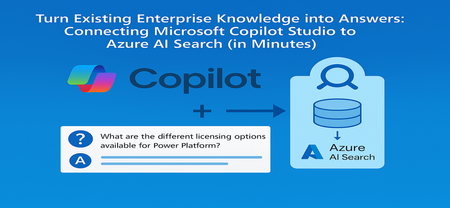
From the Field: Why This Integration Works As an experienced AI Cloud Solution Architect working in Greater China Region (GCR), I’ve seen one emerging pattern that delivers quick wins for some of my customers: combining Microsoft Copilot Studio with an existing Azure AI Search index. Teams choose this approach because it delivers two outcomes immediately: business users get grounded, reliable answers, and enterprises avoid re-building pipelines or re-platforming knowledge stores. This guide shows exactly how to connect Copilot Studio to an Azure AI Search index that is already live, so your copilot can answer confidently using your enterprise documents. What We Assume Is Already Ready To stay focused on the integration step, we assume: You have an Azure AI Search service deployed You have an index containing vectorized content (manuals, PDFs, policies, FAQs) Your platform/data team already handled ingestion, embeddings, and indexing In short, your Azure AI Search endpoint and admin key are ready, and the index already contains chunked content with embeddings. Step 1 - Collect Your Azure AI Search Connection Details From the Azure AI Search resource: Endpoint URL Azure AI Search → Overview → Url: https://<your-search-service>.search.windows.net Admin Key Azure AI Search → Keys Use either the primary or secondary key. Governance tip: For production, rotate keys regularly and use managed identities when possible. Step 2 - Add Azure AI Search as Knowledge Inside Copilot Studio Open your Copilot Studio agent Go to the Knowledge tab Select Add knowledge, choose Azure AI Search Provide: Endpoint URL Admin key Create or select the connection Choose your existing index from the dropdown Select Add to agent Step 3 - Test a Grounded Response Open the Test copilot pane and ask a question your indexed content can answer, such as: “What are the different licensing options available for Power Platform?” Verify that: The Activity Map shows Azure AI Search being invoked The answer reflects the correct document in your index Citations or references appear where applicable Conclusion Business value: You can activate grounded, explainable answers in Copilot Studio immediately by reusing your existing Azure AI Search index - no re-platforming, no new pipelines. Team model: Data/Platform teams own ingestion, enrichment, and vectorization. Business teams build and refine the copilot experience in Copilot Studio. Scale and governance: All components stay inside Azure, with enterprise-grade security, RBAC, and operational monitoring, while enabling low‑code agility for makers. For the full end-to-end lab (storage setup, embeddings, index creation), see: 🔗 https://github.com/Azure/Copilot-Studio-and-Azure (Lab 1.4). Acknowledgements This tutorial builds on foundational work by my EMEA colleague Pablo Carceller, whose GitHub repo on Copilot Studio and Azure has helped teams worldwide accelerate real customer implementations. 👉 GitHub - Copilot Studio and Azure: https://github.com/Azure/Copilot-Studio-and-Azure I would also like to thank the broader Cloud Accelerate Factory GCR team for their contributions, insights, and active collaboration in validating this pattern across customer engagements. Special appreciation to our AI Architects Dr. Longyu Qi, Jian (Jason) Shao, Lei (Leo) Ma, and Ethan Tseng, as well as our PM partners Yunxi (Rayne) Jin and Emma Wang, whose feedback and field experiences helped shape and refine this guide. Image credits: demo visuals adapted from materials by Pablo Carceller (GitHub Lab 1.4).252Views0likes0CommentsMicrosoft Foundry: Unlock Adaptive, Personalized Agents with User-Scoped Persistent Memory
From Knowledgeable to Personalized: Why Memory Matters Most AI agents today are knowledgeable — they ground responses in enterprise data sources and rely on short‑term, session‑based memory to maintain conversational coherence. This works well within a single interaction. But once the session ends, the context disappears. The agent starts fresh, unable to recall prior interactions, user preferences, or previously established context. In reality, enterprise users don’t interact with agents exclusively in one‑off sessions. Conversations can span days, weeks, evolving across multiple interactions rather than isolated sessions. Without a way to persist and safely reuse relevant context across interactions, AI agents remain efficient in the short term be being stateful within a session, but lose continuity over time due to their statelessness across sessions. Bridging this gap between short-term efficiency and long‑term adaptation exposes a deeper challenge. Persisting memory across sessions is not just a technical decision; in enterprise environments, it introduces legitimate concerns around privacy, data isolation, governance, and compliance — especially when multiple users interact with the same agent. What seems like an obvious next step quickly becomes a complex architectural problem, requiring organizations to balance the ability for agents to learn and adapt over time with the need to preserve trust, enforce isolation boundaries, and meet enterprise compliance requirements. In this post, I’ll walk through a practical design pattern for user‑scoped persistent memory, including a reference architecture and a deployable sample implementation that demonstrates how to apply this pattern in a real enterprise setting while preserving isolation, governance, and compliance. The Challenge of Persistent Memory in Enterprise AI Agents Extending memory beyond a single session seems like a natural way to make AI agents more adaptive. Retaining relevant context over time — such as preferences, prior decisions, or recurring patterns — would allow an agent to progressively tailor its behavior to each user, moving from simple responsiveness toward genuine adaptation. In enterprise environments, however, persistence introduces a different class of risk. Storing and reusing user context across interactions raises questions of privacy, data isolation, governance, and compliance — particularly when multiple users interact with shared systems. Without clear ownership and isolation boundaries, naïvely persisted memory can lead to cross‑user data leakage, policy violations, or unclear retention guarantees. As a result, many systems default to ephemeral, session‑only memory. This approach prioritizes safety and simplicity — but does so at the cost of long‑term personalization and continuity. The challenge, then, is not whether agents should remember, but how memory can be introduced without violating enterprise trust boundaries. Persistent Memory: Trade‑offs Between Abstraction and Control As AI agents evolve toward more adaptive behavior, several approaches to agent memory are emerging across the ecosystem. Each reflects a different set of trade-offs between abstraction, flexibility, and control — making it useful to briefly acknowledge these patterns before introducing the design presented here. Microsoft Foundry Agent Service includes a built‑in memory capability (currently in Preview) that enables agents to retain context beyond a single interaction. This approach integrates tightly with the Foundry runtime and abstracts much of the underlying memory management, making it well suited for scenarios that align closely with the managed agent lifecycle. Another notable approach combines Mem0 with Azure AI Search, where memory entries are stored and retrieved through vector search. In this model, memory is treated as an embedding‑centric store that emphasizes semantic recall and relevance. Mem0 is intentionally opinionated, defining how memory is structured, summarized, and retrieved to optimize for ease of use and rapid iteration. Both approaches represent meaningful progress. At the same time, some enterprises require an approach where user memory is explicitly owned, scoped, and governed within their existing data architecture — rather than implicitly managed by an agent framework or memory library. These requirements often stem from stricter expectations around data isolation, compliance, and long‑term control. User-Scoped Persistent Memory with Azure Cosmos DB The solution presented in this post provides a practical reference implementation for organizations that require explicit control over how user memory is stored, scoped, and governed. Rather than embedding long‑term memory implicitly within the agent runtime, this design models memory as a first‑class system component built on Azure Cosmos DB. At a high level, the architecture introduces user‑scoped persistent memory: a durable memory layer in which each user’s context is isolated and managed independently. Persistent memory is stored in Azure Cosmos DB containers partitioned by user identity and consists of curated, long‑lived signals — such as preferences, recurring intent, or summarized outcomes from prior interactions — rather than raw conversational transcripts. This keeps memory intentional, auditable, and easy to evolve over time. Short‑term, in‑session conversation state remains managed by Microsoft Foundry on the server side through its built‑in conversation and thread model. By separating ephemeral session context from durable user memory, the system preserves conversational coherence while avoiding uncontrolled accumulation of long‑term state within the agent runtime. This design enables continuity and personalization across sessions while deliberately avoiding the risks associated with shared or global memory models, including cross‑user data leakage, unclear ownership, and unintended reuse of context. Azure Cosmos DB provides enterprises with direct control over memory isolation, data residency, retention policies, and operational characteristics such as consistency, availability, and scale. In this architecture, knowledge grounding and memory serve complementary roles. Knowledge grounding ensures correctness by anchoring responses in trusted enterprise data sources. User‑scoped persistent memory ensures relevance by tailoring interactions to the individual user over time. Together, they enable trustworthy, adaptive AI agents that improve with use — without compromising enterprise boundaries. Architecture Components and Responsibilities Identity and User Scoping Microsoft Entra ID (App Registrations) — provides the frontend a client ID and tenant ID so the Microsoft Authentication Library (MSAL) can authenticate users via browser redirect. The oid (Object ID) claim from the ID token is used as the user identifier throughout the system. Agent Runtime and Orchestration Microsoft Foundry — serves as the unified AI platform for hosting models, managing agents, and maintaining conversation state. Foundry manages in‑session and thread‑level memory on the server side, preserving conversational continuity while keeping ephemeral context separate from long‑term user memory. Backend Agent Service — implements the AI agent using Microsoft Foundry’s agent and conversation APIs. The agent is responsible for reasoning, tool‑calling decisions, and response generation, delegating memory and search operations to external MCP servers. Memory and Knowledge Services MCP‑Memory — MCP server that hosts tools for extracting structured memory signals from conversations, generating embeddings, and persisting user‑scoped memories. Memories are written to and retrieved from Azure Cosmos DB, enforcing strict per‑user isolation. MCP‑Search — MCP server exposing tools for querying enterprise knowledge sources via Azure AI Search. This separation ensures that knowledge grounding and memory retrieval remain distinct concerns. Azure Cosmos DB for NoSQL — provides the durable, serverless document store for user‑scoped persistent memory. Memory containers are partitioned by user ID, enabling isolation, auditable access, configurable retention policies, and predictable scalability. Vector search is used to support semantic recall over stored memory entries. Azure AI Search — supplies hybrid retrieval (keyword and vector) with semantic reranking over the enterprise knowledge index. An integrated vectorizer backed by an embedding model is used for query‑time vectorization. Models text‑embedding‑3‑large — used for generating vector embeddings for both user‑scoped memories and enterprise knowledge search. gpt‑5‑mini — used for lightweight analysis tasks, such as extracting structured memory facts from conversational context. gpt‑5.1 — powers the AI agent, handling multi‑turn conversations, tool invocation, and response synthesis. Application and Hosting Infrastructure Frontend Web Application — a React‑based web UI that handles user authentication and presents a conversational chat interface. Azure Container Apps Environment — provides a shared execution environment for all services, including networking, scaling, and observability. Azure Container Apps — hosts the frontend, backend agent service, and MCP servers as independently scalable containers. Azure Container Registry — stores container images for all application components. Try It Yourself Demonstration of user‑scoped persistent memory across sessions. To make these concepts concrete, I’ve published a working reference implementation that demonstrates the architecture and patterns described above. The complete solution is available in the Agent-Memory GitHub repository. The repository README includes prerequisites, environment setup notes, and configuration details. Start by cloning the repository and moving into the project directory: git clone https://github.com/mardianto-msft/azure-agent-memory.git cd azure-agent-memory Next, sign in to Azure using the Azure CLI: az login Then authenticate the Azure Developer CLI: azd auth login Once authenticated, deploy the solution: azd up After deployment is complete, sign in using the provided demo users and interact with the agent across multiple sessions. Each user’s preferences and prior context are retained independently, the interaction continues seamlessly after signing out and returning later, and user context remains fully isolated with no cross‑identity leakage. The solution also includes a knowledge index initialized with selected Microsoft Outlook Help documentation, which the agent uses for knowledge grounding. This index can be easily replaced or extended with your own publicly accessible URLs to adapt the solution to different domains. Looking Ahead: Personalized Memory as a Foundation for Adaptive Agents As enterprise AI agents evolve, many teams are looking beyond larger models and improved retrieval toward human‑centered personalization at scale — building agents that adapt to individual users while operating within clearly defined trust boundaries. User‑scoped persistent memory enables this shift. By treating memory as a first‑class, user‑owned component, agents can maintain continuity across sessions while preserving isolation, governance, and compliance. Personalization becomes an intentional design choice, aligning with Microsoft’s human‑centered approach to AI, where users retain control over how systems adapt to them. This solution demonstrates how knowledge grounding and personalized memory serve complementary roles. Knowledge grounding ensures correctness by anchoring responses in trusted enterprise data. Personalized memory ensures relevance by tailoring interactions to the individual user. Together, they enable context‑aware, adaptive, and personalized agents — without compromising enterprise trust. Finally, this solution is intentionally presented as a reference design pattern, not a prescriptive architecture. It offers a practical starting point for enterprises designing adaptive, personalized agents, illustrating how user‑scoped memory can be modeled, governed, and integrated as a foundational capability for scalable enterprise AI.393Views1like1CommentIntroducing OpenAI’s GPT-image-1.5 in Microsoft Foundry
Developers building with visual AI can often run into the same frustrations: images that drift from the prompt, inconsistent object placement, text that renders unpredictably, and editing workflows that break when iterating on a single asset. That’s why we are excited to announce OpenAI's GPT Image 1.5 is now generally available in Microsoft Foundry. This model can bring sharper image fidelity, stronger prompt alignment, and faster image generation that supports iterative workflows. Starting today, customers can request access to the model and start building in the Foundry platform. Meet GPT Image 1.5 AI driven image generation began with early models like OpenAI's DALL-E, which introduced the ability to transform text prompts into visuals. Since then, image generation models have been evolving to enhance multimodal AI across industries. GPT Image 1.5 represents continuous improvement in enterprise-grade image generation. Building on the success of GPT Image 1 and GPT Image 1 mini, these enhanced models introduce advanced capabilities that cater to both creative and operational needs. The new image model offer: Text-to-image: Stronger instruction following and highly precise editing. Image-to-image: Transform existing images to iteratively refine specific regions Improved visual fidelity: More detailed scenes and realistic rendering. Accelerated creation times: Up to 4x faster generation speed. Enterprise integration: Deploy and scale securely in Microsoft Foundry. GPT Image 1.5 delivers stronger image preservation and editing capabilities, maintaining critical details like facial likeness, lighting, composition, and color tone across iterative changes. You’ll see more consistent preservation of branded logos and key visuals, making it especially powerful for marketing, brand design, and ecommerce workflows—from graphics and logo creation to generating full product catalogs (variants, environments, and angles) from a single source image. Benchmarks Based on an internal Microsoft dataset, GPT Image 1.5 performs higher than other image generation models in prompt alignment and infographics tasks. It focuses on making clear, strong edits – performing best on single-turn modification, delivering the higher visual quality in both single and multi-turn settings. The following results were found across image generation and editing: Text to image Prompt alignment Diagram / Flowchart GPT Image 1.5 91.2% 96.9% GPT Image 1 87.3% 90.0% Qwen Image 83.9% 33.9% Nano Banana Pro 87.9% 95.3% Image editing Evaluation Aspect Modification Preservation Visual Quality Face Preservation Metrics BinaryEval SC (semantic) DINO (Visual) BinaryEval AuraFace Single-turn GPT image 1 99.2% 51.0% 0.14 79.5% 0.30 Qwen image 81.9% 63.9% 0.44 76.0% 0.85 GPT Image 1.5 100% 56.77% 0.14 89.96% 0.39 Multi-turn GPT Image 1 93.5% 54.7% 0.10 82.8% 0.24 Qwen image 77.3% 68.2% 0.43 77.6% 0.63 GPT image 1.5 92.49% 60.55% 0.15 89.46% 0.28 Using GPT Image 1.5 across industries Whether you’re creating immersive visuals for campaigns, accelerating UI and product design, or producing assets for interactive learning GPT Image 1.5 gives modern enterprises the flexibility and scalability they need. Image models can allow teams to drive deeper engagement through compelling visuals, speed up design cycles for apps, websites, and marketing initiatives, and support inclusivity by generating accessible, high‑quality content for diverse audiences. Watch how Foundry enables developers to iterate with multimodal AI across Black Forest Labs, OpenAI, and more: Microsoft Foundry empowers organizations to deploy these capabilities at scale, integrating image generation seamlessly into enterprise workflows. Explore the use of AI image generation here across industries like: Retail: Generate product imagery for catalogs, e-commerce listings, and personalized shopping experiences. Marketing: Create campaign visuals and social media graphics. Education: Develop interactive learning materials or visual aids. Entertainment: Edit storyboards, character designs, and dynamic scenes for films and games. UI/UX: Accelerate design workflows for apps and websites. Microsoft Foundry provides security and compliance with built-in content safety filters, role-based access, network isolation, and Azure Monitor logging. Integrated governance via Azure Policy, Purview, and Sentinel gives teams real-time visibility and control, so privacy and safety are embedded in every deployment. Learn more about responsible AI at Microsoft. Pricing Model Pricing (per 1M tokens) - Global GPT-image-1.5 Input Tokens: $8 Cached Input Tokens: $2 Output Tokens: $32 Cost efficiency improves as well: image inputs and outputs are now cheaper compared to GPT Image 1, enabling organizations to generate and iterate on more creative assets within the same budget. For detailed pricing, refer here. Getting started Learn more about image generation, explore code samples, and read about responsible AI protections here. Try GPT Image 1.5 in Microsoft Foundry and start building multimodal experiences today. Whether you’re designing educational materials, crafting visual narratives, or accelerating UI workflows, these models deliver the flexibility and performance your organization needs.8.6KViews2likes1CommentHow Do We Know AI Isn’t Lying? The Art of Evaluating LLMs in RAG Systems
🔍 1. Why Evaluating LLM Responses is Hard In classical programming, correctness is binary. Input Expected Result 2 + 2 4 ✔ Correct 2 + 2 5 ✘ Wrong Software is deterministic — same input → same output. LLMs are probabilistic. They generate one of many valid word combinations, like forming sentences from multiple possible synonyms and sentence structures. Example: Prompt: "Explain gravity like I'm 10" Possible responses: Response A Response B Gravity is a force that pulls everything to Earth. Gravity bends space-time causing objects to attract. Both are correct. Which is better? Depends on audience. So evaluation needs to look beyond text similarity. We must check: ✔ Is the answer meaningful? ✔ Is it correct? ✔ Is it easy to understand? ✔ Does it follow prompt intent? Testing LLMs is like grading essays — not checking numeric outputs. 🧠 2. Why RAG Evaluation is Even Harder RAG introduces an additional layer — retrieval. The model no longer answers from memory; it must first read context, then summarise it. Evaluation now has multi-dimensions: Evaluation Layer What we must verify Retrieval Did we fetch the right documents? Understanding Did the model interpret context correctly? Grounding Is the answer based on retrieved data? Generation Quality Is final response complete & clear? A simple story makes this intuitive: Teacher asks student to explain Photosynthesis. Student goes to library → selects a book → reads → writes explanation. We must evaluate: Did they pick the right book? → Retrieval Did they understand the topic? → Reasoning Did they copy facts correctly without inventing? → Faithfulness Is written explanation clear enough for another child to learn from? → Answer Quality One failure → total failure. 🧩 3. Two Types of Evaluation 🔹 Intrinsic Evaluation — Quality of the Response Itself Here we judge the answer, ignoring real-world impact. We check: ✔ Grammar & coherence ✔ Completeness of explanation ✔ No hallucination ✔ Logic flow & clarity ✔ Semantic correctness This is similar to checking how well the essay is written. Even if the result did not solve the real problem, the answer could still look good — that’s why intrinsic alone is not enough. 🔹 Extrinsic Evaluation — Did It Achieve the Goal? This measures task success. If a customer support bot writes a beautifully worded paragraph, but the user still doesn’t get their refund — it failed extrinsically. Examples: System Type Extrinsic Goal Banking RAG Bot Did user get correct KYC procedure? Medical RAG Was advice safe & factual? Legal search assistant Did it return the right section of the law? Technical summariser Did summary capture key meaning? Intrinsic = writing quality. Extrinsic = impact quality. A production-grade RAG system must satisfy both. 📏 4. Core RAG Evaluation Metrics (Explained with Very Simple Analogies) Metric Meaning Analogy Relevance Does answer match question? Ask who invented C++? → model talks about Java ❌ Faithfulness No invented facts Book says started 2004, response says 1990 ❌ Groundedness Answer traceable to sources Claims facts that don’t exist in context ❌ Completeness Covers all parts of question User asks Windows vs Linux → only explains Windows Context Recall / Precision Correct docs retrieved & used Student opens wrong chapter Hallucination Rate Degree of made-up info “Taj Mahal is in London” 😱 Semantic Similarity Meaning-level match “Engine died” = “Car stopped running” 💡 Good evaluation doesn’t check exact wording. It checks meaning + truth + usefulness. 🛠 5. Tools for RAG Evaluation 🔹 1. RAGAS — Foundation for RAG Scoring RAGAS evaluates responses based on: ✔ Faithfulness ✔ Relevance ✔ Context recall ✔ Answer similarity Think of RAGAS as a teacher grading with a rubric. It reads both answer + source documents, then scores based on truthfulness & alignment. 🔹 2. LangChain Evaluators LangChain offers multiple evaluation types: Type What it checks String or regex Basic keyword presence Embedding based Meaning similarity, not text match LLM-as-a-Judge AI evaluates AI (deep reasoning) LangChain = testing toolbox RAGAS = grading framework Together they form a complete QA ecosystem. 🔹 3. PyTest + CI for Automated LLM Testing Instead of manually validating outputs, we automate: Feed preset questions to RAG Capture answers Run RAGAS/LangChain scoring Fail test if hallucination > threshold This brings AI closer to software-engineering discipline. RAG systems stop being experiments — they become testable, trackable, production-grade products. 🚀 6. The Future: LLM-as-a-Judge The future of evaluation is simple: LLMs will evaluate other LLMs. One model writes an answer. Another model checks: ✔ Was it truthful? ✔ Was it relevant? ✔ Did it follow context? This enables: Benefit Why it matters Scalable evaluation No humans needed for every query Continuous improvement Model learns from mistakes Real-time scoring Detect errors before user sees them This is like autopilot for AI systems — not only navigating, but self-correcting mid-flight. And that is where enterprise AI is headed. 🎯 Final Summary Evaluating LLM responses is not checking if strings match. It is checking if the machine: ✔ Understood the question ✔ Retrieved relevant knowledge ✔ Avoided hallucination ✔ Provided complete, meaningful reasoning ✔ Grounded answer in real source text RAG evaluation demands multi-layer validation — retrieval, reasoning, grounding, semantics, safety. Frameworks like RAGAS + LangChain evaluators + PyTest pipelines are shaping the discipline of measurable, reliable AI — pushing LLM-powered RAG from cool demo → trustworthy enterprise intelligence. Useful Resources What is Retrieval-Augmented Generation (RAG) : https://azure.microsoft.com/en-in/resources/cloud-computing-dictionary/what-is-retrieval-augmented-generation-rag/ Retrieval-Augmented Generation concepts (Azure AI) : https://learn.microsoft.com/en-us/azure/ai-services/content-understanding/concepts/retrieval-augmented-generation RAG with Azure AI Search – Overview : https://learn.microsoft.com/en-us/azure/search/retrieval-augmented-generation-overview Evaluate Generative AI Applications (Microsoft Learn – Learning Path) : https://learn.microsoft.com/en-us/training/paths/evaluate-generative-ai-apps/ Evaluate Generative AI Models in Microsoft Foundry Portal : https://learn.microsoft.com/en-us/training/modules/evaluate-models-azure-ai-studio/ RAG Evaluation Metrics (Relevance, Groundedness, Faithfulness) : https://learn.microsoft.com/en-us/azure/ai-foundry/concepts/evaluation-evaluators/rag-evaluators RAGAS – Evaluation Framework for RAG Systems : https://docs.ragas.io/272Views0likes0CommentsIntroducing OpenAI’s GPT-5.4 mini and GPT-5.4 nano for low-latency AI
Imagine you’re a developer building a research assistant agent on top of GPT‑5.4. The agent retrieves documents, summarizes findings, and answers follow‑up questions across multiple turns. In early testing, the reasoning quality is strong, but as the agent chains together retrieval, tool calls, and generation, latency starts to add up. For interactive experiences, those delays matter—so many teams adopt a multi‑model approach, using a larger model to plan and smaller models to execute subtasks quickly at scale. This is where GPT‑5.4 mini and GPT‑5.4 nano come in. These smaller variants of GPT-5.4 are optimized for developer workloads where latency, cost savings, and agentic design are top of mind. GPT-5.4 mini and GPT-5.4 nano will be rolling out today in Microsoft Foundry, so you can evaluate them in the model catalog and deploy the right option for each workload. GPT-5.4 mini: efficient reasoning for production workflows GPT-5.4 mini distills GPT-5.4’s strengths into a smaller, more efficient model for developer workloads where responsiveness matters. It significantly improves over GPT-5 mini across coding, reasoning, multimodal understanding, and tool use while running about 2X faster. Text and image inputs: build multimodal experiences that combine prompts with screenshots or other images. Tool use and function calling: reliably invoke tools and APIs for agentic workflows. Web search and file search: ground responses in external or enterprise content as part of multi-step tasks. Computer use: support software-interaction loops where the model interprets UI state and takes well-scoped actions. Where GPT-5.4 mini thrives Developer copilots and coding assistants: latency-sensitive coding help, code review suggestions, and fast iteration loops where turnaround time matters. Multimodal developer workflows: applications that interpret screenshots, understand UI state, or process images as part of coding and debugging loops. Computer-use sub-agents: fast executors that take well-scoped actions in software (for example, navigating UIs or completing repetitive steps) within a larger agent loop coordinated by a planner model. GPT-5.4 nano: ultra-low latency automation at scale GPT-5.4 nano is the smallest and fastest model in the lineup, designed for low-latency and low-cost API usage at high throughput. It’s optimized for short-turn tasks like classification, extraction, and ranking, plus lightweight sub-agent work where speed and cost are the priority and extended multi-step reasoning isn’t required. Strong instruction following: consistent adherence to developer intent across short, well-defined interactions. Function and tool calling: dependable invocation of tools and APIs for lightweight agent and automation scenarios. Coding support: optimized performance for common coding tasks where fast turnaround is required. Image understanding: multimodal image input support for basic image interpretation alongside text. Low-latency, low-cost execution: designed to deliver responses quickly and efficiently at scale. Where GPT-5.4 nano thrives GPT-5.4 nano is a strong fit when you need predictable behavior at very high throughput and the task can be expressed as short, well-scoped instructions. Classification and intent detection: fast labeling and routing decisions for high-volume requests. Extraction and normalization: pull structured fields from text, validate formats, and standardize outputs. Ranking and triage: reorder candidates, prioritize tickets/leads, and select best-next actions under tight latency budgets. Guardrails and policy checks: lightweight safety and policy classification, prompt gating, and enforcement decisions before dispatching to tools or larger models. High-volume text processing pipelines: batch transformation, cleanup, deduping, and normalization steps where unit cost and throughput dominate. Routing and prioritization at the edge: select the right downstream workflow (template, queue, or model) for each request under tight latency budgets. Choosing the right GPT-5.4 model Microsoft Foundry makes it possible to deploy multiple GPT-5.4 variants side by side, so teams can route requests to the model that best fits each task. Here’s a practical way to think about the lineup: Model Best suited for Typical workloads GPT-5.4 Sustained, multi-step reasoning with reliable follow-through Agentic workflows, research assistants, document analysis, complex internal tools GPT-5.4 Pro Deeper, higher-reliability reasoning for complex production scenarios High-stakes agentic workflows, long-form analysis and synthesis, complex planning, advanced internal copilots GPT-5.4 mini Balanced reasoning with lower latency for interactive systems Real-time agents, developer tools, retrieval-augmented applications GPT-5.4 nano Ultra-low latency and high throughput High-volume request routing, real-time chat, lightweight automation Responsible AI in Microsoft Foundry At Microsoft, our mission to empower people and organizations remains constant. In the age of AI, trust is foundational to adoption, and earning that trust requires a commitment to transparency, safety, and accountability. Microsoft Foundry provides governance controls, monitoring, and evaluation capabilities to help organizations deploy GPT-5.4 models responsibly in production environments, aligned with Microsoft's Responsible AI principles. Pricing Model Deployment Input (USD $/M tokens) Cached input (USD $/M tokens) Output (USD $/M tokens) GPT-5.4 mini Standard Global $0.75 $0.075 $4.5 GPT-5.4 nano Standard Global $0.20 $0.02 $1.25 The models are also available in Data Zone US. It is rolling out to Data Zone EU. Getting started Explore the models in Microsoft Foundry. Sign in to the Foundry portal and browse the model catalog to evaluate GPT-5.4 mini and GPT-5.4 nano alongside other options, then deploy the right model for each workload.10KViews0likes1CommentBuilding Production-Ready, Secure, Observable, AI Agents with Real-Time Voice with Microsoft Foundry
We're excited to announce the general availability of Foundry Agent Service, Observability in Foundry Control Plane, and the Microsoft Foundry portal — plus Voice Live integration with Agent Service in public preview — giving teams a production-ready platform to build, deploy, and operate intelligent AI agents with enterprise-grade security and observability.7.6KViews2likes0CommentsStop Drawing Architecture Diagrams Manually: Meet the Open-Source AI Architecture Review Agents
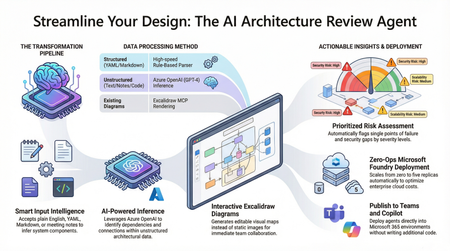
Designing and documenting software architecture is often a battle against static diagrams that become outdated the moment they are drawn. The Architecture Review Agent changes that by turning your design process into a dynamic, AI-powered workflow. In this post, we explore how to leverage Microsoft Foundry Hosted Agents, Azure OpenAI, and Excalidraw to build an open-source tool that instantly converts messy text descriptions, YAML, or README files into editable architecture diagrams. Beyond just drawing boxes, the agent acts as a technical co-pilot, delivering prioritized risk assessments, highlighting single points of failure, and mapping component dependencies. Discover how to eliminate manual diagramming, catch security flaws early, and deploy your own enterprise-grade agent with zero infrastructure overhead.9.1KViews6likes5CommentsIntegrating Microsoft Foundry with OpenClaw: Step by Step Model Configuration
Step 1: Deploying Models on Microsoft Foundry Let us kick things off in the Azure portal. To get our OpenClaw agent thinking like a genius, we need to deploy our models in Microsoft Foundry. For this guide, we are going to focus on deploying gpt-5.2-codex on Microsoft Foundry with OpenClaw. Navigate to your AI Hub, head over to the model catalog, choose the model you wish to use with OpenClaw and hit deploy. Once your deployment is successful, head to the endpoints section. Important: Grab your Endpoint URL and your API Keys right now and save them in a secure note. We will need these exact values to connect OpenClaw in a few minutes. Step 2: Installing and Initializing OpenClaw Next up, we need to get OpenClaw running on your machine. Open up your terminal and run the official installation script: curl -fsSL https://openclaw.ai/install.sh | bash The wizard will walk you through a few prompts. Here is exactly how to answer them to link up with our Azure setup: First Page (Model Selection): Choose "Skip for now". Second Page (Provider): Select azure-openai-responses. Model Selection: Select gpt-5.2-codex , For now only the models listed (hosted on Microsoft Foundry) in the picture below are available to be used with OpenClaw. Follow the rest of the standard prompts to finish the initial setup. Step 3: Editing the OpenClaw Configuration File Now for the fun part. We need to manually configure OpenClaw to talk to Microsoft Foundry. Open your configuration file located at ~/.openclaw/openclaw.json in your favorite text editor. Replace the contents of the models and agents sections with the following code block: { "models": { "providers": { "azure-openai-responses": { "baseUrl": "https://<YOUR_RESOURCE_NAME>.openai.azure.com/openai/v1", "apiKey": "<YOUR_AZURE_OPENAI_API_KEY>", "api": "openai-responses", "authHeader": false, "headers": { "api-key": "<YOUR_AZURE_OPENAI_API_KEY>" }, "models": [ { "id": "gpt-5.2-codex", "name": "GPT-5.2-Codex (Azure)", "reasoning": true, "input": ["text", "image"], "cost": { "input": 0, "output": 0, "cacheRead": 0, "cacheWrite": 0 }, "contextWindow": 400000, "maxTokens": 16384, "compat": { "supportsStore": false } }, { "id": "gpt-5.2", "name": "GPT-5.2 (Azure)", "reasoning": false, "input": ["text", "image"], "cost": { "input": 0, "output": 0, "cacheRead": 0, "cacheWrite": 0 }, "contextWindow": 272000, "maxTokens": 16384, "compat": { "supportsStore": false } } ] } } }, "agents": { "defaults": { "model": { "primary": "azure-openai-responses/gpt-5.2-codex" }, "models": { "azure-openai-responses/gpt-5.2-codex": {} }, "workspace": "/home/<USERNAME>/.openclaw/workspace", "compaction": { "mode": "safeguard" }, "maxConcurrent": 4, "subagents": { "maxConcurrent": 8 } } } } You will notice a few placeholders in that JSON. Here is exactly what you need to swap out: Placeholder Variable What It Is Where to Find It <YOUR_RESOURCE_NAME> The unique name of your Azure OpenAI resource. Found in your Azure Portal under the Azure OpenAI resource overview. <YOUR_AZURE_OPENAI_API_KEY> The secret key required to authenticate your requests. Found in Microsoft Foundry under your project endpoints or Azure Portal keys section. <USERNAME> Your local computer's user profile name. Open your terminal and type whoami to find this. Step 4: Restart the Gateway After saving the configuration file, you must restart the OpenClaw gateway for the new Foundry settings to take effect. Run this simple command: openclaw gateway restart Configuration Notes & Deep Dive If you are curious about why we configured the JSON that way, here is a quick breakdown of the technical details. Authentication Differences Azure OpenAI uses the api-key HTTP header for authentication. This is entirely different from the standard OpenAI Authorization: Bearer header. Our configuration file addresses this in two ways: Setting "authHeader": false completely disables the default Bearer header. Adding "headers": { "api-key": "<key>" } forces OpenClaw to send the API key via Azure's native header format. Important Note: Your API key must appear in both the apiKey field AND the headers.api-key field within the JSON for this to work correctly. The Base URL Azure OpenAI's v1-compatible endpoint follows this specific format: https://<your_resource_name>.openai.azure.com/openai/v1 The beautiful thing about this v1 endpoint is that it is largely compatible with the standard OpenAI API and does not require you to manually pass an api-version query parameter. Model Compatibility Settings "compat": { "supportsStore": false } disables the store parameter since Azure OpenAI does not currently support it. "reasoning": true enables the thinking mode for GPT-5.2-Codex. This supports low, medium, high, and xhigh levels. "reasoning": false is set for GPT-5.2 because it is a standard, non-reasoning model. Model Specifications & Cost Tracking If you want OpenClaw to accurately track your token usage costs, you can update the cost fields from 0 to the current Azure pricing. Here are the specs and costs for the models we just deployed: Model Specifications Model Context Window Max Output Tokens Image Input Reasoning gpt-5.2-codex 400,000 tokens 16,384 tokens Yes Yes gpt-5.2 272,000 tokens 16,384 tokens Yes No Current Cost (Adjust in JSON) Model Input (per 1M tokens) Output (per 1M tokens) Cached Input (per 1M tokens) gpt-5.2-codex $1.75 $14.00 $0.175 gpt-5.2 $2.00 $8.00 $0.50 Conclusion: And there you have it! You have successfully bridged the gap between the enterprise-grade infrastructure of Microsoft Foundry and the local autonomy of OpenClaw. By following these steps, you are not just running a chatbot; you are running a sophisticated agent capable of reasoning, coding, and executing tasks with the full power of GPT-5.2-codex behind it. The combination of Azure's reliability and OpenClaw's flexibility opens up a world of possibilities. Whether you are building an automated devops assistant, a research agent, or just exploring the bleeding edge of AI, you now have a robust foundation to build upon. Now it is time to let your agent loose on some real tasks. Go forth, experiment with different system prompts, and see what you can build. If you run into any interesting edge cases or come up with a unique configuration, let me know in the comments below. Happy coding!7.8KViews2likes2CommentsFrom Manual Document Processing to AI-Orchestrated Intelligence
Building an IDP Pipeline with Azure Durable Functions, DSPy, and Real-Time AI Reasoning The Problem Think about what happens when a loan application, an insurance claim, or a trade finance document arrives at an organisation. Someone opens it, reads it, manually types fields into a system, compares it against business rules, and escalates for approval. That process touches multiple people, takes hours or days, and the accuracy depends entirely on how carefully it's done. Organizations have tried to automate parts of this before — OCR tools, templated extraction, rule-based routing. But these approaches are brittle. They break when the document format changes, and they can't reason about what they're reading. The typical "solution" falls into one of two camps: Manual processing. Humans read, classify, and key in data. Accurate but slow, expensive, and impossible to scale. Single-model extraction. Throw an OCR/AI model at the document, trust the output, push to downstream systems. Fast but fragile — no validation, no human checkpoint, no confidence scoring. What's missing is the middle ground: an orchestrated, multi-model pipeline with built-in quality gates, real-time visibility, and the flexibility to handle any document type without rewriting code. That's what IDP Workflow is — a six-step AI-orchestrated pipeline that processes documents end to end, from a raw PDF to structured, validated data, with human oversight built in. This isn't automation replacing people. It's AI doing the heavy lifting and humans making the final call. Architecture at a Glance POST /api/idp/start → Step 1 PDF Extraction (Azure Document Intelligence → Markdown) → Step 2 Classification (DSPy ChainOfThought) → Step 3 Data Extraction (Azure Content Understanding + DSPy LLM, in parallel) → Step 4 Comparison (field-by-field diff) → Step 5 Human Review (HITL gate — approve / reject / edit) → Step 6 AI Reasoning Agent (validation, consolidation, recommendations) → Final structured result The backend is Azure Durable Functions (Python) on Flex Consumption — customers only pay for what they use, and it scales automatically. The frontend is a Next.js dashboard with SignalR real-time updates and a Reaflow workflow visualization. Every step broadcasts stepStarted → stepCompleted / stepFailed events so the UI updates as work progresses. The pattern applies wherever organisations receive high volumes of unstructured documents that need to be classified, data-extracted, validated, and approved. The Six Steps, Explained Step 1: PDF → Markdown We use Azure Document Intelligence with the prebuilt-layout model to convert uploaded PDFs into structured Markdown — preserving tables, headings, and reading order. Markdown turns out to be a much better intermediate representation for LLMs than raw text or HTML. class PDFMarkdownExtractor: async def extract(self, pdf_path: str) -> tuple[PDFContent, Step01Output]: poller = self.client.begin_analyze_document( "prebuilt-layout", analyze_request=AnalyzeDocumentRequest(url_source=pdf_path), output_content_format=DocumentContentFormat.MARKDOWN, ) result: AnalyzeResult = poller.result() # Split into per-page Markdown chunks... Output: Per-page Markdown content, total page count, and character stats. Step 2: Document Classification (DSPy) Rather than hard-coding classification rules, we use DSPy with ChainOfThought prompting. DSPy lets us define classification as a signature — a declarative input/output contract — and the framework handles prompt optimization. class DocumentClassificationSignature(dspy.Signature): """Classify document page into predefined categories.""" page_content: str = dspy.InputField(desc="Markdown content of the document page") available_categories: str = dspy.InputField(desc="Available categories") classification: DocumentClassificationOutput = dspy.OutputField() Categories are loaded from a domain-specific classification_categories.json. Adding new categories means editing a JSON file, not code. Critically, classification is per-page, not per-document. A multi-page loan application might contain a loan form on page 1, income verification on page 2, and a property valuation on page 3 — each classified independently with its own confidence score and detected field indicators. This means multi-section documents are handled correctly downstream. Why DSPy? It gives us structured, typed outputs via Pydantic models, automatic prompt optimization, and clean separation between the what (signature) and the how (ChainOfThought, Predict, etc.). Step 3: Dual-Model Extraction (Run in Parallel) This is where things get interesting. We run two independent extractors in parallel: Azure Content Understanding (CU): A specialized Azure service that takes the raw PDF and applies a domain-specific schema to extract structured fields. DSPy LLM Extractor: Uses the Markdown from Step 1 with a dynamically generated Pydantic model (built from the domain's extraction_schema.json) to extract the same fields via an LLM. The LLM provider is selectable at runtime — Azure OpenAI, Claude, or open-weight models deployed on Azure (Qwen, DeepSeek, Llama, Phi, and more from the Azure AI Model Catalog). # In the orchestrator — fire both tasks at once azure_task = context.call_activity("activity_step_03_01_azure_extraction", input) dspy_task = context.call_activity("activity_step_03_02_dspy_extraction", input) results = yield context.task_all([azure_task, dspy_task]) Both extractors use the same domain-specific schema but approach the problem differently. Running two models gives us a natural cross-check: if both extractors agree on a field value, confidence is high. If they disagree, we know exactly where to focus human attention — not the entire document, just the specific fields that need it. Multi-Provider LLM Support The DSPy extraction and classification steps aren't locked to a single model provider. From the dashboard, users can choose between: Azure OpenAI in Foundry Models — GPT-4.1, o3-mini (default) Claude on Azure — Anthropic's Claude models Foundry Models — Open-weight models deployed on Azure via Foundry Models: Qwen 2.5 72B, DeepSeek V3/R1, Llama 3.3 70B, Phi-4, and more The third option is key: instead of routing through a third-party service, you deploy open-weight models directly on Azure as serverless API endpoints through Azure AI Foundry. These endpoints expose an OpenAI-compatible API, so DSPy talks to them the same way it talks to GPT-4.1 — just with a different api_base. You get the model diversity of the open-weight ecosystem with Azure's enterprise security, compliance, and network isolation. A factory pattern in the backend resolves the selected provider and model at runtime, so switching from Azure OpenAI to Qwen on Azure AI is a single dropdown change — no config edits, no redeployment. This makes it easy to benchmark different models against the same extraction schema and compare quality. Step 4: Field-by-Field Comparison The comparator aligns the outputs of both extractors and produces a diff report: matching fields, mismatches, fields found by only one extractor, and a calculated match percentage. This feeds directly into the human review step. Output: "Match: 87.5% (14/16 fields)" Step 5: Human-in-the-Loop (HITL) Gate The pipeline pauses and waits for a human decision. The Durable Functions orchestrator uses wait_for_external_event() with a configurable timeout (default: 24 hours) implemented as a timer race: review_event = context.wait_for_external_event(HITL_REVIEW_EVENT) timeout = context.create_timer( context.current_utc_datetime + timedelta(hours=HITL_TIMEOUT_HOURS) ) winner = yield context.task_any([review_event, timeout]) The frontend shows a side-by-side comparison panel where reviewers can see both values for each disputed field — pick Azure's value, the LLM's value, or type in a correction. They can add notes explaining their decision, then approve or reject. If nobody responds within the timeout, it auto-escalates (configurable behavior). The orchestrator doesn't poll. It doesn't check a queue. The moment the reviewer submits their decision, the pipeline resumes automatically — using Durable Functions' native external event pattern. Step 6: AI Reasoning Agent The final step uses an AI agent with tool-calling to perform structured validation, consolidate field values, and generate a confidence score. This isn't just a prompt — it's an agent backed by the Microsoft Agent Framework with purpose-built tools: validate_fields — runs domain-specific validation rules (data types, ranges, cross-field logic) consolidate_extractions — merges Azure CU + DSPy outputs using confidence-weighted selection generate_summary — produces a natural-language summary with recommendations The reasoning step can use standard models or reasoning-optimised models like o3 or o3-mini for higher-stakes validation. The agent streams its reasoning process to the frontend in real time — validation results, confidence scoring, and recommendations all appear as they're generated. Domain-Driven Design: Zero-Code Extensibility One of the most powerful design choices: adding a new document type requires zero code changes. Each domain is a folder under idp_workflow/domains/ with four JSON files: idp_workflow/domains/insurance_claims/ ├── config.json # Domain metadata, thresholds, settings ├── classification_categories.json # Page-level classification taxonomy ├── extraction_schema.json # Field definitions (used by both extractors) └── validation_rules.json # Business rules for the reasoning agent The extraction_schema.json is particularly interesting — it's consumed by both the Azure CU service (which builds an analyzer from it) and the DSPy extractor (which dynamically generates a Pydantic model at runtime): def create_extraction_model_from_schema(schema: dict) -> type[BaseModel]: """Dynamically create a Pydantic model from an extraction schema JSON.""" # Maps schema field definitions → Pydantic field annotations # Supports nested objects, arrays, enums, and optional fields We currently ship four domains out of the box: insurance claims, home loans, small business lending, and trade finance. See It In Action: Processing a Home Loan Application To make this concrete, here's what happens when you process a multi-page home loan PDF — personal details, financial tables, and mixed content. Upload & Extract. The document hits the dashboard and Step 1 kicks off. Azure Document Intelligence converts all pages to structured Markdown, preserving tables and layout. You can preview the Markdown right in the detail panel. Per-Page Classification. Step 2 classifies each page independently: Page 1 is a Loan Application Form, Page 2 is Income Verification, Page 3 is a Property Valuation. Each has its own confidence score and detected fields listed. Dual Extraction. Azure CU and the DSPy LLM extractor run simultaneously. You can watch both progress bars in the dashboard. Comparison. The system finds 16 fields total. 14 match between the two extractors. Two fields differ — the annual income figure and the loan term. Those are highlighted for review. Human Review. The reviewer sees both values side by side for each disputed field, picks the correct value (or types a correction), adds a note, and approves. The moment they submit, the pipeline resumes — no polling. AI Reasoning. The agent validates against home loan business rules: loan-to-value ratio, income-to-repayment ratio, document completeness. Validation results stream in real time. Final output: 92% confidence, 11 out of 12 validations passed. The AI flags a minor discrepancy in employment dates and recommends approval with a condition to verify employment tenure. Result: A document that would take 30–45 minutes of manual processing, handled in under 2 minutes — with complete traceability. Every step, every decision, timestamped in the event log. Real-Time Frontend with SignalR Every orchestration step broadcasts events through Azure SignalR Service, targeted to the specific user who started the workflow: def _broadcast(context, user_id, event, data): return context.call_activity("notify_user", { "user_id": user_id, "instance_id": context.instance_id, "event": event, "data": data, }) The frontend generates a session-scoped userId, passes it via the x-user-id header during SignalR negotiation, and receives only its own workflow events. No Pub/Sub subscriptions to manage. The Next.js frontend uses: Zustand + Immer for state management (4 stores: workflow, events, reasoning, UI) Reaflow for the animated pipeline visualization React Query for data fetching Tailwind CSS for styling The result is a dashboard where you can upload a document and watch each pipeline step execute in real time. Infrastructure: Production-Ready from Day One The entire stack deploys with a single command using Azure Developer CLI (azd): azd up What gets provisioned: Resource Purpose Azure Functions (Flex Consumption) Backend API + orchestration Azure Static Web App Next.js frontend Durable Task Scheduler Orchestration state management Storage Account Document blob storage Application Insights Monitoring and diagnostics Network Security Perimeter Storage network lockdown Infrastructure is defined in Bicep with: Parameterized configuration (memory, max instances, retention) RBAC role assignments via a consolidated loop Two-region deployment (Functions + SWA have different region availability) Network Security Perimeter deployed in Learning mode, switched to Enforced post-deploy Key Engineering Decisions Why Durable Functions? Orchestrating a multi-step pipeline with parallel execution, external event gates, timeouts, and retry logic is exactly what Durable Functions was designed for. The orchestrator is a Python generator function — each yield is a checkpoint that survives process restarts: def idp_workflow_orchestration(context: DurableOrchestrationContext): step1 = yield from _execute_step(context, ...) # PDF extraction step2 = yield from _execute_step(context, ...) # Classification results = yield context.task_all([azure_task, dspy_task]) # Parallel extraction # ... HITL gate, reasoning agent, etc. No external queue management. No state database. No workflow engine to operate. Why Dual Extraction? Running two independent models on the same document gives us: Cross-validation — agreement between models is a strong confidence signal Coverage — one model might extract fields the other misses Auditability — human reviewers can see both outputs side by side Graceful degradation — if one service is down, the other still produces results Why DSPy over Raw Prompts? DSPy provides: Typed I/O — Pydantic models as signatures, not string parsing Composability — ChainOfThought, Predict, ReAct are interchangeable modules Prompt optimization — once you have labeled examples, DSPy can auto-tune prompts LM scoping — with dspy.context(lm=self.lm): isolates model configuration per call Getting Started # Clone git clone https://github.com/lordlinus/idp-workflow.git cd idp-workflow # DTS Emulator (requires Docker) docker run -d -p 8080:8080 -p 8082:8082 \ -e DTS_TASK_HUB_NAMES=default,idpworkflow \ mcr.microsoft.com/dts/dts-emulator:latest # Backend python -m venv .venv && source .venv/bin/activate pip install -r requirements.txt func start # Frontend (separate terminal) cd frontend && npm install && npm run dev You'll also need Azurite (local storage emulator) running, plus Azure OpenAI, Document Intelligence, Content Understanding, and SignalR Service endpoints configured in local.settings.json. See the Local Development Guide for the full setup. Who Is This For? If any of these sound familiar, IDP Workflow was built for you: "We're drowning in documents." — High-volume document intake with manual processing bottlenecks. "We tried OCR but it breaks on new formats." — Brittle extraction that fails when layouts change. "Compliance needs an audit trail for every decision." — Regulated industries where traceability is non-negotiable. This is an AI-powered document processing platform — not a point OCR tool — with human oversight, dual AI validation, and domain extensibility built in from day one. What's Next Prompt optimization — using DSPy's BootstrapFewShot with domain-specific training examples Batch processing — fan-out/fan-in orchestration for processing document queues Custom evaluators — automated quality scoring per domain Additional domains — community-contributed domain configurations Try It Out The project is fully open source: github.com/lordlinus/idp-workflow Deploy to your own Azure subscription with azd up, upload a PDF from the sample_documents/ folder, and watch the pipeline run. We'd love feedback, contributions, and new domain configurations. Open an issue or submit a PR!829Views0likes1CommentAnnouncing GPT‑5.2‑Codex in Microsoft Foundry: Enterprise‑Grade AI for Secure Software Engineering
Enterprise developers know the grind: wrestling with legacy code, navigating complex dependency challenges, and waiting on security reviews that stall releases. OpenAI’s GPT‑5.2‑Codex flips that equation and helps engineers ship faster without cutting corners. It’s not just autocomplete; it’s a reasoning engine for real-world software engineering. Generally available starting today through Azure OpenAI in Microsoft Foundry Models, GPT‑5.2‑Codex is built for the realities of enterprise codebases, large repos, evolving requirements, and security constraints that can’t be overlooked. As OpenAI’s most advanced agentic coding model, it brings sustained reasoning, and security-aware assistance directly into the workflows enterprise developers already rely on with Microsoft’s secure and reliable infrastructure. GPT-5.2-Codex at a Glance GPT‑5.2‑Codex is designed for how software gets built in enterprise teams. You start with imperfect inputs including legacy code, partial docs, screenshots, diagrams, and work through multi‑step changes, reviews, and fixes. The model helps keep context, intent, and standards intact across that entire lifecycle, so teams can move faster without sacrificing quality or security. What it enables Work across code and artifacts: Reason over source code alongside screenshots, architecture diagrams, and UI mocks — so implementation stays aligned with design intent. Stay productive in long‑running tasks: Maintain context across migrations, refactors, and investigations, even as requirements evolve. Build and review with security in mind: Get practical support for secure coding patterns, remediation, reviews, and vulnerability analysis — where correctness matters as much as speed. Feature Specs (quick reference) Context window: 400K tokens (approximately 100K lines of code) Supported languages: 50+ including Python, JavaScript/TypeScript, C#, Java, Go, Rust Multimodal inputs: Code, images (UI mocks, diagrams), and natural language API compatibility: Drop-in replacement for existing Codex API calls Use cases where it really pops Legacy modernization with guardrails: Safely migrate and refactor “untouchable” systems by preserving behavior, improving structure, and minimizing regression risk. Large‑scale refactors that don’t lose intent: Execute cross‑module updates and consistency improvements without the typical “one step forward, two steps back” churn. AI‑assisted code review that raises the floor: Catch risky patterns, propose safer alternatives, and improve consistency, especially across large teams and long‑lived codebases. Defensive security workflows at scale: Accelerate vulnerability triage, dependency/path analysis, and remediation when speed matters, but precision matters more. Lower cognitive load in long, multi‑step builds: Keep momentum across multi‑hour sessions: planning, implementing, validating, and iterating with context intact. Pricing Model Input Price/1M Tokens Cached Input Price/1M Tokens Output Price/1M Tokens GPT-5.2-Codex $1.75 $0.175 $14.00 Security Aware by Design, not as an Afterthought For many organizations, AI adoption hinges on one nonnegotiable question: Can this be trusted in security sensitive workflows? GPT-5.2-Codex meaningfully advances the Codex lineage in this area. As models grow more capable, we’ve seen that general reasoning improvements naturally translate into stronger performance in specialized domains — including defensive cybersecurity. With GPT‑5.2‑Codex, this shows up in practical ways: Improved ability to analyze unfamiliar code paths and dependencies Stronger assistance with secure coding patterns and remediation More dependable support during code reviews, vulnerability investigations, and incident response At the same time, Microsoft continues to deploy these capabilities thoughtfully balancing access, safeguards, and platform level controls so enterprises can adopt AI responsibly as capabilities evolve. Why Run GPT-5.2-Codex on Microsoft Foundry? Powerful models matter — but where and how they run matters just as much for enterprise. Organizations choose Microsoft Foundry because it combines Foundry frontier AI with Azure enterprise grade fundamentals: Integrated security, compliance, and governance Deploy GPT-5.2-Codex within existing Azure security boundaries, identity systems, and compliance frameworks — without reinventing controls. Enterprise ready orchestration and tooling Build, evaluate, monitor, and scale AI powered developer experiences using the same platform teams already rely on for production workloads. A unified path from experimentation to scale Foundry makes it easier to move from proof of concept to real deployment —without changing platforms, vendors, or operating assumptions. Trust at the platform level For teams working in regulated or security critical environments, Foundry and Azure provide assurances that go beyond the model itself. Together with GitHub Copilot, Microsoft Foundry provides a unified developer experience — from in‑IDE assistance to production‑grade AI workflows — backed by Azure’s security, compliance, and global scale. This is where GPT-5.2-Codex becomes not just impressive but adoptable. Get Started Today Explore GPT‑5.2‑Codex in Microsoft today. Start where you already work: Try GPT‑5.2‑Codex in GitHub Copilot for everyday coding and scale the same model to larger workflows using Azure OpenAI in Microsoft Foundry. Let’s build what’s next with speed and security.17KViews3likes1Comment