azure managed grafana
33 TopicsScale Data Collection Endpoint private connectivity with IP Endpoint Compression - Preview
Scale Azure Monitor Private Link with data collection endpoint IP compression As organizations expand their Azure Monitor deployments, private networking needs to scale with them. For enterprises running large, distributed environments, that can create an increasingly important challenge: how do you grow private monitoring without consuming private IP address space at the same rate? Azure Monitor is introducing private IP endpoint compression for data collection endpoints (DCEs) connected through Azure Monitor Private Link Scope (AMPLS). This capability is designed to reduce the private IP footprint by ~90%-95% associated with DCEs while preserving the Azure Monitor Private Link architecture and the security controls customers already use. The challenge: private monitoring at enterprise scale Organizations often centralize Azure Monitor connectivity through carefully governed hub-and-spoke networks. As these environments grow, they can include monitored resources, data collection rules (DCRs), DCEs, and Log Analytics workspaces distributed across multiple regions. When private connectivity is required, DCEs are connected through AMPLS. The associated private endpoint uses addresses from a customer-managed subnet. As more DCEs are added, this can increase the private IP footprint required for Azure Monitor connectivity and create challenges such as: Increased subnet-capacity planning Additional network-governance reviews Delays when onboarding workloads or regions Provisioning challenges when available subnet capacity becomes constrained More operational complexity in centralized DNS and hub-and-spoke environments As customers onboard more Azure resources to send telemetry over private networks, they need a scalable way to preserve valuable private IP address space without increasing the operational complexity of their network-isolated monitoring environment. Introducing DCE private IP endpoint compression DCE private IP endpoint compression changes how DCE service endpoints are represented behind an AMPLS private endpoint. Instead of having the private IP footprint scale directly with every DCE, the compressed architecture groups compatible DCE service endpoints regionally and allows them to use a smaller, bounded set of private IP configurations. Requests continue to be routed to the intended DCE based on the requested endpoint and the existing Azure Monitor authorization context. The result is a more scalable private-network architecture without introducing a new data collection model. What does this mean for customers? Large enterprises have limited, tightly managed, often fragmented private IPv4 spaces. Private endpoints require IP addresses from customers' private IPv4 subnets. With private IP endpoint compression, all DCEs in a region share 3 regional private IPs. For example, 20 DCEs drop from 60 private IPs to 3, which is 95% fewer. Private IP address use stops growing with every DCE you add. There are no changes to how DCEs, DCRs, AMPLS, Azure Monitor Agent or Log Analytics work. Use private address space more efficiently A smaller, bounded private IP footprint can preserve valuable subnet capacity for additional workloads and Azure services. This can be particularly useful for enterprises operating with constrained private IP address space or centralized network-allocation processes. Make network planning more predictable Instead of treating each additional DCE as a proportional increase in private IP requirements, network teams can plan capacity around the regional architecture. This approach makes the network planning more predictable for enterprise customers. Scale monitoring across more workloads and regions Reducing pressure on private IP address space can make it easier to expand monitoring across applications, subscriptions, and regions without repeatedly redesigning private endpoint subnets. Reduce operational friction A more compact endpoint representation can reduce the networking work associated with subnet capacity reviews, expansion planning, and Private Link onboarding. What stays the same? One of the goals of this design is to improve network scalability while preserving the Azure Monitor model customers already use. DCE private IP endpoint compression doesn't change: The role of AMPLS as the private Azure Monitor network boundary The role of the private endpoint connecting a virtual network to AMPLS AMPLS Open and Private Only access modes DCR collection, transformation, and routing logic Azure Monitor Agent configuration semantics Log Analytics tables, retention, or KQL query behavior The amount of telemetry ingested into Azure Monitor Application Insights data collection, which doesn't use DCEs Azure Monitor ingestion charges Azure Private Link data-processing charges based on data volume Customers should continue following their existing DNS, routing, network security, public network access, and AMPLS configuration requirements. Preparing for the controlled preview DCE private IP endpoint compression is currently intended for subscriptions participating in a controlled preview. For customers participating in the preview, we recommend starting with a nonproduction or limited deployment. Before expanding the deployment: Map your topology. Understand the virtual networks, peering, AMPLS resources, private endpoints, DCEs, DCRs, workspaces, DNS zones, and supporting subnets involved. Review DNS ownership. Pay particular attention to networks sharing Azure Monitor private DNS zones and use a deliberate AMPLS topology. Establish a baseline. Record your existing private endpoint IP configurations and DCE DNS responses. Confirm regional alignment. Review the relationship between monitored resources, DCE configuration access, ingestion endpoints, and destination workspaces. Review access modes. Confirm the appropriate use of AMPLS Open or Private Only access modes for your security requirements. Validate end to end. Verify DNS resolution, Azure Monitor Agent configuration access, DCR health, ingestion, transformation, and query behavior before expanding the deployment. Looking ahead Bottom line: DCE private IP endpoint compression is designed to make private Azure Monitor deployments easier to scale by reducing the relationship between DCE growth and private IP consumption, while preserving the Azure Monitor and AMPLS architecture customers use today. Customers interested in participating in the controlled preview can contact the author via email with their subscription need to be allowlisted for the preview. This preview is available only to allowlisted subscriptions. To request access, submit your Azure subscription ID through the DCE IP Endpoint Compression preview onboarding form. Wait for Microsoft to confirm that your subscription is preview-enabled before you create the test DCEs. IP compression applies automatically to newly created DCEs in preview-enabled subscriptions. There's no additional setting to enable when you create a DCE or associate it with AMPLS. We look forward to helping customers scale private Azure Monitor deployments while making more efficient use of their network address space. Resources Learn more about designing and configuring private connectivity for Azure Monitor: Scale Data Collection Endpoint (DCE) private connectivity with IP Endpoint Compression (Preview) - Azure Monitor | Microsoft Learn Use Azure Private Link to connect networks to Azure Monitor Learn how Azure Monitor Private Link Scope (AMPLS), private endpoints, and Azure Monitor resources work together to provide private connectivity. Design your Azure Monitor Private Link configuration Review network topology, DNS, AMPLS limits, hub-and-spoke architectures, and other considerations when planning Azure Monitor Private Link. Configure Azure Monitor Private Link Follow the configuration guidance for creating an AMPLS, connecting Azure Monitor resources such as Data Collection Endpoints (DCEs), and connecting the AMPLS to a private endpoint. Prevent IPv4 Exhaustion in Azure - Azure Architecture Center | Microsoft Learn115Views0likes0Comments
Action required: PromQL regex matching in Azure Monitor Workspace is becoming spec-compliant
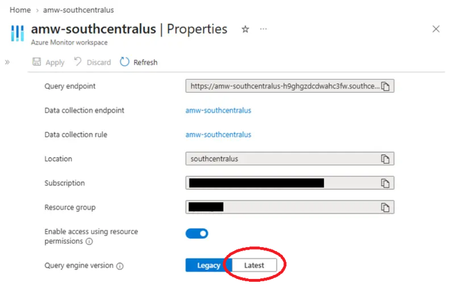
TL;DR: Bare regex matchers like pod=~"foo" will soon return only exact matches, not substring matches. If you rely on =~ for "starts with" or "contains" semantics, update your queries to add .* before the change lands. What is changing AMW's Prometheus Query Service is moving to fully-anchored regex matching, aligning with the upstream Prometheus specification. After the change, every =~ and !~ matcher is wrapped with ^…$ before evaluation. This matches the behavior of self-hosted Prometheus, Grafana Cloud Metrics, and Amazon Managed Prometheus. "Regex matches are fully anchored. A match of env=~"foo" is treated as env=~"^foo$"." Reference: Prometheus querying basics — Instant vector selectors Behavior delta Given these timeseries: kube_pod_container_status_ready{pod="grafana-otel-collector-97b6c55f4-abc12"} kube_pod_container_status_ready{pod="grafana-otel-collector-97b6c55f4-def34"} kube_pod_container_status_ready{pod="grafana-otel-collector-97b6c55f4"} Query: kube_pod_container_status_ready{pod=~"grafana-otel-collector-97b6c55f4"} Environment Effective regex Series returned AMW PQS — current grafana-otel-collector-97b6c55f4 (unanchored) 3 (all matching pods) AMW PQS — after change ^grafana-otel-collector-97b6c55f4$ 1 (exact name only) Self-hosted Prometheus, Grafana Cloud, AMP ^grafana-otel-collector-97b6c55f4$ 1 (exact name only) If your query depends on the first row, it will return fewer — often zero — series after the change. What to do Audit any query, alert rule, recording rule, or dashboard variable that uses =~ or !~. Map each to the table below. Intent Update to Exact match No change necessary; both label="value" and label=~"value" should return exact matches after updating query engine version for fully anchored regex support. Starts with label=~"value.*" Ends with label=~".*value" Contains label=~".*value.*" Set of prefixes label=~"(a\|b\|c).*" Recommendation: Where the intent is exact match, switch from =~ to = It is clearer to readers and skips per-series regex evaluation. When ready, update AMW configuration to use the latest Query engine version. This can be done via the Azure Portal UI, Azure CLI, or PowerShell. Configuring AMW to use the latest Prometheus query engine version Azure Portal In the Azure portal, open your Azure Monitor workspace. Under Settings, select Properties. Select the Latest segment of the Query engine version for the AMW. Azure CLI Run the following command to update to the latest (2.0) metrics query engine version for the AMW: Az monitor account metrics-container update --subscription <subscriptionId> -g <resourcegroupName> -w <azmonWorkspaceName> -n default --version 2.0 Azure PowerShell Run the following command to use the latest Query engine version for the AMW: $resourceId = “/subscriptions/<subscriptionId>/resourceGroups/<resourcegroupName>/providers/Microsoft.Monitor/accounts/<azureMonitorWorkspaceName>/metricsContainers/default” Az resource update --ids $resourceId --api-version 2025-10-03 --set properties.version=2.0 --force-string To confirm: Az resource show --ids $resourceId --api-version 2025-10-03 --query properties.version --output tsv Expected output: 2.0 Common pitfalls Alternation anchors the whole expression. pod=~"foo|bar" becomes ^(?:foo|bar)$, not ^foo|bar$. Add .* and parentheses for prefix sets. . matches any character, including -. pod=~"my-pod.*" will match my-pod-xyz, my-podxyz, and my-pod9xyz. Use character classes like [-] for tighter matches. Empty-label matching is unchanged. label=~"" still matches series without that label. Timeline Public Preview rollout: September 2026 In Public Preview, newly created AMWs will default to the latest metrics query version (“2.0”) which features fully anchored regex matching. AMWs created prior to September 2026 will continue using version (“1.0”) unless users take action to update. This provides users with the opportunity to verify their query intent and update accordingly prior to cutover to the latest AMW metrics query engine version. General Availability: March 2027 In General Availability, all AMWs regardless of creation date will be updated to version “2.0” for cross-workspace compatibility. Action window: Audit and update queries before the General Availability date.332Views0likes0CommentsPUBLIC PREVIEW - Azure Monitor - Collect Azure Resource Platform Logs at Scale with DCRs
PUBLIC PREVIEW - Azure Monitor - Collect Azure Resource Platform Logs at Scale with DCRs. How DCR-based platform logs simplify the telemetry collection for organizations managing 1,000+ resources.1.2KViews2likes1Comment
Connect Metrics to Traces with Exemplars in Azure Monitor
Following Microsoft’s recent GA announcement for OpenTelemetry (OTel) support, we are excited to announce support for Exemplars for customers instrumenting metrics with Prometheus or OpenTelemetry and traces using OpenTelemetry, enhancing Azure Monitor’s integrated observability experience for cloud-native applications. Modern cloud-native applications generate enormous volumes of telemetry. Metrics help teams detect that something is wrong, but traces explain why. Exemplars bridge these two worlds by attaching trace references directly to metric data points, making it dramatically easier to pivot from a spike in latency or errors to the exact distributed trace responsible for the issue. With Azure Monitor, customers can now ingest metrics with exemplars and visualize them in Azure Managed Grafana. This enables seamless correlation between metrics and traces, helping engineering teams troubleshoot issues faster and reduce mean time to resolution (MTTR). Why Exemplars Matter Traditional monitoring workflows often require users to manually correlate data across multiple systems. Exemplars simplify this workflow by embedding trace context directly into metric samples. For example, if a latency metric spikes at a specific timestamp, the exemplar associated with that data point can link directly to the distributed trace responsible for the outlier. This provides several benefits: Faster root cause analysis Quicker transition from aggregate metrics to request-level details Simplified debugging workflows for SRE and platform teams Better observability experiences for microservices and distributed applications Unified Observability with Azure Monitor With Azure Monitor and Azure Managed Grafana, you can now: Ingest OTLP or Prometheus metrics with exemplars into Azure Monitor Workspace Store and analyze traces in Azure Monitor Application Insights Visualize exemplar markers directly in Grafana charts Navigate from a metric spike to the exact distributed trace associated with that data point By combining these signals in a single observability platform, organizations can correlate infrastructure health, application behavior, and request traces without context switching between tooling. How It Works Once metrics, exemplars, and traces are ingested into Azure Monitor, Azure Managed Grafana can consume exemplar information from the configured Prometheus data source. When exemplars are enabled in Grafana dashboards, users will see markers associated with individual metric data points. Selecting an exemplar opens the associated trace in Azure Monitor, providing end-to-end diagnostic context. Getting Started Setup data ingestion: Instrument your application to emit OpenTelemetry traces, OpenTelemetry or Prometheus metrics with exemplars, and enable ingestion of the same to Azure Monitor using OpenTelemetry Collector. Follow the instructions in Ingest OTLP Data into Azure Monitor with OTel Collector - Azure Monitor | Microsoft Learn. After this step, you will have the Log Analytics Workspace, Azure Monitor Workspace and Application Insights resources all set up to store the telemetry data. Create an Azure Managed Grafana instance and connect it with the Azure Monitor Workspace by navigating to your Azure Monitor Workspace in the Azure portal and then clicking on “Linked Grafana workspaces”. To learn more, see Manage an Azure Monitor workspace - Azure Monitor | Microsoft Learn Optionally, enable Azure Managed Prometheus on your AKS cluster or use remote-write and configure it to use the same Azure Monitor Workspace to centralize infrastructure and application metrics. Enable Exemplars in Azure Managed Grafana: After setting up the data ingestion, ensure that logs and traces are flowing into Log Analytics Workspace, and metrics are flowing into Azure Monitor Workspace. Step 1: Enable Exemplars on Prometheus Data Source in Azure Managed Grafana Navigate to Connections -> Data Sources in Azure Managed Grafana. Since you have connected Azure Managed Grafana to Azure Monitor Workspace, you will see the data source (Managed_Prometheus_<AMW-Name>) already configured. If the data source is not configured, follow the steps here to add your Azure Monitor Workspace as a data source. Open the data source configuration. Click Add Exemplars to enable exemplar support. Step 2: Configure Trace Linking with Azure Monitor In the exemplar configuration section, toggle Internal Link to On. Select Azure Monitor as the data source. In the Label Name, enter the name of the field in the labels object that should be used to get the trace id, eg. trace_id. Click Save & Test. This configuration enables direct navigation from exemplar markers in Grafana charts to the associated traces stored in Azure Monitor. Azure Managed Grafana also supports trace correlation from other solutions like Jaeger etc. To use your trace solution, use the appropriate links. Step 3: Enable Exemplars in Dashboards Navigate to a Grafana dashboard that uses your configured Prometheus data source. Open the panel options for a metrics chart. Toggle Exemplars to On. Once enabled, exemplar markers will appear on supported metric visualizations. Clicking on it will show exemplar details along with an option to open the corresponding distributed trace in Azure Monitor. To learn more, visit https://aka.ms/azmon-exemplars398Views1like0CommentsMonitor AI coding agents with OpenTelemetry in Azure Monitor
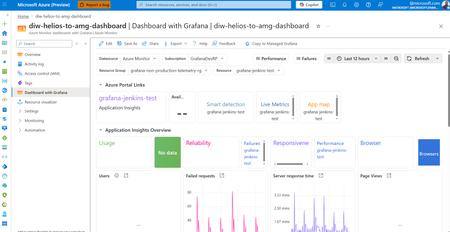
AI coding agents are quickly becoming part of the everyday developer workflow. As teams adopt tools such as GitHub Copilot, Claude Code, and Codex, they need a better way to understand usage, troubleshoot performance, and keep an eye on token consumption and cost. With Azure Monitor’s OpenTelemetry support, you can collect OpenTelemetry Protocol (OTLP) signals from AI coding agents and route them into Azure Monitor for end-to-end visibility. Ingested OTLP data is stored with OpenTelemetry semantics for logs and traces, Application Insights provides curated agent views for troubleshooting, detailed trace visualizations and end-to-end transaction views. Image: Application Insights end-to-end transaction view for agents. Azure Monitor also includes ready-to-use Grafana dashboards that deliver streamlined, out-of-the-box visualizations with the flexibility to customize further. This gives platform teams, engineering leaders, and developers a consistent way to monitor using open-source standards. The key takeaway is that these dedicated coding agent dashboards surface agent-specific details like feature usage, commit counts, code change acceptance rates, and user details if included in ingested telemetry. That creates immediate value for developer teams and organizations that want to understand adoption rates and the value being returned by coding agents. Image: Azure Monitor dashboards with Grafana for GitHub Copilot How it works Coding agents or IDEs can be configured to export OTLP signals by using organization-wide environment variables, project settings, or shared repository configurations. Note: These settings determine whether content and conversation details are captured and exported. Ensure that your configuration matches your organization's privacy and data handling policies. An OpenTelemetry Collector can receive OTLP and forward it to Azure Monitor OTLP ingestion endpoints. This OTLP ingestion pipeline uses Entra authenticated and stores logs and traces with OpenTelemetry semantics Once the data is in Azure Monitor, teams can investigate usage and adoption patterns in Application Insights agent-specific views and visualize trends with pre-built coding agent dashboards in Azure Monitor dashboards with Grafana or Azure Managed Grafana. Image: OTLP ingestion path from coding agent to Azure Monitor Why it matters This approach helps central IT and engineering management teams understand rollout, adoption, and cost across their organization, while giving developers a better view of agent interactions and productivity signals. With OpenTelemetry and Azure Monitor, teams can standardize once, reduce pipeline complexity, and access useful insights faster for these coding agents: GitHub Copilot Claude Code Codex OpenClaw Gemini CLI OpenCode Get started AI coding agents are accelerating software development, and observability needs to keep up. Azure Monitor brings together OpenTelemetry and Grafana so you can monitor agent usage and performance with a flexible, standards-based approach. To learn more, explore: OpenTelemetry export from Visual Studio Code OTLP ingestion into Azure Monitor Coding agent dashboards in Azure Managed Grafana Monitor AI agents with Application Insights926Views0likes0CommentsTroubleshoot with OpenTelemetry in Azure Monitor - Public Preview
OpenTelemetry is fast becoming the industry standard for modern telemetry collection and ingestion pipelines. With Azure Monitor’s new OpenTelemetry Protocol (OTLP) support, you can ship logs, metrics, and traces from wherever you run workloads to analyze and act on your observability data in one place. What’s in the preview Direct OTLP ingestion into Azure Monitor for logs, metrics, and traces. Automated onboarding for AKS workloads. Application Insights on OTLP for distributed tracing, performance and troubleshooting experiences. Pre-built Grafana dashboards to visualize signals quickly. Prometheus for metric storage and query. OpenTelemetry semantic conventions for logs and traces, so your data lands in a familiar standard-based schema. How to send OTLP to Azure Monitor: pick your path AKS: Auto-instrument Java and Node.js workloads using the Azure Monitor OpenTelemetry distro, or auto-configure any OpenTelemetry SDK-instrumented workload to export OTLP to Azure Monitor. Get started Limited preview: Auto-instrumentation for .NET and Python is also available. Get started VMs/VM Scale Sets (and Azure Arc-enabled compute): Use the Azure Monitor Agent (AMA) to receive OTLP from your apps and export it to Azure Monitor. Get started Any environment: Use the OpenTelemetry Collector to receive OTLP signals and export directly to Azure Monitor cloud ingestion endpoints. Get started Under the hood: where your telemetry lands Metrics: Stored in an Azure Monitor Workspace, a Prometheus metrics store. Logs + traces: Stored in a Log Analytics workspace using an OpenTelemetry semantic conventions–based schema. Troubleshooting: Application Insights lights up distributed tracing and end-to-end performance investigations, backed by Azure Monitor. Why it matters Standardize once: Instrument with OpenTelemetry and keep your telemetry portable. Reduce overhead: Fewer bespoke exporters and pipelines to maintain. Debug faster: Correlate metrics, logs, and traces to get from alert to root cause with less guesswork. Observe with confidence: Use dashboards and tracing views that are ready on day one. Next step: Try the OTLP preview in your environment, then validate end-to-end signal flow with Application Insights and Grafana dashboards. Learn More675Views3likes0CommentsCopy dashboards from Dashboards with Grafana to Azure Managed Grafana
Azure Monitor Dashboards with Grafana provides an in‑portal Grafana experience optimized for Azure Monitor and managed Prometheus data. For many teams, that simplicity is exactly what they need. As observability practices mature, teams often need more than visualization: broader data source support, stronger security controls, and advanced workflows like Azure Managed Grafana MCP. Until now, moving dashboards from Dashboards with Grafana into Azure Managed Grafana often meant recreating them by hand or exporting JSON, extra friction when teams want to move faster. The new Copy to Managed Grafana experience removes that friction. Why a copy experience was needed Dashboards with Grafana and Azure Managed Grafana serve complementary roles. Dashboards with Grafana focuses on: Fast, zero‑setup visualization Tight integration with Azure Monitor and Prometheus An embedded experience directly inside the Azure portal Azure Managed Grafana extends that foundation with: Full Grafana workflows, including alerts, reporting, and automation Support for additional data sources and plugins Enterprise‑grade security features such as private endpoints and managed identity Cross‑team reuse through folders, APIs, and Role Based Access Controls Historically, teams that outgrew Dashboards with Grafana didn’t have a simple, in‑product way to bring their dashboards forward, so continuing in a more advanced Grafana environment required extra manual steps. The goal is simple: copy dashboards to Azure Managed Grafana as needs grow—while continuing to use Dashboards with Grafana for day‑to‑day work. Introducing “Copy to Managed Grafana” Customers can now copy dashboards from Dashboards with Grafana into Azure Managed Grafana directly from the Azure portal—without changing the original dashboard. This feature is: In‑context – start from your dashboard in Dashboards with Grafana Seamless – no exports or re‑creation Non‑disruptive – keep using the source dashboard while you adopt Managed Grafana The flow is straightforward: Select “Copy to Managed Grafana” from your dashboard in Dashboards with Grafana. This feature doesn’t work on built-in dashboards, so you would have to save a copy of built-in Dashboards before you can copy those. Choose an existing Azure Managed Grafana workspace or create a new one Complete the copy and continue working in a full Grafana environment, making data connections where needed Because it appears where teams already build dashboards, the option is easy to find when it becomes relevant. Advanced capabilities, like additional data sources, alerts, and folder organization, are configured after copying, so teams can adopt them when they’re ready. This keeps the transition predictable and avoids surprises. Dashboards with Grafana is the fastest way to visualize Azure Monitor data with Grafana. When teams need more control, scale, or extensibility, Azure Managed Grafana is the natural next step, without forcing you to stop using Dashboards with Grafana. Together, they form a single observability journey: Start quickly with Dashboards with Grafana Copy dashboards into Azure Managed Grafana when you need more capabilities Enjoy end to end observability within the Azure ecosystem as requirements evolve You don’t have to trade speed today for flexibility later. Learn more by reading the doc: Copy an Azure Monitor dashboard to Azure Managed Grafana - Azure Monitor | Microsoft Learn369Views0likes0CommentsIntroducing Azure Managed Grafana MCP: The Managed Telemetry Gateway for AI Agents
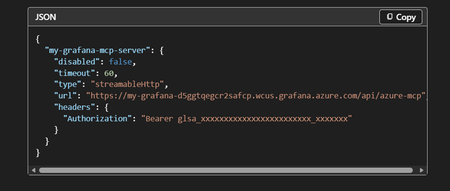
AI agents are rapidly becoming a core part of how teams build, operate, and improve cloud systems, from coding assistants to autonomous remediation workflows. To deliver on that promise in the enterprise, agents need a secure, governed way to access real production telemetry. Azure Managed Grafana MCP lets AI agents securely query the same production telemetry you already connect to Azure Managed Grafana, like Azure Monitor metrics and logs, Application Insights, and Kusto, using your existing Azure RBAC and managed identities. How do you securely connect AI agents to real production telemetry, without standing up yet another piece of infrastructure? Today, enabling an agent to query systems like Azure Monitor, Application Insights, or Kusto often requires deploying and operating a self‑hosted MCP server, wiring up identity and networking, and maintaining additional runtime infrastructure. That friction slows adoption and expands the security surface area. Azure Managed Grafana MCP removes that entire layer. With this release, every Azure Managed Grafana instance now includes a fully managed, remote MCP server that is ready by default. What is Azure Managed Grafana MCP? Azure Managed Grafana MCP is a built‑in, managed MCP endpoint that allows AI agents to securely query enterprise telemetry and operational data through Azure Managed Grafana. Instead of deploying your own MCP server, customers can simply: Point their agent to the Azure Managed Grafana MCP endpoint Grant the agent a managed identity Start querying production data immediately No containers. No extra infrastructure. No duplicated auth systems. Azure Managed Grafana MCP is very easy to configure with your existing AMG instance Because most Azure Managed Grafana customers already connect data sources like Azure Monitor metrics, logs, Kusto, and Application Insights to Azure Managed Grafana, the MCP server can expose that telemetry to AI agents instantly, using the same RBAC and access controls teams already trust. Why we built this As we’ve talked with customers experimenting with Foundry and coding agents, a consistent theme has emerged: agents are only as useful as the data they can reason over. Requiring teams to stand up and operate a separate MCP layer introduces real cost: Additional infrastructure to deploy and maintain Custom identity and token handling Expanded attack surface Slower experimentation and adoption This Azure Managed Grafana MCP takes a different approach. Rather than asking customers to build new infrastructure for agents, we leverage infrastructure they already run and trust: Azure Managed Grafana. This shifts Grafana from being just a visualization layer to something more strategic: A secure telemetry access plane An analytical engine for agent reasoning A bridge between operational data and autonomous action Core value propositions Zero infrastructure overhead Azure Managed Grafana MCP is fully managed and enabled by default: No self‑hosted MCP servers No additional networking configuration Agents connect directly to Azure Managed Grafana and start querying data. Secure by design Security is not bolted on, it’s inherited: Uses existing Azure RBAC Supports managed identities Respects current Azure Managed Grafana access controls There’s no need to duplicate authentication or authorization logic, and the security posture remains consistent with existing observability access patterns. Immediate enterprise scenarios By exposing production telemetry through MCP, teams can unlock high‑value agent workflows immediately: Root cause analysis using Application Insights Automated operational summaries Real‑time diagnostics Cross‑resource telemetry correlation Structured data access via Kusto Chatting with an agent using Azure Managed Grafana MCP These are scenarios customers already run manually today and this MCP server makes them accessible to agents. Closing the loop: from insight to action One of the most powerful aspects of Azure Managed Grafana MCP is what happens when agents have access to both code context and live telemetry. For example: An agent queries Application Insights for production errors Identifies recurring exception patterns Locates the source code emitting those errors Generates a fix and submits a pull request This closes the loop between observability and remediation, something that’s been largely manual until now. Designing for agents, not just dashboards Humans and agents consume data very differently. Humans: Navigate dashboards sequentially Are limited by cognitive bandwidth Correlate issues manually Agents: Process large datasets in parallel Perform iterative drill‑downs without fatigue Detect statistically significant patterns quickly Azure Managed Grafana MCP is designed with this in mind. Instead of only exposing raw data, it enables agent‑optimized tools, like aggregated failure views across dozens of Application Insights instances, so agents can reason efficiently at scale. To make it easier for our customers, it is now available as a native tool within Microsoft Foundry, so you can easily connect it to your Foundry Agents. Azure Managed Grafana MCP as a native Foundry tool Looking ahead Azure Managed Grafana MCP is the foundation for a broader vision: Observability‑driven autonomous agents Secure enterprise telemetry reasoning AI systems that detect, diagnose, and act Over time, this transforms Azure Managed Grafana from dashboard software into a strategic AI integration layer for Azure. This isn’t just a visualization feature. It’s an infrastructure shift. Check out the doc for more information: Configure an Azure Managed Grafana remote MCP server | Microsoft Learn1.3KViews2likes0CommentsIntroducing Azure Managed Grafana 12
In this release, Azure Managed Grafana makes it easier to tighten access with current-user Entra authentication, speed up Azure Monitor logs exploration, and level up Prometheus and database monitoring experiences. What’s new in Azure Managed Grafana 12 Use current-user Entra authentication for supported Azure data sources to query with the signed-in user’s permissions. Analyze Azure Monitor logs faster with a new query builder and improved visualization and Explore experiences. Explore Prometheus metrics with improved drill-down, prefix and suffix filters, group-by label support, plus OpenTelemetry and native histogram support. Use updated, pre-built database monitoring dashboards for Azure PostgreSQL, Azure SQL, and SQL Managed Instance (SQL MI). Advanced authentication: query with current user’s Entra credentials Current-user Entra authentication is now available in Azure data sources. That means Grafana admins can configure supported data sources to re-use the logged-in user’s credentials when issuing queries. In practice, the signed-in user’s permissions define what data stores they can access, helping teams apply least-privilege access to each user while keeping the option to use Managed Identities and Service Principals in other data sources where that fits best. Supported data sources include: Azure Monitor Azure Data Explorer Azure Monitor Managed Service for Prometheus Faster log analysis: Click-to-build queries and smoother Explore If you live in Azure Monitor logs, this update is for you. Improvements to log visualization in the Logs visualization panel and Grafana Explore make it easier to filter and extract meaningful insights from Azure Monitor logs. There’s also a new Azure Monitor logs query builder, so you can create and refine queries with a few clicks instead of writing Kusto Query Language (KQL) by hand. Performance is significantly faster too. Grafana Explore can now query and render up to 30K log records at a time, so you get much faster load times, faster searches, and more responsive navigation through large log volumes. Prometheus query enhancements: drill down without the query gymnastics Users new to Prometheus get a smoother path to explore metrics and analyze time series. Metrics drill-down now includes sidebar filters for prefix/suffix so you can quickly narrow metrics by naming conventions, and group-by label support to build more context-rich groupings. This is a true queryless exploration of Azure Managed Prometheus metrics when you’re troubleshooting or just identifying what’s been collected. This release also adds OpenTelemetry & native histogram support, including an OTel mode to automate label-join complexities when querying OTLP metrics. New database monitoring dashboards Azure Managed Grafana now includes new versions of pre-built dashboards for monitoring Azure Database for PostgreSQL and Azure SQL Databases (Preview). For teams building on Azure-native databases, these updated dashboards can help you get to a useful baseline faster, so you spend less time wiring panels and more time acting on what the data is telling you. Getting started To try Grafana 12, you can create a new Azure Managed Grafana instance with Grafana 12 selected, or upgrade an existing instance from the Azure portal. From there, consider enabling current-user Entra authentication for supported Azure data sources, test the new Azure Monitor logs query builder in Explore for day-to-day investigations, and take the updated database dashboards for a spin if you run Azure PostgreSQL, Azure SQL, or SQL MI. Check out the doc for more information: Upgrade Azure Managed Grafana to Grafana 12 - Azure Managed Grafana.944Views0likes0CommentsGenerally Available - Azure Monitor Private Link Scope (AMPLS) Scale Limits Increased by 10x!
Introduction We are excited to announce the General Availability (GA) of Azure Monitor Private Link Scope (AMPLS) scale limit increase, delivering 10x scalability improvements compared to previous limits. This enhancement empowers customers to securely connect more Azure Monitor resources via Private Link, ensuring network isolation, compliance, and Zero Trust alignment for large-scale environments. What is Azure Monitor Private Link Scope (AMPLS)? Azure Monitor Private Link Scope (AMPLS) is a feature that allows you to securely connect Azure Monitor resources to your virtual network using private endpoints. This ensures that your monitoring data is accessed only through authorized private networks, preventing data exfiltration and keeping all traffic inside the Azure backbone network. AMPLS – Scale Limits Increased by 10x in Public Cloud & Sovereign Cloud (Fairfax/Mooncake) - Regions In a groundbreaking development, we are excited to share that the scale limits for Azure Monitor Private Link Scope (AMPLS) have been significantly increased by tenfold (10x) in Public & Sovereign Cloud regions as part of the General Availability! This substantial enhancement empowers our customers to manage their resources more efficiently and securely with private links using AMPLS, ensuring that workload logs are routed via the Microsoft backbone network. What’s New? 10x Scale Increase Connect up to 3,000 Log Analytics workspaces per AMPLS (previously 300) Connect up to 10,000 Application Insights components per AMPLS (previously 1,000) 20x Resource Connectivity Each Azure Monitor resource can now connect to 100 AMPLS resources (previously 5) Enhanced UX/UI Redesigned AMPLS interface supports loading 13,000+ resources with pagination for smooth navigation Private Endpoint Support Each AMPLS object can connect to 10 private endpoints, ensuring secure telemetry flows Why It Matters Top Azure Strategic 500 customers, including major Telecom service providers and Banking & Financial Services organizations, have noted that previous AMPLS limits did not adequately support their increasing requirements. The demand for private links has grown 3–5 times over existing capacity, affecting both network isolation and integration of essential workloads. This General Availability release resolves these issues, providing centralized monitoring at scale while maintaining robust security and performance. Customer Stories Our solution now enables customers to scale their Azure Monitor resources significantly, ensuring seamless network configurations and enhanced performance. Customer B - Case Study: Leading Banking & Financial Services Customer Challenge: The Banking Customer faced complexity in delivering personalized insights due to intricate workflows and content systems. They needed a solution that could scale securely while maintaining compliance and performance for business-critical applications. Solution: The Banking Customer has implemented Microsoft Private Links Services (AMPLS) to enhance the security and performance of financial models for smart finance assistants, leading to greater efficiency and improved client engagement. To ensure secure telemetry flow and compliance, the banking customer implemented Azure Monitor with Private Link Scope (AMPLS) and leveraged the AMPLS Scale Limit Increase feature. Business Impact: Strengthened security posture aligned with Zero Trust principles Improved operational efficiency for monitoring and reporting Delivered a future-ready architecture that scales with evolving compliance and performance demands Customer B - Case Study: Leading Telecom Service Provider - Scaling Secure Monitoring with AMPLS Architecture: A Leading Telecom Service Provider employs a highly micro-segmented design where each DevOps team operates in its own workspace to maximize security and isolation. Challenge: While this design strengthens security, it introduces complexity for large-scale monitoring and reporting due to physical and logical limitations on Azure Monitor Private Link Scope (AMPLS). Previous scale limits made it difficult to centralize telemetry without compromising isolation. Solution: The AMPLS Scale Limit Increase feature enabled the Telecom Service Provider to expand Azure Monitor resources significantly. Monitoring traffic now routes through Microsoft’s backbone network, reducing data exfiltration risks and supporting Zero Trust principles. Impact & Benefits Scalability: Supports up to 3,000 Log Analytics workspaces and 10,000 Application Insights components per AMPLS (10× increase). Efficiency: Each Azure Monitor resource can now connect to 100 AMPLS resources (20× increase). Security: Private connectivity via Microsoft backbone mitigates data exfiltration risks. Operational Excellence: Simplifies configuration for 13K+ Azure Monitor resources, reducing overhead for DevOps teams. Customer Benefits & Results Our solution significantly enhances customers’ ability to manage Azure Monitor resources securely and at scale using Azure Monitor Private Link Scope (AMPLS). Key Benefits Massive Scale Increase 3,000 Log Analytics workspaces (previously 300) 10,000 Application Insights components (previously 1,000) Each AMPLS object can now connect to: Azure Monitor resources can now connect with up to 100 AMPLS resources (20× increase). Broader Resource Support - Supported resource types include: Data Collection Endpoints (DCE) Log Analytics Workspaces (LA WS) Application Insights components (AI) Improved UX/UI Redesigned AMPLS interface supports loading 13,000+ Azure Monitor resources with pagination for smooth navigation. Private Endpoint Connectivity Each AMPLS object can connect to 10 private endpoints, ensuring secure telemetry flows. Resources: Explore the new capabilities of Azure Monitor Private Link Scope (AMPLS) and see how it can transform your network isolation and resource management. Visit our Azure Monitor Private Link Scope (AMPLS) documentation page for more details and start leveraging these enhancements today! For detailed information on configuring Azure Monitor private link scope and azure monitor resources, please refer to the following link: Use Azure Private Link to connect networks to Azure Monitor - Azure Monitor | Microsoft Learn Design your Azure Private Link setup - Azure Monitor | Microsoft Learn Configure your private link - Azure Monitor | Microsoft Learn991Views0likes0Comments