azure friday
395 Topics
Intune MAM BYOD: Remove Account message for iOS devices
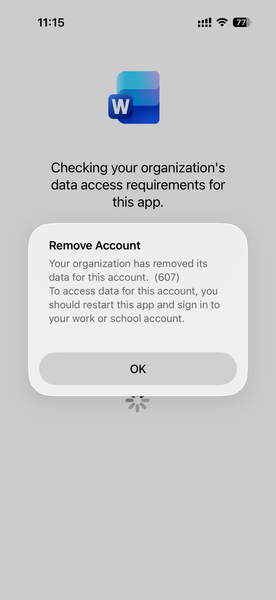
Hello, I am seeing an issue for Intune MAM BYOD(iOS) users. After a user account password reset, it causes Intune to remove the account configured from mobile applications like MS Outlook, Work, OneDrive, etc. Current Intune Configuration: Done - App Protection Policy Done - Conditional access policy --> Grant --> Requires app protection policy (checked) Users had to re-enrol to access his/her data. Here is the screenshot, Thank you,154Views0likes1Comment
Azure passowrd protection
We have a hybrid Azure infrastructure with an AD Connector installed on-prem and configured for PTA. We installed the password protection server and registered it with the Azure tenant, then deployed the DC agent on all domain controllers. Both the proxy and agents are operational. We published a few banned words to block in case anyone uses them. For testing, I changed my password to include one of the banned words. To my surprise, I was able to change the password. I checked the corresponding logon server, and the DC event viewer showed that the password was validated, but the banned word was in the password list that Azure set to enforce. Why is it not blocking the change?Solved81Views0likes1CommentApplying DevOps Principles on Lean Infrastructure. Lessons From Scaling to 102K Users.
Hi Azure Community, I'm a Microsoft Certified DevOps Engineer, and I want to share an unusual journey. I have been applying DevOps principles on traditional VPS infrastructure to scale to 102,000 users with 99.2% uptime. Why am I posting this in an Azure community? Because I'm planning migration to Azure in 2026, and I want to understand: What mistakes am I already making that will bite me during migration? THE CURRENT SETUP Platform: Social commerce (West Africa) Users: 102,000 active Monthly events: 2 million Uptime: 99.2% Infrastructure: Single VPS Stack: PHP/Laravel, MySQL, Redis Yes - one VPS. No cloud. No Kubernetes. No microservices. WHY I HAVEN'T USED AZURE YET Honest answer: Budget constraints in emerging market startup ecosystem. At our current scale, fully managed Azure services would significantly increase monthly burn before product-market expansion. The funding we raised needs to last through growth milestones. The trade: I manually optimize what Azure would auto-scale. I debug what Application Insights would catch. I do by hand what Azure Functions would automate. DEVOPS PRACTICES THAT KEPT US RUNNING Even on single-server infrastructure, core DevOps principles still apply: CI/CD Pipeline (GitHub Actions) • 3-5 deployments weekly • Zero-downtime deploys • Automated rollback on health check failures • Feature flags for gradual rollouts Monitoring & Observability • Custom monitoring (would love Application Insights) • Real-time alerting • Performance tracking and slow query detection • Resource usage monitoring Automation • Automated backups • Automated database optimization • Automated image compression • Automated security updates Infrastructure as Code • Configs in Git • Deployment scripts • Environment variables • Documented procedures Testing & Quality • Automated test suite • Pre-deployment health checks • Staging environment • Post-deployment verification KEY OPTIMIZATIONS Async Job Processing • Upload endpoint: 8 seconds → 340ms • 4x capacity increase Database Optimization • Feed loading: 6.4 seconds → 280ms • Strategic caching • Batch processing Image Compression • 3-8MB → 180KB (94% reduction) • Critical for mobile users Caching Strategy • Redis for hot data • Query result caching • Smart invalidation Progressive Enhancement • Server-rendered pages • 2-3 second loads on 4G WHAT I'M WORRIED ABOUT FOR AZURE MIGRATION This is where I need your help: Architecture Decisions • App Service vs Functions + managed services? • MySQL vs Azure SQL? • When does cost/benefit flip for managed services? Cost Management • How do startups manage Azure costs during growth? • Reserved instances vs pay-as-you-go? • Which Azure services are worth the premium? Migration Strategy • Lift-and-shift first, or re-architect immediately? • Zero-downtime migration with 102K active users? • Validation approach before full cutover? Monitoring & DevOps • Application Insights - worth it from day one? • Azure DevOps vs GitHub Actions for Azure deployments? • Operational burden reduction with managed services? Development Workflow • Local development against Azure services? • Cost-effective staging environments? • Testing Azure features without constant bills? MY PLANNED MIGRATION PATH Phase 1: Hybrid (Q1 2026) • Azure CDN for static assets • Azure Blob Storage for images • Application Insights trial • Keep compute on VPS Phase 2: Compute Migration (Q2 2026) • App Service for API • Azure Database for MySQL • Azure Cache for Redis • VPS for background jobs Phase 3: Full Azure (Q3 2026) • Azure Functions for processing • Full managed services • Retire VPS QUESTIONS FOR THIS COMMUNITY Question 1: Am I making migration harder by waiting? Should I have started with Azure at higher cost to avoid technical debt? Question 2: What will break when I migrate? What works on VPS but fails in cloud? What assumptions won't hold? Question 3: How do I validate before cutting over? Parallel infrastructure? Gradual traffic shift? Safe patterns? Question 4: Cost optimization from day one? What to optimize immediately vs later? Common cost mistakes? Question 5: DevOps practices that transfer? What stays the same? What needs rethinking for cloud-native? THE BIGGER QUESTION Have you migrated from self-hosted to Azure? What surprised you? I know my setup isn't best practice by Azure standards. But it's working, and I've learned optimization, monitoring, and DevOps fundamentals in practice. Will those lessons transfer? Or am I building habits that cloud will expose as problematic? Looking forward to insights from folks who've made similar migrations. --- About the Author: Microsoft Certified DevOps Engineer and Azure Developer. CTO at social commerce platform scaling in West Africa. Preparing for phased Azure migration in 2026. P.S. I got the Azure certifications to prepare for this migration. Now I need real-world wisdom from people who've actually done it!113Views0likes0Comments
Blocking users using edge add-ons store
Hi all, I am really struggling to find a way to stop users getting to this location: https://microsoftedge.microsoft.com/addons/microsoft-edge-extensions-home and adding addons. I have tried multiple intune policies like blocking the side bar: Any ideas?3.2KViews1like3Comments
Having trouble with MDM
I am trying to set up a surface pro with a business account. However I got a error saying looks like we can't connect to the URL for your organization's MDM terms of us. Error: invalid_client Error subcode: Description: failed%20to%20authenticate%20user Does anyone know a quick fix to this problem. Thanks,117Views0likes1Comment
Conditional Access Policy Loop with Edge on BYOD Devices – Need Help!
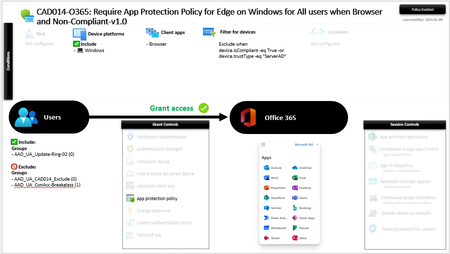
Body: Hello Tech Community, I’m facing an issue with an Azure AD Conditional Access Policy that seems to be causing a loop when users access Office 365 resources using Microsoft Edge on Windows 11 24H2 BYOD devices. Here’s the scenario: Problem: The policy is titled "Require App Protection Policy for Edge on Windows for All Users when Browser and Non-Compliant-v1.0" and continuously prompts users to switch profiles in Edge. These devices are BYOD and intentionally excluded from full Intune management (non-compliant by design). However, Edge repeatedly requests authentication or profile switching, creating a frustrating experience. Policy Details: Applies to: Windows devices using browsers (primarily Edge). Excludes: Compliant devices or those with trustType = ServerAD. Includes: Office 365 applications. Excludes Groups: Certain groups that should bypass the policy. What I’ve Tried: Verified device compliance status in Azure AD and Intune. Checked Azure AD Sign-In Logs for errors or repetitive authentications. Cleared Edge browser cache and cookies. Ensured Edge is configured to use Windows sign-in information. Adjusted the App Protection Policy settings for Edge. Questions: Could this be an issue with how Edge handles profile authentication in Conditional Access scenarios? How can I ensure that BYOD devices remain excluded from full Intune management but still work seamlessly with this policy? Are there specific adjustments I can make to the Conditional Access or App Protection Policy to avoid these loops? Additional Context: My goal is to secure access using App Protection Policies (MAM) for BYOD scenarios without requiring full device enrollment in Intune. Any insights, suggestions, or similar experiences would be greatly appreciated! Thank you in advance for your help!726Views2likes3Comments
Scaling Smart with Azure: Architecture That Works
Hi Tech Community! I’m Zainab, currently based in Abu Dhabi and serving as Vice President of Finance & HR at Hoddz Trends LLC a global tech solutions company headquartered in Arkansas, USA. While I lead on strategy, people, and financials, I also roll up my sleeves when it comes to tech innovation. In this discussion, I want to explore the real-world challenges of scaling systems with Microsoft Azure. From choosing the right architecture to optimizing performance and cost, I’ll be sharing insights drawn from experience and I’d love to hear yours too. Whether you're building from scratch, migrating legacy systems, or refining deployments, let’s talk about what actually works.209Views0likes1CommentError Running Script in Runbook with System Assigned Managed Identity
Hello everyone, I could use some assistance, please. I'm encountering an error when trying to run a script within a runbook. I'm using PowerShell 5.1 with a system-assigned managed identity. The script works find without using the managed identiy via powershell outside of azure. Error: System.Management.Automation.ParameterBindingException: Cannot process command because of one or more missing mandatory parameters: Credential. at System.Management.Automation.CmdletParameterBinderController.PromptForMissingMandatoryParameters(Collection1 fieldDescriptionList, Collection1 missingMandatoryParameters) at System.Management.Automation.CmdletParameterBinderController.HandleUnboundMandatoryParameters I am using this script Connect-ExchangeOnline -ManagedIdentity -Organization domain removed for privacy reasons # Specify the user's mailbox identity $mailboxIdentity = "email address removed for privacy reasons" # Get mailbox configuration and statistics for the specified mailbox $mailboxConfig = Get-Mailbox -Identity $mailboxIdentity $mailboxStats = Get-MailboxStatistics -Identity $mailboxIdentity # Check if TotalItemSize and ProhibitSendQuota are not null and extract the sizes if ($mailboxStats.TotalItemSize -and $mailboxConfig.ProhibitSendQuota) { $totalSizeBytes = $mailboxStats.TotalItemSize.Value.ToString().Split("(")[1].Split(" ")[0].Replace(",", "") -as [double] $prohibitQuotaBytes = $mailboxConfig.ProhibitSendQuota.ToString().Split("(")[1].Split(" ")[0].Replace(",", "") -as [double] # Convert sizes from bytes to gigabytes $totalMailboxSize = $totalSizeBytes / 1GB $mailboxWarningQuota = $prohibitQuotaBytes / 1GB # Check if the mailbox size exceeds 90% of the warning quota if ($totalMailboxSize -ge ($mailboxWarningQuota * 0.0)) { # Send an email notification $emailBody = "The mailbox $($mailboxIdentity) has reached $($totalMailboxSize) GB, which exceeds 90% of the warning quota." Send-MailMessage -To "email address removed for privacy reasons" -From "email address removed for privacy reasons" -Subject "Mailbox Size Warning" -Body $emailBody -SmtpServer "smtp.office365.com" -Port 587 -UseSsl -Credential (Get-Credential) } } else { Write-Host "The required values(TotalItemSize or ProhibitSendQuota) are not available." }753Views0likes1CommentComparision on Azure Cloud Sync and Traditional Entra connect Sync.
Introduction In the evolving landscape of identity management, organizations face a critical decision when integrating their on-premises Active Directory (AD) with Microsoft Entra ID (formerly Azure AD). Two primary tools are available for this synchronization: Traditional Entra Connect Sync (formerly Azure AD Connect) Azure Cloud Sync While both serve the same fundamental purpose, bridging on-prem AD with cloud identity, they differ significantly in architecture, capabilities, and ideal use cases. Architecture & Setup Entra Connect Sync is a heavyweight solution. It installs a full synchronization engine on a Windows Server, often backed by SQL Server. This setup gives administrators deep control over sync rules, attribute flows, and filtering. Azure Cloud Sync, on the other hand, is lightweight. It uses a cloud-managed agent installed on-premises, removing the need for SQL Server or complex infrastructure. The agent communicates with Microsoft Entra ID, and most configurations are handled in the cloud portal. For organizations with complex hybrid setups (e.g., Exchange hybrid, device management), is Cloud Sync too limited?838Views1like2Comments