azure container apps
202 Topics
Find the Alerts You Didn't Know You Were Missing with Azure SRE Agent
I had 6 alert rules. CPU. Memory. Pod restarts. Container errors. OOMKilled. Job failures. I thought I was covered. Then my app went down. I kept refreshing the Azure portal, waiting for an alert. Nothing. That's when it hit me: my alerts were working perfectly. They just weren't designed for this failure mode. Sound familiar? The Problem Every Developer Knows If you're a developer or DevOps engineer, you've been here: a customer reports an issue, you scramble to check your monitoring, and then you realize you don't have the right alerts set up. By the time you find out, it's already too late. You set up what seems like reasonable alerting and assume you're covered. But real-world failures are sneaky. They slip through the cracks of your carefully planned thresholds. My Setup: AKS with Redis I love to vibe code apps using GitHub Copilot Agent mode with Claude Opus 4.5. It's fast, it understands context, and it lets me focus on building rather than boilerplate. For this project, I built a simple journal entry app: AKS cluster hosting the web API Azure Cache for Redis storing journal data Azure Monitor alerts for CPU, memory, pod restarts, container errors, OOMKilled, and job failures Seemed solid. What could go wrong? The Scenario: Redis Password Rotation Here's something that happens constantly in enterprise environments: the security team rotates passwords. It's best practice. It's in the compliance checklist. And it breaks things when apps don't pick up the new credentials. I simulated exactly this. The pods came back up. But they couldn't connect to Redis (as expected). The readiness probes started failing. The LoadBalancer had no healthy backends. The endpoint timed out. And not a single alert fired. Using SRE Agent to Find the Alert Gaps Instead of manually auditing every alert rule and trying to figure out what I missed, I turned to Azure SRE Agent. I asked it a simple question: "My endpoint is timing out. What alerts do I have, and why didn't any of them fire?" Within minutes, it had diagnosed the problem. Here's what it found: My Existing Alerts Why They Didn't Fire High CPU/Memory No resource pressure,just auth failures Pod Restarts Pods weren't restarting, just unhealthy Container Errors App logs weren't being written OOMKilled No memory issues Job Failures No K8s jobs involved The gaps SRE Agent identified: ❌ No synthetic URL availability test ❌ No readiness/liveness probe failure alerts ❌ No "pods not ready" alerts scoped to my namespace ❌ No Redis connection error detection ❌ No ingress 5xx/timeout spike alerts ❌ No per-pod resource alerts (only node-level) SRE Agent didn't just tell me what was wrong, it created a GitHub issue with : KQL queries to detect each failure type Bicep code snippets for new alert rules Remediation suggestions for the app code Exact file paths in my repo to update Check it out: GitHub Issue How I Built It: Step by Step Let me walk you through exactly how I set this up inside SRE Agent. Step 1: Create an SRE Agent I created a new SRE Agent in the Azure portal. Since this workflow analyzes alerts across my subscription (not just one resource group), I didn't configure any specific resource groups. Instead, I gave the agent's managed identity Reader permissions on my entire subscription. This lets it discover resources, list alert rules, and query Log Analytics across all my resource groups. Step 2: Connect GitHub to SRE Agent via MCP I added a GitHub MCP server to give the agent access to my source code repository.MCP (Model Context Protocol) lets you bring any API into the agent. If your tool has an API, you can connect it. I use GitHub for both source code and tracking dev tickets, but you can connect to wherever your code lives (GitLab, Azure DevOps) or your ticketing system (Jira, ServiceNow, PagerDuty). Step 3: Create a Subagent inside SRE Agent for managing Azure Monitor Alerts I created a focused subagent with a specific job and only the tools it needs: Azure Monitor Alerts Expert Prompt: " You are expert in managing operations related to azure monitor alerts on azure resources including discovering alert rules configured on azure resources, creating new alert rules (with user approval and authorization only), processing the alerts fired on azure resources and identifying gaps in the alert rules. You can get the resource details from azure monitor alert if triggered via alert. If not, you need to ask user for the specific resource to perform analysis on. You can use az cli tool to diagnose logs, check the app health metrics. You must use the app code and infra code (bicep files) files you have access to in the github repo <insert your repo> to further understand the possible diagnoses and suggest remediations. Once analysis is done, you must create a github issue with details of analysis and suggested remediation to the source code files in the same repo." Tools enabled: az cli – List resources, alert rules, action groups Log Analytics workspace querying – Run KQL queries for diagnostics GitHub MCP – Search repositories, read file contents, create issues Step 4: Ask the Subagent About Alert Gaps I gave the agent context and asked a simple question: "@AzureAlertExpert: My API endpoint http://132.196.167.102/api/journals/john is timing out. What alerts do I have configured in rg-aks-journal, and why didn't any of them fire? The agent did the analysis autonomously and summarized findings with suggestions to add new alert rules in a GitHub issue. Here's the agentic workflow to perform azure monitor alert operations Why This Matters Faster response times. Issues get diagnosed in minutes, not hours of manual investigation. Consistent analysis. No more "I thought we had an alert for that" moments. The agent systematically checks what's covered and what's not. Proactive coverage. You don't have to wait for an incident to find gaps. Ask the agent to review your alerts before something breaks. The Bottom Line Your alerts have gaps. You just don't know it until something slips through. I had 6 alert rules and still missed a basic failure. My pods weren't restarting, they were just unhealthy. My CPU wasn't spiking, the app was just returning errors. None of my alerts were designed for this. You don't need to audit every alert rule manually. Give SRE Agent your environment, describe the failure, and let it tell you what's missing. Stop discovering alert gaps from customer complaints. Start finding them before they matter. A Few Tips Give the agent Reader access at subscription level so it can discover all resources Use a focused subagent prompt, don't try to do everything in one agent Test your MCP connections before running workflows What Alert Gaps Have Burned You? What's the alert you wish you had set up before an incident? Credential rotation? Certificate expiry? DNS failures? Let us know in the comments.224Views0likes0CommentsFrom Vibe Coding to Working App: How SRE Agent Completes the Developer Loop
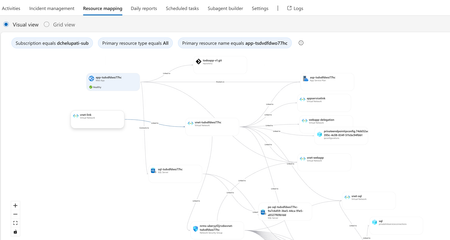
The Most Common Challenge in Modern Cloud Apps There's a category of bugs that drive engineers crazy: multi-layer infrastructure issues. Your app deploys successfully. Every Azure resource shows "Succeeded." But the app fails at runtime with a vague error like Login failed for user ''. Where do you even start? You're checking the Web App, the SQL Server, the VNet, the private endpoint, the DNS zone, the identity configuration... and each one looks fine in isolation. The problem is how they connect and that's invisible in the portal. Networking issues are especially brutal. The error says "Login failed" but the actual causes could be DNS, firewall, identity, or all three. The symptom and the root causes are in completely different resources. Without deep Azure networking knowledge, you're just clicking around hoping something jumps out. Now imagine you vibe coded the infrastructure. You used AI to generate the Bicep, deployed it, and moved on. When it breaks, you're debugging code you didn't write, configuring resources you don't fully understand. This is where I wanted AI to help not just to build, but to debug. Enter SRE Agent + Coding Agent Here's what I used: Layer Tool Purpose Build VS Code Copilot Agent Mode + Claude Opus Generate code, Bicep, deploy Debug Azure SRE Agent Diagnose infrastructure issues and create developer issue with suggested fixes in source code (app code and IaC) Fix GitHub Coding Agent Create PRs with code and IaC fix from Github issue created by SRE Agent Copilot builds. SRE Agent debugs. Coding Agent fixes. What I Built I used VS Code Copilot in Agent Mode with Claude Opus to create a .NET 8 Web App connected to Azure SQL via private endpoint: Private networking (no public exposure) Entra-only authentication Managed identity (no secrets) Deployed with azd up. All green. Then I tested the health endpoint: $ curl https://app-tsdvdfdwo77hc.azurewebsites.net/health/sql {"status":"unhealthy","error":"Login failed for user ''.","errorType":"SqlException"} Deployment succeeded. App failed. One error. How I Fixed It: Step by Step Step 1: Create SRE Agent with Azure Access I created an SRE Agent with read access to my Azure subscription. You can scope it to specific resource groups. The agent builds a knowledge graph of your resources and their dependencies visible in the Resource Mapping view below. Step 2: Connect GitHub to SRE Agent using GitHub MCP server I connected the GitHub MCP server so the agent could read my repository and create issues. Step 3: Create Sub Agent to analyze source code I created a sub-agent for analyzing source code using GitHub mcp tools. this lets SRE Agent understand not just Azure resources, but also the Bicep and source code files that created them. "you are expert in analyzing source code (bicep and app code) from github repos" Step 4: Invoke Sub-Agent to Analyze the Error In the SRE Agent chat, I invoked the sub-agent to diagnose the error I received from my app end point. It correlated the runtime error with the infrastructure configuration Step 5: Watch the SRE Agent Think and Reason SRE Agent analyzed the error by tracing code in Program.cs, Bicep configurations, and Azure resource relationships Web App, SQL Server, VNet, private endpoint, DNS zone, and managed identity. Its reasoning process worked through each layer, eliminating possibilities one by one until it identified the root causes. Step 6: Agent Creates GitHub Issue Based on its analysis, SRE Agent summarized the root causes and suggested fixes in a GitHub issue: Root Causes: Private DNS Zone missing VNet link Managed identity not created as SQL user Suggested Fixes: Add virtualNetworkLinks resource to Bicep Add SQL setup script to create user with db_datareader and db_datawriter roles Step 7: Merge the PR from Coding Agent Assign the Github issue to Coding Agent which then creates a PR with the fixes. I just reviewed the fix. It made sense and I merged it. Redeployed with azd up, ran the SQL script: curl -s https://app-tsdvdfdwo77hc.azurewebsites.net/health/sql | jq . { "status": "healthy", "database": "tododb", "server": "tcp:sql-tsdvdfdwo77hc.database.windows.net,1433", "message": "Successfully connected to SQL Server" } 🎉 From error to fix in minutes without manually debugging a single Azure resource. Why This Matters If you're a developer building and deploying apps to Azure, SRE Agent changes how you work: You don't need to be a networking expert. SRE Agent understands the relationships between Azure resources private endpoints, DNS zones, VNet links, managed identities. It connects dots you didn't know existed. You don't need to guess. Instead of clicking through the portal hoping something looks wrong, the agent systematically eliminates possibilities like a senior engineer would. You don't break your workflow. SRE Agent suggests fixes in your Bicep and source code not portal changes. Everything stays version controlled. Deployed through pipelines. No hot fixes at 2 AM. You close the loop. AI helps you build fast. Now AI helps you debug fast too. Try It Yourself Do you vibe code your app, your infrastructure, or both? How do you debug when things break? Here's a challenge: Vibe code a todo app with a Web App, VNet, private endpoint, and SQL database. "Forget" to link the DNS zone to the VNet. Deploy it. Watch it fail. Then point SRE Agent at it and see how it identifies the root cause, creates a GitHub issue with the fix, and hands it off to Coding Agent for a PR. Share your experience. I'd love to hear how it goes. Learn More Azure SRE Agent documentation Azure SRE Agent blogs Azure SRE Agent community Azure SRE Agent home page Azure SRE Agent pricing564Views3likes0CommentsExtend SRE Agent with MCP: Build an Agentic Workflow to Triage Customer Issues
Your inbox is full. GitHub issues piling up. "App not working." "How do I configure alerts?" "Please add dark mode." You open each one, figure out what it is, ask for more info, add labels, route to the right team. An hour later, you're still sorting issues. Sound familiar? The Triage Tax Every L1 support engineer, PM, and on-call developer who's handled customer issues knows this pain. When tickets come in, you're not solving problems, you're sorting them. Read the issue. Is it a bug or a question? Check the docs. Does this feature exist? Ask for more info. Wait two days. Re-triage. Add labels. Route to engineering. It's tedious. It requires judgment, you need to understand the product, know what info is needed, check documentation. And honestly? It's work that nobody volunteers for but someone has to do. In large organizations, it gets even more complex. The issue doesn't just need to be triaged, it needs to be routed to the right engineering team. Is this an auth issue? Frontend? Backend? Infrastructure? A wrong routing decision means delays, re-assignments, and frustrated customers. What if an AI agent could do this for you? Enter Azure SRE Agent + MCP Here's what I built: I gave SRE Agent access to my GitHub and PagerDuty accounts via MCP, uploaded my triage rubric as a markdown file, and set it to run twice a day. No more reading every ticket manually. No more asking the same "please provide more info" questions. No more morning triage sessions. What My Setup Looks Like My app's customer issues come in through GitHub. My team uses PagerDuty to track bugs and incidents. So I connected both via MCP to the SRE Agent. I also uploaded my triage logic as a .md file on how to classify issues, what info is required for each category, which labels to use, which team handles what. And since I didn't want to run this workflow manually, I set up a scheduled task to trigger it twice a day. Now it just runs. I verify its work if I want to. What the Agent Does Fetches all open, unlabeled GitHub issues Reads each issue and classifies it (bug, doc question, feature request) Checks if required info is present Posts a comment asking for details if needed, or acknowledges the issue Adds appropriate labels Creates a PagerDuty incident for bugs ready for engineering Moves to the next issue How I Built It: Step by Step Let me walk you through exactly how I set this up inside SRE Agent. Step 1: Create an SRE Agent I created a new SRE Agent in the Azure portal. Since this workflow triages GitHub issues and not Azure resources, I didn't need to configure any Azure resource groups or subscriptions. Just an agent. Step 2: Connect MCP Servers I added two MCP servers to give the agent access to my tools: GitHub MCP– Fetch issues, post comments, add labels PagerDuty MCP – Create incidents for bugs that need dev team's attention MCP (Model Context Protocol) lets you bring any API into the agent. If your tool has an API, you can connect it. Step 3: Create Subagents I created two focused subagents, each with a specific job and only the tools it needs: GitHub Issue Triager "You are expert in triaging GitHub issues, classifying them into categories such as user needs to supply additional information, bug, documentation question, or feature request. Use the knowledge base to search for the right document that helps you with performing this triaging. Perform all actions autonomously without waiting for user input. Hand off to Incident Creator for the issues you classified as bugs." Tools: GitHub MCP (issues, labels, comments) Incident Creator Here "You are expert in managing incidents in PagerDuty, listing services, incidents, creating incidents with all details. Once done, hand off back to GitHub Issue Triager." Tools: PagerDuty MCP (services, incidents) The handoff between them creates a workflow. They collaborate without human involvement. Step 4: Add Your Knowledge I uploaded my triage logic as a .md file to the agent's knowledge base. This is my rubric - my mental model for how to triage issues: How do I classify bugs vs. doc questions vs. feature requests? What info is required for each category? What labels do I use? When should an incident be created? Which team handles which type of issue? I wrote it down the way I'd explain it to a new teammate. The agent searches and follows it. Step 5: Add a Scheduled Task I didn't want to trigger this workflow manually every time. SRE Agent supports scheduled tasks, workflows that run automatically on a cadence. I set up a trigger to run twice a day: morning and evening. Now the workflow is fully automated. Here is the end to end automated agentic workflow to triage customer tickets. Why MCP Matters Every team uses different tools. Maybe your customer issues live in Zendesk, incidents go to ServiceNow and you use Jira or Azure DevOps. SRE Agent doesn't lock you in. With MCP, you connect to whatever tools you already use. The agent orchestrates across them. That's the extensibility model: your tools, your workflow, orchestrated by the agent. The Result Before: 2 hours every morning sorting tickets. After: By the time anyone logs in, issues are labeled, missing-info requests are posted, urgent bugs have incidents, and feature requests are acknowledged. Your team can finally focus on the complex stuff not sorting tickets. Why This Matters Faster response times. Issues get acknowledged in minutes, not days. Consistent classification. No "this should have been a P1" moments. No tickets bouncing between teams. Happier customers. They get a response immediately even if it's just "we're looking into it." Focus on what matters. Your team should be solving problems, not sorting them. The Bottom Line Triage isn't the job, it's the tax on the job. It quietly eats the hours your team could spend building, debugging, and shipping. You don't need to build a custom triage bot. You don't need to wire up webhooks and write glue code. You give the SRE agent your tools, your logic, and a schedule and it handles the sorting. Use GitHub? Connect GitHub. Use Zendesk? Connect Zendesk. PagerDuty, ServiceNow, Jira - whatever your team runs on, the agent meets you there. Stop sorting tickets. Start shipping. A Few Tips Test MCP endpoints before configuring them in the SRE agent Give each subagent only the tools it needs, don't enable everything Start read-only until you trust the classification, then enable comments Do You Still Want to Triage Issues Manually? What tools does your team use to track customer-reported issues and incidents? Let us know in the comments, we'd love to hear how you'd use this workflow with your stack. Is triage your most toilsome workflow or is there something even worse eating your team's time? Let us know in the comments.439Views1like0Comments
Capacity Planning with Azure Container Apps Workload Profiles
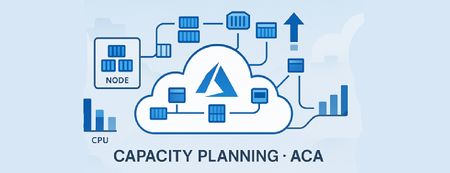
Overview Azure Container Apps (ACA) simplifies container orchestration, but capacity planning often confuses developers. Questions like “How do replicas consume node resources?”, “When does ACA add nodes?”, and “How should I model limits and requests?”. This guide pairs official ACA guidance with practical examples to demystify workload profiles, autoscaling, and resource modelling. Understanding Workload Profiles in Azure Container Apps ACA offers three profile types: Consumption Scales to zero Platform decides node size Billing per replica execution time Dedicated Choose VM SKU (e.g., D4 → 4 vCPU, 16 GiB RAM) Billing per node Flex (Preview) Combines dedicated isolation with consumption-like billing Each profile defines node-level resources. For Example: D4 → 4 vCPU, 16 GiB RAM per node. 2. How Replicas Consume Node Resources ACA runs on managed Kubernetes. Node = VM with fixed resources Replica = Pod scheduled on a node Replicas share node resources; ACA packs replicas until node capacity is full. Example Node: D4 (4 vCPU, 16 GiB RAM) Replica requests: 1 vCPU, 2 GiB 5 replicas → Needs 5 vCPU, 10 GiB ACA places 4 replicas on Node 1 and adds Node 2 for replica 5. 3. When ACA Adds Nodes ACA adds nodes when: Pending replicas cannot fit on existing nodes Resource requests exceed available capacity ACA uses Kubernetes scheduling principles. Nodes scale out when pods are not schedulable due to CPU/memory constrains. 4. Practical Sizing Strategy Identify peak load → translate to CPU/memory per replica Choose workload profile SKU (e.g., D4) Calculate packing: node capacity ÷ replica request = max replica node Add buffer (e.g. 20%) for headroom Configure autoscaling: Min replicas for HA. Max replicas for burst. Min/Max nodes for cost control. 5. Common Misconceptions Myth: “Replicas have dedicated CPU/RAM per container automatically.” Reality: Not exactly. They consume from the node pool based on your configured CPU & memory. Multiple replicas compete for the same node until capacity is exhausted. Myth: “ACA node scaling is CPU-time based.” Reality: ACA node scaling is driven by non-schedulable replicas (cannot place due to configured resources). Triggers for replica scaling are KEDA rules (HTTP, queue, CPU/memory %, etc.), but node scale follows from replica placement pressure. 6. Key Takeaways Model per-node packing before setting replica counts Plan for zero-downtime upgrades (double replicas temporarily) Monitor autoscaling behavior; defaults may not fit every workload 7. Relevant Links: Azure Container Apps plan types | Microsoft Learn Compute and billing structures in Azure Container Apps | Microsoft Learn Post questions | Provide product feedback701Views4likes1CommentStop Running Runbooks at 3 am: Let Azure SRE Agent Do Your On-Call Grunt Work
Your pager goes off. It's 2:47am. Production is throwing 500 errors. You know the drill - SSH into this, query that, check these metrics, correlate those logs. Twenty minutes later, you're still piecing together what went wrong. Sound familiar? The On-Call Reality Nobody Talks About Every SRE, DevOps engineer, and developer who's carried a pager knows this pain. When incidents hit, you're not solving problems - you're executing runbooks. Copy-paste this query. Check that dashboard. Run these az commands. Connect the dots between five different tools. It's tedious. It's error-prone at 3am. And honestly? It's work that doesn't require human creativity but requires human time. What if an AI agent could do this for you? Enter Azure SRE Agent + Runbook Automation Here's what I built: I gave SRE Agent a simple markdown runbook containing the same diagnostic steps I'd run manually during an incident. The agent executes those steps, collects evidence, and sends me an email with everything I need to take action. No more bouncing between terminals. No more forgetting a step because it's 3am and your brain is foggy. What My Runbook Contains Just the basics any on-call would run: az monitor metrics – CPU, memory, request rates Log Analytics queries – Error patterns, exception details, dependency failures App Insights data – Failed requests, stack traces, correlation IDs az containerapp logs – Revision logs, app configuration That's it. Plain markdown with KQL queries and CLI commands. Nothing fancy. What the Agent Does Reads the runbook from its knowledge base Executes each diagnostic step Collects results and evidence Sends me an email with analysis and findings I wake up to an email that says: "CPU spiked to 92% at 2:45am, triggering connection pool exhaustion. Top exception: SqlException (1,832 occurrences). Errors correlate with traffic spike. Recommend scaling to 5 replicas." All the evidence. All the queries used. All the timestamps. Ready for me to act. How to Set This Up (6 Steps) Here's how you can build this yourself: Step 1: Create SRE Agent Create a new SRE Agent in the Azure portal. No Azure resource groups to configure. If your apps run on Azure, the agent pulls context from the incident itself. If your apps run elsewhere, you don't need Azure resource configuration at all. Step 2: Grant Reader Permission (Optional) If your runbooks execute against Azure resources, assign Reader role to the SRE Agent's managed identity on your subscription. This allows the agent to run az commands and query metrics. Skip this if your runbooks target non-Azure apps. Step 3: Add Your Runbook to SRE Agent's Knowledge base You already have runbooks, they're in your wiki, Confluence, or team docs. Just add them as .md files to the agent's knowledge base. To learn about other ways to link your runbooks to the agent, read this Step 4: Connect Outlook Connect the agent to your Outlook so it can send you the analysis email with findings. Step 5: Create a Subagent Create a subagent with simple instructions like: "You are an expert in triaging and diagnosing incidents. When triggered, search the knowledge base for the relevant runbook, execute the diagnostic steps, collect evidence, and send an email summary with your findings." Assign the tools the agent needs: RunAzCliReadCommands – for az monitor, az containerapp commands QueryLogAnalyticsByWorkspaceId – for KQL queries against Log Analytics QueryAppInsightsByResourceId – for App Insights data SearchMemory – to find the right runbook SendOutlookEmail – to deliver the analysis Step 6: Set Up Incident Trigger Connect your incident management tool - PagerDuty, ServiceNow, or Azure Monitor alerts and setup the incident trigger to the subagent. When an incident fires, the agent kicks off automatically. That's it. Your agentic workflow now looks like this: This Works for Any App, Not Just Azure Here's the thing: SRE Agent is platform agnostic. It's executing your runbooks, whatever they contain. On-prem databases? Add your diagnostic SQL. Custom monitoring stack? Add those API calls. The agent doesn't care where your app runs. It cares about following your runbook and getting you answers. Why This Matters Lower MTTR. By the time you're awake and coherent, the analysis is done. Consistent execution. No missed steps. No "I forgot to check the dependencies" at 4am. Evidence for postmortems. Every query, every result, timestamped and documented. Focus on what matters. Your brain should be deciding what to do not gathering data. The Bottom Line On-call runbook execution is the most common, most tedious, and most automatable part of incident response. It's grunt work that pulls engineers away from the creative problem-solving they were hired for. SRE Agent offloads that work from your plate. You write the runbook once, and the agent executes it every time, faster and more consistently than any human at 3am. Stop running runbooks. Start reviewing results. Try it yourself: Create a markdown runbook with your diagnostic queries and commands, add it to your SRE Agent's knowledge base, and let the agent handle your next incident. Your 3am self will thank you.931Views0likes0Comments
How-to add an MCP tool to your Azure Foundry agent using dynamic sessions on Azure Container Apps
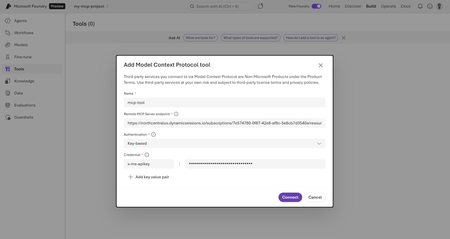
Now available in preview, Azure Container Apps supports a new shell session pool type in dynamic sessions as well as MCP support for both shell and Python container types. With MCP enablement, you can bring the benefits of dynamics sessions to your AI agents by giving them the ability to execute code, run system commands, access file systems, and perform complex tasks in isolated, secure container environments that appear and disappear on demand. The following is a tutorial on how to use an MCP enabled dynamic session as a tool used in an Azure Foundry agent giving it the capability to run remote shell commands. Setup For this tutorial, we're going to use an ARM template to deploy our Container App Session Pool resource. Begin by signing into Azure and creating a resource group. az login After you're logged in, set the following variables that will be used to deploy the resource. Replace the <> with your own values. SUBSCRIPTION_ID=$(az account show --query id --output tsv) RESOURCE_GROUP=<RESOURCE_GROUP_NAME> SESSION_POOL_NAME=<SESSION_POOL_NAME> LOCATION=<LOCATION> Create a resource group az group create --name $RESOURCE_GROUP --location $LOCATION 1. Create a shell dynamic session with MCP enabled Use an ARM template to create a shell session pool with MCP server enabled. Create a deployment template file named deploy.json and copy the following into the file: { "$schema": "http://schema.management.azure.com/schemas/2015-01-01/deploymentTemplate.json#", "contentVersion": "1.0.0.0", "parameters": { "name": { "type": "String" }, "location": { "type": "String" } }, "resources": [ { "type": "Microsoft.App/sessionPools", "apiVersion": "2025-02-02-preview", "name": "[parameters('name')]", "location": "[parameters('location')]", "properties": { "poolManagementType": "Dynamic", "containerType": "Shell", "scaleConfiguration": { "maxConcurrentSessions": 5 }, "sessionNetworkConfiguration": { "status": "EgressEnabled" }, "dynamicPoolConfiguration": { "lifecycleConfiguration": { "lifecycleType": "Timed", "coolDownPeriodInSeconds": 300 } }, "mcpServerSettings": { "isMCPServerEnabled": true } } } ] } Next, deploy the ARM template you just created. az deployment group create --resource-group $RESOURCE_GROUP --template-file deploy.json --name $SESSION_POOL_NAME --location $LOCATION Once completed, your resource will be provisioned and available in the portal. Get the MCP server endpoint and credentials Next, retrieve the MCP server endpoint from the deployed container app session pool. az rest --method GET --uri "/subscriptions/$SUBSCRIPTION_ID/resourceGroups/$RESOURCE_GROUP/providers/Microsoft.App/sessionPools/$SESSION_POOL_NAME?api-version=2025-02-02-preview" --query "properties.mcpServerSettings.mcpServerEndpoint" -o tsv Then, request the API credentials for the MCP server az rest --method POST --uri "/subscriptions/$SUBSCRIPTION_ID/resourceGroups/$RESOURCE_GROUP/providers/Microsoft.App/sessionPools/$SESSION_POOL_NAME/fetchMCPServerCredentials?api-version=2025-02-02-preview" --query "apiKey" -o tsv Keep the fetched values nearby and copied to be used in the next step to connect your MCP server as a tool in the Azure Foundry agent. 2. Create an Azure Foundry project and agent Go to the Azure Foundry website and follow the steps below to create a project. Make sure you are in the New Foundry portal by turning it on in the top nav. Navigate to the top left nav bar and click an existing project and click Create new project Give your project a Name Click on Advanced options to choose and fill out the following Foundry resource Subscription Region Resource group After filling the previous options out, click Create Once your project is created, follow the steps below to create an agent. Click on the Build tab on the top right navigation bar Navigate to the Agents section in the left nav Click on the Create agent button Give your agent a name and click Create 3. Connect your remote MCP server as a Tool to your agent After your agent is created, you can connect a remote MCP server as a tool for your agent to use. Follow the steps below to connect an MCP server to your agent. Navigate to Tools on the left nav bar Click on the Connect a tool button Go to the Custom tab Click on the Model Context Protocol (MCP) option, click Create Fill out the form on the following screen and click Create. Use the MCP server endpoint and API credentials from the previous section. Name="your-unique-name" Remote MCP server endpoint="your-mcp-server-endpoint" Authentication type= "Key-based" Credential= Key:"x-ms-apikey" Value: "your-api-key" Once the tool is created you will see a Use in an agent button. Click on that and choose the agent you previously created. After choosing the agent you should now see a connected tool in your agent view. 4. Use the connected tool to run shell commands with your agent Now that the tool is connected you can use the playground to prompt the agent with a question that will launch the shell environment. Try the following prompt with your agent: "Create a hello world flask app in a new remote environment. Then send a request to the app to show that it works." Once prompted, the connected MCP server will use it's tools to launch a shell environment and create an environmentId. This is used to track your session by creating a unique GUID so future commands are run in the same session. The Foundry agent will then ask for approval for each step as the connected MCP tool will execute a series of shell commands that will install Python and Flask. Once all requests have been completed and approved, you'll notice it has run the necessary shell commands in the remote environment and sent a curl request to the app with a response of Hello, World! In this tutorial, we demonstrated how to extend Azure AI Foundry agents using Azure Container Apps dynamic session pools. By enabling MCP support on a shell session pool, we created a secure, on-demand execution environment that allows AI agents to run remote shell commands. With this setup, your AI agents can now bridge the gap between conversation and action, providing users with interactive and useful experiences.523Views0likes1CommentStaying in the flow: SleekFlow and Azure turn customer conversations into conversions
A customer adds three items to their cart but never checks out. Another asks about shipping, gets stuck waiting eight minutes, only to drop the call. A lead responds to an offer but is never followed up with in time. Each of these moments represents lost revenue, and they happen to businesses every day. SleekFlow was founded in 2019 to help companies turn those almost-lost-customer moments into connection, retention, and growth. Today we serve more than 2,000 mid-market and enterprise organizations across industries including retail and e-commerce, financial services, healthcare, travel and hospitality, telecommunications, real estate, and professional services. In total, those customers rely on SleekFlow to orchestrate more than 600,000 daily customer interactions across WhatsApp, Instagram, web chat, email, and more. Our name reflects what makes us different. Sleek is about unified, polished experiences—consolidating conversations into one intelligent, enterprise-ready platform. Flow is about orchestration—AI and human agents working together to move each conversation forward, from first inquiry to purchase to renewal. The drive for enterprise-ready agentic AI Enterprises today expect always-on, intelligent conversations—but delivering that at scale proved daunting. When we set out to build AgentFlow, our agentic AI platform, we quickly ran into familiar roadblocks: downtime that disrupted peak-hour interactions, vector search delays that hurt accuracy, and costs that ballooned under multi-tenant workloads. Development slowed from limited compatibility with other technologies, while customer onboarding stalled without clear compliance assurances. To move past these barriers, we needed a foundation that could deliver the performance, trust, and global scale enterprises demand. The platform behind the flow: How Azure powers AgentFlow We chose Azure because building AgentFlow required more than raw compute power. Chatbots built on a single-agent model often stall out. They struggle to retrieve the right context, they miss critical handoffs, and they return answers too slowly to keep a customer engaged. To fix that, we needed an ecosystem capable of supporting a team of specialized AI agents working together at enterprise scale. Azure Cosmos DB provides the backbone for memory and context, managing short-term interactions, long-term histories, and vector embeddings in containers that respond in 15–20 milliseconds. Powered by Azure AI Foundry, our agents use Azure OpenAI models within Azure AI Foundry to understand and generate responses natively in multiple languages. Whether in English, Chinese, or Portuguese, the responses feel natural and aligned with the brand. Semantic Kernel acts as the conductor, orchestrating multiple agents, each of which retrieves the necessary knowledge and context, including chat histories, transactional data, and vector embeddings, directly from Azure Cosmos DB. For example, one agent could be retrieving pricing data, another summarizing it, and a third preparing it for a human handoff. The result is not just responsiveness but accuracy. A telecom provider can resolve a billing question while surfacing an upsell opportunity in the same dialogue. A financial advisor can walk into a call with a complete dossier prepared in seconds rather than hours. A retailer can save a purchase by offering an in-stock substitute before the shopper abandons the cart. Each of these conversations is different, yet the foundation is consistent on AgentFlow. Fast, fluent, and focused: Azure keeps conversations moving Speed is the heartbeat of a good conversation. A delayed answer feels like a dropped call, and an irrelevant one breaks trust. For AgentFlow to keep customers engaged, every operation behind the scenes has to happen in milliseconds. A single interaction can involve dozens of steps. One agent pulls product information from embeddings, another checks it against structured policy data, and a third generates a concise, brand-aligned response. If any of these steps lag, the dialogue falters. On Azure, they don’t. Azure Cosmos DB manages conversational memory and agent state across dedicated containers for short-term exchanges, long-term history, and vector search. Sharded DiskANN indexing powers semantic lookups that resolve in the 15–20 millisecond range—fast enough that the customer never feels a pause. Microsoft Phi’s model Phi-4 as well as Azure OpenAI in Foundry Models like o3-mini and o4-mini, provide the reasoning, and Azure Container Apps scale elastically, so performance holds steady during event-driven bursts, such as campaign broadcasts that can push the platform from a few to thousands of conversations per minute, and during daily peak-hour surges. To support that level of responsiveness, we run Azure Container Apps on the Pay-As-You-Go consumption plan, using KEDA-based autoscaling to expand from five idle containers to more than 160 within seconds. Meanwhile, Microsoft Orleans coordinates lightweight in-memory clustering to keep conversations sleek and flowing. The results are tangible. Retrieval-augmented generation recall improved from 50 to 70 percent. Execution speed is about 50 percent faster. For SleekFlow’s customers, that means carts are recovered before they’re abandoned, leads are qualified in real time, and support inquiries move forward instead of stalling out. With Azure handling the complexity under the hood, conversations flow naturally on the surface—and that’s what keeps customers engaged. Secure enough for enterprises, human enough for customers AgentFlow was built with security-by-design as a first principle, giving businesses confidence that every interaction is private, compliant, and reliable. On Azure, every AI agent operates inside guardrails enterprises can depend on. Azure Cosmos DB enforces strict per-tenant isolation through logical partitioning, encryption, and role-based access control, ensuring chat histories, knowledge bases, and embeddings remain auditable and contained. Models deployed through Azure AI Foundry, including Azure OpenAI and Microsoft Phi, process data entirely within SleekFlow’s Azure environment and guarantees it is never used to train public models, with activity logged for transparency. And Azure’s certifications—including ISO 27001, SOC 2, and GDPR—are backed by continuous monitoring and regional data residency options, proving compliance at a global scale. But trust is more than a checklist of certifications. AgentFlow brings human-like fluency and empathy to every interaction, powered by Azure OpenAI running with high token-per-second throughput so responses feel natural in real time. Quality control isn’t left to chance. Human override workflows are orchestrated through Azure Container Apps and Azure App Service, ensuring AI agents can carry conversations confidently until they’re ready for human agents. Enterprises gain the confidence to let AI handle revenue-critical moments, knowing Azure provides the foundation and SleekFlow provides the human-centered design. Shaping the next era of conversational AI on Azure The benefits of Azure show up not only in customer conversations but also in the way our own teams work. Faster processing speeds and high token-per-second throughput reduce latency, so we spend less time debugging and more time building. Stable infrastructure minimizes downtime and troubleshooting, lowering operational costs. That same reliability and scalability have transformed the way we engineer AgentFlow. AgentFlow started as part of our monolithic system. Shipping new features used to take about a month of development and another week of heavy testing to make sure everything held together. After moving AgentFlow to a microservices architecture on Azure Container Apps, we can now deploy updates almost daily with no down time or customer impact. And this is all thanks to native support for rolling updates and blue-green deployments. This agility is what excites us most about what's ahead. With Azure as our foundation, SleekFlow is not simply keeping pace with the evolution of conversational AI—we are shaping what comes next. Every interaction we refine, every second we save, and every workflow we streamline brings us closer to our mission: keeping conversations sleek, flowing, and valuable for enterprises everywhere.304Views3likes0CommentsExpanding the Public Preview of the Azure SRE Agent
We are excited to share that the Azure SRE Agent is now available in public preview for everyone instantly – no sign up required. A big thank you to all our preview customers who provided feedback and helped shape this release! Watching teams put the SRE Agent to work taught us a ton, and we’ve baked those lessons into a smarter, more resilient, and enterprise-ready experience. You can now find Azure SRE Agent directly in the Azure Portal and get started, or use the link below. 📖 Learn more about SRE Agent. 👉 Create your first SRE Agent (Azure login required) What’s New in Azure SRE Agent - October Update The Azure SRE Agent now delivers secure-by-default governance, deeper diagnostics, and extensible automation—built for scale. It can even resolve incidents autonomously by following your team’s runbooks. With native integrations across Azure Monitor, GitHub, ServiceNow, and PagerDuty, it supports root cause analysis using both source code and historical patterns. And since September 1, billing and reporting are available via Azure Agent Units (AAUs). Please visit product documentation for the latest updates. Here are a few highlights for this month: Prioritizing enterprise governance and security: By default, the Azure SRE Agent operates with least-privilege access and never executes write actions on Azure resources without explicit human approval. Additionally, it uses role-based access control (RBAC) so organizations can assign read-only or approver roles, providing clear oversight and traceability from day one. This allows teams to choose their desired level of autonomy from read-only insights to approval-gated actions to full automation without compromising control. Covering the breadth and depth of Azure: The Azure SRE Agent helps teams manage and understand their entire Azure footprint. With built-in support for AZ CLI and kubectl, it works across all Azure services. But it doesn’t stop there—diagnostics are enhanced for platforms like PostgreSQL, API Management, Azure Functions, AKS, Azure Container Apps, and Azure App Service. Whether you're running microservices or managing monoliths, the agent delivers consistent automation and deep insights across your cloud environment. Automating Incident Management: The Azure SRE Agent now plugs directly into Azure Monitor, PagerDuty, and ServiceNow to streamline incident detection and resolution. These integrations let the Agent ingest alerts and trigger workflows that match your team’s existing tools—so you can respond faster, with less manual effort. Engineered for extensibility: The Azure SRE Agent incident management approach lets teams reuse existing runbooks and customize response plans to fit their unique workflows. Whether you want to keep a human in the loop or empower the Agent to autonomously mitigate and resolve issues, the choice is yours. This flexibility gives teams the freedom to evolve—from guided actions to trusted autonomy—without ever giving up control. Root cause, meet source code: The Azure SRE Agent now supports code-aware root cause analysis (RCA) by linking diagnostics directly to source context in GitHub and Azure DevOps. This tight integration helps teams trace incidents back to the exact code changes that triggered them—accelerating resolution and boosting confidence in automated responses. By bridging operational signals with engineering workflows, the agent makes RCA faster, clearer, and more actionable. Close the loop with DevOps: The Azure SRE Agent now generates incident summary reports directly in GitHub and Azure DevOps—complete with diagnostic context. These reports can be assigned to a GitHub Copilot coding agent, which automatically creates pull requests and merges validated fixes. Every incident becomes an actionable code change, driving permanent resolution instead of temporary mitigation. Getting Started Start here: Create a new SRE Agent in the Azure portal (Azure login required) Blog: Announcing a flexible, predictable billing model for Azure SRE Agent Blog: Enterprise-ready and extensible – Update on the Azure SRE Agent preview Product documentation Product home page Community & Support We’d love to hear from you! Please use our GitHub repo to file issues, request features, or share feedback with the team5.7KViews2likes3CommentsAnnouncing a flexible, predictable billing model for Azure SRE Agent
Billing for Azure SRE Agent will start on September 1, 2025. Announced at Microsoft Build 2025, Azure SRE Agent is a pre-built AI agent for root cause analysis, uptime improvement, and operational cost reduction. Learn more about the billing model and example scenarios.3.6KViews1like1CommentReimagining AI Ops with Azure SRE Agent: New Automation, Integration, and Extensibility features
Azure SRE Agent offers intelligent and context aware automation for IT operations. Enhanced by customer feedback from our preview, the SRE Agent has evolved into an extensible platform to automate and manage tasks across Azure and other environments. Built on an Agentic DevOps approach - drawing from proven practices in internal Azure operations - the Azure SRE Agent has already saved over 20,000 engineering hours across Microsoft product teams operations, delivering strong ROI for teams seeking sustainable AIOps. An Operations Agent that adapts to your playbooks Azure SRE Agent is an AI powered operations automation platform that empowers SREs, DevOps, IT operations, and support teams to automate tasks such as incident response, customer support, and developer operations from a single, extensible agent. Its value proposition and capabilities have evolved beyond diagnosis and mitigation of Azure issues, to automating operational workflows and seamless integration with the standards and processes used in your organization. SRE Agent is designed to automate operational work and reduce toil, enabling developers and operators to focus on high-value tasks. By streamlining repetitive and complex processes, SRE Agent accelerates innovation and improves reliability across cloud and hybrid environments. In this article, we will look at what’s new and what has changed since the last update. What’s New: Automation, Integration, and Extensibility Azure SRE Agent just got a major upgrade. From no-code automation to seamless integrations and expanded data connectivity, here’s what’s new in this release: No-code Sub-Agent Builder: Rapidly create custom automations without writing code. Flexible, event-driven triggers: Instantly respond to incidents and operational changes. Expanded data connectivity: Unify diagnostics and troubleshooting across more data sources. Custom actions: Integrate with your existing tools and orchestrate end-to-end workflows via MCP. Prebuilt operational scenarios: Accelerate deployment and improve reliability out of the box. Unlike generic agent platforms, Azure SRE Agent comes with deep integrations, prebuilt tools, and frameworks specifically for IT, DevOps, and SRE workflows. This means you can automate complex operational tasks faster and more reliably, tailored to your organization’s needs. Sub-Agent Builder: Custom Automation, No Code Required Empower teams to automate repetitive operational tasks without coding expertise, dramatically reducing manual workload and development cycles. This feature helps address the need for targeted automation, letting teams solve specific operational pain points without relying on one-size-fits-all solutions. Modular Sub-Agents: Easily create custom sub-agents tailored to your team’s needs. Each sub-agent can have its own instructions, triggers, and toolsets, letting you automate everything from outage response to customer email triage. Prebuilt System Tools: Eliminate the inefficiency of creating basic automation from scratch, and choose from a rich library of hundreds of built-in tools for Azure operations, code analysis, deployment management, diagnostics, and more. Custom Logic: Align automation to your unique business processes by defining your automation logic and prompts, teaching the agent to act exactly as your workflow requires. Flexible Triggers: Automate on Your Terms Invoke the agent to respond automatically to mission-critical events, not wait for manual commands. This feature helps speed up incident response and eliminate missed opportunities for efficiency. Multi-Source Triggers: Go beyond chat-based interactions, and trigger the agent to automatically respond to Incident Management and Ticketing systems like PagerDuty and ServiceNow, Observability Alerting systems like Azure Monitor Alerts, or even on a cron-based schedule for proactive monitoring and best-practices checks. Additional trigger sources such as GitHub issues, Azure DevOps pipelines, email, etc. will be added over time. This means automation can start exactly when and where you need it. Event-Driven Operations: Integrate with your CI/CD, monitoring, or support systems to launch automations in response to real-world events - like deployments, incidents, or customer requests. Vital for reducing downtime, it ensures that business-critical actions happen automatically and promptly. Expanded Data Connectivity: Unified Observability and Troubleshooting Integrate data, enabling comprehensive diagnostics and troubleshooting and faster, more informed decision-making by eliminating silos and speeding up issue resolution. Multiple Data Sources: The agent can now read data from Azure Monitor, Log Analytics, and Application Insights based on its Azure role-based access control (RBAC). Additional observability data sources such as Dynatrace, New Relic, Datadog, and more can be added via the Remote Model Context Protocol (MCP) servers for these tools. This gives you a unified view for diagnostics and automation. Knowledge Integration: Rather than manually detailing every instruction in your prompt, you can upload your Troubleshooting Guide (TSG) or Runbook directly, allowing the agent to automatically create an execution plan from the file. You may also connect the agent to resources like SharePoint, Jira, or documentation repositories through Remote MCP servers, enabling it to retrieve needed files on its own. This approach utilizes your organization’s existing knowledge base, streamlining onboarding and enhancing consistency in managing incidents. Azure SRE Agent is also building multi-agent collaboration by integrating with PagerDuty and Neubird, enabling advanced, cross-platform incident management and reliability across diverse environments. Custom Actions: Automate Anything, Anywhere Extend automation beyond Azure and integrate with any tool or workflow, solving the problem of limited automation scope and enabling end-to-end process orchestration. Out-of-the-Box Actions: Instantly automate common tasks like running azcli, kubectl, creating GitHub issues, or updating Azure resources, reducing setup time and operational overhead. Communication Notifications: The SRE Agent now features built-in connectors for Outlook, enabling automated email notifications, and for Microsoft Teams, allowing it to post messages directly to Teams channels for streamlined communication. Bring Your Own Actions: Drop in your own Remote MCP servers to extend the agent’s capabilities to any custom tool or workflow. Future-proof your agentic DevOps by automating proprietary or emerging processes with confidence. Prebuilt Operations Scenarios Address common operational challenges out of the box, saving teams time and effort while improving reliability and customer satisfaction. Incident Response: Minimize business impact and reduce operational risk by automating detection, diagnosis, and mitigation of your workload stack. The agent has built-in runbooks for common issues related to many Azure resource types including Azure Kubernetes Service (AKS), Azure Container Apps (ACA), Azure App Service, Azure Logic Apps, Azure Database for PostgreSQL, Azure CosmosDB, Azure VMs, etc. Support for additional resource types is being added continually, please see product documentation for the latest information. Root Cause Analysis & IaC Drift Detection: Instantly pinpoint incident causes with AI-driven root cause analysis including automated source code scanning via GitHub and Azure DevOps integration. Proactively detect and resolve infrastructure drift by comparing live cloud environments against source-controlled IaC, ensuring configuration consistency and compliance. Handle Complex Investigations: Enable the deep investigation mode that uses a hypothesis-driven method to analyze possible root causes. It collects logs and metrics, tests hypotheses with iterative checks, and documents findings. The process delivers a clear summary and actionable steps to help teams accurately resolve critical issues. Incident Analysis: The integrated dashboard offers a comprehensive overview of all incidents managed by the SRE Agent. It presents essential metrics, including the number of incidents reviewed, assisted, and mitigated by the agent, as well as those awaiting human intervention. Users can leverage aggregated visualizations and AI-generated root cause analyses to gain insights into incident processing, identify trends, enhance response strategies, and detect areas for improvement in incident management. Inbuilt Agent Memory: The new SRE Agent Memory System transforms incident response by institutionalizing the expertise of top SREs - capturing, indexing, and reusing critical knowledge from past incidents, investigations, and user guidance. Benefit from faster, more accurate troubleshooting, as the agent learns from both successes and mistakes, surfacing relevant insights, runbooks, and mitigation strategies exactly when needed. This system leverages advanced retrieval techniques and a domain-aware schema to ensure every on-call engagement is smarter than the last, reducing mean time to resolution (MTTR) and minimizing repeated toil. Automatically gain a continuously improving agent that remembers what works, avoids past pitfalls, and delivers actionable guidance tailored to the environment. GitHub Copilot and Azure DevOps Integration: Automatically triage, respond to, and resolve issues raised in GitHub or Azure DevOps. Integration with modern development platforms such as GitHub Copilot coding agent increases efficiency and ensures that issues are resolved faster, reducing bottlenecks in the development lifecycle. Ready to get started? Azure SRE Agent home page Product overview Pricing Page Pricing Calculator Pricing Blog Demo recordings Deployment samples What’s Next? Give us feedback: Your feedback is critical - You can Thumbs Up / Thumbs Down each interaction or thread, or go to the “Give Feedback” button in the agent to give us in-product feedback - or you can create issues or just share your thoughts in our GitHub repo at https://github.com/microsoft/sre-agent. We’re just getting started. In the coming months, expect even more prebuilt integrations, expanded data sources, and new automation scenarios. We anticipate continuous growth and improvement throughout our agentic AI platforms and services to effectively address customer needs and preferences. Let us know what Ops toil you want to automate next!3.1KViews1like0Comments