azure active directory (aad)
1580 Topics
'Microsoft App Access Panel' and Conditional Access with SSPR combined registration bug
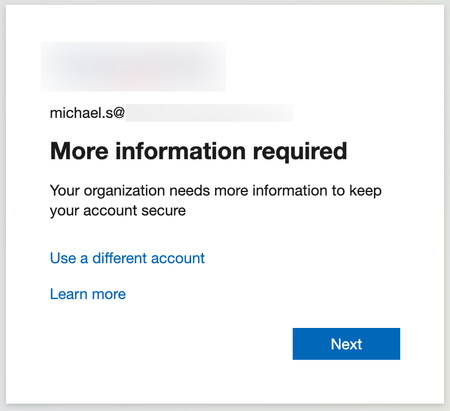
Currently, enabling self-service password reset (SSPR) registration enforcement causes the app 'Microsoft App Access Panel' to be added to the login flow of users who have SSPR enabled. This app is not able to be excluded from Conditional Access (CA) polices and is caught by 'All cloud apps', which breaks secure zero-trust scenarios and CA policy configurations. Best way to demonstrate this is through examples... ----Example 1---- Environment: CA Policy 1 - 'All cloud apps' requiring hybrid/compliant device, but excluding [App] (for all non-guest accounts) CA Policy 2 - [App] requiring MFA only (for contractor accounts, etc) CA Policy 3 - [App] requiring hybrid/compliant device (for internal accounts, etc) SSPR registration enforcement (Password reset > Registration) - set to 'Yes' MFA registration enforcement (Security > Authentication Methods > Registration campaign) - set to 'Enabled' Scenario: A new user requires access to web [App] on an unenrolled device and is assigned an account that falls under CA Policy 1 and 2, however [App] is excluded from 1 and shouldn't apply to this login. When accessing [App] for the first time, users must register SSPR/MFA. They see the below message, click 'Next' and are directed to https://accounts.activedirectory.windowsazure.com/passwordreset/register.aspx: Then they see this screen, which will block the login and try to get the user to download the Company Portal app: While behind the scenes, the login to [App] is being blocked by 'Microsoft App Access Panel' because it is seemingly added to the login flow and caught in CA Policy 1 in Req 2/3: CA Policy 1 shows as not applied on Req 1, CA Policy 2 shows as successful for Req 1/2/3 and CA Policy 3 shows as not applied for Req 1/2/3. Creating a CA policy for the 'Register security information' user action has no effect on this scenario and also shows as not applied on all the related sign-in logs. ----Example 2---- Environment: Same as above, but SSPR registration enforcement - set to 'No' Scenario: Same as above, but when accessing the [App] for the first time, they see the below message instead, click 'Next' and are directed to https://accounts.activedirectory.windowsazure.com/proofup.aspx: Then they are directed to the combined SSPR/MFA registration experience successfully: The 'Microsoft App Access Panel' doesn't show in the sign-in logs and the sign-in is successful after registration. From the two examples, it seems to be a bug with the SSPR registration enforcement and the combined registration experience. ----Workarounds---- 1 - Prevent using 'All cloud apps' with device based CA policies (difficult, requires redesigning/thinking/testing policies, could introduce new gaps, etc) 2 - Turn off SSPR registration enforcement and turn on MFA registration enforcement like in example 2 (easy, but only enforces MS MFA App registration, doesn't seem to re-trigger registration if the MS MFA App is removed, no other methods are supported for registration, and doesn't remind users to update) 3 - Disable SSPR entirely for affected users (medium depending on available security groups, and doesn't allow for affected users to use SSPR) ----Related links---- https://feedback.azure.com/d365community/idea/d5253b08-d076-ed11-a81b-000d3adb7ffd https://feedback.azure.com/d365community/idea/1365df89-c625-ec11-b6e6-000d3a4f0789 Conditional Access Policies, Guest Access and the "Microsoft Invitation Acceptance Portal" - Microsoft Community Hub MS, please either: 1 - Allow 'Microsoft App Access Panel' to be added to CA policies so it can be excluded 2 - Prevent 'Microsoft App Access Panel' from showing up in the CA login flow when SSPR registration enforcement is enabled20KViews2likes15Comments
Device Migration from On-prem AD to Azure AD
Hello All, We want to migrate our On-Prem AD devices to Azure AD and enroll into intune. We have Azure AD sync and all but needs to convert machine to Azure AD join only not Hybrid AD. So we would like to create new user profile on machine. We have used two methods so far. 1) Reset the machine and use join to Azure AD from OOBE. ( Issue - This will make user a Administrator for that machine and we dont want that ) 2) Unbind from on-prem AD, join to Azure AD manually but the same issue like number 1. 3) Using Hardware Hash, register devices to Autopilot and then reset all the machines. ( Issue - This will take too long to migrate 250 machines and helping remote workers are quite difficult ) Has anyone tried any different method or is there any expert suggestion ? Thanks!148KViews1like43Comments
Can External ID (CIAM) federate to an Azure AD/Entra ID tenant using SAML?
What I'm trying to achieve I'm setting up SAML federation FROM my External ID tenant (CIAM) TO a partner's Entra ID tenant (regular organizational tenant) for a hybrid CIAM/B2B setup where: Business users authenticate via their corporate accounts (OIDC or SAML) Individual customers use username/password or social providers (OIDC) Tenant details / Terminology: CIAM tenant: External ID tenant for customer-facing applications IdP tenant: Example Partner's organizational Entra ID tenant with business accounts Custom domain: mycustomdomain.com (example domain for the IdP tenant) Configuration steps taken Step 1: IdP Tenant (Entra ID) - Created SAML App Set up Enterprise App with SAML SSO Entity ID: https://login.microsoftonline.com/<CIAM_TENANT_ID>/ Reply URL: https://<CIAM_TENANT_ID>.ciamlogin.com/login.srf NameID: Persistent format Claim mapping: emailaddress → user.mail Step 2: CIAM Tenant (External ID) - Added SAML IdP (Initially imported from the SAML metadata URL from the above setup) Federating domain: mycustomdomain.com Issuer URI: https://sts.windows.net/<IDP_TENANT_ID>/ Passive endpoint: https://login.microsoftonline.com/mycustomdomain.com/saml2 DNS TXT record added: DirectFedAuthUrl=https://login.microsoftonline.com/mycustomdomain.com/saml2 Step 3: Attached to User Flow Added SAML IdP to user flow under "Other identity providers" Saved configuration and waited for propagation The problem It doesn't work. When testing via "Run user flow": No SAML button appears (should display "Sign in with mycustomdomain") Entering email address removed for privacy reasons doesn't trigger federation The SAML provider appears configured but never shows up in the actual flow Also tried using the tenant GUID in the passive endpoint instead of the domain - same result My question Is SAML federation from External ID to regular Entra ID tenants actually possible? I know OIDC federation to Microsoft tenants is (currently, august 2025) explicitly blocked (microsoftonline.com domains are rejected). Is SAML similarly restricted? The portal lets me configure everything without throwing any errors, but it never actually works. Am I missing something in my configuration? The documentation for this use case is limited and I've had to piece together the setup from various sources. Or is this a fundamental limitation where External ID simply can't federate to ANY Microsoft tenant regardless of the protocol used?281Views1like2CommentsMFA catch-22 during onboarding due to registration policy
Hi, We are experiencing a catch-22 scenario during user onboarding related to MFA. New users are required to install the Microsoft Authenticator app via our Company Portal. However, they are prompted to complete MFA registration before they can access or download anything from the Company Portal. Since they do not yet have the Authenticator app installed, they are effectively blocked from completing the MFA setup. From our investigation, it appears that the Multi-Factor Authentication registration policy is enforcing MFA registration for new users. In our scenario, this creates a circular dependency. We have attempted to exclude our office network from MFA using Conditional Access, but this does not resolve the issue because the MFA registration policy is triggered before Conditional Access policies are evaluated. Our questions: Is there a recommended way to handle MFA onboarding in this type of scenario? Can Conditional Access policies be used instead of the MFA registration policy for initial MFA enrollment?293Views0likes4Comments
Free Webinar: Microsoft Entra ID Break-Glass Accounts Done Right (Live Demo + Q&A)
Hi everyone, I’m hosting a free community webinar focused on one of the most common (and painful) Entra ID issues: tenant lockouts caused by break-glass account misconfiguration. This session is practical and demo-driven, and I’ll cover real-world scenarios I’ve seen involving Conditional Access and emergency access design. What we’ll cover Why every tenant should have at least two break-glass accounts Common misconfigurations that lead to lockouts Conditional Access exclusions: what works and what fails Recommended hardening approach (without blocking emergency access) Monitoring + alerting best practices Live demo + Q&A Who it’s for Microsoft 365 admins Entra ID / Conditional Access admins Security engineers MSP engineers The recording will be shared with registrants after the session. Registration link: https://teams.microsoft.com/l/meetup-join/19%3ameeting_MjkwYzExNzItMzY4OC00NThmLTg2ZDYtM2ExMTRiNWYwMGZl%40thread.v2/0?context=%7b%22Tid%22%3a%224bb6dd74-2dd1-459b-b867-f51781e1e7ed%22%2c%22Oid%22%3a%2251c6a848-6393-44f9-bac5-21855d5c7c3d%22%7d Thanks! Jaspreet Singh63Views0likes0Comments
Orphaned TPM-bound Entra Workplace Join device — no tenant access, backend deletion required
I have a personal Windows device that remains stuck in a TPM-protected Workplace Join to a former Microsoft Entra ID tenant. I no longer have tenant access and am not an admin. Local remediation completed: - dsregcmd /leave executed as SYSTEM - All MS-Organization / AAD certificates removed - Device still reports WorkplaceJoined : YES Azure Support ticket creation fails with: AADSTS160021 – interaction_required Application requested a user session which does not exist. Tenant inaccessible / user not present in tenant. This is an orphaned Entra ID device object. Requesting guidance or escalation for backend deletion. Tenant ID: 99f9b903-8447-4711-a2df-c5bd1ad1adf7 Device ID: f47987f4-a20b-4c34-a5f7-40ab0f593c6c58Views0likes0Comments
Fido passkeys blocked by policy
Hi all I'm helping out a customer with deploying physical passkeys and I'm running into a weird error. I've activated the sign in method and selected the two AAGuids for the Authenticator app and I've added the right AAGuid for the brand and model of passkey we are using. We can select the authentication method and enroll the security correctly but when trying to sign in using it we get the error as displayed in the attached picture. When checking the sign in logs i get this error message FIDO sign-in is disabled via policy and the error code is: 135016 I've not been able to track down any policy that would be blocking passkeys. anyone got any ideas?3.1KViews0likes7Comments
Cloud only Entra ID Domain Services and Seamless SSO from Entra ID Joined machines
Hello I am currently implementing Entra ID Domain Services with one customer (he has no on-premises active directory). We now face the issue that an Entra ID joined client is not able to access ressources on machines that are joined to Entra ID Domain Services without entering his username and password. The authentication fails with incorrect username and password (event id 200) message and the Security-Kerberos eventlog reports that it was not able to contact a domain controller for the AzureAd Domain (so he is not using the Domain name of the target domain). However has someone already tried this and is there something I am overlooking or is that something that simply can not work. Thank you very much in advance for any ideas.2KViews0likes8CommentsMigrating from Hybrid to pure Azure AD
We've currently got our domain/environment setup in a Hybrid AD. We've got a DC with AzureAD Connect installed and syncing to Azure. The plan is to uninstall AzureAD connect, demote the DC server, manually join computers to AzureAD. Will this work? I'm trying to understand if there is any consideration when uninstalling the AzureAD connect or disconnecting the server from Azure. Thanks!48KViews0likes7Comments