azure ai search
18 TopicsIntegrating Microsoft Foundry with OpenClaw: Step by Step Model Configuration
Step 1: Deploying Models on Microsoft Foundry Let us kick things off in the Azure portal. To get our OpenClaw agent thinking like a genius, we need to deploy our models in Microsoft Foundry. For this guide, we are going to focus on deploying gpt-5.2-codex on Microsoft Foundry with OpenClaw. Navigate to your AI Hub, head over to the model catalog, choose the model you wish to use with OpenClaw and hit deploy. Once your deployment is successful, head to the endpoints section. Important: Grab your Endpoint URL and your API Keys right now and save them in a secure note. We will need these exact values to connect OpenClaw in a few minutes. Step 2: Installing and Initializing OpenClaw Next up, we need to get OpenClaw running on your machine. Open up your terminal and run the official installation script: curl -fsSL https://openclaw.ai/install.sh | bash The wizard will walk you through a few prompts. Here is exactly how to answer them to link up with our Azure setup: First Page (Model Selection): Choose "Skip for now". Second Page (Provider): Select azure-openai-responses. Model Selection: Select gpt-5.2-codex , For now only the models listed (hosted on Microsoft Foundry) in the picture below are available to be used with OpenClaw. Follow the rest of the standard prompts to finish the initial setup. Step 3: Editing the OpenClaw Configuration File Now for the fun part. We need to manually configure OpenClaw to talk to Microsoft Foundry. Open your configuration file located at ~/.openclaw/openclaw.json in your favorite text editor. Replace the contents of the models and agents sections with the following code block: { "models": { "providers": { "azure-openai-responses": { "baseUrl": "https://<YOUR_RESOURCE_NAME>.openai.azure.com/openai/v1", "apiKey": "<YOUR_AZURE_OPENAI_API_KEY>", "api": "openai-responses", "authHeader": false, "headers": { "api-key": "<YOUR_AZURE_OPENAI_API_KEY>" }, "models": [ { "id": "gpt-5.2-codex", "name": "GPT-5.2-Codex (Azure)", "reasoning": true, "input": ["text", "image"], "cost": { "input": 0, "output": 0, "cacheRead": 0, "cacheWrite": 0 }, "contextWindow": 400000, "maxTokens": 16384, "compat": { "supportsStore": false } }, { "id": "gpt-5.2", "name": "GPT-5.2 (Azure)", "reasoning": false, "input": ["text", "image"], "cost": { "input": 0, "output": 0, "cacheRead": 0, "cacheWrite": 0 }, "contextWindow": 272000, "maxTokens": 16384, "compat": { "supportsStore": false } } ] } } }, "agents": { "defaults": { "model": { "primary": "azure-openai-responses/gpt-5.2-codex" }, "models": { "azure-openai-responses/gpt-5.2-codex": {} }, "workspace": "/home/<USERNAME>/.openclaw/workspace", "compaction": { "mode": "safeguard" }, "maxConcurrent": 4, "subagents": { "maxConcurrent": 8 } } } } You will notice a few placeholders in that JSON. Here is exactly what you need to swap out: Placeholder Variable What It Is Where to Find It <YOUR_RESOURCE_NAME> The unique name of your Azure OpenAI resource. Found in your Azure Portal under the Azure OpenAI resource overview. <YOUR_AZURE_OPENAI_API_KEY> The secret key required to authenticate your requests. Found in Microsoft Foundry under your project endpoints or Azure Portal keys section. <USERNAME> Your local computer's user profile name. Open your terminal and type whoami to find this. Step 4: Restart the Gateway After saving the configuration file, you must restart the OpenClaw gateway for the new Foundry settings to take effect. Run this simple command: openclaw gateway restart Configuration Notes & Deep Dive If you are curious about why we configured the JSON that way, here is a quick breakdown of the technical details. Authentication Differences Azure OpenAI uses the api-key HTTP header for authentication. This is entirely different from the standard OpenAI Authorization: Bearer header. Our configuration file addresses this in two ways: Setting "authHeader": false completely disables the default Bearer header. Adding "headers": { "api-key": "<key>" } forces OpenClaw to send the API key via Azure's native header format. Important Note: Your API key must appear in both the apiKey field AND the headers.api-key field within the JSON for this to work correctly. The Base URL Azure OpenAI's v1-compatible endpoint follows this specific format: https://<your_resource_name>.openai.azure.com/openai/v1 The beautiful thing about this v1 endpoint is that it is largely compatible with the standard OpenAI API and does not require you to manually pass an api-version query parameter. Model Compatibility Settings "compat": { "supportsStore": false } disables the store parameter since Azure OpenAI does not currently support it. "reasoning": true enables the thinking mode for GPT-5.2-Codex. This supports low, medium, high, and xhigh levels. "reasoning": false is set for GPT-5.2 because it is a standard, non-reasoning model. Model Specifications & Cost Tracking If you want OpenClaw to accurately track your token usage costs, you can update the cost fields from 0 to the current Azure pricing. Here are the specs and costs for the models we just deployed: Model Specifications Model Context Window Max Output Tokens Image Input Reasoning gpt-5.2-codex 400,000 tokens 16,384 tokens Yes Yes gpt-5.2 272,000 tokens 16,384 tokens Yes No Current Cost (Adjust in JSON) Model Input (per 1M tokens) Output (per 1M tokens) Cached Input (per 1M tokens) gpt-5.2-codex $1.75 $14.00 $0.175 gpt-5.2 $2.00 $8.00 $0.50 Conclusion: And there you have it! You have successfully bridged the gap between the enterprise-grade infrastructure of Microsoft Foundry and the local autonomy of OpenClaw. By following these steps, you are not just running a chatbot; you are running a sophisticated agent capable of reasoning, coding, and executing tasks with the full power of GPT-5.2-codex behind it. The combination of Azure's reliability and OpenClaw's flexibility opens up a world of possibilities. Whether you are building an automated devops assistant, a research agent, or just exploring the bleeding edge of AI, you now have a robust foundation to build upon. Now it is time to let your agent loose on some real tasks. Go forth, experiment with different system prompts, and see what you can build. If you run into any interesting edge cases or come up with a unique configuration, let me know in the comments below. Happy coding!903Views1like1Comment
Monitoring and Evaluating LLMs in Clinical Contexts with Azure AI Foundry
👀 Missed Session 02? Don’t worry—you can still catch up. But first, here’s what AI HLS Ignited is all about: What is AI HLS Ignited? AI HLS Ignited is a Microsoft-led technical series for healthcare innovators, solution architects, and AI engineers. Each session brings to life real-world AI solutions that are reshaping the Healthcare and Life Sciences (HLS) industry. Through live demos, architectural deep dives, and GitHub-hosted code, we equip you with the tools and knowledge to build with confidence. Session 02 Recap: In this session, we introduced MedEvals, an end-to-end evaluation framework for medical AI applications built on Azure AI Foundry. Inspired by Stanford’s MedHELM benchmark, MedEvals enables providers and payers to systematically validate performance, safety, and compliance of AI solutions across clinical decision support, documentation, patient communication, and more. 🧠 Why Scalable Evaluation Is Critical for Medical AI "Large language models (LLMs) hold promise for tasks ranging from clinical decision support to patient education. However, evaluating the performance of LLMs in medical contexts presents unique challenges due to the complex and critical nature of medical information." — Evaluating large language models in medical applications: a survey As AI systems become deeply embedded in healthcare workflows, the need for rigorous evaluation frameworks intensifies. Although large language models (LLMs) can augment tasks ranging from clinical documentation to decision support, their deployment in patient-facing settings demands systematic validation to guarantee safety, fidelity, and robustness. Benchmarks such as MedHELM address this requirement by subjecting models to a comprehensive battery of clinically derived tasks built on dataset (ground truth), enabling fine-grained, multi-metric performance assessment across the full spectrum of clinical use cases. However, shipping a medical LLM is only step one. Without a repeatable, metrics-driven evaluation loop, quality erodes, regulatory gaps widen, and patient safety is put at risk. This project accelerates your ability to operationalize trustworthy LLMs by delivering plug-and-play medical benchmarks, configurable evaluators, and CI/CD templates—so every model update triggers an automated, domain-specific “health check” that flags drift, surfaces bias, and validates clinical accuracy before it ever reaches production. 🚀 How to Get Started with MedEvals Kick off your MedEvals journey by following our curated labs. Newcomers to Azure AI Foundry can start with the foundational workflow; seasoned practitioners can dive into advanced evaluation pipelines and CI/CD integration. 🧪 Labs 🧪 Foundry Basics & Custom Evaluations: 🧾 Notebook Authenticate, initialize a Foundry project, run built-in metrics, and build custom evaluators with EvalAI and PromptEval. 🧪 Search & Retrieval Evaluations: 🧾 Notebook Prepare datasets, execute search metrics (precision, recall, NDCG), visualize results, and register evaluators in Foundry. 🧪 Repeatable Evaluations & CI/CD: 🧾 Notebook Define evaluation schemas, build deterministic pipelines with PyTest, and automate drift detection using GitHub Actions. 🏥 Use Cases 📝 Creating Your Clinical Evaluation with RevCycle Determinations Select a model and metric that best supports the determination behind the rationale made on AI-assisted prior authorizations based on real payor policy. This notebook use case includes: Selecting multiple candidate LLMs (e.g., gpt-4o, o1) Breaking down determinations both in deterministic results (approved vs rejected) and the supporting rationale and logic. Running evaluations across multiple dimensions Combining deterministic evaluators and LLM-as-a-Judge methods Evaluating the differential impacts of evaluators on the rationale across scenarios 🧾Get Started with the Notebook Why it matters: Enables data-driven metric selection for clinical workflows, ensures transparent benchmarking, and accelerates safe AI adoption in healthcare. 📝 Evaluating AI Medical Notes Summarization Applications Systematically assess how different foundation models and prompting strategies perform on clinical summarization tasks, following the MedHELM framework. This notebook use case includes: Preparing real-world datasets of clinical notes and summaries Benchmarking summarization quality using relevance, coherence, factuality, and harmfulness metrics Testing prompting techniques (zero-shot, few-shot, chain-of-thought prompting) Evaluating outputs using both automated metrics and human-in-the-loop scoring 🧾Get Started with the Notebook Why it matters: Ensures responsible deployment of AI applications for clinical summarization, guaranteeing high standards of quality, trustworthiness, and usability. 📣 Join Us for the Next Session Help shape the future of healthcare by sharing AI HLS Ignited with your network—and don’t miss what’s coming next! 📅 Register for the upcoming session → AI HLS Ignited Event Page 💻 Explore the code, demos, and architecture → AI HLS Ignited GitHub Repository1.2KViews0likes0CommentsBuilding AI-Powered Clinical Knowledge Stores with Azure AI Search
👀 Missed Session 01? Don’t worry—you can still catch up. But first, here’s what AI HLS Ignited is all about: What is AI HLS Ignited? AI HLS Ignited is a Microsoft-led technical series for healthcare innovators, solution architects, and AI engineers. Each session brings to life real-world AI solutions that are reshaping the Healthcare and Life Sciences (HLS) industry. Through live demos, architectural deep dives, and GitHub-hosted code, we equip you with the tools and knowledge to build with confidence. Session 01 Recap: In our first session, we introduced the accelerator MedIndexer - which is an indexing framework designed for the automated creation of structured knowledge bases from unstructured clinical sources. Whether you're dealing with X-rays, clinical notes, or scanned documents, MedIndexer converts these inputs into a schema-driven format optimized for Azure AI Search. This will allow your applications to leverage state-of-the-art retrieval methodologies, including vector search and re-ranking. Moreover, by applying a well-defined schema and vectorizing the data into high-dimensional representations, MedIndexer empowers AI applications to retrieve more precise and context-aware information... The result? AI systems that surface more relevant, accurate, and context-aware insights—faster. 🔍 Turning Your Unstructured Data into Value "About 80% of medical data remains unstructured and untapped after it is created (e.g., text, image, signal, etc.)" — Healthcare Informatics Research, Chungnam National University In the era of AI, the rise of AI copilots and assistants has led to a shift in how we access knowledge. But retrieving clinical data that lives in disparate formats is no trivial task. Building retrieval systems takes effort—and how you structure your knowledge store matters. It’s a cyclic, iterative, and constantly evolving process. That’s why we believe in leveraging enterprise-ready retrieval platforms like Azure AI Search—designed to power intelligent search experiences across structured and unstructured data. It serves as the foundation for building advanced retrieval systems in healthcare. However, implementing Azure AI Search alone is not enough. Mastering its capabilities and applying well-defined patterns can significantly enhance your ability to address repetitive tasks and complex retrieval scenarios. This project aims to accelerate your ability to transform raw clinical data into high-fidelity, high-value knowledge structures that can power your next-generation AI healthcare applications. 🚀 How to Get Started with MedIndexer New to Azure AI Search? Begin with our guided labs to build a strong foundation and get hands-on with the core capabilities. Already familiar with the tech? Jump ahead to the real-world use cases—learn how to build Coded Policy Knowledge Stores and X-ray Knowledge Stores. 🧪 Labs 🧪 Building Your Azure AI Search Index: 🧾 Notebook - Building your first Index Learn how to create and configure an Azure AI Search index to enable intelligent search capabilities for your applications. 🧪 Indexing Data into Azure AI Search: 🧾 Notebook - Ingest and Index Clinical Data Understand how to ingest, preprocess, and index clinical data into Azure AI Search using schema-first principles. 🧪 Retrieval Methods for Azure AI Search: 🧾 Notebook - Exploring Vector Search and Hybrid Retrieval Dive into retrieval techniques such as vector search, hybrid retrieval, and reranking to enhance the accuracy and relevance of search results. 🧪 Evaluation Methods for Azure AI Search: 🧾 Notebook - Evaluating Search Quality and Relevance Learn how to evaluate the performance of your search index using relevance metrics and ground truth datasets to ensure high-quality search results. 🏥 Use Cases 📝 Creating Coded Policy Knowledge Stores In many healthcare systems, policy documents such as pre-authorization guidelines are still trapped in static, scanned PDFs. These documents are critical—they contain ICD codes, drug name coverage, and payer-specific logic—but are rarely structured or accessible in real-time. To solve this, we built a pipeline that transforms these documents into intelligent, searchable knowledge stores. This diagram shows how pre-auth policy PDFs are ingested via blob storage, passed through an OCR and embedding skillset, and then indexed into Azure AI Search. The result: fast access to coded policy data for AI apps. 🧾 Notebook - Creating Coded Policies Knowledge Stores Transform payer policies into machine-readable formats. This use case includes: Preprocessing and cleaning PDF documents Building custom OCR skills Leveraging out-of-the-box Indexer capabilities and embedding skills Enabling real-time AI-assisted querying for ICDs, payer names, drug names, and policy logic Why it matters: This streamlines prior authorization and coding workflows for providers and payors, reducing manual effort and increasing transparency. 🩻 Creating X-ray Knowledge Stores In radiology workflows, X-ray reports and image metadata contain valuable clinical insights—but these are often underutilized. Traditionally, they’re stored as static entries in PACS systems or loosely connected databases. The goal of this use case is to turn those X-ray reports into a searchable, intelligent asset that clinicians can explore and interact with in meaningful ways. This diagram illustrates a full retrieval pipeline where radiology reports are uploaded, enriched through foundational models, embedded, and indexed. The output powers an AI-driven web app for similarity search and decision support. 🧾 Notebook - Creating X-rays Knowledge Stores Turn imaging reports and metadata into a searchable knowledge base. This includes: Leveraging push APIs with custom event-driven indexing pipeline triggered on new X-ray uploads Generating embeddings using Microsoft Healthcare foundation models Providing an AI-powered front-end for X-ray similarity search Why it matters: Supports clinical decision-making by retrieving similar past cases, aiding diagnosis and treatment planning with contextual relevance. 📣 Join Us for the Next Session Help shape the future of healthcare by sharing AI HLS Ignited with your network—and don’t miss what’s coming next! 📅 Register for the upcoming session → AI HLS Ignited Event Page 💻 Explore the code, demos, and architecture → AI HLS Ignited GitHub RepositoryAI Agents: Mastering Agentic RAG - Part 5
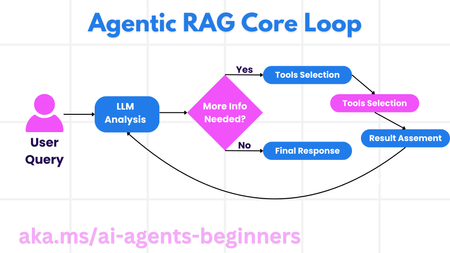
This blog post, Part 5 of a series on AI agents, explores Agentic RAG (Retrieval-Augmented Generation), a paradigm shift in how LLMs interact with external data. Unlike traditional RAG, Agentic RAG allows LLMs to autonomously plan their information retrieval process through an iterative loop of actions and evaluations. The post highlights the importance of the LLM "owning" the reasoning process, dynamically selecting tools and refining queries. It covers key implementation details, including iterative loops, tool integration, memory management, and handling failure modes. Practical use cases, governance considerations, and code examples demonstrating Agentic RAG with AutoGen, Semantic Kernel, and Azure AI Agent Service are provided. The post concludes by emphasizing the transformative potential of Agentic RAG and encourages further exploration through linked resources and previous blog posts in the series.3.6KViews1like0Comments[pt2] Choosing the right Data Storage Source (Under Preview) for Azure AI Search
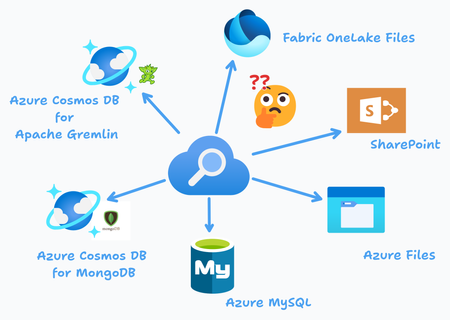
This blog introduces new preview data sources for Azure AI Search, including Fabric OneLake Files, Azure Cosmos DB for Gremlin, Azure Cosmos DB for MongoDB, SharePoint, and Azure Files. Each data source supports incremental indexing, metadata extraction, and AI enrichment, making Azure AI Search more powerful for enterprise search applications.323Views1like0Comments[pt1] Choosing the right Data Storage Source (Generally available) for Azure AI Search
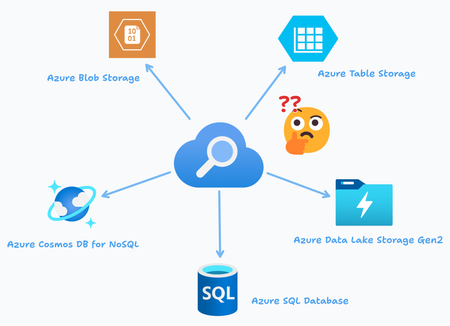
When integrating Azure AI Search into your solutions, choosing the right data storage and data sources is crucial for efficient and scalable indexing. This blog dives into three primary data source connectors for Azure AI Search: Azure Blob Storage, Azure Cosmos DB for NoSQL, and Azure SQL Database. Each data source type offers distinct advantages and use cases depending on the structure of your data and the desired search functionality.492Views0likes0Comments
RoomRadar.ai: Revolutionising Hotel Search with Azure Maps and Azure AI Services
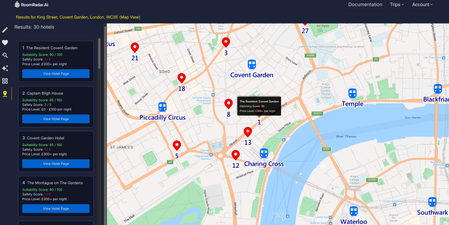
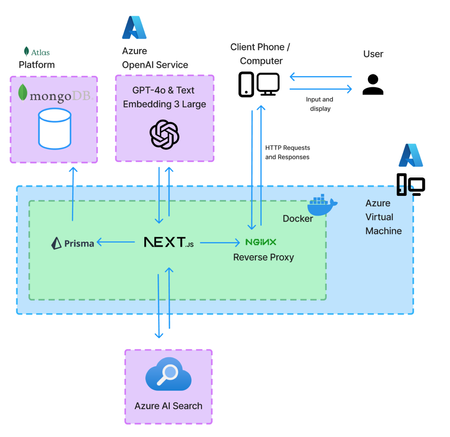
Explore how RoomRadar.ai leverages Azure Maps and AI Search to transform hotel hunting. From interactive map views with route planning to finding hotels based on visual preferences with AI, RoomRadar.ai showcases the future of travel planning. Dive into the technical details for this UCL-Microsoft collaboration.1.8KViews2likes0CommentsEnhancing Applications with AI - RoomRadar.Ai's Chatbot, Search, and Recommendation Systems
Learn how to build AI-powered applications using Microsoft Azure’s AI services. This article discusses RoomRadar.Ai, a hotel search system, as an example to guide developers to help create personalized user experiences with AI technologies. Within, the GPT-4o chatbot, search, and recommendation (similarity search) systems are discussed.1.6KViews1like0CommentsTeach ChatGPT to Answer Questions: Using Azure AI Search & Azure OpenAI (Semantic Kernel)
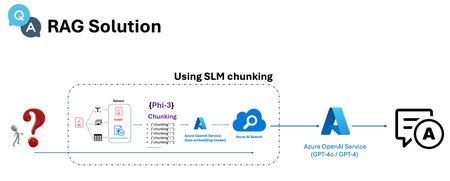
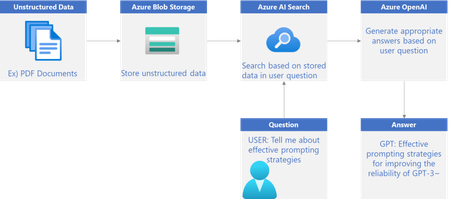
In this two-part series, we will explore how to build intelligent service using Azure. In Series 1, we'll use Azure AI Search to extract keywords from unstructured data stored in Azure Blob Storage. In Series 2, we'll Create a feature to answer questions based on PDF documents using Azure OpenAI26KViews4likes3Comments