autopatch
3 TopicsWill Intune device-only subscription get additional value in FY27
Will the Intune device-only subscription (Microsoft Intune announces device-only subscription for shared resources | Microsoft Community Hub) get the additional features which Intune P1 will get in FY27 (Microsoft 365 adds advanced Microsoft Intune solutions at scale - Microsoft Intune Blog), Intune Remote Help, Intune Advanced Analytics and Intune P2? This would have a huge impact of our planning how to manage special purpose devices in production environments without any user affinity. Deploying security and configuration settings, Windows Autopilot for Windows IoT Enterprise LTSC kiosk deployment, Windows Autopatch (servicing), Remote Help and FOTA for Zebra devices would be drivers to add these production devices to Intune.60Views0likes0Comments
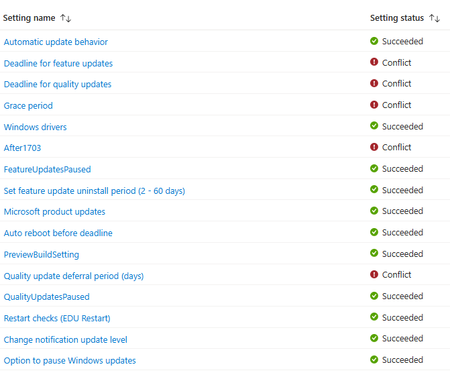
Autopatch reporting Errors and Conflicts, but I can't find them...
Greetings all. I am fairly new to Intune. I setup Autopatch to do Windows Updates (Quality & Features). I was looking over some of the stats today and noticed that some computers (<10%) have issues. When I click on one of the computers I get a list of Profile Settings... If I click on any of these (even the success, I get Not Found... How do I figure out what the error or conflict is so I can correct it? I thought I might have had another Windows Update policy (Non-Autopatch), but I deleted it a while back when I switched to Autopatch. Thanks in advance for your time. J194Views0likes1CommentWhat Happens Outside "Active Hours?"
While looking at the features and functionality of autopatch, I'm being asked for more detailed information on behaviors related to "Active Hours", but more specifically what happens outside of active hours. (Please let me know if additional information is required to answer this) Example: It's 21:30p, the device active hours are being automatically set (05:00a to 20:00p) and a quality update is discovered and installed that requires a reboot to complete. if I'm still interacting with the host, will it try and reboot because its technically outside of active hours? Will it provide a warning or option to pause, reschedule, etc? What is the expected behavior? Does the windows host recognize that activity is occurring and wait until a specific point in time outside of active hours? How best can I explain what happens outside of active hours to the rest of the team so they will better understand expected behaviors? Thank you in advance,41Views0likes0Comments