app services
211 Topics
Azure support team not responding to support request
I am posting here because I have not received a response to my support request despite my plan stating that I should hear back within 8 hours. It has now gone a day beyond that limit, and I am still waiting for assistance with this urgent matter. This issue is critical for my operations, and the delay is unacceptable. The ticket/reference number for my original support request was 2410100040000309. And I have created a brand new service request with ID 2412160040010160. I need this addressed immediately.732Views1like7CommentsApplying DevOps Principles on Lean Infrastructure. Lessons From Scaling to 102K Users.
Hi Azure Community, I'm a Microsoft Certified DevOps Engineer, and I want to share an unusual journey. I have been applying DevOps principles on traditional VPS infrastructure to scale to 102,000 users with 99.2% uptime. Why am I posting this in an Azure community? Because I'm planning migration to Azure in 2026, and I want to understand: What mistakes am I already making that will bite me during migration? THE CURRENT SETUP Platform: Social commerce (West Africa) Users: 102,000 active Monthly events: 2 million Uptime: 99.2% Infrastructure: Single VPS Stack: PHP/Laravel, MySQL, Redis Yes - one VPS. No cloud. No Kubernetes. No microservices. WHY I HAVEN'T USED AZURE YET Honest answer: Budget constraints in emerging market startup ecosystem. At our current scale, fully managed Azure services would significantly increase monthly burn before product-market expansion. The funding we raised needs to last through growth milestones. The trade: I manually optimize what Azure would auto-scale. I debug what Application Insights would catch. I do by hand what Azure Functions would automate. DEVOPS PRACTICES THAT KEPT US RUNNING Even on single-server infrastructure, core DevOps principles still apply: CI/CD Pipeline (GitHub Actions) • 3-5 deployments weekly • Zero-downtime deploys • Automated rollback on health check failures • Feature flags for gradual rollouts Monitoring & Observability • Custom monitoring (would love Application Insights) • Real-time alerting • Performance tracking and slow query detection • Resource usage monitoring Automation • Automated backups • Automated database optimization • Automated image compression • Automated security updates Infrastructure as Code • Configs in Git • Deployment scripts • Environment variables • Documented procedures Testing & Quality • Automated test suite • Pre-deployment health checks • Staging environment • Post-deployment verification KEY OPTIMIZATIONS Async Job Processing • Upload endpoint: 8 seconds → 340ms • 4x capacity increase Database Optimization • Feed loading: 6.4 seconds → 280ms • Strategic caching • Batch processing Image Compression • 3-8MB → 180KB (94% reduction) • Critical for mobile users Caching Strategy • Redis for hot data • Query result caching • Smart invalidation Progressive Enhancement • Server-rendered pages • 2-3 second loads on 4G WHAT I'M WORRIED ABOUT FOR AZURE MIGRATION This is where I need your help: Architecture Decisions • App Service vs Functions + managed services? • MySQL vs Azure SQL? • When does cost/benefit flip for managed services? Cost Management • How do startups manage Azure costs during growth? • Reserved instances vs pay-as-you-go? • Which Azure services are worth the premium? Migration Strategy • Lift-and-shift first, or re-architect immediately? • Zero-downtime migration with 102K active users? • Validation approach before full cutover? Monitoring & DevOps • Application Insights - worth it from day one? • Azure DevOps vs GitHub Actions for Azure deployments? • Operational burden reduction with managed services? Development Workflow • Local development against Azure services? • Cost-effective staging environments? • Testing Azure features without constant bills? MY PLANNED MIGRATION PATH Phase 1: Hybrid (Q1 2026) • Azure CDN for static assets • Azure Blob Storage for images • Application Insights trial • Keep compute on VPS Phase 2: Compute Migration (Q2 2026) • App Service for API • Azure Database for MySQL • Azure Cache for Redis • VPS for background jobs Phase 3: Full Azure (Q3 2026) • Azure Functions for processing • Full managed services • Retire VPS QUESTIONS FOR THIS COMMUNITY Question 1: Am I making migration harder by waiting? Should I have started with Azure at higher cost to avoid technical debt? Question 2: What will break when I migrate? What works on VPS but fails in cloud? What assumptions won't hold? Question 3: How do I validate before cutting over? Parallel infrastructure? Gradual traffic shift? Safe patterns? Question 4: Cost optimization from day one? What to optimize immediately vs later? Common cost mistakes? Question 5: DevOps practices that transfer? What stays the same? What needs rethinking for cloud-native? THE BIGGER QUESTION Have you migrated from self-hosted to Azure? What surprised you? I know my setup isn't best practice by Azure standards. But it's working, and I've learned optimization, monitoring, and DevOps fundamentals in practice. Will those lessons transfer? Or am I building habits that cloud will expose as problematic? Looking forward to insights from folks who've made similar migrations. --- About the Author: Microsoft Certified DevOps Engineer and Azure Developer. CTO at social commerce platform scaling in West Africa. Preparing for phased Azure migration in 2026. P.S. I got the Azure certifications to prepare for this migration. Now I need real-world wisdom from people who've actually done it!102Views0likes0CommentsWhen Words Matter Noise-Free, Domain-Specific Voice Recognition with Azure Custom Speech
As voice-driven technologies continue to transform how users interact with applications, delivering accurate, natural, and noise-resilient speech recognition has become essential. From virtual assistants and customer service bots to voice-controlled industrial systems, users expect speech interfaces that just work — even in noisy environments or when complex technical terms are spoken. That’s where Azure Custom Speech comes in. It allows you to tailor Azure’s Speech-to-Text service for your specific domain by training it to handle background noise, unique terminology, and diverse accents — enabling seamless and reliable voice experiences across industries. https://dellenny.com/when-words-matter-noise-free-domain-specific-voice-recognition-with-azure-custom-speech/40Views0likes0Comments
Replicate workload from VMWare to Azure using Azure Site Recovery(ASR)
Hello, I am working on a project to replicate worklooad hosted on a VMWare to Azure Site Recovery for disaster recovery purpose. Current Environment: More than 80 VMs hosted on VMWare managed by VMWare Sphere running both Linux and Windows OS.. Databases: Oracle DB, Microsoft SQL and MySQL Requirements: seamless failover and disaster recovery requirements. scalable setup No down-time integrate identity and access mgt. integration with Microsoft Entra ID. RTO < 2 hrs and RPO > 15 minutes Backup: critical database backup every 3 hours App servers: Daily*incremental) and weekly (full) Transaction Logs: every 10 mins backup config. should be Daily Questions I have confirmed ASR supports fail back from Azure- on premise(VMWare specifically). Hence ASR(Azure site recovery) will be used for the project. However, what is the seamless method to replicate the databases(Oracle, Microsoft SQL and MySQL). https://learn.microsoft.com/en-us/azure/site-recovery/vmware-azure-failback What is the best approach to replicate the Application Servers? integrating existing on-premise 3rd party network security tool for firewall etc instead of the azure cloud native security tool. recommendation?? cost optimization techniques/recommendations Best practices for conducting non-destructive DR drills.153Views0likes1CommentMysterious Nightly CPU Spikes on App Service Plans (22:00-10:00) Despite Low Traffic
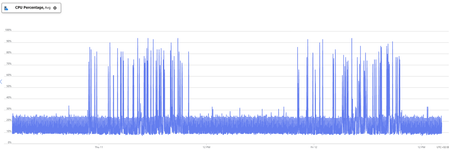
For several months now, all of our Azure App Service Plans have been experiencing consistent CPU spikes during off-peak hours, specifically from approximately 22:00 PM to 10:00 AM. This pattern is particularly puzzling because: This timeframe corresponds to our lowest traffic and activity periods We've conducted thorough investigations but haven't identified the root cause No scheduled timer functions or planned jobs are running during these hours that could explain the spikes What we've already checked: Application logs and metrics Scheduled functions and background jobs Traffic patterns and user activity Has anyone encountered similar behavior? What could be causing these nightly CPU spikes on otherwise idle App Service Plans?345Views0likes2CommentsHow to deploy n8n on Azure App Service and leverage the benefits provided by Azure.
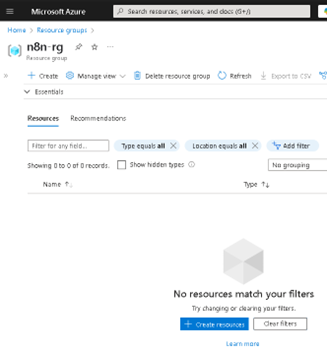
Lately, n8n has been gaining serious traction in the automation world—and it’s easy to see why. With its open-source core, visual workflow builder, and endless integration capabilities, it has become a favorite for developers and tech teams looking to automate processes without being locked into a single vendor. Given all the buzz, I thought it would be the perfect time to share a practical way to run n8n on Microsoft Azure using App Service. Why? Because Azure offers a solid, scalable, and secure platform that makes deployment easy, while still giving you full control over your container and configurations. Whether you're building a quick demo or setting up a production-ready instance, Azure App Service brings a lot of advantages to the table—like simplified scaling, integrated monitoring, built-in security features, and seamless CI/CD support. In this post, I’ll walk you through how to get your own n8n instance up and running on Azure—from creating the resource group to setting up environment variables and deploying the container. If you're into low-code automation and cloud-native solutions, this is a great way to combine both worlds. The first step is to create our Resource Group (RG); in my case, I will name it "n8n-rg". Now we proceed to create the App Service. At this point, it's important to select the appropriate configuration depending on your needs—for example, whether or not you want to include a database. If you choose to include one, Azure will handle the connections for you, and you can select from various types. In my case, I will proceed without a database. Proceed to configure the instance details. First, select the instance name, the 'Publish' option, and the 'Operating System'. In this case, it is important to choose 'Publish: Container', set the operating system to Linux, and most importantly select the region closest to you or your clients. Service Plan configuration. Here, you should select the plan based on your specific needs. Keep in mind that we are using a PaaS offering, which means that underlying compute resources like CPU and RAM are still being utilized. Depending on the expected workload, you can choose the most appropriate plan. Secondly—and very importantly—consider the features offered by each tier, such as redundancy, backup, autoscaling, custom domains, etc. In my case, I will use the Basic B1 plan. In the Database section, we do not select any option. Remember that this will depend on your specific requirements. In the Container section, under 'Image Source', select 'Other container registries'. For production environments, I recommend using Azure Container Registry (ACR) and pulling the n8n image from there. Now we will configure the Docker Hub options. This step is related to the previous one, as the available options vary depending on the image source. In our case, we will use the public n8n image from Docker Hub, so we select 'Public' and proceed to fill in the required fields: the first being the server, and the second the image name. This step is very important—use the exact same values to avoid issues. In the Networking section, we will select the values as shown in the image. This configuration will depend on your specific use case—particularly whether to enable Virtual Network (VNet) integration or not. VNet integration is typically used when the App Service needs to securely communicate with private resources (such as databases, APIs, or services) that reside within an Azure Virtual Network. Since this is a demo environment, we will leave the default settings without enabling VNet integration. In the 'Monitoring and Security' section, it is essential to enable these features to ensure traceability, observability, and additional security layers. This is considered a minimum requirement in production environments. At the very least, make sure to enable Application Insights by selecting 'Yes'. Finally, click on 'Create' and wait for the deployment process to complete. Now we will 'stop' our Web App, as we need to make some preliminary modifications. To do this, go to the main overview page of the Web App and click on 'Stop'. In the same Web App overview page, navigate through the left-hand panel to the 'Settings' section. Once there, click on it and select 'Environment Variables'. Environment variables are key-value pairs used to configure the behavior of your application without changing the source code. In the case of n8n, they are essential for defining authentication, webhook behavior, port configuration, timezone settings, and more. Environment variables within Azure specifically in Web Apps function the same way as they do outside of Azure. They allow you to configure your application's behavior without modifying the source code. In this case, we will add the following variables required for n8n to operate properly. Note: The variable APP_SERVICE_STORAGE should only be modified by setting it to true. Once the environment variables have been added, proceed to save them by clicking 'Apply' and confirming the changes. A confirmation dialog will appear to finalize the operation. Restart the Web App. This second startup may take longer than usual, typically around 5 to 7 minutes, as the environment initializes with the new configuration. Now, as we can see, the application has loaded successfully, and we can start using our own n8n server hosted on Azure. As you can observe, it references the host configured in the App Service. I hope you found this guide helpful and that it serves as a useful resource for deploying n8n on Azure App Service. If you have any questions or need further clarification, feel free to reach out—I'd be happy to help.7KViews4likes8Comments
Scaling Smart with Azure: Architecture That Works
Hi Tech Community! I’m Zainab, currently based in Abu Dhabi and serving as Vice President of Finance & HR at Hoddz Trends LLC a global tech solutions company headquartered in Arkansas, USA. While I lead on strategy, people, and financials, I also roll up my sleeves when it comes to tech innovation. In this discussion, I want to explore the real-world challenges of scaling systems with Microsoft Azure. From choosing the right architecture to optimizing performance and cost, I’ll be sharing insights drawn from experience and I’d love to hear yours too. Whether you're building from scratch, migrating legacy systems, or refining deployments, let’s talk about what actually works.202Views0likes1Comment
Error Running Script in Runbook with System Assigned Managed Identity
Hello everyone, I could use some assistance, please. I'm encountering an error when trying to run a script within a runbook. I'm using PowerShell 5.1 with a system-assigned managed identity. The script works find without using the managed identiy via powershell outside of azure. Error: System.Management.Automation.ParameterBindingException: Cannot process command because of one or more missing mandatory parameters: Credential. at System.Management.Automation.CmdletParameterBinderController.PromptForMissingMandatoryParameters(Collection1 fieldDescriptionList, Collection1 missingMandatoryParameters) at System.Management.Automation.CmdletParameterBinderController.HandleUnboundMandatoryParameters I am using this script Connect-ExchangeOnline -ManagedIdentity -Organization domain removed for privacy reasons # Specify the user's mailbox identity $mailboxIdentity = "email address removed for privacy reasons" # Get mailbox configuration and statistics for the specified mailbox $mailboxConfig = Get-Mailbox -Identity $mailboxIdentity $mailboxStats = Get-MailboxStatistics -Identity $mailboxIdentity # Check if TotalItemSize and ProhibitSendQuota are not null and extract the sizes if ($mailboxStats.TotalItemSize -and $mailboxConfig.ProhibitSendQuota) { $totalSizeBytes = $mailboxStats.TotalItemSize.Value.ToString().Split("(")[1].Split(" ")[0].Replace(",", "") -as [double] $prohibitQuotaBytes = $mailboxConfig.ProhibitSendQuota.ToString().Split("(")[1].Split(" ")[0].Replace(",", "") -as [double] # Convert sizes from bytes to gigabytes $totalMailboxSize = $totalSizeBytes / 1GB $mailboxWarningQuota = $prohibitQuotaBytes / 1GB # Check if the mailbox size exceeds 90% of the warning quota if ($totalMailboxSize -ge ($mailboxWarningQuota * 0.0)) { # Send an email notification $emailBody = "The mailbox $($mailboxIdentity) has reached $($totalMailboxSize) GB, which exceeds 90% of the warning quota." Send-MailMessage -To "email address removed for privacy reasons" -From "email address removed for privacy reasons" -Subject "Mailbox Size Warning" -Body $emailBody -SmtpServer "smtp.office365.com" -Port 587 -UseSsl -Credential (Get-Credential) } } else { Write-Host "The required values(TotalItemSize or ProhibitSendQuota) are not available." }749Views0likes1Comment
Azure Form Recognizer Redaction Issue with Scanned PDFs and Page Size Variations
Hi all, I’m working on a PDF redaction process using Azure Form Recognizer and Azure Functions. The flow works well in most cases — I extract the text and bounding box coordinates and apply redaction based on that. However, I’m facing an issue with scanned PDFs or PDFs with slightly different page sizes. In these cases, the redaction boxes don’t align properly — they either miss the text or appear slightly off (above or below the intended area). It seems like the coordinate mapping doesn't match accurately when the document isn't a standard A4 size or has DPI inconsistencies. Has anyone else encountered this? Any suggestions on: Adjusting for page size or DPI dynamically? Mapping normalized coordinates correctly for scanned PDFs? Appreciate any help or suggestions!154Views0likes1Comment
🚀 Azure Application Gateway: Smart Load Balancing & Security
Ensuring high availability and efficient load balancing is crucial for web applications. Azure offers several traffic management solutions, including Application Gateway, Front Door, Load Balancer, and Traffic Manager. Today, let's focus on why Application Gateway stands out as a powerful tool for managing web traffic. 🚀 Why we should use Azure Application Gateway? 🔹 Layer 7 Load Balancing: Unlike Layer 3 or 4 solutions, Application Gateway makes intelligent routing decisions based on HTTP request properties. For example, requests to /images/ can be directed to dedicated image servers, while /videos/ traffic is routed to specialized video servers. 🔹 SSL/TLS Termination (Offloading): Reduces processing load on backend servers by decrypting traffic at the gateway before forwarding it unencrypted. Note: This might conflict with compliance requirements, so verify your app’s security needs !! 🔹 Autoscaling: Dynamically scales up or down based on traffic patterns, ensuring cost-effective resource utilization. 🔹 Zone Redundancy: Operates across multiple Availability Zones, enhancing fault tolerance without needing separate gateways in each zone. 🔹 Web Application Firewall (WAF): Provides centralized security against common exploits like SQL injection and cross-site scripting (XSS). Built on OWASP 3.1 (WAF_v2), it can function in Detection Mode (alerting admins) or Prevention Mode (blocking threats proactively). 🔹 URL-Based Routing: Enables smart traffic distribution by directing different types of content to the most appropriate backend pools. Example: http://contoso.com/video/* → VideoServerPool 🔹 Multiple-Site Hosting: Hosts multiple web applications on a single gateway, routing requests based on hostname or domain. Example: http://contoso.com → ContosoServerPool 🔹 Redirection & Rewrite Capabilities: ✔ Redirect HTTP → HTTPS to enforce encrypted traffic. ✔ Rewrite HTTP headers & URLs to enhance security (e.g., add HSTS or remove sensitive response headers). 🔹 Cookie-Based Session Affinity: Ensures users maintain session continuity by always connecting to the same backend server. Useful when session state is stored locally. ⚙️ How to Deploy & Configure Azure Application Gateway ⚙️ ✅ Dedicated Subnet: Create a subnet (e.g., myAGSubnet) within a Virtual Network. ✅ Frontend IP: Define whether to use a public or private IP or both (If you configured multiple listeners) to receive client requests. ✅ Backend Pool: Assign backend servers via NICs, Virtual Machine Scale Sets, public/internal IPs, or FQDNs. ✅ HTTP/HTTPS Listener: Specify which port (e.g., 80, 443) will handle incoming requests. ✅ Routing Rules: Set up domain-based (host-based routing) or path-based routing logic. 🔹 Host-Based Routing means routing traffic based on the hostname in the HTTP request header 🔹 Path-based Routing allows you to direct traffic to different backend pools based on the URL path in the request. ✅ Health Probes: Ensure backend servers are online using TCP or HTTP-based monitoring.147Views1like0Comments