access web app
70 Topics
Full account lock (Error 0x80004005) on multiple devices and networks. Automated support fails.
Greetings to the community and the Microsoft support team, I am turning to this forum because the automated support system and bots keep me in a closed loop, preventing me from reaching a human agent to resolve a critical lockout on my account. Currently, I am unable to sign in to my Xbox Live account under any circumstances. The system constantly throws the following error: Error code: 0x80004005 Message: "We couldn't sign you in to Xbox Live. Sorry, something went wrong. Try again in a while." As a technician, I have rigorously isolated the variables and can confirm the following to save time on diagnostics: It is not a local hardware failure: The exact same error replicates when trying to sign in from my Xbox console, my PC, and the mobile app. It is not a local connectivity (ISP) issue: I have tested this through my home Wi-Fi and different cellular data networks, getting the exact same access denial. All diagnostics point to the failure being directly at the server level: a token generation issue with my profile, an invisible security lock, or an internal synchronization failure. I kindly request that a Microsoft Agent or moderator send me a Private Message (DM) here so I can provide the affected email address and have this case escalated to Tier 2 support. I need the internal status of my profile to be checked. My Xbox Gamertag is: #Non9969 I look forward to your help. Thank you very much.54Views0likes1Comment
Bug in Microsoft Access's Number Filters for Less Than & Greater Than options
Dear Microsoft Office 365 Development Team, I am submitting this bug report regarding an issue I have encountered with the Number Filters in Microsoft Access within Office 365. Specifically, the "Less Than..." and "Greater Than..." filters do not behave according to basic mathematical principles. Here are the details of the issue: When applying the "Less Than..." filter and entering a value (e.g., 250), the filter includes records equal to 250 in the result. The correct behavior should be to display records with values strictly less than 250, i.e., from 1 to 249. Similarly, when applying the "Greater Than..." filter and entering a value (e.g., 250), the filter also includes records equal to 250. The expected behavior should be to show records with values strictly greater than 250, i.e., from 251 to 500. It appears that the filter logic is not following the expected mathematical rules for "less than" and "greater than" comparisons. Could you kindly investigate this issue and confirm once a fix is available? I would also appreciate it if you could provide details about when the new, fixed version of Microsoft Access will be released. Thank you for your attention to this matter. Kind regards,Solved222Views0likes2Comments
Transitioning From Access To Web Sites
I have a question for the individuals out there that are moving to a web interface from Access What it the best app/program to use to make the move from using Access to using web pages? I've been tasked with converting the Access app that I have been working with for years to make it a web "site", which would be converting the entire application - forms, reports, etc. so that it can be used via web browser instead of MS Access. I am in no means a website developer, but I'm always open to learning new things. Mind you, one of the databases has in excess of 12K lines of VBA. I want to be able to use some of the same techniques as what I've done with VBA and to be able to create a good user experience on the front end plus create some additional enhancements. Al of my searches have not yielded anything helpful. Thanks in advance. Jeff3.6KViews0likes25Comments
Sharepoint Linked Table - Help
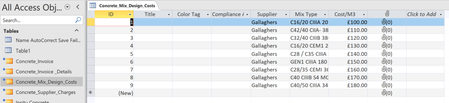
Hi, I have an older sharepoint list that collects concrete deliveries to site (Insitu Concrete), i have a new Sharepoint list that that shows the price for each mix type (Concrete_Mix_Design_Costs). I cannot run a query or use DLookup succesfully to add the price to each delivery. Above are the tables i want to put the price against each delivery based on Mix Type. Any help would be much appreciated, I am a builder not a computer person but have muddled my way to building a database that runs our procurement etc, but despite hours of effort i am going nowhere with this. ThanksSolved290Views0likes4Comments
MS Access Handling Nulls In Query Formula
Hi all, I have this formula in Access: IIf([Init_Static_P] < 0 And (Nz([Adj_Static_P], -9999) < 0), "Resolved", "Not resolved" which keeps outputting an #Error when Adj_Static_P is null which will happen. I need the nulls in my dataset. Whenever Init_Static_P is < 0 and or Adj_Static_P is < 0, it works as it should outputting "Resolved" and vicer versa, however it does not work whenever there is any instance of Adj_Static_P as a blank value. Does anyone know how I can handle the nulls so that if the Init_Static_P is >0 and Adj_Static_P is null, then it would output "Unresolved", and if Init_Static_P is <0 and Adj_Static_P is null then it would output "Resolved" instead of #Error? Output should be as follows: Init_Static_P Adj_Static_P Result >0 Null "Not resolved" >0 >0 "Not resolved" <0 Null "Resolved" <0 < 0 "Resolved" Thanks in advance! <3366Views0likes3CommentsAccess Releases 8 Issue Fixes in Version 2302 (Released February 28, 2023)
Our newest round of Access bug fixes was released on February 28, 2023. In this blog post, we are highlighting some of the fixed issues that our Access engineers released in the current monthly channel.6.8KViews3likes1CommentODBC --call failed. [Sage][Support] (40190) Data conversion algorithm not supported for...
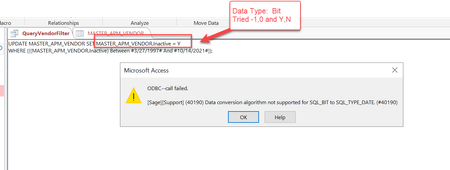
ODBC --call failed. [Sage][Support] (40190) Data conversion algorithm not supported for SQL_BIT to SQL_TYPE_DATE. (#40190) I'm trying to execute an update statement in MS Access using the following, but keep getting an error message: Any ideas what I'm doing wrong here? Appreciate any feedback.Solved363Views0likes6Comments