access management
440 Topics
Introducing the Entra Helpdesk Portal: A Zero-Trust, Dockerized ITSM Interface for Tier 1 Support
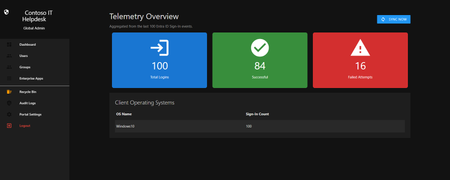
Hello everyone, If you manage identity in Microsoft Entra ID at an enterprise scale, you know the struggle: delegating day-to-day operational tasks (like password resets, session revocations, and MFA management) to Tier 1 and Tier 2 support staff is inherently risky. The native Azure/Entra portal is incredibly powerful, but it’s complex and lacks mandatory ITSM enforcement. Giving a helpdesk technician the "Helpdesk Administrator" role grants them access to a portal where a single misclick can cause a major headache. To solve this, I’ve developed the Entra Helpdesk Portal (Community Edition)—an open-source, containerized application designed to act as an isolated "airlock" between your support team and your Entra ID tenant. Why This Adds Value to Your Tenant Instead of having technicians log into the Azure portal, they log into this clean, Material Design web interface. It leverages a backend Service Principal (using MSAL and the Graph API) to execute commands on their behalf. Strict Zero Trust: Logging in via Microsoft SSO isn’t enough. The app intercepts the token and checks the user’s UPN against a hardcoded ALLOWED_ADMINS whitelist in your Docker environment file. Mandatory ITSM Ticketing: You cannot enforce ticketing in the native Azure Portal. In this app, every write action prompts a modal requiring a valid ticket number (e.g., INC-123456). Local Audit Logging: All actions, along with the actor, timestamp, and ticket number, are written to an immutable local SQLite database (audit.db) inside the container volume. Performance: Heavy Graph API reads are cached in-memory with a Time-To-Live (TTL) and smart invalidation. Searching for users or loading Enterprise Apps takes milliseconds. What Can It Do? Identity Lifecycle: Create users, auto-generate secure 16-character passwords, revoke sign-in sessions, reset passwords, and delete specific MFA methods to force re-registration. Diagnostics: View a user's last 5 sign-in logs, translating Microsoft error codes into plain English. Group Management: Add/remove members to Security and M365 groups. App/SPN Management: Lazy-load raw requiredResourceAccess Graph API payloads to audit app permissions, and instantly rotate client secrets. Universal Restore: Paste the Object ID of any soft-deleted item into the Recycle Bin tab to instantly resurrect it. How Easy Is It to Setup? I wanted this to be universally deployable, so I compiled it as a multi-architecture Docker image (linux/amd64 and linux/arm64). It will run on a massive Windows Server or a simple Raspberry Pi. Setup takes less than 5 minutes: Create an App Registration in Entra ID and grant it the necessary Graph API Application Permissions (e.g., User.ReadWrite.All, AuditLog.Read.All). Create a docker-compose.yml file. Define your feature toggles. You can literally turn off features (like User Deletion) by setting an environment variable to false. version: '3.8' services: helpdesk-portal: image: jahmed22/entra-helpdesk:latest container_name: entra_helpdesk restart: unless-stopped ports: - "8000:8000" environment: # CORE IDENTITY - TENANT_ID=your_tenant_id_here - CLIENT_ID=your_client_id_here - CLIENT_SECRET=your_client_secret_here - BASE_URL=https://entradesk.jahmed.cloud - ALLOWED_ADMINS=email address removed for privacy reasons # CUSTOMIZATION & FEATURE FLAGS - APP_NAME=Entra Help Desk - ENABLE_PASSWORD_RESET=true - ENABLE_MFA_MANAGEMENT=true - ENABLE_USER_DELETION=false - ENABLE_GROUP_MANAGEMENT=true - ENABLE_APP_MANAGEMENT=true volumes: - entra_helpdesk_data:/app/static/uploads - entra_helpdesk_db:/app volumes: entra_helpdesk_data: entra_helpdesk_db: 4.Run docker compose up -d and you are done! I built this to give back to the community and help secure our Tier 1 operations. If you are interested in testing it out in your dev tenants or want to see the full architecture breakdown, you can read the complete documentation on my website here I’d love to hear your thoughts, feedback, or any feature requests you might have!22Views0likes0Comments
Entra ID Private Access - data flow
Hello, I am successfully testing Entra Private Access. From outside, I can easily access my shared permissions. However, I have one more question. What happens if I my device on the internal network? If I access the shares directly, I get about 1GB/s. What happens if the "Global Secure Access" client is active? Do all the data go through the Entra portal, or just the authentication? If all the data go through the Entra portal, there could be challenges with the internet connection (all data in and out). Thank you for your support Stefan52Views0likes2Comments
Challenges with custom data provided resource reviews
I was thrilled to see the ability to review disconnected applications in Entra, and even more thrilled to see that the permission and its description are available to the reviewer, which addresses a significant gap present in group-based reviews. However, the current decision-tracking approach does not adequately replicate the closed-loop remediation model typically found in traditional IGA access reviews for integrated applications. Requiring reviewers to upload confirmation that revocations have been completed is problematic. This approach does not mitigate the core risk: access may remain in place due to fulfillment errors or be incorrectly retained, and the reviewer may unknowingly validate an inaccurate state. This can lead to a compliance incident or audit finding. A more effective solution would allow reviewers to upload a current export of access data, enabling the review system to reconcile intended revocations against the actual state. Any discrepancies could then be flagged for remediation where revocations were missed or have failed, or for validation where access was revoked and immediately reinstated (e.g., due to reviewer misjudgement), ideally supported by corresponding ticketing or justification. There are currently a lot of gaps in Entra ID access reviews, and while this new feature arguably resolved the worst one, I think it's headed down the wrong path. I am curious about other people's thoughts.30Views0likes0Comments
PIM
Hello, everyone. I need some help. We already use PIM for Just-in-Time activation of administrative functions in Entra ID, but we would like something more granular. For example, we want certain administrative actions in Microsoft 365, such as accessing sensitive data or performing critical tasks, to only be possible upon specific request and approval, even if the user has already activated the function in PIM. Is this only possible with PIM, or is there another feature in Microsoft 365 for this type of control?119Views0likes1CommentDisplay On-prem Password Policy on SSPR Page
Hi All We are beginning to rollout SSPR with on-prem writeback. So far so good. Is there a way we can display our on-prem password policy requirements on the SSPR screen? I have seen the MS docs, but can't really make any sense of them so any help would be greatly appreciated. SK210Views1like3CommentsAADSTS50105 error message is unreadable for end users — UX improvement suggestion
1. What’s wrong with the current error message a. It’s written for administrators, not users The message exposes: Internal system names (AADSTS50105) GUIDs (aaaabbbb-cccc-dddd-eeee-ffff01234567) Identity provider jargon (“direct member of a group with access”) None of this helps the person who sees the error decide what to do next. b. The actual problem is buried in a wall of text The real issue is simply: You don’t have permission to access this app. Instead, the message forces users to: Read a long paragraph Decode domain-specific language Guess which part matters Cognitively, this is high effort for low payoff. c. “Contact your administrator” is vague and unhelpful Users ask: Which administrator? IT? Security? App owner? Their manager? What should they say? Without context, users either: Ignore the error Forward screenshots randomly Open the wrong support ticket d. Error codes without guidance increase support load AADSTS50105 may be meaningful internally, but: Users don’t know whether to Google it Support teams receive unclear tickets (“it doesn’t work”) This paradoxically raises support cost instead of lowering it. 2. What a better error message should do A good error message answers four questions in order: What happened? Why did it happen (in plain language)? What can the user do next? Who specifically can help? And it does so in under 30 seconds of reading time. 3. Example of a much better error message You don’t have access to [APPLICATION] Your account (email address removed for privacy reasons) isn’t currently authorized to use [APPLICATION]. This usually means: You haven’t been added to the required security group, or Access hasn’t been requested or approved yet. What to do next If you believe you should have access, contact IT Service Desk or your [APPLICATION] owner and request access. Helpful details to include in your request Application name: [APPLICATION] Your email: email address removed for privacy reasons Error reference: Access not assigned (Error ID: AADSTS50105 — for IT use) 4. Optional but high-impact improvement: Add a “Request Access” button or link One-click takes users to: ServiceNow / Jira / internal form Auto-populates app name and user email Administrators configure support link when configuring the application65Views0likes0CommentsGrant Just-in-Time Admin Access with Microsoft Entra PIM
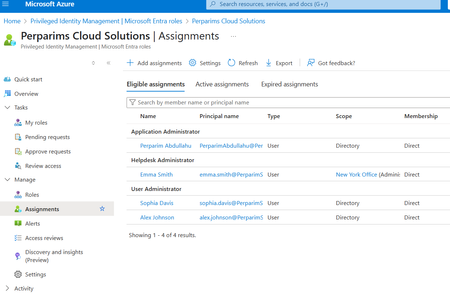
In my lab, I worked with Microsoft Entra Privileged Identity Management (PIM) to grant Just-in-Time admin access. Instead of permanent assignments, users become eligible for roles and must activate them only when needed. Steps I tested: - Configured roles as eligible rather than permanent - Required MFA and approval for role activation - Verified access automatically expired after the time window This approach reduces standing privileges and aligns with Zero Trust by securing privileged access. Curious — does your org still keep permanent Global Admins, or have you moved to JIT with PIM?159Views0likes1CommentIssues with Microsoft Authenticator not popping up Approval message
We have recently implemented MFA with a conditional access policy. We turned off the ability to receive texts/calls and are forcing the Authenticator app. This is causing issues when users need to re set up the account in the Authenticator app. I have had multiple scenarios this week where the Microsoft Authenticator app has stopped displaying the approve/deny message. The end users try to fix the issue themselves and will remove their accounts from the app and try to reenroll by going to myapps.microsoft.com and restarting the setup process. The problem lies in that even though they are visiting the portal from devices that are excluded from MFA via conditional access (Compliant/Hybrid AD Joined) the myapps.microsoft.com portal is still enforcing MFA to log in. Since they have removed their account from the application they can not authenticate to the portal. There is no alternate method since Phone/Text are disabled. In order to get the end user back into the portal I have to go to the regular MFA Setup page, enable phone calls or texts, enable and enforce MFA on the end user, and they can finally get in to re-set up the account. All of this could be fixed with a one time bypass for cloud!Solved1MViews1like41Comments
Block all 365 apps except Outlook via CA
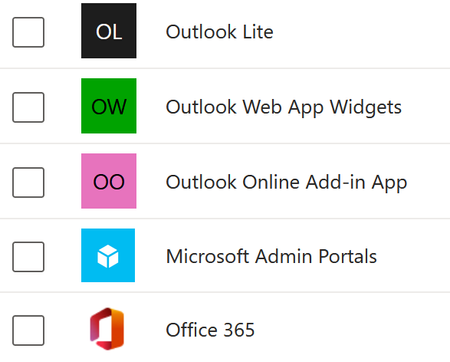
Trying to block 365 for a subset of users, except email. The old app-based CA rules made this easy. The new 'resource' based setup... I'm not even sure if it's possible. CoPilot just keeps telling me to use the old version of CA, because it hasn't clued into Microsoft's downgrade cycle. If I try to filter by resource attribute, I'm told I don't have permission to do so. I'm the global admin. Here's what searching for Outlook gives me and Exchange Advice? We ARE intune licensed, but i'm not sure App Protection Policies will help here. The intention is to block BYOD from accessing anything but Outlook / Exchange. That is, Mobile devices that aren't (whatever param I decide on)620Views0likes4CommentsSecurity Best Practices for Bookings Page's Mailbox Objects in Entra ID
Hi, are there any recommendations / best practices for hardening the user objects that are created in Entra ID when I create a new Microsoft Bookings page? Unlike regular shared mailboxes, the sign-in is enabled by default, I can simply reset the password, sign in via Outlook Web and see the Microsoft Bookings calendar. Bad actors could brute force this sign-in, register the MFA authentication method of their choice and gather data of the customers that used my public bookings page. What is the recommeded way to handle these objects in Entra ID? Conditional Access settings? Azure Monitoring alerts for sign-ins? Defender alerts for when an inbox rule is created? Kind regards, YaseminSolved1.1KViews0likes4Comments