ASP.NET
11 TopicsOld to Gold: How to Modernize Your Legacy ASP.NET Apps Gradually
🚀 Old to Gold: How to Modernize Your Legacy ASP.NET Apps Gradually Still running legacy ASP.NET applications? You’re not alone and you don’t need to rebuild everything overnight! Join us for an insightful session where we’ll uncover how to incrementally modernize your apps using: 💡 YARP (Yet Another Reverse Proxy) – seamlessly route traffic between old and new components ⚙️ .NET Upgrade Assistant – simplify the migration process 🌿 The “Strangler Fig” pattern – evolve your legacy systems into modern ASP.NET Core solutions with minimal disruption You’ll walk away with practical guidance, real-world strategies, and the confidence to start your modernization journey, one step at a time. If your future involves .NET upgrades or cloud-ready architectures, this is a session you don’t want to miss! 🗓️ Date: 15 November 2025 ⏰ Time: 18:00 (CET) 🎙️ Speaker: Jonathan "J." Tower 📌 Topic: Old to Gold: How to Modernize Your Legacy ASP.NET Apps Gradually218Views0likes1CommentA Guide to .NET Development Technologies
Enter the world of .NET — Microsoft’s cross-platform framework that serves as the backbone for a spectrum of powerful application development technologies. In this journey through the Microsoft ecosystem, we’ll explore the unique features of WinForms, WPF, WinUI, .NET MAUI, Blazor and ASP.NET Core APIs. Before we dive into the details of each technology, it’s important to note that the information here is gathered from trusted sources like Microsoft’s official Learn blogs, the .NET official website, and other reputable sources. Microsoft’s commitment to transparent and detailed documentation ensures that you’re getting accurate insights. WinForms Windows Forms is a UI framework for building Windows desktop apps. It provides one of the most productive ways to create desktop apps based on the visual designer provided in Visual Studio. Functionality such as drag-and-drop placement of visual controls makes it easy to build desktop apps. With Windows Forms, you develop graphically rich apps that are easy to deploy, update, and work while offline or while connected to the internet. Windows Forms apps can access the local hardware and file system of the computer where the app is running. To learn how to create a Windows Forms app, see Tutorial: Create a new WinForms app. Windows Presentation Foundation (WPF) A UI framework that is resolution-independent and uses a vector-based rendering engine, built to take advantage of modern graphics hardware. WPF provides a comprehensive set of application-development features that include Extensible Application Markup Language (XAML), controls, data binding, layout, 2D and 3D graphics, animation, styles, templates, documents, media, text, and typography. WPF is part of .NET, so you can build applications that incorporate other elements of the .NET API. If you want to create a skinned user interface, dynamically load some areas of the UI components from a web service, bind to XML or want to develop a desktop application which has the web-like navigation style, then WPF is a great choice. To learn how to create a WPF app, see Tutorial: Create a new WPF app. Windows UI Library (WinUI) The Windows UI Library (WinUI) is a native user experience (UX) framework for both Windows desktop and UWP applications. By incorporating the Fluent Design System into all experiences, controls, and styles, WinUI provides consistent, intuitive, and accessible experiences using the latest user interface (UI) patterns. With support for both desktop and UWP apps, you can build with WinUI from the ground up, or gradually migrate your existing MFC, WinForms, or WPF apps using familiar languages such as C++, C#, Visual Basic, and JavaScript (using React Native for Windows). At this time, there are two generations of the Windows UI Library (WinUI): WinUI 2 for UWP and WinUI 3 in the Windows App SDK. While both can be used in production-ready apps on Windows 10 and later, each have different development targets. .NET WAUI .NET Multi-platform App UI (MAUI) is an open-source, cross-platform framework for building Android, iOS, macOS, and Windows applications that leverage the native UI and services of each platform from a single .NET code base. Because .NET MAUI favors platform native experiences, it uses WinUI 3 and the Windows App SDK so apps get the latest user experience on Windows. This gives your apps access to everything you get with WinUI 3 plus the ability to reach to other platforms. .NET MAUI for Windows is a great choice if: You want to share as much .NET code as possible across mobile and desktop applications. You want to ship your application beyond Windows to other desktop and mobile targets with native platform experiences. You want to use C# and/or XAML for building cross-platform apps. You’re using Blazor for web development and wish to include all or part of that in a mobile or desktop application. For more information about .NET MAUI visit the link. Blazor Blazor is a web framework that is part of the ASP.NET Core framework. Blazor enables you to create progressive web apps using C#, having significantly less reliance on JavaScript that was necessary in previous versions of ASP.NET. This model is intended to make Blazor appealing to current C# developers, since they can focus less on JavaScript and write more in C# for full-stack development. In Blazor, both the server-side code (APIs, models, etc.) and the client are written in C#. This enables Blazor developers to do full-stack development all in .NET, though it’s also possible to write JavaScript if desired. Blazor Tutorials: Build your first web app with ASP.NET Core using Blazor. ASP.NET Core APIs In the realm of backend development, ASP.NET Core APIs take the spotlight. These APIs provide a robust foundation for building scalable and high-performance backend services, supporting modern application architectures such as microservices. With ASP.NET you use the same framework and patterns to build both web pages and services, side-by-side in the same project. Conclusion From WinForms to .NET MAUI, we’ve explored Microsoft’s tech universe. Each tool adds a unique touch to the toolkit. Whether you’re into desktop apps, web experiences, or robust backends, Microsoft’s ecosystem has you covered. But it doesn’t end here. Microsoft keeps evolving. Stay curious, explore, and find more on their official blogs, the .NET website, and other reliable sources. Resources: For further exploration and in-depth information, consider checking out these resources: .NET Official Website .NET Documentation968Views0likes0CommentsHow to fix Error System.Web.HttpApplication does not implement IHttpModule in IIS
Hi, I need some help with error "Error System.Web.HttpApplication does not implement IHttpModule" with some steps for diagnose cause this error. Note: MY_SERVER has a single web site called "SitioNuevoVacio2" Context I have a web site called "SitioNuevoVacio2" this contains a single html file called "index.html" with following source code... <html> <body> -- empty web site -- </body> </html> when I browse "SitioNuevoVacio2", I get these error messages: " Server Error in '/' Application. ________________________________________ System.Web.HttpApplication does not implement IHttpModule. Description: An unhandled exception occurred during the execution of the current web request. Please review the stack trace for more information about the error and where it originated in the code. Exception Details: System.Configuration.ConfigurationErrorsException: System.Web.HttpApplication does not implement IHttpModule. Source Error: An unhandled exception was generated during the execution of the current web request. Information regarding the origin and location of the exception can be identified using the exception stack trace below. Stack Trace: [ConfigurationErrorsException: System.Web.HttpApplication does not implement IHttpModule.] System.Web.Configuration.Common.ModulesEntry..ctor(String name, String typeName, String propertyName, ConfigurationElement configElement) +11874417 System.Web.HttpApplication.BuildIntegratedModuleCollection(List`1 moduleList) +221 System.Web.HttpApplication.GetModuleCollection(IntPtr appContext) +1103 System.Web.HttpApplication.RegisterEventSubscriptionsWithIIS(IntPtr appContext, HttpContext context, MethodInfo[] handlers) +122 System.Web.HttpApplication.InitSpecial(HttpApplicationState state, MethodInfo[] handlers, IntPtr appContext, HttpContext context) +173 System.Web.HttpApplicationFactory.GetSpecialApplicationInstance(IntPtr appContext, HttpContext context) +255 System.Web.Hosting.PipelineRuntime.InitializeApplication(IntPtr appContext) +347 [HttpException (0x80004005): System.Web.HttpApplication does not implement IHttpModule.] System.Web.HttpRuntime.FirstRequestInit(HttpContext context) +552 System.Web.HttpRuntime.EnsureFirstRequestInit(HttpContext context) +122 System.Web.HttpRuntime.ProcessRequestNotificationPrivate(IIS7WorkerRequest wr, HttpContext context) +732 ________________________________________ Version Information: Microsoft .NET Framework Version:4.0.30319; ASP.NET Version:4.8.9195.0 " And Event viewer has this warning: " Event code: 3008 Event message: A configuration error has occurred. Event time: 9/10/2024 8:56:20 a. m. Event time (UTC): 9/10/2024 1:56:20 p. m. Event ID: 5bffbb78122e470a85ffaa557e38532d Event sequence: 1 Event occurrence: 1 Event detail code: 0 Application information: Application domain: /LM/W3SVC/3/ROOT-2-133729557801407411 Trust level: Full Application Virtual Path: / Application Path: C:\inetpub\wwwroot\SitioNuevoVacio2\ Machine name: MY_SERVER Process information: Process ID: 9424 Process name: w3wp.exe Account name: IIS APPPOOL\DefaultAppPool Exception information: Exception type: ConfigurationErrorsException Exception message: System.Web.HttpApplication does not implement IHttpModule. at System.Web.Configuration.Common.ModulesEntry..ctor(String name, String typeName, String propertyName, ConfigurationElement configElement) at System.Web.HttpApplication.BuildIntegratedModuleCollection(List`1 moduleList) at System.Web.HttpApplication.GetModuleCollection(IntPtr appContext) at System.Web.HttpApplication.RegisterEventSubscriptionsWithIIS(IntPtr appContext, HttpContext context, MethodInfo[] handlers) at System.Web.HttpApplication.InitSpecial(HttpApplicationState state, MethodInfo[] handlers, IntPtr appContext, HttpContext context) at System.Web.HttpApplicationFactory.GetSpecialApplicationInstance(IntPtr appContext, HttpContext context) at System.Web.Hosting.PipelineRuntime.InitializeApplication(IntPtr appContext) Request information: Request URL: http://localhost:8085/ Request path: / User host address: ::1 User: Is authenticated: False Authentication Type: Thread account name: MY_SERVER\SomeUser Thread information: Thread ID: 12 Thread account name: MY_SERVER\SomeUser Is impersonating: False Stack trace: at System.Web.Configuration.Common.ModulesEntry..ctor(String name, String typeName, String propertyName, ConfigurationElement configElement) at System.Web.HttpApplication.BuildIntegratedModuleCollection(List`1 moduleList) at System.Web.HttpApplication.GetModuleCollection(IntPtr appContext) at System.Web.HttpApplication.RegisterEventSubscriptionsWithIIS(IntPtr appContext, HttpContext context, MethodInfo[] handlers) at System.Web.HttpApplication.InitSpecial(HttpApplicationState state, MethodInfo[] handlers, IntPtr appContext, HttpContext context) at System.Web.HttpApplicationFactory.GetSpecialApplicationInstance(IntPtr appContext, HttpContext context) at System.Web.Hosting.PipelineRuntime.InitializeApplication(IntPtr appContext) " I searched in the web and some post suggest check your source code in these files: - web.config - global.asax and find any reference to custom HttpModule, but "SitioNuevoVacio2" only has a single page. I don't know what to do, any suggestions? Technical Specs - SO: windows server 2022 standard 21H2 - IIS: Version 10.0.20438.1 - .NET Framework Version:4.0.30319 - ASP.NET Version:4.8.9195.0 TRY 1. List of 12 Handlers manually created... 1. PageHandlerFactory-ISAPI-4.0_32bit • Request path: *.aspx • Type: C:\\Windows\\Microsoft.NET\\Framework\\v4.0.30319\\aspnet_isapi.dll • Name: PageHandlerFactory-ISAPI-4.0_32bit • Module: IsapiModule • Script Processor: C:\\Windows\\Microsoft.NET\\Framework\\v4.0.30319\\aspnet_isapi.dll • Entry Type: Local 2. PageHandlerFactory-ISAPI-4.0_64bit • Request path: *.aspx • Type: C:\\Windows\\Microsoft.NET\\Framework64\\v4.0.30319\\aspnet_isapi.dll • Name: PageHandlerFactory-ISAPI-4.0_64bit • Module: IsapiModule • Script Processor: C:\\Windows\\Microsoft.NET\\Framework64\\v4.0.30319\\aspnet_isapi.dll • Entry Type: Local 3. PageHandlerFactory-Integrated-4.0 • Request path: *.aspx • Type: System.Web.UI.PageHandlerFactory • Name: PageHandlerFactory-Integrated-4.0 • Module: ManagedPipelineHandler • Entry Type: Local 4. SimpleHandlerFactory-ISAPI-4.0_32bit • Request path: *.ashx • Type: C:\\Windows\\Microsoft.NET\\Framework\\v4.0.30319\\aspnet_isapi.dll • Name: SimpleHandlerFactory-ISAPI-4.0_32bit • Module: IsapiModule • Script Processor: C:\\Windows\\Microsoft.NET\\Framework\\v4.0.30319\\aspnet_isapi.dll • Entry Type: Local 5. SimpleHandlerFactory-ISAPI-4.0_64bit • Request path: *.ashx • Type: C:\\Windows\\Microsoft.NET\\Framework64\\v4.0.30319\\aspnet_isapi.dll • Name: SimpleHandlerFactory-ISAPI-4.0_64bit • Module: IsapiModule • Script Processor: C:\\Windows\\Microsoft.NET\\Framework64\\v4.0.30319\\aspnet_isapi.dll • Entry Type: Local 6. SimpleHandlerFactory-Integrated-4.0 • Request path: *.ashx • Type: System.Web.UI.SimpleHandlerFactory • Name: SimpleHandlerFactory-Integrated-4.0 • Module: ManagedPipelineHandler • Entry Type: Local 7. WebServiceHandlerFactory-ISAPI-4.0_32bit • Request path: *.asmx • Type: C:\\Windows\\Microsoft.NET\\Framework\\v4.0.30319\\aspnet_isapi.dll • Name: WebServiceHandlerFactory-ISAPI-4.0_32bit • Module: IsapiModule • Script Processor: C:\\Windows\\Microsoft.NET\\Framework\\v4.0.30319\\aspnet_isapi.dll • Entry Type: Local 8. WebServiceHandlerFactory-ISAPI-4.0_64bit • Request path: *.asmx • Type: C:\\Windows\\Microsoft.NET\\Framework64\\v4.0.30319\\aspnet_isapi.dll • Name: WebServiceHandlerFactory-ISAPI-4.0_64bit • Module: IsapiModule • Script Processor: C:\\Windows\\Microsoft.NET\\Framework64\\v4.0.30319\\aspnet_isapi.dll • Entry Type: Local 9. WebServiceHandlerFactory-Integrated-4.0 • Request path: *.asmx • Type: System.Web.Services.Protocols.WebServiceHandlerFactory • Name: WebServiceHandlerFactory-Integrated-4.0 • Module: ManagedPipelineHandler • Entry Type: Local 10. ScriptHandlerFactory-ISAPI-4.0_32bit • Request path: *.axd • Type: C:\\Windows\\Microsoft.NET\\Framework\\v4.0.30319\\aspnet_isapi.dll • Name: ScriptHandlerFactory-ISAPI-4.0_32bit • Module: IsapiModule • Script Processor: C:\\Windows\\Microsoft.NET\\Framework\\v4.0.30319\\aspnet_isapi.dll • Entry Type: Local 11. ScriptHandlerFactory-ISAPI-4.0_64bit • Request path: *.axd • Type: C:\\Windows\\Microsoft.NET\\Framework64\\v4.0.30319\\aspnet_isapi.dll • Name: ScriptHandlerFactory-ISAPI-4.0_64bit • Module: IsapiModule • Script Processor: C:\\Windows\\Microsoft.NET\\Framework64\\v4.0.30319\\aspnet_isapi.dll • Entry Type: Local 12. ScriptHandlerFactory-Integrated-4.0 • Request path: *.axd • Type: System.Web.Handlers.ScriptHandlerFactory • Name: ScriptHandlerFactory-Integrated-4.0 • Module: ManagedPipelineHandler • Entry Type: Local 2. Check, download, install, update and reboot last windows updates. 3. Compare Handlers and Modules between IIS developer server with MY_SERVER note: IIS developer server works fine when I publish "SitioNuevoVacio2" EXPECT After made those verifications and changes IIS works fine and see index.html "SitioNuevoVacio2"Solved825Views0likes8CommentsHTTP 500 Internal Server Errors: Understanding and Log Collection for Effective Analysis
The HTTP 500 Internal Server Error is one of the most common errors faced by developers and administrators when hosting web applications in IIS. This error indicates that the server encountered an issue preventing it completing the request, but it doesn’t provide much detail on what went wrong. To effectively troubleshoot the problem understanding of 500 status code and detailed log collection are essential. In this article, we’ll explore the 500 Internal Server Error, why it happens, and the various methods for collecting useful diagnostic logs.21KViews6likes0Comments
Public Preview for Azure Migrate ASP.NET Assessments & Business Case for Windows Containers
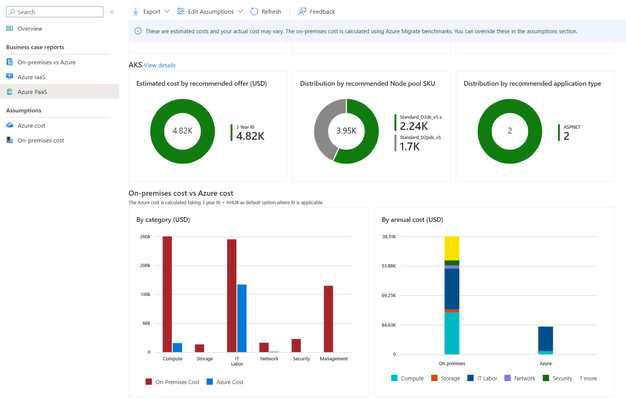
Today we're excited to announce the public preview of ASP.NET Assessments and the Business Case features for Windows Containers on Azure Kubernetes Services (AKS) and App Service via Azure Migrate. These new features add on top of the existing functionality of discovering and migrating .NET web apps. Azure Migrate aims to be a one-stop shop for all migrations to Azure, providing capabilities to discover, assess and right size your workloads and migrate them at-scale. With these new features, Azure Migrate provides the following for ASP.NET web apps: Cloud readiness for AKS, App Service A recommended configuration of Node SKUs and Node count (or App Service plan) The yearly cost savings by running these apps on Azure.3.8KViews1like0Comments
force start/reboot aspnet_state in scheduled task
I have a little problem with the "ASP.NET Server State" service, which does not restart when I "shutdown" from the task scheduler. I am therefore looking to plan a task to force the reboot, but ... I can't find the right arguments to force the reboot of the service. How do I force the scheduled task to start the service "aspnet_state" ? C:\Windows\Microsoft.NET\Framework64\v4.0.30319\aspnet_state.exe1.5KViews1like1Comment
ASP.NET ActiveDirectoryMembershipProvider and port 445 (SMB)
While AD Membership is no longer recommended for use (use ADFS or something more modern instead), and is no longer being actively developed, we still see it from time-to-time here in support. One issue when using System.Web.Security.ActiveDirectoryMembershipProvider I've personally seen a couple times is the provider failing when port 445 is either inaccessible or blocked. When setting-up this provider with Active Directory, port 445 between the app server and Domain Controllers must be open and usable.3.2KViews2likes0Comments
How to enable ASP.NET 4.8 on Windows Server 2016
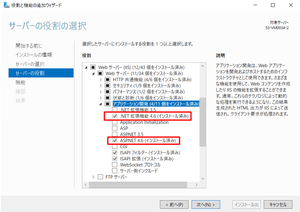
Hello All, I have installed on my server as bellow: + Windows Server 2016 Standard Evaluation 64 bit + IIS 10 version 1607 - OS build 14393.693 + .NET Framework 4.8 - Release DWORD: 528049 Everything will be simple when I may enable ASP.NET 4.8; but I didn't see this option here. (There is only ASP.NET 4.6) May I enable ASP.NET 4.8 on above Windows Server 2016? Thanks in advance, Nguyen Duc HoaSolved46KViews0likes4Comments