ama
535 TopicsAsk Microsoft Anything: Data & AI Security in the Real World
Security practitioners, bring your real questions. Join Microsoft Security experts live at RSA Conference or online via Tech Community for a live AMA focused on data and AI security in real-world environments. Ask how data protection, AI security, and governance actually work in production—what teams are turning on first, what can wait, and where things commonly break. This session is designed for practitioners who want practical answers, not future-state vision. What to expect • Live Q&A with Microsoft Security SMEs and real practitioners • Questions submitted both in person and online • No slides, no pitches, no roadmap discussions • Real usage, real challenges, real answers Whether you’re attending RSA in person or joining remotely, this is your chance to get straight answers from people building and securing AI at scale.976Views1like4CommentsAsk Microsoft Anything: Secure Boot
It's time for our third Ask Microsoft Anything (AMA) about updating Secure Boot certificates on your Windows devices before they expire in June of 2026. If you've already bookmarked Secure Boot playbook, but need more details or have a specific question, join us to get the answers you need to prepare for this milestone. No question is too big or too small. Update scenarios, inventorying your estate, formulating the right deployment plan for your organization -- we're here to help! How do I participate? Registration is not required. Simply select Add to calendar then sign in to the Tech Community and select Attend to receive reminders. Post your questions in advance, or any time during the live broadcast Get started with these helpful resources Secure Boot resources and guidance Secure Boot playbook7.8KViews0likes220CommentsAsk Microsoft Anything: Secure Boot - April 2026
It's time for our fourth Ask Microsoft Anything (AMA) about updating Secure Boot certificates on your Windows devices before they expire in June of 2026. If you've already bookmarked Secure Boot playbook, but need more details or have a specific question, join us to get the answers you need to prepare for this milestone. No question is too big or too small. Update scenarios, inventorying your estate, formulating the right deployment plan for your organization -- we're here to help! How do I participate? Registration is not required. Simply select Add to calendar then sign in to the Tech Community and select Attend to receive reminders. Post your questions in advance, or any time during the live broadcast Get started with these helpful resources Secure Boot resources and guidance Secure Boot playbook57Views0likes2CommentsAsk Microsoft Anything: Secure Boot - February 2026
It's time for our second Ask Microsoft Anything (AMA) about updating Secure Boot certificates on your Windows devices before they expire in June of 2026. If you've already bookmarked Secure Boot playbook, but need more details or have a specific question, join us to get the answers you need to prepare for this milestone. No question is too big or too small. Update scenarios, inventorying your estate, formulating the right deployment plan for your organization -- we're here to help! On the panel: Arden White; Scott Shell; Richard Powell, Kevin Sullivan This event has concluded. Follow https://aka.ms/securebootplaybook for announcements about future Secure Boot AMAs. Get started with these helpful resources Secure Boot resources and guidance Secure Boot playbook26KViews14likes393Comments🚨 Partner‑Exclusive Event: AMA with Fabric Leadership
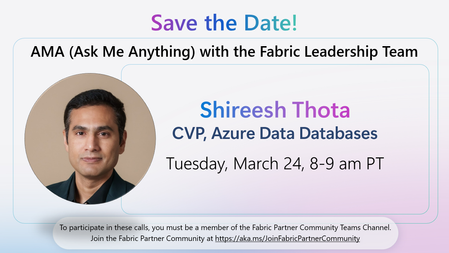
We’re excited to invite Fabric Partner Community members to a live Ask Me Anything (AMA) with Fabric leadership—a rare opportunity to get direct answers and insights from the team shaping Azure Data and Microsoft Fabric. Featured Guest Shireesh Thota CVP, Azure Data Databases Tuesday, March 24 8:00–9:00 AM PT With FabCon + SQLCon wrapping just days before, this session is designed for partners who want to go deeper—ask follow‑up questions, pressure‑test ideas, and understand what’s next as they plan with customers. Topics may include: What’s next for Azure SQL, Cosmos DB, and PostgreSQL Guidance on SQL Server roadmap direction Deep‑dive questions on SQL DB in Fabric Questions about the new DP‑800 Analytics Engineer exam going into beta this month Partners can submit any questions—technical, roadmap‑focused, certification‑related, or customer‑scenario driven. This event is exclusively available to members of the Fabric Partner Community. Not a member yet? Join the Fabric Partner Community to attend this AMA and unlock access to partner‑only events like this: https://aka.ms/JoinFabricPartnerCommunity12Views0likes0CommentsAMA: Windows Autopilot
Join the Windows Autopilot engineering team for a live Ask Microsoft Anything session. We’ll cover the latest updates, but the focus here is on your questions! Bring your concerns, deployment scenarios, and real‑world blockers—this is your chance to speak directly with the engineers building the next generation of provisioning. Speakers: Maggie Dakeva & Deepika Wadhwa Moderator: Joe Lurie This session is part of the Microsoft Technical Takeoff: Windows + Intune. Add it to your calendar, click Attend for event reminders, and post your questions and comments below! This session will also be recorded and available on demand shortly after conclusion of the live event.3.2KViews0likes31CommentsAMA: Secure and manage AI and agentic capabilities in Windows
Windows is integrating AI and agents into workflows across physical devices and Cloud PCs to help users get more done. We're also making sure that your organization has choice and control. Join us at Tech Takeoff with your questions about how to best manage AI and agentic capabilities using familiar enterprise tools like Microsoft Intune, Microsoft Entra, and Group Policy. This session is part of the Microsoft Technical Takeoff: Windows + Intune. Add it to your calendar, click Attend for event reminders, and post your questions and comments below! This session will also be recorded and available on demand shortly after conclusion of the live event.474Views0likes1CommentAMA: The latest in Windows hardware security
Ask Microsoft anything about the latest announcements and innovations in Windows hardware security. If you have questions about new capabilities built on the Microsoft Pluton security processor, advancements in hardware accelerated BitLocker, or other ways Windows technologies work together to reduce attack surfaces, improve device integrity, and deliver faster, more resilient data protection—this is the session for you. Whether you manage fleets or design devices, get the information you need to understand how to take advantage of Windows and hardware advanced security at every layer. This session is part of the Microsoft Technical Takeoff: Windows + Intune. Add it to your calendar, click Attend for event reminders, and post your questions and comments below! This session will also be recorded and available on demand shortly after conclusion of the live event.550Views0likes0CommentsAsk Microsoft Anything: Purview Data Security Investigations Part 2
Microsoft Purview Data Security Investigations is now generally available! Data Security Investigations enables customers to quickly uncover and mitigate data security and sensitive data risks buried in their data using AI‑powered deep content analysis—both proactively and reactively. With Data Security Investigations, security teams can identify investigation-relevant data, analyze it at scale with AI, and mitigate uncovered risks in a single unified solution. By streamlining complex, time‑consuming investigative workflows, organizations can move from signal to insight in hours rather than weeks or months. Whether you're responding to an active data security incident or proactively assessing data exposure, DSI gives data security teams the clarity, speed, and confidence to investigate data risk in today's threat landscape. Join us for an AMA with the team that developed Microsoft Purview's newest solution to go over new features, our refined business model and more! What is an AMA? An 'Ask Microsoft Anything' (AMA) session is an opportunity for you to engage directly with Microsoft employees! This AMA will consist of a short presentation followed by taking questions on-camera from the comment section down below! Ask your questions/give your feedback and we will have our awesome Microsoft Subject Matter Experts engaging and responding directly in the video feed. We know this timeslot might not work for everyone, so feel free to ask your questions at any time leading up to the event and the experts will do their best to answer during the live hour. This page will stay up so come back and use it as a resource anytime. We hope you enjoy!4.2KViews11likes23Comments