Forum Discussion

Windows Admin Center 2110 - Storage Migration Service (Missing Start Transfer button)
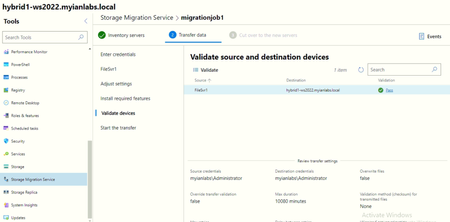

Temporary workaround that i have found is at Windows Admin Center 2110, uninstall Storage Migration Service extension v2.6. Once uninstalled, you will have the option to install the older Windows Server Migration Service 1.1392 extension.
Using the older version, you can start the transfer. Just need to ignore the "update is for available extension" prompt. This seems to be a temporary workaround until there is a new update for the extension.

- kennycwk182Nov 12, 2021Copper Contributorhi guys, update on this bug. The microsoft team has rolled out an update for the SMS extension.
When you click on Storage Migration Service on WAC, you will see an Update is available for extension prompt.
The latest version of extension should be version 2.6.1
Please go ahead and update it. Cheers.- SumterClerkNov 18, 2021Copper Contributor
Tried the newer 2.6.1 version and still seeing this occur...did the usual "clear browser cache" and still vanishes like my wife with the ATM card on payday....anyone still seeing this?
- Hitesh8085Jan 11, 2022Copper Contributor
Yes. Now the Start Transfer works fine with the new extension update but the screen gets refreshed when you try to see the phase details.
Also have issue with downloading the logs. Do others have similar issue?
- JarrodPichaNov 15, 2021Copper ContributorThis fixed the issue for me. Thanks!
