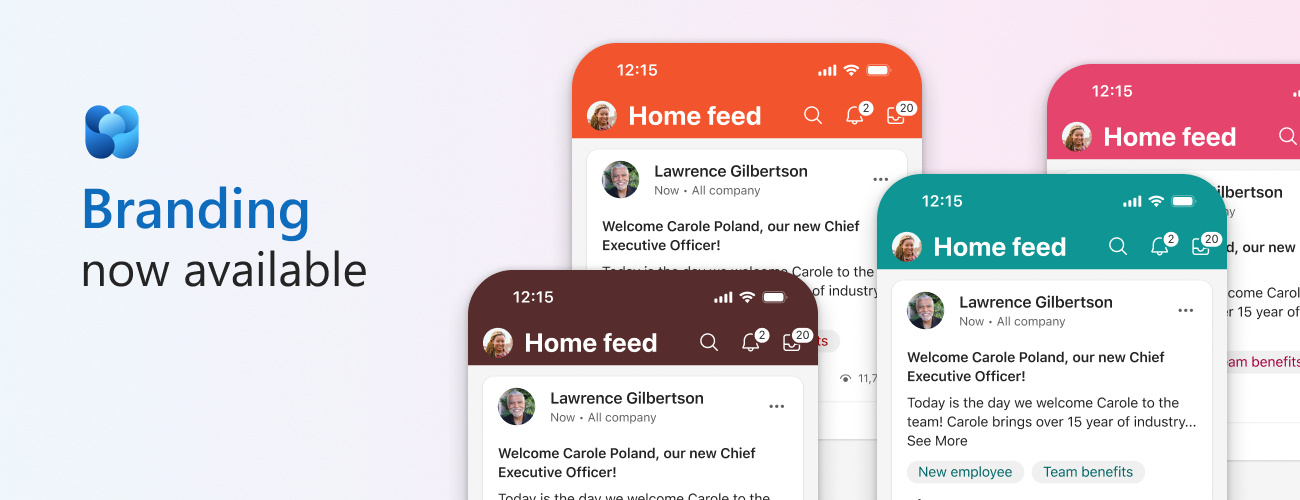
Organizations invest heavily in building their visual brand, culture and identity, and Engage is where a lot of it happens internally - leaders and employees connect, employees find each other across the organization, and build culture. Our customers have consistently told us Engage should look and feel like their own.
Custom Branding delivers that - it empowers organizations to personalize their Engage's visual identity to reflect their brand and values: your logo, your name, your colors, across the Engage experiences your employees use. A simple way to think about it: your logo helps employees know where they are, your colors make the space feel familiar, and your brand name connects Engage back to the culture they already know.
Custom Branding is an admin-managed capability that applies a tenant-wide brand name, logos, and theme color across Viva Engage on the web, Engage app in Teams, and in the iOS and Android mobile apps. It is available to all Engage customers and does not require premium Viva suite or C&C bundle licenses. It's configured from a new Brand center in the Viva Engage admin center, and nothing changes for users in the tenant until an admin publishes it.
Brand center in the Viva Engage admin center — Set your brand name, upload your logos, and choose your theme color in one place. Pick from the existing theme palette or add your own hex value with the + under Themes.
Branding assets in Engage brand center
Preview before you publish — See exactly how your branding will look before anyone else does, on all platforms - Web, Mobile, Engage app in Teams. When it's right, publish it to the organization. If it doesn't look right, discard changes to go back to the last published version.
Consistent on web, in Teams, and in mobile — Your brand carries across the Engage web experience, the Engage app in Teams, and the Engage mobile apps on iOS and Android, so the experience holds together wherever people pick it up.
Branded Engage web experience in light modeBranded Engage mobile app in light modeBranded Engage mobile app in dark mode
Frequently asked questions
Who can set up branding?
Only a Viva Engage administrator that can has access to the Engage admin center can set up Branding. Branding is applied to users only once an admin publishes it for the tenant.
What happens to our Microsoft 365 organization theme?
Your Microsoft 365 organization theme stays in effect until you publish Custom Branding in Engage. Once Branding is published, it takes precedence within Engage. Please note that if an organizational theme was applied in a tenant (and no branding has been published), the navigation bar color will continue to be applied to the Engage web header and the Accent color will be applied to components such as buttons and links in the Web app. This M365 organizational theme is also visible in the Engage brand center under the label “Organizational theme”. However, once branding has been published in the tenant, it replaces the M365 organizational theme, and is applied in the Mobile apps too. Simply said, Branding set in Engage always has higher priority than M365 organizational theme, and wins in the case that both are applied. If Branding is not set in Engage, then we attempt to pick the org theme set in M365 admin center. If the tenant has no M365 org theme either, then the users in that tenant see the default Engage experience.
Can different parts of the organization have their own branding?
Custom Branding is tenant-wide in this release — one brand name, logo set, and theme color across the entire network.
What happened to user themes?
User themes are being deprecated with the roll out of Branding (announced in a separate communication, MC1162958). This decision was made due to accessibility limitations in the current user themes implementation, which conflict with branding. This retirement now helps pave the way for the new admin-led branding capability. You may want to notify your users that individual user themes will be removed.
Availability for Custom Branding
Custom Branding is rolling out worldwide, beginning end of August 2026 and expected to complete by mid-September 2026. Admin details are in Message Center post MC1447681, and the feature is tracked as Microsoft 365 Roadmap ID 568364.
Custom Branding is not just about making Engage look different. It is about helping employees recognize Engage as part of the digital workplace they already trust. The best brand experience is not the one people notice first, but the one that helps them feel they are already in the right place.

 Microsoft