User Profile

Katharine_Holdsworth
 Microsoft
Joined Feb 26, 2021


User Widgets
Recent Discussions
Microsoft Ignite 2024 companion guide: Windows security
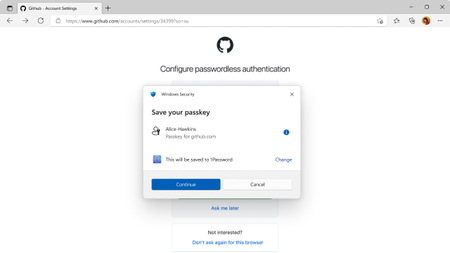
With all the exciting news coming this week from Ignite, here are some great resources to help you dive deeper into Windows 11 security topics after you watch my session on Windows 11 security and resiliency. Hardware baselines Pluton, Secured-Core PC, secure by default – Review hardware-based security features available out-of-the box in Windows 11. Protect data Personal Data Encryption for known folders – Learn about file-based encryption capabilities using Windows Hello Authentication, available starting in Windows 11 Enterprise, version 22H2. Virtualization-based security (VBS) enclaves – Find an overview and development guide for VBS enclaves and learn how to enable isolation of sensitive workloads from both the host application and the rest of the system. Multifactor authentication and identity hardening Passwordless authentication – Discover how Windows Hello and passkeys on Windows enable safer sign-ins with passwordless authentication. Recall security and privacy architecture – Get the latest information on how Microsoft is designing Recall with security and privacy in mind. Delegated Managed Service Accounts (dMSA) Overview in Windows Server 2025 – Read more about the new dMSA account type introduced in Windows Server 2025 and watch a demo about the migration path from a service account to dMSA. NTLMless – Keep up to date with deprecated Windows features, including NTLM. Verified, least privilege apps and drivers Modern print platform: Windows Protected Print – Take a closer look at how Modern print provides a simple, streamlined and secure printing experience. Tools for Win32app isolation – Access tools for using Win32app isolation feature on Windows to help contain the damage and safeguard user privacy choices in the event of an app compromise. Administrator protection – Find out how this new Windows 11 platform security feature protects users while still allowing just-in-time administrator privileges authorized using Windows Hello. Trusted Signing – Check out the new code signing service for developers and IT professionals, backed by a Microsoft managed certification authority. Smart App Control, App Control for Business – Read how you can use policies to provide peace of mind that only verified apps can run on your device. OS configuration Device Health Attestation – Help confirm devices are in a good state and haven't been tampered with. New Windows 11, version 24H2 security baseline – Get the latest information about changes to the security baseline for Windows 11, version 24H2, including additional protections to LAN Manager, Kerberos, User Account Control, and more. Config Refresh – Use Config Refresh helps enforce IT-defined security policies by automatically returning PC settings to the preferred configuration. Zero Trust DNS – Discover how Zero Trust DNS enables domain-name-based lockdown to block network traffic to unapproved network destinations. Hotpatching with Windows Autopatch - Hotpatch updates for Windows 11 Enterprise, version 24H2 client devices are now available in public preview. Learn more Finally, to learn more about how Windows 11 is built secure by design and secure by default to help businesses transform and thrive in a new era, bookmark the Windows 11 Security Book!1.2KViews1like0CommentsBuild 2024 companion guide: Windows developer security resources
Ready to learn more about the topics discussed in our sessions on "Unleash Windows App Security & Reputation with Trusted Signing" and "The Latest in Windows Security for Developers" at Microsoft Build 2024? Here are some resources and tools to help you get started: Dive deeper into: Passkeys in Windows - (1 min.) Get a quick overview of passkeys, how they are used in Windows, and how they compare to passwords. Virtualization-based security (VBS) key protection - (5 min.) Learn how to create, import, and protect your keys using VBS. NTLM-less - (4 min.) Find the syntax, parameters, return value, and remarks for the AcquireCredentialsHandle (Negotiate) function. Personal Data Encryption (PDE) - (5 min.) Get information on prerequisites, protection levels, and more for this security feature that provides file-based data encryption capabilities to Windows. Virtualization-based security (VBS) Enclave - (1 min.) Explore the functions used by System Services and Secure Enclaves. Trusted Platform Module attestation - (8 min.) Explore key TPM attestation concepts and capabilities supported by Azure Attestation. Zero Trust DNS - (4 min.) Learn more about Zero Trust DNS (ZTDNS), currently in development for a future version of Windows to help support those trying to lock down devices so that they can access approved network destinations only. Win32 app isolation repo - Access the documentation and tools you need to help you isolate your applications. MSIX app packaging - (3 min.) Learn how to use the MSIX Packaging Tool to repackage your existing desktop applications to the MSIX format. Trusted Signing - Access how-to guides, quickstart tutorials, and other documentation to help you utilize this Microsoft fully managed end-to-end signing solution for third party developers. Smart App Control - (3 min.) Get to know the requirements and stages for Smart App Control, plus get answers to frequently asked questions. Coming soon: Making admins more secure Granular privacy controls for all Win32 apps Continue the conversation. Find best practices. Join us on the Windows security discussion board.598Views0likes0Comments