User Profile

s_salaria
Copper Contributor
Joined Feb 25, 2021


User Widgets
Recent Discussions
Re: Create MSIX Package in Release Pipeline!
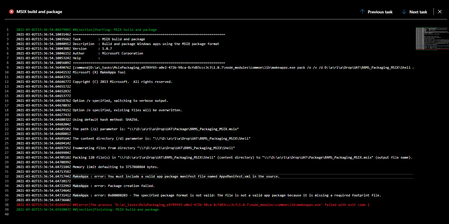
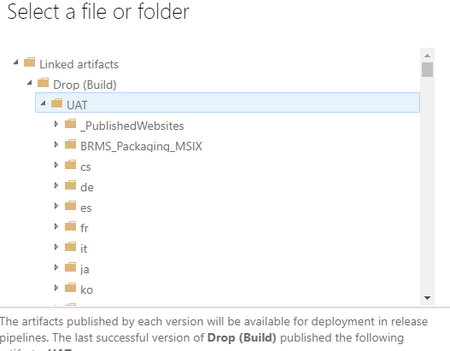
Hi Chacon, I've changed all the setting as per your suggestion but still I'm getting error " MakeAppx : error: You must include a valid app package manifest file named AppxManifest.xml in the source." I'm browsing AppxManifest.xml from artifacts. Can you take a look in below settings and suggest what I'm doing wrong: 1. Build task(.yml) 2. Output in Artifacts. Shell is the actual .csproj referenced in UWP project 3. Release pipeline task settings 4. Appxmanifest.xml in Artifacts4.1KViews0likes2CommentsRe: Create MSIX Package in Release Pipeline!
Hi Chacon, Thank you for your response. How I can create MSIX package in release pipeline because task "MSIX build and package" look for .sln which is not present in Artifacts(build output). Artifact contains build output(dlls and config file) or msix package(if I include packaging information in vsbuild arguments). Is there a way to create MSIX in release pipeline?4.3KViews0likes6CommentsRe: Create MSIX Package in Release Pipeline!
Hi Chacon, Just to add on more about env specific config , I'm using multiple app.config files with env text in their names e.g app.dev.config. I have added one propertygroup in project's .csproj file. Attached is the screenshot for your reference. By using above approach I'm able to create env specific MSIX in build pipeline(e.g Dev or UAT). What I'm not understanding that how I can proceed further to use that MSIX to point QA configs then later to Prod configs in release pipeline.4.3KViews0likes8CommentsRe: Create MSIX Package in Release Pipeline!
Thank you Chacon, Currently I have only one app.config in project and that project is being referenced in UWP project. Further UWP project is generating MSIX based on that. I don't have any idea how we can use different configs through UWP publishing. As per your suggestion I'm looking for second option. Build pipeline will build that project(without UWP project) and release pipelines uses $(Build.BinariesDirectory) or Build Artifacts to generate MSIX with specific env config. please accept my apology if I'm asking too much OOB or uneven. Thank you and I really appreciate your response.4.3KViews0likes0CommentsCreate MSIX Package in Release Pipeline!
Hello, I'm new to UWP development and CI/CD pipeline. I'm trying to create MSIX using UWP project. Below are the scenarios where things work and what I'm looking for. 1. I'm able to generate MSIX package through VS2019 .(Publish->Installed->Wworking) 2. I'm able to generate MSIX package in Azure Build Pipeline using VSBuild@1 task and its arguments.(Installed and Working). 3. Requirement: I'm trying to generate MSIX package in release pipeline through build output(Artifacts) with different env configs. Reason to do that is to generate MSIX to have env specific configurations(dev/qa/prod). As per Azure MSIX packaging tool, I unable to select Project to Build and Manifest File to Update Version .appxmanifest file from build output directory $(Build.ArtifactStagingDirectory. Because it contains only output dlls. Am I doing this in wrong way? Can you please suggest me the better way to generate MSIX that points to specific env in different stages of release pipeline. Thank you, ShubSolved4.9KViews0likes11Comments
Recent Blog Articles
No content to show