User Profile

Infotechninja
MCT
Joined Feb 18, 2021


User Widgets
Recent Discussions
Re: DFS replication issues
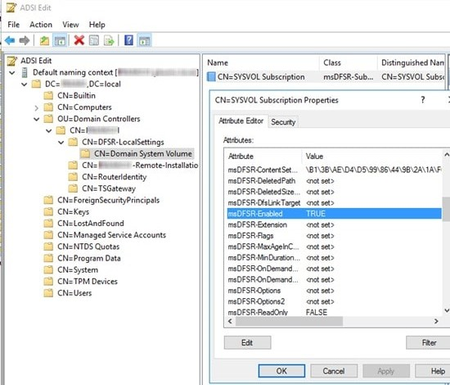
Vard0 To resume replication of the folder, use the DFS Management snap-in to remove this server from the replication group, and then add it back to the group. This causes the server to perform an initial synchronization task, which replaces the stale data with fresh data from other members of the replication group. I would suggest trying the below. Stop the DFS Replication Service: net stop DFSR In the ADSIEDIT.MSC tool, modify the following DN and two attributes on the domain controller you want to make authoritative (preferably the PDC Emulator, which is usually the most up to date for SYSVOL contents): CN=SYSVOL Subscription,CN=Domain System Volume,CN=DFSR-LocalSettings,CN=<the server name>,OU=Domain Controllers,DC=<domain> msDFSR-Enabled=FALSE msDFSR-options=1 Here is where you will find that key: Start the DFS Replication service: net start DFSR You will see Event ID 4114 in the DFSR event log indicating SYSVOL is no longer being replicated On the same DN above, set it back to TRUE: msDFSR-Enabled=TRUE Force Active Directory replication throughout the domain and validate its success on all DCs: repadmin /syncall /AdP Run the following command from an elevated command prompt on the same server that you set as authoritative: DFSRDIAG POLLAD You will see Event ID 4602 in the DFSR event log indicating SYSVOL has been initialized. That domain controller has now done a “D4” of SYSVOL.1KViews0likes0CommentsRe: Looking for assistance with NPS cert based Wifi for Macs and PCs
Hi stewdesmarais-validity, You can issue certs to no corp devices if this is something you wish to do but may not be able to automate it. Below is a link that you can use to get an idea about setting NPS up with certificate based authentication for Domain joined devices. Given that there are mac computers and are not domain joined, it could have been possible to join them to corporate wifi's by using intune and Apple business manager or conifgurator in which it makes it part of AAD Devices. I suggest following the below guide for domain joined computers and then look at the second link from apple about Connecting Apple devices to 802.1X networks. As this should give you an Idea as what I am referring to with connecting using and MDM solution or Apple configurator to get your NPS setup going. https://dailysysadmin.com/KB/Article/690/configure-802-1x-certificate-based-authentication-meraki-wireless-access-points-microsoft-nps-authentication/ Connect Apple devices to 802.1X networks https://support.apple.com/en-eg/guide/deployment/depabc994b84/web4KViews0likes1CommentRe: Does Windows server 2019 core only OS have Windows Performance Adapter service installed?
Hi pash0887, WMI is installed by default on all Windows desktop and server platforms. This service is installed by default and its startup type is Manual and when the WMI Performance Adapter service is started in its default configuration, it logs on by using the Local System account. I suggest going to the link below as this microsoft article may be able to help. https://learn.microsoft.com/en-us/windows/win32/wmisdk/operating-system-availability-of-wmi-components485Views0likes0Comments
Recent Blog Articles
No content to show