User Profile

pmonfette-ns
Brass Contributor
Joined Oct 01, 2020


User Widgets
Recent Discussions
Re: Defender for Endpoint issues on Apple Silicon Macs (Issue: Action Needed)
Btw all: https://docs.microsoft.com/en-us/microsoft-365/security/defender-endpoint/mac-whatsnew?view=o365-worldwide Seems like the fix got released today, expect updates to roll out... "Fixed a regression introduced in version 101.61.69 where the status menu icon was sometimes showing an error icon, even though no action was required from the end user"12KViews1like3CommentsRe: Defender for Endpoint issues on Apple Silicon Macs (Issue: Action Needed)
Not in our organization. And we're running 12.3.1. The only time the checkmark is there is when Defender gets installed initially for us. As soon as you reboot or get an update of it, it becomes an X.11KViews0likes4CommentsRe: Defender for Endpoint issues on Apple Silicon Macs (Issue: Action Needed)
LeoJohn Same here. On Mac M1 since version 101.61.69 and maybe even 101.60.91, I see the defender icon with a X on it showing "Action needed" but everything seems to be running fine. mdatp health in command line says healthy. systemextensionsctl list shows activated and enabled. Rebooting doesn't change anything, it starts up like this. I'm using intune and this was not an issue a few versions ago. Unsure if it is caused by Monterey 12.3.1 update or a recent Defender update. This is working well and without the X mark on Intel Macs.11KViews0likes1CommentRe: MDE apparently blocks MacOS Monterey 12.1 / 12.2 upgrades?
They seem to have updated Defender to take into account a few issues in regards to the latest Monterey releases in the last few days: https://docs.microsoft.com/en-us/microsoft-365/security/defender-endpoint/mac-whatsnew?view=o365-worldwide Especially in version: 101.59.50, maybe this version is more compatible now with Monterey upgrades ?8KViews0likes0CommentsRe: MDE apparently blocks MacOS Monterey 12.1 / 12.2 upgrades?
This apparently seems to be a "hit and miss" kind of issue. Sometimes, it works, sometimes it doesn't, at least with 101.56.62. My colleague upgraded from 12.1 to 12.2.1 and he was successful on first attempt. But I had multiple issues with 101.56.36. Either 101.56.62 improved the chance of success or maybe we were just lucky.8.5KViews0likes3CommentsRe: MDE apparently blocks MacOS Monterey 12.1 / 12.2 upgrades?
What bugs me the most right now is that even though I disabled DLP through intune and that the config makes it to the Mac and I see it as disabled in mdatp, the dlpdaemon still continues to run and affect performance. Rebooting doesn't fix it, it starts again on the next boot even though it should be disabled. So far, the only solution I found is to delete Microsoft Defender and wait for Intune to automatically reinstall it. Once you uninstall it, the dlpdaemon goes away after a few seconds as the Defender services stops and unload. It's as if once it runs at least one time, it will always run, whether you disable it or not in the config. But if it is not allowed to run when install Defender, it will never run and you're good as it doesn't get configured (or something like that) and it will never run unless you enable it later on. This is most likely a bug of some sort and I hope they fix it because no way I'm going to go manually on each Mac in the company and remove and then reinstall Defender on each of them, hehehe.11KViews1like0CommentsRe: MDE apparently blocks MacOS Monterey 12.1 / 12.2 upgrades?
Right now I'm in the process of completely disabling DLP agent/daemon for MacOS since it makes the computers very slow and laggy. Especially in the browser (tested with Chrome and Edge). In the browser, the worst effect is when you type something in the search bar, when the DLP daemon runs (along MDE), you will notice that what you type is laggy and has a delay. If you disable DLP daemon and make sure the process doesn't run anymore "ps aux | grep dlpdaemon", you'll notice it's back to being very responsive and fast, as it should. Make sure you don't see this process running or else, disable it using Intune and policies until they get this behaviour under control as the computers become way too slow when it is enabled and things timeout or even crash (like the update) /Library/Application Support/Microsoft/DLP/com.microsoft.dlp.daemon.app/Contents/MacOS/dlpdaemon --daemon You can determine if DLP is enabled if you run "mdatp health" If you see that data_loss_prevention_status near the end, is not stopped or dormant, it means it is most likely enabled and affecting your performance.11KViews1like0CommentsRe: MDE apparently blocks MacOS Monterey 12.1 / 12.2 upgrades?
Yes, same here. From 12.1 to 12.2. upgrade completed but after last reboot, MacOS remained on 12.1. Looking at the logs, there were errors related to DLP and Defender which creates some issue with the upgraded disk Volume. Seems like the Upgrade process doesn't like this and thinks there is an issue and rolls back to the previous snapshot or something like that thus remaining on 12.1 instead of being upgraded to 12.2 I was able to get it through after I added com.apple.MobileSoftwareUpdate.UpdateBrainService to the process exclusion list in Defender. Not sure if that's what did it or I was just lucky. I also now see that DLP (Data Loss Protection) seems supported in MDE for MacOS and my logs were full or errors related to it since it was not properly configured/enabled in intune and this was preventing some extensions in MacOS from being loaded properly, possibly making this more problematic since the filesystem didn't seem to recognize the DLP attributes in the filesystem properly because of this. I properly allowed and enable the DLP loading in MDE (mdatp health) data_loss_prevention_status : "active" And DLP errors are gone and it seems to properly works now. as I see logs being pushed to 365 Compliance. However, be careful, this seems to have a huge CPU and IO impact on everything.11KViews1like4CommentsRe: Roadmap for PDF reader in Microsoft Edge
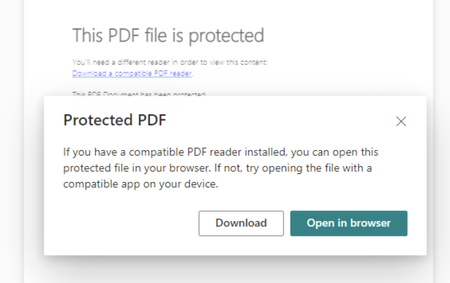
Doug Punchak Interesting problem, this works well for us (users in the same tenant for IRM protected PDF files). Can you share the IRM settings you are using ? On my side I'm testing with: Windows 10 Pro latest updates installed Latest version of Edge installed I'm logging to Windows 10 using my 365 account and password The IRM-protected PDF files are stored on SharePoint I'm logged onto SharePoint Web in Edge with the same 365 user account I'm logged onto Windows 10 Pro I get this screen when I first try to open the PDF, I then click "Open in Browser" and then the PDF opens up and I can see it in clear in Edge using the embedded PDF reader like this. you can that the "file is protected by MSFT IRM..." If I check the permissions, I see this (which is in accordance to my IRM settings in SharePoint Library I'm the SP site owner so I have a few more rights than other users but my other users can also open up the files and they are normal users, not owners. My SP site IRM settings are as follow (blanked out some infos) I'm especially wondering about the "Prevent opening documents in the browser for this Document Library" part...5.1KViews0likes1CommentRe: Roadmap for PDF reader in Microsoft Edge
No, we do not share those files publicly or with consumers. We only share the IRM-protected PDF files with users (both internal and guests) that are members of the MS 365 group associated to the IRM-protected SharePoint site. And this problem (inability to open the file and Edge saying "Need Permissions") only applies to guests users that are members of the group. Internal users are able to open the files properly . And the feature you're explaining exactly apply to our issue since I know those guests also use 365 in their organization so I'm quite sure the "in other tenants" applies here. Thank you, having this in development is really good news !8.8KViews0likes0CommentsRe: Roadmap for PDF reader in Microsoft Edge
Doug Punchak and Aditi_Gangwar Re-posting since my last post got deleted, possibly because of the link to the Microsoft download site I included. Anyways, just so you know, the users (guests) that were unable to open the Sharepoint IRM-protected PDF files in Edge were able to open the exact same files using "Microsoft Azure Information Protection Viewer" that I had them install on their computer for testing. They downloaded locally the PDF IRM-protected files from the Sharepoint site and opened them (right-click, open with...) using MS AIP Viewer and it worked. They were also able to see that the files were protected by IRM and what were their rights on those files for them. So the protection is working and the files are protected properly. So the files and their permissions are ok for their external (guest) user to open them. It really seems at this point that this is a bug in Edge and IRM-protected PDF files that only seems to happen for external (guests) users to our tenant when they open it in the browser (which was the only way to open them for us until I found MS AIP Viewer. Hope this helps troubleshooting and unlocks some of us having the same issue.8.9KViews0likes8CommentsRe: Defender ATP for Mac - Time Machine
I was able to get this working now with the latest version or Defender ATP for MacOS (101.19.88) and using those exclusions ===================================== Excluded folder Path: "/Volumes/.timemachine" --- Excluded folder Path: "/Volumes/Backups of Patrick-MBP-NS" --- Excluded folder Path: "/Volumes/com.apple.TimeMachine.localsnapshots" ===================================== The "/Volumes/Backups of Patrick-MBP-NS" exclusion is the mounted network drive where the TM backups are stored. Beside the network drive, I also had to exclude the localsnapshot folder and the .timemachine one. Since this was working, I did not bother trying to troubleshooting other combinations of only one of them or which one really creates the issue.3.2KViews0likes0CommentsRe: Roadmap for PDF reader in Microsoft Edge
Aditi_Gangwar and Doug Punchak The same guests were able to open up the same PDF that Edge was refusing to open but using AIP viewer (Azure Information Protection Viewer) after downloading the files locally from the IRM-protected Sharepoint site. So that confirms it seems to be a bug with Edge and guests users that are unable to open Sharepoint IRM protected PDF files. AIP classic client is being deprecated this month so I guess this Edge/IRM protected PDF bug needs to be fixed rapidly or else there won't be any more workaround to open those files. In the meantime the AIP viewer is your friend: https://can01.safelinks.protection.outlook.com/?url=https%3A%2F%2Furldefense.proofpoint.com%2Fv2%2Furl%3Fu%3Dhttps-3A__go.microsoft.com_fwlink_-3Flinkid-3D838993%26d%3DDwMF-g%26c%3DXrlteKwfXYQQOdH4SY0K4vGE2mbzTeRYKli9iSebGmE%26r%3DzFyOTo_xTWX24ZmSy4soxQMGE9pSTBwadyT4g7YtFrc%26m%3D4E8B_JpjxJwWP0h4GQ0Dh-L45j2Tx0dr0jBmglKW_lk%26s%3DHDYriNQZHRgZ76fhZapMAEc7NFYZd3-kWQ0VnEGoHlg%26e%3D&data=04%7C01%7CDPerrone%40telesat.com%7Cdaf8d15925e94922e1fa08d8e3260af7%7Cfb8d338f7e5b498b97aa38cd3a213a70%7C0%7C0%7C637509099838075880%7CUnknown%7CTWFpbGZsb3d8eyJWIjoiMC4wLjAwMDAiLCJQIjoiV2luMzIiLCJBTiI6Ik1haWwiLCJXVCI6Mn0%3D%7C1000&sdata=v2eHzWUAKH43FN0JIIXTGL5nPxsXeFwi2fsBLWivOL8%3D&reserved=08.8KViews0likes0CommentsRe: Roadmap for PDF reader in Microsoft Edge
Doug Punchak Aditi_Gangwar Same issue here. It seems that the users that are external users (guests) are unable to open the PDF files even though they have edit rights on the files. All other Office files work for them but PDF files say "Need Permissions". Other internal users that are in the edit group are able to open the PDF in Edge without issue. The guests users are in the exact same group and have the same permissions as others internal users. But it seems the guest users only get the "Needs Permissions", internal users do not get this error. Doug if you have guests users, do all users (members and owners) get the same error as well or only guests ?9KViews0likes10Comments
Recent Blog Articles
No content to show