User Profile

Jeffz9527
Brass Contributor
Joined Jun 18, 2020


User Widgets
Recent Discussions
Re: Introducing Workspaces in Edge | New feature
It is gone. Microsoft use this for a totally different scenario: share tabs within groups https://twitter.com/MSEdgeDev/status/1580264087849619456 A shared set of browser tabs where everyone can view the same websites and latest working files in one place to stay on the same page. Raise your hand if you're excited about Workspaces 🙋:female_sign: 🙋🙋:male_sign:https://t.co/o6EAUcphHD https://t.co/myj2r5f3fG" / Twitter4.4KViews1like12CommentsRe: Introducing Workspaces in Edge | New feature
Just updated to dev 97.0.1069.0, "C:\Program Files (x86)\Microsoft\Edge Dev\Application\msedge.exe" --profile-directory="Default" -enable-features=msWorkspaces,msRightSideWorkspacesButton switches not work anymore. workspaces button is gone. Please make it back5.7KViews1like3CommentsRe: Dev channel update to 93.0.957.0 is live
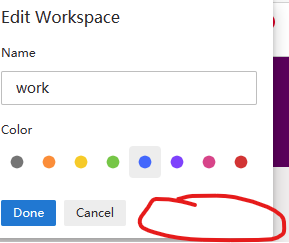
What I have said is not very true: It is 4th workspace (last one), What I have found: top 3 have the remove button rename 4th to other name, remove button does not show add 5th workspace, 5th has the remove button, 4ths does not have the remove button remove 5th, 4th becam last one, still has no remove button. remove 3th, 4th becam 3th, still has no remove button.8.7KViews0likes0CommentsRe: Introducing Workspaces in Edge | New feature
HotCakeX Actually, I did use Edge's workspaces feature since I know it. I moved my tabs from another user profile to a workspace named "Life", so I don't have to maintain 2 sets of extensions, adblock rules, proxy rules. English is not my first language, so let me try again . Edge's workspace is a shortcut to open your named windows which can constantly and automatically save. Before it, you open a window, open some tab, close the window, you lost them( You still can find them in history's recent closed section) I mixed two things in last post: 1) All mainstream browser made some effect to make tabs better, but currently, opera's workspaces has the best user experience, because Opera has a sidebar, when you add a workspace, a new icon appeared, so you only need 1 click switch between workspaces, the whole browser has only 1 window in taskbar. 2) Edge need a sidebar to put all dockable thing(bookmark, history, download, sidebar search) together, also, workspaces feature can leverage it to get better user experience. Hopefully, I made myself clear.7.9KViews1like4CommentsRe: Introducing Workspaces in Edge | New feature
Workspaces and vertical tabs are two different thing. You can turn on both workspaces and vertical tabs at the same time, you can also have workspaces and traditional horizontal tabs. For me, I like to put workspaces button to right side. 1) Less mouse moves 2) Workspaces is a light weight use profile, they should put together. You can have 2 different workspaces while do not need to setup your favorite extensions and adblock rules again. If you do want to open another user profile, It is not too far.7.9KViews1like0CommentsRe: Introducing Workspaces in Edge | New feature
I have used Vivaldi's session, Chrome and Edges' tab group, titled window, and Opera's workspaces. I have to say Opera's workspaces feature has best user experience. Now, Edge has dockable history, dockable bookmark, dockable download and sidebar search, maybe a real sidebar is needed to put these all together.7.9KViews0likes6CommentsRe: Introducing Workspaces in Edge | New feature
There are some issues though: 1) In vertical tab mode, there is some align issue of workspace button, Workspace name can not fully showed, but when I hover the mouse cursor on it, the name showed with a different background color. 2) When edge closed and launched, It entered a unsaved workspace window with last session' tabs. I have to select a named workspace and close the unsaved workspace window.33KViews0likes0Comments
Recent Blog Articles
No content to show