User Profile

foo_bar
Brass Contributor
Joined Jan 09, 2020


User Widgets
Recent Discussions
Re: Dev channel update to 103.0.1253.0 is live
Is it just me or has the address bar large font size returned since the previous dev build? Also, the Performance (heart) button appears automatically when I click any other flyout button around the address bar, like the 'View site information', 'Add to favourites', 'Extensions' menu as well as the actual extensions, 'Collections', 'Profile', etc. buttons, and then hides when I close the flyout.9.2KViews1like0CommentsRe: Dev channel update to 97.0.1069.0 is live
josh_bodner wrote: foo_bar First let's figure out if the profiles are still on the machine. Can you go to %LOCALAPPDATA%\Microsoft\Edge Dev\User Data, and see if you have old profile folders still in there like Default, Profile 1, etc.? josh_bodner Yes, 'Default' folder is there. Also fyi, Edge hasn't reset itself since me commenting here. But it does open blank with "Restore pages" dialogue even when it had not crashed earlier.1.3KViews0likes0CommentsRe: Dev channel update to 97.0.1069.0 is live
Why is Edge Dev frequently resetting on its own? I'm being signed out of all sites and I get the Welcome to Edge OOBE-kind of dialogue box on launch where I have to, all over again, select sync settings, default search engine, New Tab page layout, etc. It has happened thrice in two days. I understand dev builds are unstable but the problem is that none of that is mentioned in Known Issues.11KViews0likes2CommentsRe: Dev channel update to 95.0.1011.1 is live
This update broke the Space Jam theme and I have now lost it forever because I reverted to a built-in theme hoping to get Space Jam to work again after reinstalling it but it is no longer available in the Add-on store. Should've backed it up. Edit: Got the theme folder from one of my other laptops since Edge on it as well has the Space Jam theme installed. At least the address bar's Korean IME input mode amnesia seems to have finally been cured (and hopefully doesn't recur).7.5KViews0likes0CommentsRe: Dev channel update to 93.0.946.1 is live
For some reason Edge has always had problems with Korean IME. Had submitted feedbacks many times before and those problems even got fixed, only to reappear in some later build. As of now, if I switch to Korean alphabet (using the Alt key) while typing in Edge's address bar, it doesn't stay that way when I want to type something in the bar the next time. The input reverts back to Latin alphabet. This behaviour is not seen in any other text input boxes (afaik). Only the address bar notoriously has had this issue since a long time now.10KViews0likes0CommentsRe: Dev channel update to 92.0.891.1 is live
The UI font appears vertically squished and horizontally bulging, like Earth, after this update. In the menus, Favorites' names, tab title, tab preview and cursor hover tooltips on the UI. Address bar and webpages are unaffected. Is it just me?3.2KViews0likes1CommentRe: Dev channel update to 90.0.810.1 is live
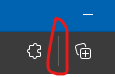
josh_bodner I would like to believe the team is already aware of this extra-long separator between the extensions menu button and the Collections button as it is easily noticeable which is why I didn't send a feedback. Compare its size with that of the separator before "Other favourites" folder on the favourites bar.8.5KViews2likes0CommentsRe: Dev channel update to 90.0.796.0 is live
josh_bodner Facing 2 major issues after this update. The extensions that appear on webpages are rendering badly. Their functionality isn't broken but their appearance is. Edge freezes at launch. Some users are reporting a 10-15 seconds-long freeze while for me it is well over a minute or two.2.6KViews0likes0CommentsRe: Dev channel update to 90.0.789.1 is live
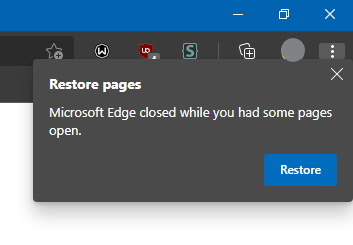
josh_bodner wrote: foo_bar is this still happening after today's Dev update? josh_bodner Replying to your message from version 89.0.774.4. Yes, it is still happening, even in the current build. I am talking about the "Restore pages" dialogue box that is shown on first launch of Edge after Windows start-up. I guess I have figured out the cause. This problem arises probably only if startup on login is disabled for Edge. I enabled it from the Task Manager and then Edge opened normally after a restart. This shouldn't happen. Edge should work normally even if auto-startup is manually disabled for it. If you say, I'll send this as a feedback via Edge's Send feedback option. PS: Just saw the systray Edge icon and it had an option to let Edge run in background which I turned off. Doing so seems to have removed Edge from the startup apps list. Will see what happens on next Windows startup. PPS: The issue seems to be have been resolved. But still, it will continue to occur if one manually disables auto-startup for Edge.96KViews0likes0CommentsRe: *UPDATED* Dev channel update to 88.0.705.9 is live
josh_bodner wrote: foo_bar I suspect this is happening because of Edge's fast startup feature where closing Edge causes it to re-launch in the background so the next startup will be faster. One way to confirm would be to close Edge, then look in Task Manager to see if there are still any Edge processes hanging around. If so, killing them and then restarting the computer will prevent this message, I suspect. Either way, this shouldn't be happening though, so I'll let the team know. josh_bodner I guess that is in fact the problem. I closed Edge and opened the task manager and found several msedge.exe processes still running. I ended the process tree for those and then re-opened Edge. Again got the restore pages dialogue box.9.1KViews0likes2CommentsRe: *UPDATED* Dev channel update to 88.0.705.9 is live
josh_bodner wrote: foo_bar Are you closing Edge before restarting the computer? josh_bodner Yes, I close Edge, and all other programs, every time before shutting Windows down. Fast startup is enabled, btw. josh_bodner wrote: foo_bar If you are, this may be a crash when closing Edge. We fixed a couple of those in today's Dev update. Okay. Just fyi, I'm getting that 'Restore pages' dialogue box again after updating to Dev version 89.9.1KViews0likes4CommentsRe: *UPDATED* Dev channel update to 88.0.705.9 is live
josh_bodner Is it just me who gets the "Restore pages" dialogue box every time Edge is opened after starting the PC? Edge does not crash but it still shows this dialogue box on every first run after starting the PC. Been happening since the previous one or two updates.9.4KViews0likes8CommentsRe: Dev channel update to 87.0.664.8 is live
HotCakeX josh_bodner There's no policy. It's my personal computer and I was asked to install the Teams app by my college for some purpose. I had to sign-up for a 365 domain account which I had done using Edge. Although I no longer require that account I'm letting it stay for some more time just in case. I just cleared the cookies and now Edge is asking me to sign-in. So, that worked, thanks. But imo there should always be an option to switch accounts on a sign-in page.2.8KViews0likes0CommentsRe: Dev channel update to 87.0.664.8 is live
HotCakeX Thanks for the reply. Actually, I already only have my personal account in my Edge profile whereas both my personal and Teams accounts are present in Windows 10. So, I'm not sure why Edge chooses only the Teams account for signing-in to techcommunity.microsoft.com. On the other hand, username is asked when singing-in to other Microsoft websites such as manage account, OneDrive and Outlook.11KViews0likes2CommentsRe: Dev channel update to 87.0.664.8 is live
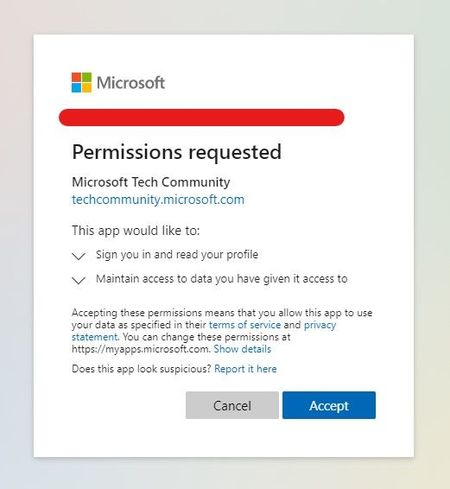
josh_bodner I'm not sure if this is a correct place to ask this but how do I sign-in to techcommunity.microsoft.com using my personal Microsoft account instead of my Teams (school/work) account on Edge Dev? Whenever I try to sign-in, Edge does not give me an option to switch accounts. Instead it directly asks for permissions from my Teams account. I am posting this reply from Google Chrome.12KViews0likes5CommentsRe: Dev channel update to 86.0.587.0 is live
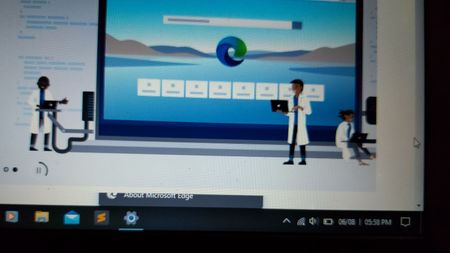
josh_bodner wrote: ... if Edge is covering those things (since we've had issues in the past where menus, tooltips, etc. render underneath the Edge window) ... josh_bodner I'm sure it's the same issue because larger/longer context menus appear clipped with the last one or two rows visible in the foreground while the page is loading. When I took screenshots of it, the entire context menus appeared in the screenshots. Same thing was happening when I tried to record the screen while giving feedback. That's why I am attaching a photo I took using my phone's camera. It clearly shows the clipped 'Help and feedback' section of the ••• menu. The picture is blurry because I had to rush to click the photo because the entire menu would appear immediately after the page finished loading. Other Windows elements like the Action Center, Windows Explorer and other opened program windows also appear clipped at the bottom of the Edge window.1.2KViews0likes1Comment
Recent Blog Articles
No content to show