User Profile

AndrewSAIF
Iron Contributor
Joined Nov 14, 2019


User Widgets
Recent Discussions
Re: Machine learning powered autofill suggestions
Just an update on this thread - the Machine Learning Powered AutoFill Suggestions policy that was released in January, and the Edge Scareware Blocker policy released March 6 are still not available in Settings catalog as of the end of April. I've decided to run a parallel CP with the imported Edge ADMX to set the settings. I'll check into Settings Catalog whenever I need to update this ADMX and transfer any settings to our regular CP as they become available. This seems like the best option with the least amount of rework if I want to avoid migrating everything to the Edge Management Service. I understand resources are not unlimited at MS, so I apologize if this feedback is redundant with internal concerns - but I just want to impress on whoever will listen that folks want to use Intune/Settings Catalog to manage this browser. It would be easier and better than group policy if I could rely on it to contain current policies. Updating my on-prem ADMX should not be faster and more reliable than your 1st party cloud service. Thanks for listening! Andrew70Views0likes1CommentEdge Update Service Error
Hello, Our organization recently set a target version in Intune to update Edge 132.0.2957.115 to 134.0.3124.51, and we noticed that around 80% of our clients failed to install this update. In the Microsoft Edge Update Service log, it appears that our devices were failing the hardware compatibility check: None of these devices are more than 5 years old, so I assume there is a bug with this check in the service. We were able to work around this issue by deploying the MSI, which installed without any error. Hope this helps someone! Andrew331Views1like2CommentsRe: Machine learning powered autofill suggestions
Thanks Kelly. I have a question - how does Microsoft intend folks to manage Edge? For certain things (like Copilot recently) it seems like they assume folks have auto-update turned on. Yet in Intune, the management policies that are released with new browser versions don't appear in Settings Catalog for weeks or months. Does Microsoft assume folks will have parallel group policy and Intune policy? Or parallel configuration profiles with Settings Catalog and OMA settings? Settings Catalog and Remediation? It seems like no matter how you do it, if you want to use Settings Catalog, you have to have another deployment method for new policies if you want to keep up with browser updates. And I'd assume most folks want to use Settings Catalog, because it is easier than the other methods. Is the assumption that everyone is using the Microsoft Edge Management Service rather than Intune? It looks like both this policy and the ScarewareBlockerProtectionEnabled policy I'm waiting to deploy are available there. If that's what MS wants folks to use, that's fine I guess, but I'm sure I'm not the only org that built all of their Edge CPs in Intune before this was even available. I really don't want to migrate everything, and even if I did, I'd have parallel management services (Intune, Admin Center) rather than parallel configuration profiles. If I'm managing the rest of my Windows environment (including other browsers) in Intune, it seems silly to have a separate tool just for Edge. Sorry if this comes off as a rant, but I am genuinely curious whether my use case has been thought out and I'm just missing it. Thanks! Andrew179Views1like2CommentsUpdate to the latest version of Edge to continue using Copilot
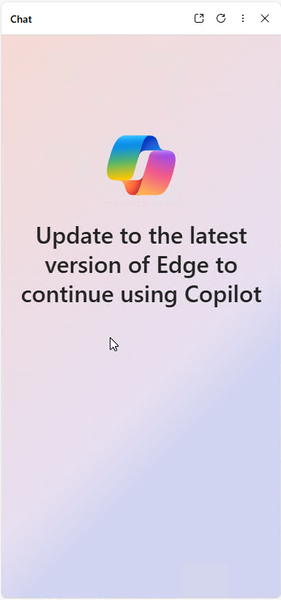
Hello, My organization has about 130 Copilot licenses. We use a controlled rollout for Edge updates to validate compatibility with in-house applications. We are currently on Edge 132.0.2957.115 for our main update ring. My Copilot users are reporting the following message in Edge today when they try to open the Copilot sidebar: Is there documentation somewhere indicating what version of Edge is required to use Copilot? We can't turn on automatic updates, and I'm sure other orgs that have purchased Copilot licenses are in the same boat. Copilot seems to load fine on the M365/Webview2/UWP version. Thanks! Andrew2.4KViews2likes3CommentsMachine learning powered autofill suggestions
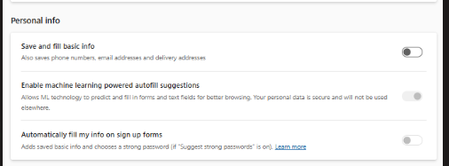
Hello, It looks like a new Machine Learning autofill feature was rolled out with Edge 132 and enabled by default. There is a bug with this setting where even if you have the parent "Save and fill basic info" setting disabled, the Machine Learning suggestions still appear even though the setting is grayed out. This leads to a confusing user experience, because folks that work in enterprise forms with PII try to disable their autofill, only for the feature to remain active. The workaround to disable this feature is to re-enable Autofill, turn of ML suggestions, then disable Autofill again. It looks like there is an enterprise policy to control this setting rolled out on January 17 with Edge 132.0.2957.115. However, I do not see this setting in Intune's Settings Catalog. We are trying to manage in the cloud and avoid creating any more group policies. Is anyone aware of an ETA for this to be added to Settings Catalog? I'd prefer not to set up a Remediation or ADMX CP only for the setting to become available shortly thereafter. Thanks! Andrew865Views1like9CommentsEdge prompts users that it is out of date when a target version is set in Intune
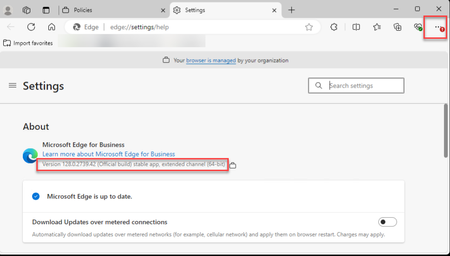
Hello, We are using the target channel override and target version policies in Intune to control when our users receive Edge updates. Our target version is currently 128.0.2739.42. Despite this, Edge is showing an update notification to our users. When they click on it in the menu, they get a message that says "Microsoft Edge couldn't update to the latest version, so you're missing out on new features and security fixes." I looked through the log for Microsoft Edge Update, and at no point did it try to download and install a new Edge version. The only update it performed was for WebView2. I found this thread: Edge UpdatePolicy - Disable automatic updates leads to "Microsoft Edge is out of Date" - Microsoft Community Hub However, this registry value is set to INBX (Inbox, I guess?) in our environment. I couldn't find any documentation about what this means. I tried changing this to GCEU as described in the thread, but this did not change the behavior long term. The message initially goes away after a restart, but comes back some time later. We are intentionally controlling our update rollouts and do not want our users knowing or caring Edge is out of date. Does anyone know how to suppress these warnings? This kind of seems like a bug. Thanks! Andrew832Views1like3CommentsRe: Compose and Inline Compose feature disabled for Entra ID Edge profiles
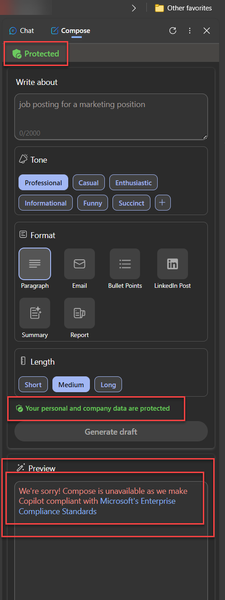
Kelly_Y Hi Kelly, yes, we are using Enterprise Data Protection. Your link was helpful - it sounds like Compose is disabled and will be removed for enterprise customers, and Rewrite is disabled but will eventually be re-enabled at some point in the future. For now, users can still access the UI elements for these features even though they are not intended to work: If Entra accounts can't use them, it would be nice if these features were not available in the UI by default - similar to how the option for DNS over HTTPS is removed when the browser is managed. Thanks for the explanation, Andrew1.7KViews1like0CommentsCompose and Inline Compose feature disabled for Entra ID Edge profiles
Hello, Can anyone direct me to more information about why Compose and Inline Compose have been disabled in the Edge browser for profiles signed in to Entra ID accounts? Our users are receiving a message that says: "We're sorry! [Compose/Rewrite] is unavailable as we make Copilot compliant with Microsoft's Enterprise Compliance Standards" The only documentation I could find was on this page explaining the Rewrite feature, but it basically just mirrors the error message: https://www.microsoft.com/en-us/edge/features/rewrite?form=MA13FJ It looks like compose features in Office desktop apps are still working for users with a Copilot license. We are concerned whether information previously entered into these prompts was not protected by Enterprise Compliance Standards. Thanks! Andrew2.1KViews0likes2CommentsRe: Possible bug - unable to disable Sidebar/Discover in Edge 111.0.1661.44
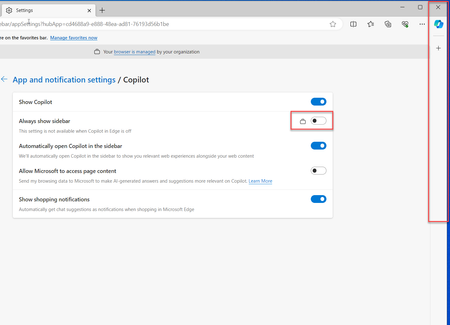
Kelly_Y Hello, I was asked to revisit this policy due to some of the buzz around Copilot. Here is what I have found the current state of it to be. It looks like when the HubsSidebarEnabled policy is set to 0 as Recommended, the Sidebar is still enabled for the user by default the next time they launch the browser. The "Always show sidebar" setting is correctly set to Off, but the user sees the sidebar anyway. If the user toggles the setting to on, then back to off, the setting is then respected. We've had the sidebar disabled as Mandatory for the last 9 months because of this unpredictable behavior. Is there a fix in the works that would allow us to accommodate the minority of our users that wish to use the sidebar without forcing it on every user? Thanks! Andrew2.1KViews0likes1CommentRe: Show briefcase icon on work profile
I wanted to chime in and say that between the briefcase icon change and the banner advertising Edge for Business, this did indeed cause a healthy number of service desk contacts at our organization the day after we rolled out 116. Many users assumed that the briefcase icon was a notification of some sort, like the Outlook icon displays when you have a new email. They were looking for a way to dismiss the notification. Andrew4.6KViews0likes0CommentsRe: Disable pop-up banner advertising Edge for Business in Edge 116
Thanks Kelly. I know this was not your decision, but here is my feedback - at my organization, our Information Security group is not going to allow us to stay on Edge 114 when Edge 116 remediates CVE-2023-4863. Therefore all 1200 of my users will get upgraded to 116 and see this banner. By the time 118 comes out, it won't be as much of a concern for me. It would be nice if we could decouple these major feature updates from security updates. That was the allure of Extended Stable for us, but since these big features are coming on even-numbered releases anyway, it doesn't make much of a real-world difference for us. Thanks for following up, I do appreciate the communication even if it is not great news. Andrew2.4KViews0likes3CommentsFeedback on Edge for Business in Edge 116
Hi there, This is general feedback on the implementation of the Edge for Business feature that debuted in Edge 116. There are a number of bugs, unconsidered use cases, and policy omissions that came with Edge for Business. What's more, these issues are affecting organizations that can't even make use of the feature due to having MSA login disabled. I think in the future it may be wiser to debut larger feature updates like this on odd-numbered releases. This would prevent organizations that have opted for the Extended Stable release track from receiving the feature immediately upon release. This would benefit organizations that depend heavily on browser stability, and benefit the development team by allowing additional time to address issues discovered upon release of the feature to the Stable track before Extended Stable customers are affected. I understand that we can't put the genie back in the bottle for 116, but thank you for considering this feedback going forward. Andrew611Views0likes1Comment

Recent Blog Articles
No content to show