User Profile

galaxytechsolutions
Brass Contributor
Joined Aug 13, 2019


User Widgets
Recent Discussions
Re: Dev channel update to 80.0.320.3 is live
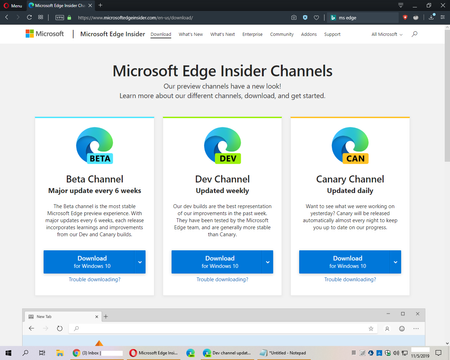
josh_bodner So many issues with the new taskbar icon, I don't even know where to start. Clean install doesn't fix these issues. Here's just two: See attached screenshot. Now I have a "double icon" on the taskbar when the browser is open. As you can see, Chrome & Opera (and even notepad) are behaving correctly. There is no workaround, eventually the "double icon" will appear. Never happened prior to today's update. Also, the right-click options have now vanished when the browser is closed but are there when the browser is open. Never happened prior to today's update. UPDATE: it appears both of the issues have been solved in this forum: "unpin the icons, then with browser open pin them again." I had un-pinned & re-pinned many times but not with the browser open. Definitely a weird glitch (& only happens if you unpin the original taskbar icons & then re-pin new ones).11KViews0likes3CommentsRe: Top feedback summary for October 22
David Rubino I'm loving the Edge Dev experience and it's a pleasure to be a part of watching the growth & evolution of the browser over the past few months. Way better than chrome. Uses far less system resources than any other chromium browser when streaming video & multi-tasking. Keep up the great work!8.5KViews2likes0CommentsRe: Dev channel update to 78.0.249.1 is live
josh_bodner I was having a rather unimportant issue with windows today but chose to do a "System Restore" anyway. The Restore Point was an (automatic) "install" restore point from the upgrade to 249.1 and the only "affected program" listed was a regression from Dev 249.1 back to 244.0 After the "System Restore" Edge Dev was rendered totally useless. Wouldn't execute at all. I reversed the "System Restore" and everything was fine again. Short version: there may be an issue with Edge Dev working after "System Restore" but I obviously haven't (and won't) be doing any further testing on my system!14KViews0likes0CommentsRe: Dev channel update to 78.0.249.1 is live
josh_bodner I love the new "Global Media Controls" icon. However - it's a little weird because the icon isn't there when the browser is opened (which is fine), it then shows-up when media is played (also fine) but then when the tab playing the media is closed - the icon stays. I'm feeling that the icon should vanish when the tab playing the media is closed. Other than that, keep up the great work!14KViews5likes0CommentsRe: Dev channel update to 78.0.244.0 is live
josh_bodner under the new "Read aloud getting better with the cloud," you mention the "Settings & more" menu. When I click the three dots I see "Settings" but not "Settings & more." Am I misunderstanding or missing something? Thanks!21KViews0likes3Comments
Recent Blog Articles
No content to show