User Profile

ppnacho
Iron Contributor
Joined May 12, 2019


User Widgets
Recent Discussions
Re: Provide run / open / save / save as options when downloading files - Discussion
NO no no ... the image is NOT OFFICIAL. The red box is something that I have added as an example of what can be done that is not currently implemented. I feel like it leads to confusion !! In Canary and Dev, when you download something, if you have activated the option "Ask me what to do with each download" it will ask you if you want to "Open" or "Save as". So far correct and it is a good solution. What I see is not right, is that every time you download something IN THE SAME SESSION you will always choose "Downloads" as the default destination (or the path that you have chosen in the configuration). At first this behavior is correct, but if IN THE SAME SESSION you are going to download several files that you want to save in the same directory and which is NOT the default, with each file it will force you to navigate to the path where you want to save it . Until now edge did not have this behavior when you downloaded several files in a row since it always used the last selected path, WITHIN THE SAME SESSION. Anyway, I hope I have explained it better now. Greetings and thank you. ------------------------------------------------------------------- (Spanish) NO no no ... la imagen no es OFICIAL. El recuadro en rojo es algo que he añadido yo como un ejemplo de lo que se puede hacer y que actualmente no esta implementado. Siento que lleve a confusión!! En Canary y en Dev, cuando descargas algo, si tienes activada la opción "Preguntarme que hacer con cada descarga" te preguntara si deseas "Abrir" o "Guardar como". Hasta aquí correcto y es una buena solución. Lo que veo que no esta bien, es que cada vez que descargas algo EN LA MISMA SESION siempre te va elegir como destino predeterminado "Downloads" (o la ruta que tu hayas elegido en la configuración). En un primer momento este comportamiento es correcto, pero si EN LA MISMA SESION vas a descargar varios archivos que quieres guardar en el mismo directorio y que NO es el predeterminado, con cada archivo te obligara a navegar hasta la ruta en la que lo quieres guardar. Hasta ahora Edge no tenia este comportamiento cuando descargabas varios archivos seguidos ya que siempre utilizaba la ultima ruta seleccionada, DENTRO DE LA MISMA SESION. En fin, espero haberlo explicado mejor ahora. Un saludo y gracias.2.7KViews0likes5CommentsRe: Provide run / open / save / save as options when downloading files - Discussion
Hello: I have just verified that in the canary version and in the dev version the option "Open" and "Save as" appears each time a download link is clicked. It is an important advance for all those who just want to "Open" the download link without having to download it first. However, the option "Save as" does not "memorize" the last directory used, so if you have to download several files and save them in the same directory, for each download you have to start browsing to the final directory. This is a major loss of functionality. The option to memorize the last download should be given. Something like "Save the file in the same directory used in the last download" (Yes / No) as one more option in the configuration. Something similar to the example in the image: Thank you very much!! ---------------------------------------------------------------------------------------------- (Spanish) Hola: Acabo de comprobar que en la version canary y en la version dev aparece la opcion "Abrir" y "Guardar como" cada vez que se pulsa sobre un enlace de descarga. Es un adelanto importante para todos aquellos que solo quieren "Abrir" el enlace de descarga sin necesidad de descargarlo previamente. Sin embargo, la opcion "Guardar como" no "memoriza" el ultimo directorio utilizado por lo que si tienes que descargar varios ficheros y guardarlos en un mismo directorio, para cada descarga se tiene que iniciar la navegacion hasta el directorio final. Esto es una perdida importante de funcionalidad. Se deberia dar la opcion de memorizar la ultima descarga. Algo asi como "Guardar el archivo en el mismo directorio utilizado en la ultima descarga" (Si/No) como una opcion mas en la configuracion. Algo similar al ejemplo de la imagen: Muchas gracias!!2.7KViews1like2CommentsRe: Deployment - Fonts, Favorites, Sync
tomscharbach Totally agree!! You can not explain better! It is something that has been requested in many threads of this forum. In any browser, good bookmark management is essential. Personally I have resorted to a third-party extension to access favorites. And for its management I still use the favorite folder of "My documents" and then importing them from IE11. But this someday can not be done and it is a great shame because I am convinced that it is the way many users use. @tomscharbach, thank you very much for your detailed explanation. Greetings -------------- (Spanish) Totalmente de acuerdo!! No se puede explicar mejor!! Es algo que se lleva pidiendo en muchos hilos de este foro. En cualquier navegador, una buena gestion de los favoritos es fundamental. Personalmente he recurrido a una extension de terceros para acceder a los favoritos. Y para su gestion sigo usando la carperta favoritos de "Mis documentos" y despues importandolos desde el IE11. Pero esto algun dia no podra hacerse y es una gran pena porque estoy convencido que es la forma que utilizan muchos usuarios. @tomscharbach, muchas gracias por su explicacion tan detallada. Un saludo6.9KViews0likes0CommentsRe: Top Features that Microsoft Edge should learn from Vivaldi browser
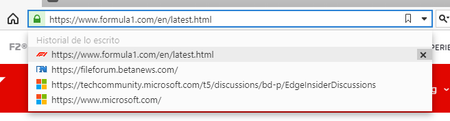
HotCakeX A modo ejemplo, imagina que yo te mando por mail, o por whatsapp, o por otro medio cualquiera, o simplemente veo en una web, la url https://www.aaaaaabbbbbcccc.com. Yo copio "https://www.aaaaaabbbbbcccc.com" y la pego en la barra de navegacion del navegador. Una vez estoy en esa url, puede contener otros enlaces a otras webs diferentes y puedes navegar por ellas. El caso es que tras varios clicks, pierdes la url original. La unica opcion seria buscarla en el "historial" En IE 11 y en vivaldi, gracias a esta funcion que he comentado, aunque cierres en navegador, cuando lo vuelves a abrir, veras que te sigue apareciendo la opcion de volver a visitar "https://www.aaaaaabbbbbcccc.com". Para mi, esta funcion me resulta muy comoda y muy util en muchas ocasiones. Espero haberme explicado mejor. Disculpa!! Un saludo12KViews0likes2CommentsRe: Top Features that Microsoft Edge should learn from Vivaldi browser
Llevo mucho tiempo usando vivaldi y si que tiene cosas muy interesantes, pero esa lentitud en el manejo de su interface es lo que me esta echando para atras. Entre sus muchas funciones, tiene una funcion que echo mucho de menos en el edge chromiun y es la de consultar las ultimas url escritas. El IE lo tuvo siempre y es una pena que desaparezca. No es cuestion de consultar el historial, sino de consultar las urls que copias y pegas o simplemente escribes. Ohala esta caracteristica la implementen en el nuevo edge. Ya hay hilos de otros usuarios solicitando lo mismo. Un saludo12KViews0likes4CommentsRe: Please -Bring over the classic Edge Favorits experience with pin-able side menu!
FredrikStahlbrandt Hi: I completely agree with your comment. Managing favorites is still a black dot in the new Edge. There are many open posts requesting solutions for current favorites. As it seems that the subject is going for a long time, this is currently using the extension "Neater Bookmarks" that although it is not a wonder, in my case if it improves the navigation by the favorites, and solves the problem that you are posing in your post. I hope that the development team will soon give us some joy with the management of favorites in the new Edge. a greeting ----------------------- (Spanish) Hola: Estoy completamente de acuerdo con tu comentario. La gestion de favoritos todavia es un punto negro en el nuevo Edge. Hay muchos post abiertos solicitando soluciones para los favoritos actuales. Como parece que el tema va para largo, actualmente esto utilizando la extension "Neater Bookmarks" que aunque no es una maravilla, en mi caso si mejora la navegacion por los favoritos, y soluciona el problema que estas planteando en tu post. Confio que el equipo de desarrollo pronto nos de alguna alegria con la gestion de favoritos en el nuevo Edge. Un saludo4.8KViews1like1CommentRe: I can`t open Edge Insider
Hau9en Control panel -> Default programs -> Set default programs -> In web browser choose Edge Beta Sorry, but I have the operating system in Spanish. I hope that with the translation it will help you to reach the end. Greetings ------------ (Spanish) Panel de control -> Programas predeterminados -> Establecer programas predeterminados -> En navegador web elegir Edge Beta Disculpa, pero tengo el sistema operativo en español. Espero que con la traduccion te sirva para llegar al final. Un saludo2.4KViews0likes2CommentsRe: Create shortcut on desktop
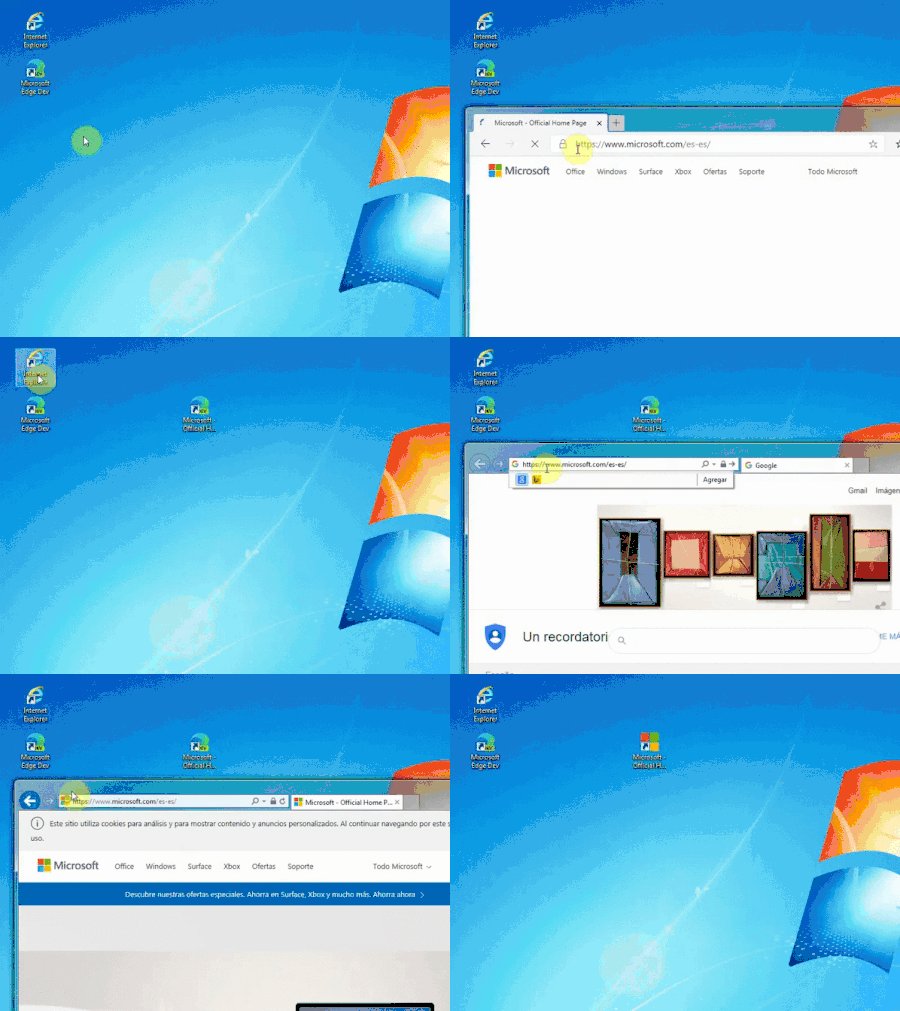
HotCakeX To my knowledge ... IE11 if it comes installed with the latest official version of windows 10 (May 2019) so to say that IE is disabled is not correct. And we are not talking about creating shortcuts with IE11 but with the new Edge Chromiun. In the gif, I only check using IE11 as the icon reappears without creating the shortcut. That's why I decline more because of a problem with windows and edge together. And how do I know this? Because I have spent time researching and when I speak I do not speak. And surely the use of IE11 is much less than a few years ago, but from what I read in this forum, there are still many people who continue to use it for different reasons. So don't be the one who says it's "few people" and not "worth it." Greetings and have a nice day ---- Que yo sepa ... IE11 si viene instalado con la ultima version oficial de windows 10 (mayo 2019) por lo que decir que IE esta deshabilitado no es correcto. Y no estamos hablando de crear accesos directos con IE11 sino con el nuevo Edge Chromiun. En el gif, solo compruebo usando el IE11 como el icono reaparece sin necesidad de crear el acceso directo. Por eso me declino mas por un problema de windows y edge juntos. Y como se esto? Pues porque me he pasado tiempo investigando y cuando hablo no hablo por hablar. Y seguramente el uso de IE11 es mucho menor que hace unos años, pero por lo que leo en este foro, aun hay mucha gente que por diferentes razones lo sigue usando. Asi que no seas tu la que dice que es "poca gente" y que no "vale la pena". Un saludo y que tengas un buen dia1.4KViews0likes3CommentsRe: Create shortcut on desktop
HotCakeX I made the video in a virtual machine of windows 7. But the same thing happens with windows 10. If I didn't say anything before ... it was because I didn't know until I tried it. @HotCakeX, I really appreciate all your contributions and all your participation in this forum, no doubt with the intention of helping others ... but sometimes you offer people "alternatives" that is not what they are looking for. I think that in this forum, we comment on the things we like about IE11, the old edge or even other browsers and that we would like to keep on the new edge. There will be many obsolete things that for many will not be worth anything but that for others are essential. It is as if we have been crossing a bridge from home to work for 20 years and suddenly they put a wall in the middle of the bridge that does not allow us to pass. If the alternative is to take a bridge 1 km below because I do not like it, I prefer to remove the wall. If in the end they do not remove the wall, I will hold on and I will have to take the other bridge, but at least I will try to say that blocking the bridge with a wall is not a good idea and that there are many people who use it. I think this is the purpose of this forum. That said, I thank you again for all your good intentions to help people in this forum. There may be people who don't care about the shortcut icons but I don't care. And I imagine there will be more people who think like me. I only comment on this forum, in case those responsible for the development of edge have any suggestions or can transfer this incident to whoever corresponds. Anyway, I feel if my words are not correct, but that is what I think. Thanks again to all for your help and comments. Greetings P.D: My native language is Spanish from Spain. I'm not good at English and I use the google translator. That is why I almost always put the text I write in Spanish in case the translation does not correspond faithfully with what I want to express. -------------------------- (Spanish) He realizado el video en una maquina virtual de windows 7. Pero ocurre lo mismo con windows 10. Si antes no dije nada ... fue porque no lo sabia hasta que lo probe. @HotCakeX, agradezco mucho todos tus aportes y toda tu participacion en este foro, sin duda con la intencion de ayudar a los demas ... pero en ocasiones le ofreces a la gente "alternativas" que no es lo que buscan. Creo que en este foro, comentamos las cosas que nos gustan del IE11, del edge viejo o incluso de otros navegadores y que nos gustaria mantener en el nuevo edge. Habra muchas cosas obsoletas que para muchos no valdran nada pero que para otros son esenciales. Es como si llevamos 20 años cruzando por un puente de casa al trabajo y de repente le ponen un muro en mitad del puente que no nos permite pasar. Si la alternativa es coger un puente 1 km mas abajo pues no me gusta, prefiero que retiren el muro. Si al final no retiran el muro me aguantare y tendre que coger el otro puente, pero al menos intentare decir que bloquear el puente con un muro no es una buena idea y que hay mucha gente que lo usa. Creo que esta es la finalidad de este foro. Dicho esto, vuelco a agradecerte todas tus buenas intenciones de ayudar a la gente en este foro. Puede que haya gente a la que le da igual los iconos de los accesos directos pero a mi no me da igual. E imagino que habra mas gente que piensa como yo. Solo lo comento en este foro, por si los reponsables de desarrollo de edge tienen alguna sugerencia o puenden trasladar esta incidencia a quien corresponda. En fin, siento si mis palabras no son correctas, pero es lo que pienso. Gracias de nuevo a todos por vuestra ayuda y comentarios. Un saludo P.D: Mi idioma nativo es el español de España. El ingles no se me da nada bien y utilizo el traductor de google. Por eso casi siempre pongo el texto que escribo en español por si la traduccion no se corresponde fielmente con lo que quiero expresar.3.5KViews0likes5CommentsRe: Create shortcut on desktop
HotCakeX Thanks for your contribution! Follow that path, it is the same as dragging the link from edge to the desktop. And with the same final result, no icon. I think it shouldn't be an Edge problem, but rather a windows problem and its icon management. If you create a shortcut with the Edge, it doesn't generate an icon. But if you open the same URL with IE11 and do the same, dragging to the desktop BUT WITHOUT RELEASE, the icon created by the Edge is automatically updated (as shown in the video). That's why I think it's a problem more than windows than Edge. Greetings ------------------------------ (Spanish) Gracias por tu aportacion! Seguir ese camino, es el mismo que arrastrar el enlace desde edge al escritorio. Y con el mismo resultado final, sin icono. Pienso que no debe de ser un problema de Edge, sino mas bien un problema de windows y su gestion de iconos. Si creas un acceso directo con el Edge, no te genera un icono. Pero si la misma url la abres con el IE11 y haces lo mismo, arrastrando al escritorio PERO SIN SOLTAR, automaticamente se actualiza el icono creado por el Edge (como se muestra en el video). Por eso creo que es un problema mas de windows que de Edge. Un saludo3.5KViews0likes10CommentsRe: Create shortcut on desktop
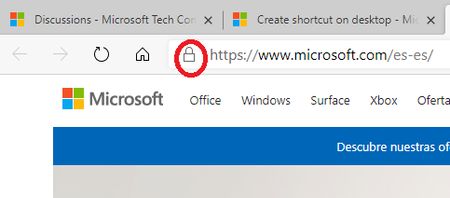
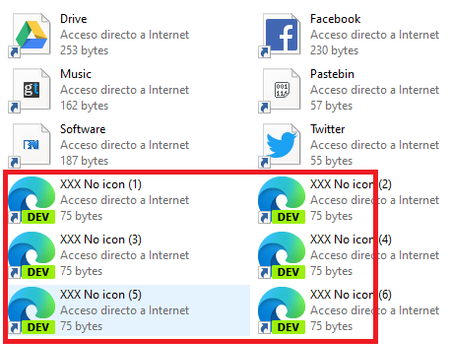
Create the shortcuts on the desktop correctly. The problem is that these shortcuts are not assigned the web icon. But the shortcut works correctly. Until a few days ago, he had several shortcuts with his icons but since Edge updated his new logo the vast majority disappeared (I don't know if this would have anything to do with it). It is not a big problem ... but a small nuisance. Hopefully find a solution. ------------------------------- (Spanish) Crea los accesos directos en el escritorio de forma correcta. El problema es que a estos accesos directos no les asigna el icono de la web. Pero el acceso directo funciona correctamente. Hasta hace unos dias, tenia varios accesos directos con sus iconos pero desde que Edge actualizo su nuevo logo desaparecieron la gran mayoria (no se si esto tendra algo que ver). No es un gran problema ... pero si una pequeña molestia. Esperemos encontrar una soluccion.3.6KViews0likes12CommentsRe: Create shortcut on desktop
HotCakeX That is a problem, so I opened this thread: https://techcommunity.microsoft.com/t5/Discussions/Url-shortcut-icon-cache/m-p/993665 Sometimes he puts an icon and sometimes not. Me with https://pastebin.com/ if that puts an icon But with https://techcommunity.microsoft.com/t5/Discussions/bd-p/EdgeInsiderDiscussions does not put an icon. I will continue investigating ... thank you very much!!3.7KViews0likes16CommentsRe: Url shortcut icon cache
Thank you very much HotCakeX I didn't know this edge function. It is true that it retains the icon, but the result as an app is not functional for me. I think there has to be another solution to this problem. Anyway, thank you very much for your help and support. ----- Muchas gracias HotCakeX Desconocia esta funcion de edge. Es cierto que conserva el icono, pero el resultado como app no es funcional para mi. Creo que tiene que haber otra soluccion a este problema. De todas formas, muchas gracias por tu ayuda y soporte.1.8KViews0likes1CommentUrl shortcut icon cache
Hello everyone! Since I started using Edge Dev (April 2019) I have problems with the icons of the shortcuts to urls. These accesses do not show the url site icon. Some do, but most do not show it. There are days that show all the icons and other days disappear. I do not see logic. It only happens to me with the shortcuts to the urls that I create with the Edge Dev. Those that I create with the IE11 show all the icons. I tried to restart the icon cache in Windows with msdos commands, but without success. And it's something that happens to me on several different computers and I haven't been able to find a solution. Anyone have the solution? Is it a general problem of Edge Dev? Or is it simply not a problem and is it working correctly? For me it is important. The site icons make it easier for me to find what I am looking for more easily. Thank you! --------- (Spanish) Hola a todos! Desde que comence a utilizar el Edge Dev (Abril 2019) tengo problemas con los iconos de los accesos directos a urls. Estos accesos no muestran el icono del sitio de la url. Algunos si, pero la mayoria no lo muestran. Hay dias que muestra todos los iconos y otros dias desaparecen. No le veo logica. Solo me pasa con los accesos directos a las urls que creo con el Edge Dev. Los que creo con el IE11 muestran todos los iconos. He probado a reiniciar la caché de iconos en Windows con comandos de msdos, pero sin exito. Y es algo que me pasa en varios ordenadores diferentes y no he sido capaz de encontrar una solucion. Alguien tiene la solucion? Es un problema general de Edge Dev? O simplemente no es un problema y es el funcionamiento correcto? Para mi es importante. Los iconos de los sitios me facilita encontrar mas facilmente lo que busco. Muchas gracias!1.9KViews0likes3Comments

Recent Blog Articles
No content to show