User Profile

WolfIcefang
Iron Contributor
Joined May 08, 2019


User Widgets
Recent Discussions
Re: Introducing new Fluent Iconography for Microsoft Edge
IrinaL This is great; I really like the new "tab" icon and the refresh icon (even though it's just been rotated a bit) but why is the folder icon in the bookmarks bar going to different from the recently updated folder icon in my Windows 10 Start Menu? They share the same visual style, which I'm very happy to see, but they aren't actually the same, which just seems odd.32KViews6likes5CommentsCONCEPT: Improving Edge's context / right click menu
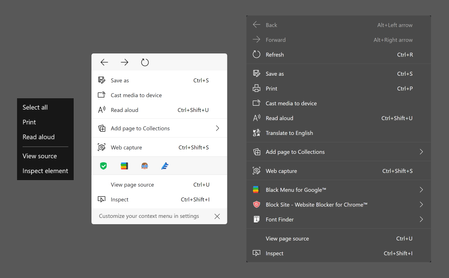
I think it's pretty safe to claim that the context menus in Edge are getting too big to work with effectively. For people who like using the navigation features, it can feel pretty disheartening to right click and see "back, forwards, refresh" appear halfway across the screen anyway. Additionally, it can be difficult to remember which options are part of the context menu and which are hidden away in Settings and More. In an attempt to highlight and address these issues, I came up with this concept: Left: Edge Legacy's context menu. Center: my context menu concept. Right: Edge Canary's context menu. My new context menu proposes two major improvements. First, the menu cuts down on bulky elements by using the address bar versions of the navigation cluster and extensions. The horizontal navigation cluster is already such a staple of modern web browsers that I don't believe it would confuse anyone. Extensions are usually chosen by the user (or their company) so turning these into icons shouldn't cause any issues. These edits give the added (albeit unintentional) benefit of color coding the different sections. I find the whole menu easier to look through because the actual "contextual" part is bounded by two grey sections. Another benefit is, because the names of extensions are hidden, Microsoft can have complete control over the width of the menu. Finally, shrinking the navigation cluster to one line makes it more reasonable to incorporate into every context menu. Right now, right clicking an image, a link, or selected text will not make the navigation options appear, and this unreliability undercuts any usefulness the buttons had in the first place. Second is the ability to "Customize your context menu in settings" as hinted by the dismissible bar under the menu. I see this as similar to the Customize Toolbar section of edge://settings/appearance . Many of the context menu items would be listed with toggle switches next to them. It (should be) easy to implement. Personally, I would turn off the "Print" and "Translate to English" options, which is why they are absent in the image above. I don't think any items should be hidden by default, and I don't think it should be possible to right click inside the right click menu to hide items. Some users might not know where to find the controls that make missing items reappear. (In other words, I want to lower the chance of having to explain it to my grandparents.) I also considered sorting the options into submenus, but forcing users to look through sub-menus sounded way worse than giving them the ability to customize the menu to their needs. I spent way too much time on this thing, mostly fixing mistakes I made with the image, so thank you very much for reading through this whole post.5.1KViews14likes5CommentsRe: Dev channel update to 85.0.545.0 is live
HereItis I still don't understand. I can have two different pdfs side by side by dragging and dropping tabs to create two different windows. See the first attachment: on the left is math homework and on the right is a D&D character sheet. If you're talking about seeing multiple pages of the same PDF side by side, then I agree that this is a feature of Edge Legacy that is lacking in Edge Chromium. See the second attachment.9KViews0likes0CommentsRe: Dev channel update to 85.0.552.1 is live
I think this is a really big deal. Pushing webpages to the left and right is, to me at least, a big part of what makes Edge... Edge. Collections and Sidebar search already do it, and Vertical Tabs are gearing up to implement it soon. Personally, I've only had mild issues with the mechanic; every once in a blue moon, a website will reload instead of resizing. My guess as to why it is so reliable is that it treats the situation the same was as it would if I restored down a maximized window. Websites and web browsers have already been doing it for... I don't know, 20 years? On the other hand, I have generally had much worse experiences when using "floating" menus, which some of my extensions use. With a pushing sidebar, I only have to scroll once to get back to the context I need. With a floating menu, especially if there is text that spans the width of the page, I might have to continuously juggle the menu just to read a few lines - and don't even think about trying to highlight something. That's also assuming the floating menus can be dragged to other parts of the screen in the first place. Take the description of images on NASA's APOD website as an example. https://apod.nasa.gov/apod/astropix.html If we let the right portion of the screen get covered, we're chopping off parts of sentences. I want to see Edge add MORE "pushing" sidebars, not less. For example, Edge Legacy's Hub had a useful "recently downloaded" pane that could make it easier to move a file from a cloud storage platform to a social media page. I just want to know what issues you're experiencing more specifically, since our views are polar opposites. If you already made a detailed post about it in the past, just tell me and I'll find it on your user profile. 👍11KViews3likes0CommentsRe: InPrivate theming
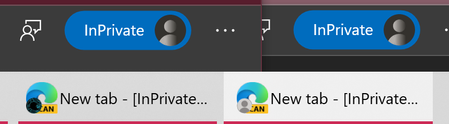
We've brought up "the chip" a lot, and I want to add a bit more about it. #1: Chip color = Accent color. In Edge Legacy, the chip color was always blue, but everything in Edge was blue. In Chromium Edge, the Title Bar's color is determined by my Windows Accent Color, and I believe the color of the inPrivate chip (along with other parts of the UI) should play along with this. #2: Incognito tabs are still tied to the profile of the window you opened them from, but the profile icon inside of the chip is always a faded version of the default profile icon, not my profile icon. I hadn't thought about this previously, but it's impossible to tell the difference between incognito tabs for two different profiles. I believe that the user's profile picture should appear within the chip instead of a generic icon. People wouldn't want to save personal incognito favorites to their spouse's or work's profiles! #3: I don't have any issue differentiating when the contents of the tabs in inPrivate mode are substantially different from normal mode. When the contents of my current inPrivate browsing tab is the same as the contents of my regular browsing window, and I am in dark theme, I can accidentally use the wrong window. (This has happened when testing Google Docs link settings). I believe a user-definable choice of in-private address bar accent color would be the best solution. (I am, like some others here, partial to dark purple, but do not want to speak for everyone when I say that.) ShirleyNg5.9KViews0likes0CommentsRe: Microsoft Edge extends tools for the PDF reader
I'm very excited for text boxes and notes. I have a Dell XPS laptop from 2017, so while I have a touch screen, it isn't good enough for precision styluses and it can't fold all the way around the screen. The keyboard is my most precise input method... Most PDF readers are workable when studying, but are not up to the challenge of taking notes in a lecture. A 2-in-1 laptop has already solved this problem, but perhaps more forgiving software would also allow me to reach that goal. For example: Some kind of "smart text box" (where the text automatically resizes based on the size of the text box) would make taking notes during class a lot easier. The ability to select a bunch of ink in order to move or resize it would also be useful. A smart "select" or "edit" tool, which would be able to do both of the above, might be very useful. Elliot Kirk111KViews1like0CommentsRe: Provide run / open / save / save as options when downloading files - Discussion
From my experience, Google Chrome and Chromium Edge have exceedingly similar security tools - could you post a screenshot of the feature in Google Chrome? I don't quite know what you're referring to. (And I'm no security expert)3.1KViews0likes0CommentsRe: From a profit viewpoint, why should Microsoft support Edge?
HotCakeX That's strange... I've had the exact opposite experience on my device! I have a 4k display, and the touch screen scrolling is smooth as silk, while the trackpad is jerky (not any worse than Chrome, but noticeably worst than built in Windows apps like Calendar and Mail. To be fair, Windows defaults my screen's refresh rate to 59Hz for some reason, so I might have a unique case. Also, scrolling with a traditional mouse wheel seems a lot smoother than before - that must have been optimized recently!5.8KViews0likes1CommentRe: From a profit viewpoint, why should Microsoft support Edge?
While I agree with everything you're saying, you haven't really answered my question. All of the reasons you've given here are altruistic (that is, morally good.) Two major companies working on optimizations, a better user interface, more features, and less work for extension developers are all "nice" things to have, but they aren't easy to monetize. I guess both Microsoft and Google need fast browsers for their business software suites to run on, so maybe I was being too cynical about it in this post.6.1KViews0likes12CommentsFrom a profit viewpoint, why should Microsoft support Edge?
EDIT: I should preface this message by saying that everything here is purely speculative, and is the result of, probably, 15 minutes of searching. I do not know what reasons Microsoft had for creating the original Microsoft Edge or this new version, and I do not know if Bing is important to Edge's success. Please don't think of any of these theories as facts. END OF EDIT. I think we can mostly agree that Microsoft Edge is, or at least will be, pretty great. It has collections, a music control thing, a development team that actively listens to user input, a nice looking NTP, and way more coming "soon". However, a big question started bothering me this afternoon: Why is Microsoft developing a Chromium Web Browser? Well, let's look back at where this all began: Project Spartan. https://blogs.windows.com/windowsexperience/2015/03/30/introducing-project-spartan-the-new-browser-built-for-windows-10/ Spartan was meant to be way more user-friendly, faster, and less power hungry than Chrome. It was supposed to do to Chrome what Chrome had done to Internet Explorer and Firefox. But more than that: Spartan's tagline was The New Browser Built for Windows 10. If you wanted to use the best new browser, you had to have a Windows machine. Furthermore, if you wanted to use some of Edge's best new features, like Inking on Web Pages, you would need a pen, and essentially, if you needed a pen, you needed a Microsoft Surface Tablet. So from my best guess, Microsoft saw that the web browser had become the most important piece of software and wanted to create a browser that would make their hardware sell like hotcakes. https://youtu.be/q4rL_Lnt6kA Obviously, that didn't happen. So, at the tail end of 2018, Microsoft announced that Spartan Edge would be replaced by Chromium Edge. This was so exciting; now Edge would be just as fast and stable as Chrome, but with a plethora of new Microsoft tools and UI enhancements! I'm really loving the new Microsoft Edge for exactly those reasons, but there's a problem: "from a profit standpoint, why should Microsoft support Edge?" Edge runs on Windows 7, 8.1 and Mac just as well as it runs on Windows 10. Furthermore, Edge inherited a lot of Chrome's clunky mouse / keyboard based UI, so it isn't a shining example of the Surface hardware or the Fluent UI software. If Edge isn't a tool to market Windows, and Edge can't generate profits on its own, then why is Microsoft spending so many resources on this project? Maybe we can look at the new marketing page for Edge: Oh no. Bing is supposedly one of the main reasons to download Edge. In fact, it gets its own page! Bing definitely generates revenue for Microsoft through the incorporation of advertising, but relying on Bing to fund Edge raises two really big alarms for me: First off, Bing is to Google Search what Spartan Edge was to Chrome. Sure, both Bing and Google work, but most people use Google. Second, Edge can't force users to search with Bing. Bing is a website, the same as Google.com. It's really easy to get to Google.com in Microsoft Edge. Maybe this is why Edge made it super difficult to change search providers? Seriously, "default search provider" is the very last option in Privacy and Services. The only way to hide it better would be to put it "in the bottom of a locked filing cabinet stuck in a disused lavatory with a sign on the door saying ‘Beware of the Leopard." - Douglas Adams, The Hitchhiker's Guide to the Galaxy This partnership with Bing is strenuous at best, and the perceived reliance on Bing's revenue seems ill-fated. Regardless of how popular Edge becomes in two years, what will happen to it? In two years, how big will Edge's development team be? In two years, will the development team be able to pump out features like they have in 2019? I really want to see Edge achieve, and maintain, a status as one of the most innovative and well-designed web browsers available. As much as I am afraid to kick this beehive, the importance of the topic feels too great to let slide. Hopefully, someone can provide an answer.Solved6.7KViews0likes16CommentsRe: Discussion - Set Aside Tabs and Warn on Close
Elliot Kirk Sorry in advance for the bad grammar, I have limited time today. Two parts to this reply: Keeping all my tabs in a window, and keeping my tabs open because they are doing something. Part 1: I always keep all my tabs in one window, but why is this? I could have a window for my scheduling, (list of tasks and calendar) a window for my music and entertainment (Pandora and Youtube) and a window for my each of my current projects. I keep everything in the same window because it's much easier and faster to jump between tabs than it is to jump between windows. There are two reasons for this. First, multiple windows means going to a tab is a two-step process. Click the window you want, then click the tab. However, more importantly, in my opinion, is the issue of identification. Windows of Edge can either look like this: or like this: Or maybe even like this: The issue is that tabs have favicons, making it easy to know the contents of every tab. Windows have the application's favicon, and the text depends on which tab is open in that window. Why is this important for setting aside tabs? Well, a large part of the reason why Set Aside Tabs was "all or nothing" for me was that I kept all my tabs together in an "all or nothing" window. Part 2: why the "close all tabs" warning is important. I am not concerned about losing all my tabs and not being able to reopen them. If I close all my tabs then reopen microsoft Edge, I can simply right click in the tab bar, choose "reopen closed window", and get all my tabs back. If that's too much of a chore, I can just hit ctrl+shift+t on my keyboard. The real reason why I don't want to close my tabs by accident is that some of my tabs are doing important things. If I have a 3 paragraph Amazon review in a tab, and the tab is closed, restoring the tab does not bring back my draft. When all my tabs close unexpectedly, I lose any in-progress downloads, music, video streams, and text box contents. The URL isn't the important part. I have to get to class now, have a great rest of your day!33KViews16likes2CommentsRe: Discussion - Updating our interface with Fluent touches
Dear Elliot Kirk and the Edge development team, First of all, thank you for making this post! I'm sure I'm not the only person who is relieved and excited to see that you're all finally ready to discuss Fluent Design in detail. After all, Fluent Design isn't just the package that Windows applications come in - it's the way everything is accomplished between the user and the browser. I want to lay down a few pieces of groundwork before I respond to the specific statements you've put forward. First off, I will try my best to explain only my own desires for the future of Fluent Design in Edge. There are some people that would probably want Edge to feel familiar, similar to Google Chrome. There might be other people who are only interested in how the New Edge can be made to look and feel like the Old Edge. I cannot speak for these positions. I do not have adequate insight into why people hold those positions or what specific benefits those design philosophies would have. I also do not have the resources to be able to determine what camp is largest or most important to making Edge a success "with the masses". As I cannot tell if I am speaking for the masses, and I can't tell whether I am part of the masses, I must speak only for myself. My position is that Edge should "be new" and that it should fit well with the operating system it is installed on. Second, I want to define Fluent Design in my own words. I believe this is important because my definition of Fluent Design might be very different from other people's. With the emphasis that I have personally put on design languages in the past, I've had the subconscious feeling that "design languages are everything." With the amount of feedback I've been writing to the Edge team, I've realized that this just isn't true. Fluent Design defines how apps look and how apps are laid out, but it does not define what an app can do. For example, Fluent Design says that the Set Aside Tabs feature should slide out from a side panel, and the button for it should turn blue. However, Fluent Design doesn't say whether or not Edge should have a Set Aside Tabs feature. Given this, I won't use this post to ask that any particular feature be added to Edge. With that lengthy introduction down, let's get to responding to the topics set forth in Elliot Kirk's post. Why Insider Edge should look Fluent Fluent design makes it obvious that an app isn't just made to run on Windows 10, but that it's made to fully take advantage of features like Timeline, Share, and Focus assist. Apps like Your Phone and Calculator feel better to use in Windows 10 than apps like Microsoft To-Do or File Explorer. This has nothing to do with the age of the app; To-Do recently got a UI makeover while calculator was one of the oldest apps to get the Fluent treatment. The determining factor is fluent design. Even though I spend most of my time in this browser, I am also familiar with how the rest of the preinstalled apps look. Those apps define Windows 10 for me. When I booted up Edge Canary on release day, the first two things I said to myself was "wow, that was fast", and "wow, it looks like Chrome." I think Microsoft Edge is supposed to be the crown jewel of the operating system. Edge Canary still feels like it was developed primarily by Google, and it doesn't fit with the rest of Windows 10. What task am I trying to accomplish with Fluent Design's theme? Fluent Design is the official Microsoft stamp of quality and compatibility for Windows 10. I also like the shiny, glass look of new apps like Your Phone more than the flat, google-style look of Edge. This whole paragraph brings up a good question: how should Edge look on other operating systems? Well, I can't answer that. I don't have any experience with Mac OS, and Linux doesn't really have a "style", so I don't know if it would be better to have a Fluent style to bring home the fact that "this is a Microsoft product" or if it would be better to have a style that matches the OS to say "this software was made special, just for this environment". There is another big part of my desire to see Fluent added to Microsoft Edge Insider. I believe that Insider Edge should react Fluently. Fluent design is about efficient, capable design. Open up the old version of Edge, and open up the latest version of Edge insider. The design choices in Classic Edge have two big advantages: You can do more with less, and you can do things more easily. What do I mean by doing more with less? Well, when on a simple website like google.com, Classic's right click menu has only 4 items. Edge Insider has 9. There are a bunch of extra, unnecessary things in Edge insider's context menu! Some things are already easy to access from the address bar; others should stay in the Settings and More menu. This applies to a lot of the things Edge Insider inherited from Chrome. Why do we need a profile button in the address bar? Why do we need a New Tab button in the Settings and More menu? Classic Edge has so many more features than Edge Insider: Set Aside Tabs, Tab Previews, Inking on Webpages... and yet it feels way less cluttered because every tool has a specific place to be. In Edge Insider, every tool tries to be everywhere, and it just bothers me. You shouldn't forget that Classic Edge also lets the user do things more easily. The Edge Hub combines History and Favorites into a side pane that can be pinned open. Edge insider has a massive dropdown menu for favorites. Maybe middle or right clicking on those favorites will keep the dropdown menu open, but a dedicated "pin pane" button takes out the guesswork. This isn't a unique situation: Edge Insider kept Google's Find in page popup menu; Classic Edge has an entire row worth of features and adjusts the tab size to accommodate it. Google's Fullscreen mode just has an X when you move the mouse to the top of the screen; Classic Edge pulls down the entire Edge tab and address bars. The genius layout of Classic Edge is why I liked that browser and why I wanted to see it improve. I said it before, and I'll say it again: Classic Edge runs horribly on my PC. Smooth scroll doesn't work, rearranging tabs around used to crash it, and Youtube just wouldn't pause for a full 10 seconds when clicking the button. The layout of the features included was what made Edge good, and the pairing of that layout philosophy with the speed and reliability of Google Chrome was why I was, and am, excited to see the development of Chromium Edge. I am extremely happy to see the edge development team prioritize reliability in this version. I've had to reinstall the Your Phone application about once a month now, and that app is missing a back button if you shrink the window too small, but I haven't had any major crashes or usability hurdles (I mean, besides sync) with Edge Canary in recent memories. This is a multi-platform daily build vs a so-called stable version on one OS! It's something to be really proud of. However, I don't want to see Edge to launch looking or feeling like a Google browser plus some things that could have been extensions. If a stable chromium release came out tomorrow, I'd love it because I know how reliable this browser is. However, if a stable Chromium Edge came out tomorrow and I hadn't been using Edge Canary for a year already, I would download it and say "Well, this is just Chrome but with collections and read aloud tacked on. What were they doing for the last year?" So, what is the task that I am trying to accomplish? I want a browser that looks like it was made by Microsoft, and a browser that is easy to use (no more dropdown list for favorites!) and well laid out so that things are easy to find (no more bloated right click menu!) Elliot Kirk22KViews4likes3CommentsRe: Reading List - Discussion
Elliot Kirk While I agree with many other posts in this thread, I feel like adding my own voice. Reading List, to me, was useless in Old Edge. It felt like it was just a folder in Favorites that looked special. I was turned off from it because, while Favorites could be transferred to Chrome or another browser, the Reading List was stuck on Edge. I do not want to see the return of Reading List in Edge. Collections has already borrowed the visual style of Reading List; I could just create a collection called Reading List and call it a day. For the Stable release of Edge, importing Reading List should create a Collection in Collections instead of a folder in Favorites. The only point of using Reading List in Classic Edge was the unique visual style. I do not want the Edge team to end up with four unique ways to save lists of web pages. We are planning: Favorites (already here, must be kept the same for compatibility with other browsers) Collections (already here, brand new, and awesome) Set Aside Tabs (Not here yet, but pretty unique) Reading List (imported into favorites) When we talk about Reading List features, we're talking about features that were not in old Edge. These brand new features could be added to the brand new Collections. For example, the ability to choose "view offline" on a collection by collection basis would be neat. Another feature I have wanted for a while is the ability for the Reading List to remember what part of a webpage you stopped reading at - just like a bookmark in a real book. "Bookmark section" would be a great feature in collections too; I sometimes save an entire webpage to a collection because of a 2 paragraph chunk 3/4th through an article. Inking on webpages isn't out yet, but I'd assume that'll be as useful in Collections as it would have been in Reading list. Arguably, the Reading List has enough potential to be its own unique tool, and this had been making me uncertain about my desire to see it be ignored in favor of collections. However, while writing this post, I realized something: if Reading List is added with unique features, it would really be depriving Collections of greater flexibility. If Collections retained all of its current features plus all planned Reading List features, users wouldn't have to choose which tool to use. They wouldn't be saying "jeez, I really wish I could use Collections for the notes and organization, but it needs to be offline so I guess it's getting put in reading list." I can only see one potential negative in this: Collections might end up overcomplicated. That's something I can't really predict, so I'm sticking with what I've said here.19KViews2likes0CommentsRe: Ask Cortana / Ask Bing - Discussion
"A sidebar sounds good but not a sidebar like collection's sidebar where it pushes the web contents to the left to make room for itself instead of overlaying the web contents. when it pushes web contents to the left, it breaks the original view, can create problems, can force an already loaded heavy page to need to reload etc." - HotCakeX I was asking why the sidebar pushing things to the left would actually need to reload the website; a user can resize an entire window without having to reload anything. I should have mentioned that I am in the A/B testing group that still hasn't gotten Collections, so I don't know what it does to websites when activated. I don't really feel like turning it on; that would somewhat defeat the purpose of A/B testing.5.9KViews1like2CommentsRe: Ask Cortana / Ask Bing - Discussion
HotCakeX I don't think reloading the tab would be necessary. When Edge Insider (or any web browser, for that matter) is restored down, (windowed, not maximized), it can be resized without having to be refreshed. I don't know if this is universally true; I almost always use Edge in side-by-side mode or maximized.6.5KViews0likes4CommentsRe: Ask Cortana / Ask Bing - Discussion
After musing some more, I think Ask Cortana actually could work in a side bar. Maybe it was just the layout and density of the sidebar's contents that threw me off in Edge Classic. One of the benefits of a sidebar over a more squared popup window is that the original page doesn't have to be obscured.7.5KViews6likes8CommentsSmooth scrolling is not working in recent canary builds
I've already submitted this as feedback through the Send feedback tool, but I wanted to upload a video demonstrating the issue. Earlier this week, the scroll speed for Edge Canary was tweaked to carry more momentum. By that, I mean webpages travel farther when you flick the touch screen. It is now in line with my other Windows 10 apps. I really like this change, and I would have said it makes the experience smoother... except that, in upping the speed, the Edge team also brought back the choppy, stuttering effects with a vengeance. To put it in comparison, for those who can't see the attached video, I can only really tell that Chrome is imperfect when I put it side by side with Edge Dev. With the latest versions of Canary, I can tell there is a serious issue as soon as I try to use the browser. I have (hopefully successfully) attached a video of this problem in action. On the left is Edge Dev, which you can tell decelerates too quickly but is buttery smooth. On the right is Edge Canary, which keeps moving after you lift your finger, but is noticeably choppy. If you're having trouble seeing it, try glancing back and forth between the two browsers a few times, and watch what happens when I lift my fingers, not when I'm actively controlling where I scroll to. I'd also like to note that the new scrolling in Edge Canary is equally choppy when using a trackpad; it's just easier to show what's going on with the touch screen. Mouse wheel based scrolling seems fine, but don't quote me on that. Bonus fact: If you try to trim your video length using the photos app for Windows 10, it will cut the frame-rate to 30 fps. This makes the effect much harder to notice. If you want to contribute to this thread, make sure you keep your video frame-rate at 60 fps.1.3KViews0likes2Comments


Recent Blog Articles
No content to show