User Profile

MitchDahl
Brass Contributor
Joined May 07, 2019


User Widgets
Recent Discussions
Re: MS Defender on MacOS Ventura
I had this; after updating to Ventura, Defender was acting as if it didn't have the Full Disk Access permissions. Only thing that fixed it for me was: 1. Use https://freemacsoft.net/appcleaner/ to uninstall Defender, so that it also removes all the temp files/preferences etc 2. Restart 3. Check Settings -> Security & Privacy and make sure Defender has disappeared from all Permissions options 4. Then re-install it, and make sure to do the Quick Scan when prompted during initial setup (not sure why, but it only showed all the prompts properly if I did run the scan) After that, it went through and picked up the permissions properly again.8.8KViews0likes1CommentRe: Push Notifications Inconsistent
HotCakeX Definitely on 20H2. It seemed to work for Twitter, so thanks for the suggestion. But on Facebook I still don't have the option to enable push notifications in the first place like I do with other browsers (as shown in those first screenshots I posted). Also, this is only for Windows, as the Mac version doesn't have those flags at all, so I'm still stuck there lol. Thanks again though.2.4KViews0likes1CommentPush Notifications Inconsistent
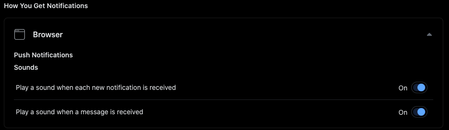
Hi all, Currently running the latest Dev channel release (88.0.685.3) on 2 laptops (1 Windows, 1 Mac), but have been having this issue on both for as long as I can remember. Push Notifications just don't work on most websites (I've also just installed Canary on both laptops and confirmed it happens on there too). Some examples: YouTube: Notifications are allowed and turned on in YT settings, but none appear Twitter: Same as above, notifications are allowed and turned on, but don't appear Facebook: Notifications are allowed in Edge settings, but the option to enable them in Facebook doesn't appear at all when using Edge: (However I just noticed it appears if I use a User Agent extension to appear as Chrome) But using another browser, the setting appears as normal: There are some sites where notifications work without issue, e.g. Gmail, Reddit, most notification test sites. I've tried everything I can think of: reset all website permissions disable and re-enable Edge notifications in System Preferences completely uninstall and re-install Edge Check the OS itself is up to date on both laptops Nothing seems to resolve it. Any other suggestions, or ideas as to why this is only happening for some websites?2.7KViews0likes7CommentsRe: Dev channel update to 86.0.587.0 is live
Not sure what's happened but I can no longer sync on my Mac (MacOS Catalina 10.15.6) since this update. It's logged in as me but says it can't sync my account since it needs to verify it's me, so needs to sign in again. I go through the steps and log in, verify 2FA code etc, then I'm stuck at the Sign In screen again. No matter how many times I sign in, I can't get past this screen to actually sync my data. I've tried: Restarting the laptop Signing out of Edge completely and back in Deleting my profile and starting again from scratch (losing all my Edge data on this laptop in the process, lol) Uninstalling and reinstalling Edge Dev altogether Nothing has worked. On my Windows PC though, no issues with this update Just installed Edge Beta on the MacBook to test, which signed in and is syncing without any issues.15KViews1like4CommentsRe: Dev channel update to 80.0.320.3 is live
If you're having trouble getting the icon to update (nothing already mentioned in this thread fixed it for me unfortunately), just sign out of Sync and straight back in, that's fixed it for me on all PCs I've tried so far (you won't lose anything, just make sure to not tick the option to clear your browsing data).15KViews1like0CommentsRe: How to get the new Edge insider Logo after update
HotCakeX wrote: UPDATE 1: You have to uninstall your browser and then download and reinstall it again from here: https://www.microsoftedgeinsider.com/en-us/download/ this is one way to get the correct icon everywhere (start menu, taskbar, desktop) and with the correct label (Canary, Dev, Beta) I did it and chose to delete user data during uninstall, but be careful, make sure to enable Sync before uninstall to prevent from losing any data. UPDATE 2: Thanks toasplode If you create a new profile and then promptly delete it, the icons are fixed! Update 2 didn't work for me, my main profile still had the old icon. I found the .ico file and deleted it thinking that would work, but it just gave me a blank icon, even after uninstalling and reinstalling. Deleting all data when uninstalling would work but Edge doesn't sync extensions yet so that's not ideal to have to set all of them back up. In the end all that fixed it for me was signing out of Sync and then back in.13KViews0likes1CommentCompatibility with "Join" Chrome Extension
This isn't specific to Edge Chromium as most other Chromium-based browsers have this same issue, but it's one that prevents me from switching to any other browser. This extension, https://chrome.google.com/webstore/detail/join/flejfacjooompmliegamfbpjjdlhokhj, is one I heavily rely on to mirror my phone's notifications to my PC, sync my clipboard across devices and send SMS from my PC (I know Pushbullet is a good alternative that would probably work but the subscription model is too expensive). Most other Chromium browsers are missing certain components Chrome has, which causes this extension to not work, and Edge seems to be the same, but I'm not sure what's actually missing (I'm no good with the developer side of things). Is anyone able to offer any insight as to whether Edge Chromium may eventually support this extension? Thanks in advance! :)4.9KViews4likes12Comments
Recent Blog Articles
No content to show