User Profile

Nukmicah
Iron Contributor
Joined Apr 28, 2019


User Widgets
Recent Discussions
Re: Provide run / open / save / save as options when downloading files - Discussion
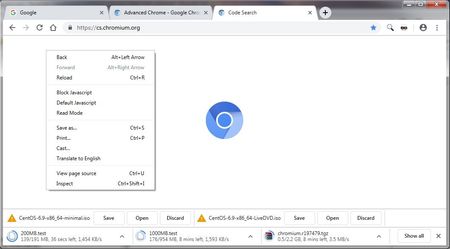
Advanced Chrome (https://browser.taokaizen.com) manages downloads with the desire Open functionality (though not the other functionality discussed in this thread). Up to 999 downloads can be handled at the same time, which all stack and wait for user action. It provides Save, Open, and Discard buttons in its Download Shelf for each download: Save: Downloads to default folder or prompts user for location. Open: Downloads to temp folder and opens download when finish. Discard: Cancel download. Source code is available at https://browser.taokaizen.com/download/patch.txt. Thank you to https://forum.vivaldi.net/post/374980 for bringing this to my attention! Here is a screenshot from their website: https://browser.taokaizen.com/images/screen1.jpg3.2KViews2likes1CommentRe: Provide run / open / save / save as options when downloading files - Discussion
i-am-kent Elliot Kirk Looking forward to hearing your update when it's ready. I personally would prefer you to take whatever time is necessary simplifying the Chromium backend first, so that Edge can more easily implement the minimum features requested in this thread but then still be easily able to add all other requested features as well (especially the admin previously noting certain requirements for configuration in Group Policies -- I bet that needs really significant changes to the backend). The Vivaldi moderator at https://forum.vivaldi.net/post/362500 said Chromium's downloader implementation and file path determination is very complex, and any changes need careful scrutiny to avoid opening security vulnerabilities. My assumption is that the Edge developers are aware of these same limitations and are looking into it just like the Vivaldi devs are. It would be great if y'all could work together to contribute the necessary improvements to the Chromium codebase, instead of duplicating each other's work. This all sounds like a ton of work to me -- thank you to everyone working so hard on this to listen to users and support their unique needs, rather than just making a Chrome clone and calling it a day.4KViews0likes0CommentsRe: Provide run / open / save / save as options when downloading files - Discussion
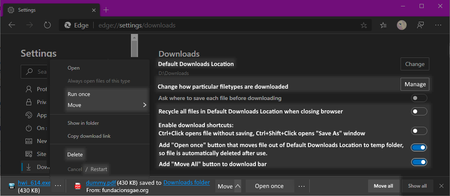
Elliot Kirk I think you guys nailed identifying the main customer needs. Here's another mockup showing a way it could be done, I think this meets all the needs you presented along with some additional features discussed by others above. Summary To minimize clicks like in the current flow (#3), by default files are saved to the Download folder. It preserves the option "Ask where to save each file before downloading", which some users want. If users want to change an individual download's filename or location (#2), they click "Move". If users want a particular file saved in a temporary fashion (#1), they can enable the "Open once" button option and use that button (it's disabled by default to avoid users like this). And since all of these are readily accessible on a file-by-file basis, it also meets (#4). Additional Explanation of Buttons and Options There isn't space to have all these extra buttons on every download. Therefore, they only appear on one file at a time -- either the most recent download, or if a user has already clicked one of the buttons on the most recent file then it shows the buttons on the second-most-recent file, and so on. For files which are collapsed and showing just the filename and filesize/progress bar, the extra functions can all still be accessed under the "..." menu. The wording could dynamically change by having the "Move" button be "Save As" while a download is still ongoing, and by having the "Open once" button be "Run once" if a file happens to be an executable (.exe, .msi, etc.). I'd also keep the current behavior where clicking anywhere in the file's download section causes it to open (or to queue up to open if the download hasn't finished yet), but doesn't cause the file to be automatically recycled. The "Open once" button option is disabled by default to help prevent https://answers.microsoft.com/en-us/msoffice/forum/all/how-do-i-recover-a-tempstate-download-file/1080856b-80a3-4a85-87fc-9e15b47a65df This is also the reasoning behind the option "Recycle all files in Downloads when closing browser", rather than "Delete all files in Downloads in when closing browser"; this option was suggested by josh_bodner, though the recycling behavior is my idea. The "Move All" button proposed by WolfIcefang and DinosaurTim lets people quickly click a bunch of pictures to download (for example), then click "Move All" to put all items in the downloads bar into a particular folder. The Ctrl+Click and Ctrl+Shift+Click keyboard shortcut option is adapted from Wessso's suggestion above. Per HotCakeX's suggestion above, an option exists to manage choosing how particular filetype downloads are automatically handled https://support.mozilla.org/en-US/kb/change-firefox-behavior-when-open-file#w_changing-download-actions. For each type of file, a user can choose to have it automatically "Preview", "Always Ask", "Save", or "Open With...". https://www.technipages.com/google-chrome-open-pdf-in-adobe-reader, but no other filetypes that I can find. Per LuKePicci's suggestion, there's a dropdown menu by the "Move" button which is populated with the most recent folder locations. Per CyanCoding's suggestion here from Apr 2019, the right-click menu gets a "Delete" button and the Cancel becomes "Cancel / Restart" like other browsers which let you attempt to restart a canceled download (I know at least Vivaldi does, I assume other browsers do as well). A "Pause"/"Resume" function would be cool too, but I'm not sure how to put that in the interface elegantly. Miscellaneous Comments DinosaurTim argues above that I think this "Open" button actually needs to die. The reason? Storage Sense. Windows 10's Storage Sense can automatically clean up the Downloads folder of old things we only needed temporarily (like program installers or things to print). The "Open" button of IE caused unneeded confusion, because people wanted to save AND open, and making them choose just confused them. I disagree because the new Edge is cross-platform. Just because a user happens to be on MacOS or Linux doesn't mean they should lose the ability to open files in a temporary fashion. You also mention the "Open" button causing unneeded confusion; I agree this is bad, and is another reason my mockup uses an "Open once" button which is disabled by default for users who don't understand the difference. RussTurrentine says above that ...When clicking on a html or htm file that someone has in a documents list on their website, the file just needs to open in the browser in another tab. Why would I want to download that? I just want to view it or print it.. I disagree because that behavior you're describing is defined by MIME types on a website, https://developer.mozilla.org/en-US/docs/Web/Security/Securing_your_site/Configuring_server_MIME_types for more information. Edge could "guess" what the right behavior is, but that breaks web standards which I think causes more trouble than it's worth. For a vivid example of how the website not the browser controls what happens to files, check out these two links. Both are just hyperlinks to a PDF file, but the websites they're hosted on are configured with different behavior: http://www.softerviews.org/Acariya%20Typeface.pdf (and not save to computer) http://www.fundacionsgae.org/Lists/FSGAE_SalaPrensa_Recursos/Attachments/1/dummy.pdf3KViews3likes8CommentsRe: Top Feedback Summary for January 22
MissyQ Thank you for the detailed communication! I've been trying to share feedback with the Edge dev team, and tried the answers.microsoft.com forum, the "Feedback" button in new Edge, and searching various posts, but now that I've found your post I see you already know about the issue, and have linked to a discussion thread about it! I'm looking forward to seeing all these issues addressed in the coming months!8.6KViews0likes0Comments
Recent Blog Articles
No content to show