User Profile

NamishB
Steel Contributor
Joined Apr 27, 2019


User Widgets
Recent Discussions
Edge Cross-Platform PDF editing with Office and OneDrive mobile apps
Many of us who work with a lot of PDFs use an Android tablet or an iPad for editing on the go. It would, therefore, be really cool if we could actually edit the annotations made using Edge on our PC by opening the same PDF file using the OneDrive or Office mobile apps, both of which have their own PDF annotation tools. This would make things super-convenient. Additionally, it will promote the installation of OneDrive and Office mobile apps for those who want this feature. Edge can already edit annotations made using Edge on another device. So, instead of making this cross-device, why not make it completely cross-platform? The respective mobile app teams will presumably have to re-work a lot of their PDF tools, but it's going to be worth it, I think. What do other members think? HotCakeX1.2KViews0likes0CommentsMajor New Tab bug while syncing open tabs on Edge Stable version
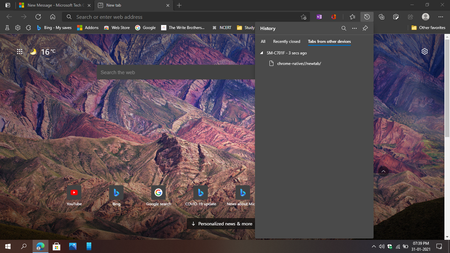
When I sync open tabs with Microsoft Edge on my Android, if a New Tab is open on the Android version, it shows up on the PC version as chrome-native://new-tab. TO BE NOTED: chrome-native://newtab does not show up on the list normally when a new tab is opened on Edge Android. It shows up when:- I am browsing any webpage, say, msn.com on my Android. While browsing that page on Android, Edge PC version shows it in the list of open tabs. Now when I press the Home button on Android, what one would expect is that the Android page that was displayed in Open Tabs list on Edge PC would just disappear. But what actually happens is that the webpage displayed earlier is replaced by chrome-native://newtab Now when I click on this link on the PC version, I am taken to a blank page. And then onwards, any time, even after restarting the browser, pressing the Home button leads me to chrome-native://newtab page instead of edge://newtab, where it should be taking me. This setting has to be changed manually in Edge Settings. I am unable to recreate this issue again; maybe it doesn't happen always. So, two things need fixing: Edge Android's New Tab should appear as edge://newtab and not chrome-native://newtab, if at all. Ideally, it shouldn't appear on the list. If a user somehow goes to chrome-native://newtab, the browser should redirect to edge://newtab instead of just displaying a black screen. Elliot Kirk HotCakeX2.4KViews3likes1CommentRe: Microsoft websites detects Edge browser as Chrome hahaaha
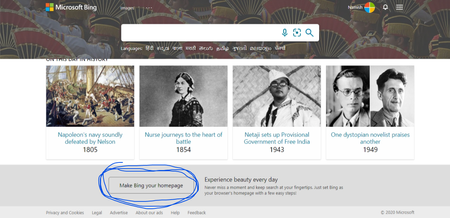
TrueGame You are right, and this needs to be fixed. Even the Bing Homepage treats it as Chrome. Look at the "make Bing your homepage" link at the bottom. Now see what happens when I click on it. Only Chrome, Firefox and IE are mentioned. If it isn't for Edge, why was the link there in the first place. I know there are other ways of setting Edge's homepage as Bing, but that link at the bottom should not have been there.2.1KViews0likes10CommentsRe: "Search the web" option in pdf right click menu
Hi there, Microsoft has officially confirmed that they are working on enabling web search and sidebar search for PDFs. When the sidebar search feature was first released to insiders, I reported to Microsoft that it doesn't work for PDFs. So, in the next update, they removed that option, and replied to me that they are working on this. So, the feature's coming soon.1KViews0likes0CommentsRe: Bug: Edge for Android is literally not useable in split screen
Well, though the new Edge for PC (Mac and Windows) is great, I certainly agree that Microsoft doesn't seem to care about the mobile version. They've focused so much on adding features that they seem to have forgotten about things like stability. For example, while using the tab switch swipe gesture, especially in Dark mode, the address bar looks extremely ugly - it temporarily changes from black to white. Another example, if a site opens by extracting API from Edge (i.e. powered by Microsoft Edge), the Contextual Search menu that appears at the bottom on selecting a word sometimes appears black and sometimes white. Yet another example, while scrolling on a webpage, the address bar always temporarily changes from rounded to square, before it gets hidden at the top.There are tons of such examples in the Edge mobile app. To be honest, I am a little disappointed in Microsoft this time, based on their Android browser. These are small things, but these things are not expected from such a large company. Google get's this perfect every time, everywhere. They may sometimes compromise on the features, but their softwares' stability and code quality, multi-device sync and consistency in multiple terms across services seems to be unbeatable. I hope Microsoft realizes this and actually fixes the (too many to count) errors.2.4KViews0likes0CommentsRe: Bug: Edge for Android is literally not useable in split screen
Hi there, I am glad that I finally found someone beside myself who found this a problem. Most don't seem to care. I understand that the main issue is that you want to select the address bar while browsing in split-screen but when you attempt to click on it, there is so little space that you end up clicking on the padlock icon instead. Till Microsoft resolves this issue, I can suggest a workaround. Press the three dots ellipsis (...) button on the right-hand side. There, press the 'Web Search' button. This will essentially perform the same task that you wanted (though it requires one additional touch). If you are a frequent split screen user like me, I suggest that you arrange the ellipsis menu such that the Web Search button appears in the topmost row for easier access.2.5KViews1like2CommentsFeature: Add integration of Edge Collections with Bing My Saves collections.
It would be really cool if Microsoft Edge could show our Collections saved at www.bing.com/saves. I think this will also give people a reason to use Bing. Edge could have a separate Collection named Bing Saves or something where these things are stored. For those who don't use Bing, there may be an option to turn off the feature. If anyone likes it, please also send this idea as a feature request through the feedback tool (alt + shift + i).897Views1like0CommentsCollections should automatically upload newly later added items to OneNote, Word or elsewhere
It happens at times that I create a collection and send it to OneNote. Later, I update the collection with new items. In this case, it would be quite helpful if Edge would automatically upload the newly added item to the same location in OneNote.456Views1like0CommentsRe: Collections is the exact opposite of 'set aside tabs'
I understand what you say, yet it isn't as smooth as the Set Aside tabs. You need to right click on a tab, and then in the long context menu, you need to find the option to close the tabs or to add them to a collection. Though, I agree, I might have exaggerated the number of clicks required, it still is worse that the Set Aside Tabs with regard to ease of use, time-taken and number of clicks1.2KViews0likes1Comment
Recent Blog Articles
No content to show