User Profile

BillTheKid
Brass Contributor
Joined Oct 17, 2018


User Widgets
Recent Discussions
Re: Hunting suspicious PowerShell activity in Defender
For process creation events use MDE table: DeviceProcessEvents with ActionType: ProcessCreated and look for e.g. FileName = powershell.exe | powershell_ise.exe | pwsh.exe to find powershell being started/using one-liners. Documentation is at: https://learn.microsoft.com/en-us/microsoft-365/security/defender/advanced-hunting-deviceprocessevents-table?view=o365-worldwide InitiatingProcessCommandLine -> Command line used to run the process that initiated the event ProcessCommandLine -> Command line used to create the new process For PowerShell cmdlets events use MDE table: DeviceEvents with ActionType: PowerShellCommand. Note: For PowerShell no ScriptBlockLogging and ModuleLogging telemetry is available in MDE :-(. It's really only CmdLets, which is mostly useless, as attackers can simply rename these. Documentation is at https://learn.microsoft.com/en-us/microsoft-365/security/defender/advanced-hunting-deviceevents-table?view=o365-worldwide9.6KViews0likes0CommentsRe: DFI/DFE and IdentityQueryEvents DNS events
SpeedRacer theoretically yes, but there might be edge-cases where some DNS requests won't be visible on MDI but rather on MDE, depending on what DNS server is used. For MDE use ActionType: DnsQueryRequest For MDI use ActionType: DNS query I would suggest putting up usecases on both datasources.3.2KViews1like1CommentRe: Issue with API of Microsoft Defender for Endpoint
When your client secret is fine and you still get unauthorized you might be missing the Admin consent for the permission you requested. Every time you add a permission, you must select Grant consent for the new permission to take effect. Need to be done by Global-Administrator for example, Security-Admin is not enough.3.9KViews0likes1CommentRe: DeviceTvmBrowserExtensions hunting table
Look here: https://github.com/Iveco/xknow_infosec/blob/main/M365D_tables.md#table-devicetvmbrowserextensions-tvm-add-on if you want to take a look at the schema layout. But as Heike has correctly pointed out, this table is now part of "Defender for Vulnerability Management Add-on." Important is the part Add-on. Even if you have E5 you will not get the table without explicitly getting the license for TVM-Addon. This is a brand new product just recently in general preview.3.5KViews2likes0CommentsRe: cloud app security and SIEM agent
SurVir, you don't use it anymore more today (2 years later). You would integrate MDCA (previously known as MCAS) within MDE and use the https://docs.microsoft.com/en-US/microsoft-365/security/defender/streaming-api?view=o365-worldwide to get all raw-data via https://docs.microsoft.com/en-US/microsoft-365/security/defender/advanced-hunting-cloudappevents-table?view=o365-worldwide table (for MDCA raw data). Alerts are merged into https://docs.microsoft.com/en-US/microsoft-365/security/defender/advanced-hunting-alertinfo-table?view=o365-worldwide table (for MDCA alerts) (for alerts you alternatively may use https://docs.microsoft.com/en-US/graph/api/resources/alert?view=graph-rest-1.0) and Incidents would require https://docs.microsoft.com/en-US/microsoft-365/security/defender/api-list-incidents?view=o365-worldwide (for MDCA merged incidents). This gets you safe all the information and is scalable and has no point of failures when implementing correctly - forget the MCAS SIEM AGENT , this was before they went "XDR".2.5KViews0likes0CommentsRe: Consume Azure ATP alerts via Microsoft Graph API
mstair You need to share telemetry between Defender for Identity and MCAS -> see integration here 1) https://docs.microsoft.com/en-US/cloud-app-security/mdi-integration and 2) https://docs.microsoft.com/en-US/defender-for-identity/mcas-integration then you can consume those 40~ alerts using MS-Graph API. All 40~ Defender for Identity / Azure ATP alerts --> https://docs.microsoft.com/en-US/defender-for-identity/suspicious-activity-guide?tabs=external Then use the MS-Graph API to receive those events in a nice format --> https://docs.microsoft.com/en-US/graph/api/resources/security-api-overview?view=graph-rest-1.0 Here is the info-note: *** Microsoft Defender for Identity alerts are available via the Microsoft Cloud App Security integration. This means you will get Microsoft Defender for Identity alerts only if you have joined Unified SecOps and connected Microsoft Defender for Identity into Microsoft Cloud App Security. Learn more about https://docs.microsoft.com/en-us/defender-for-identity/mcas-integration.3.7KViews0likes1CommentRe: Defender for Identity - Streaming of events possible?
Or Tsemah- Thanks for your answer! MCAS connector for Defender for Identity does not print all raw events. But the other API you mentioned... Streaming https://docs.microsoft.com/en-US/microsoft-365/security/mtp/api-advanced-hunting?view=o365-worldwide Thats the solution to get access to it (or kinda every raw data if needed). Did not really think of it that way 🙂 Thank you for your reply!2.4KViews0likes0CommentsDefender for Identity - Streaming of events possible?
Hello! In Defender for Endpoint events can be forwarded through Azure Event hubs or Azure storage (see https://docs.microsoft.com/en-US/windows/security/threat-protection/microsoft-defender-atp/raw-data-export-event-hub). How do I archieve the same functionality through Defender for Identity? Particular I am interesting in the following tables: IdentityQueryEvents (DC DNS events) IdentityDirectoryEvents (DC events) I could not find such data-export functionality in the Azure-ATP portal. Additionally I've enabled telemetry data-sharing between Defender for Endpoint and Defender for Identity, so I can access the schema tables from Microsoft 365 security (central portal) but still even I cannot use the internal Defender-ATP data-exporter to enable/click forwarding for these data tables. The current CEF exporter for Defender for Identity (see https://docs.microsoft.com/en-US/defender-for-identity/cef-format-sa) in CEF-format only gives alerts and some additional test-messages. Couldn't find the raw events here too. So how do I forward all Defender for Identity raw data to an Azure Hub/Azure storage so e.g. Advanced Hunting of that data is possible in third party SIEM? Related MS-Blog for hunting in Azure-ATP data via KQL: https://techcommunity.microsoft.com/t5/microsoft-365-defender/hunt-for-threats-using-events-captured-by-azure-atp-on-your/ba-p/1598212 Regards from Germany BillSolved2.8KViews0likes3CommentsRe: What's we can do if we cannot cover full M365 Defender platform (threat protection platform)?
HuyPham-VNYou don't need each platform, but the more telemetry you generate, the better detections you get. So in best case, using all portals and products of the "Microsoft 365 Defender Threat Protection Platform" will give you the coverage and drawing of a full killchain. Let me take your producs: - Microsoft Defender for Endpoint Used for Clients and Servers Used to manage devices - Microsoft Defender for Office 365 Used for Mail, Phishing, Safe-Attachments etc. - Microsoft Defender for Identity Used for Domain-Controller Used to manage identites/users/sessions - Microsoft Cloud App Security Used for cloud apps policies and Shadow-IT and DLP, e.g. you can define policies on session-level to "connected apps". There are not much yet. But the most common connected Apps: Teams, Skype, Outlook, SharePoint various Apps on the phone etc. Here you can add fine-granular policies. - Azure Security Center You missed this. Used for Risk-Level and Compliance of Users. Used for sign-in and audit-logs in Azure Each of these portals can share signals, therefor the data can be combined. That will add value by improving the backend cloud-detections/ML/behaviour based detections. For example if you use O365 ATP, with Defender for Endpoint and Defender for Identity. You can get an "incident" which has a full killchain from: - Initial Attack: An Email has been opened by an User, Macro, Powershell, Executed ( - Attacker moves on Endpoint to Servers, fires malicious processes on endpoints etc. (Defender for Endpoint) - Attacker moves to DCs, makes pass-the-hash, bruteforce etc. (Defender for Identity). You can now see the whole attack from A-Z, but only if signals were shared. This is were the power comes from. For example: https://docs.microsoft.com/en-US/microsoft-365/compliance/alert-policies?view=o365-worldwide https://docs.microsoft.com/en-US/defender-for-identity/suspicious-activity-guide?tabs=external https://docs.microsoft.com/en-US/windows/security/threat-protection/microsoft-defender-atp/alerts-queue https://docs.microsoft.com/en-US/cloud-app-security/anomaly-detection-policy Now imagine, you have all of these in one chain.1.6KViews1like0CommentsRe: Defender for Endpoint alert delays
burnettcmultiply hours is not fine. I see alerts mostly popping up after 2 minutes of delay. Maybe this was caused by delays from your proxy to the backends? Check this https://docs.microsoft.com/en-US/windows/security/threat-protection/microsoft-defender-atp/configure-proxy-internet, to see what connections endpoints make. There is also a https://github.com/MicrosoftDocs/windows-itpro-docs/raw/public/windows/security/threat-protection/microsoft-defender-atp/downloads/mdatp-urls.xlsx with all IPs and connections which Defender does. Make sure, there was no bottleneck during deployment phase to these IPs/DNS/URLs. If you open the sheet, go to the left side to see all URLs. Maybe these devices had problems communicating with backend.5.1KViews0likes0CommentsRe: Defender on file servers is making SMB file copy going modem speed
Björn Lagerwalldid you try to play around with ScanAvgCPULoadFactor - sanning options listed https://docs.microsoft.com/en-US/windows/security/threat-protection/microsoft-defender-antivirus/configure-advanced-scan-types-microsoft-defender-antivirus Maybe that reduces some of the load during scanning and get's the I/O back.3.2KViews0likes1CommentRe: cloud app security and SIEM agent
Hamid285to get all MCAS - Cloud App Security raw events you need the MCAS API via https://docs.microsoft.com/en-US/cloud-app-security/siem which will be ingested using remote syslog into Splunk (CEF-format). Additionally you need the https://docs.microsoft.com/en-US/graph/overview?view=graph-rest-1.0 for the high level telemetry - the https://splunkbase.splunk.com/app/4564/.3.3KViews0likes4CommentsRe: ATP Query to find an event ID in the security log
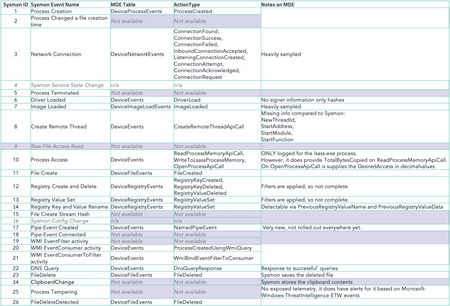
AFAIK this is not possible. This is not how Defender for Endpoint works. Events are locally analyzed and new telemetry is formed from that. It does not send all the raw ETW events to the backend (as that would actually be something totally different and may overload endpoints). It's doing some magic on its own and you can only query its existing https://docs.microsoft.com/en-US/microsoft-365/security/mtp/advanced-hunting-schema-tables?view=o365-worldwide So there is no way to get raw access for client/endpoints yet, except installing your own forwarding solution (e.g. Splunk UniversalForwarder, e.g. WEC/WEF -> e.g. analyze in SIEM) on these clients or by installing https://docs.microsoft.com/en-US/azure/azure-monitor/platform/log-analytics-agent - the Microsoft Monitoring Agent (MMA) additionally (e.g. analyze in Loganalytics Workspace). The same approach is done by Microsoft with Azure Sentinel in the schema https://docs.microsoft.com/en-US/azure/azure-monitor/reference/tables/securityevent. Until today, the builtin Defender for Endpoint sensor does not allow raw ETW access using Advanced Hunting nor forwards them. Microsoft tries to get upfront on each detection theirselfs, so you would always have the kind of logic you are trying to archieve, doing on their cloud/ML-backend already and then forming a new incident/alert from you from these various raw ETW sources, they may have seen and updated in the agent. Thats why Microsoft is currently also so powerful with Defender, cause the telemetry they have, allows to build an unbelievable good amount of detection sets and sequences ;-). So I think at some point you don't need to regulary go that deep, only when doing live-forensic maybe. Like use the Response-Shell builtin and grab the ETWs yourself. Atleast, for clients. No need forwarding all raw ETWs. Defender for Identity allows what you are trying to archieve, as it allows https://docs.microsoft.com/en-US/defender-for-identity/configure-windows-event-collection This can be https://docs.microsoft.com/en-US/defender-for-identity/configure-event-forwarding. But thats also why you need to install a different agent (Azure ATP sensor). Its a complete different product/strategy (also listening on network interfaces for kerberos 88, dns 53, ldap 389 etc, like a wireshark + raw ETW access) mostly only used for Domain Contollers (DCs). But this needs another agent and is not meant to be used for clients/endpoints TBH. You can also forward these events to an SIEM using https://docs.microsoft.com/en-US/defender-for-identity/cef-format-sa Again, you could use your own forwarding solution on top for these machines, rather than doing that. I think this should sum it up until today, please correct me if I am wrong.21KViews1like0Comments
Recent Blog Articles
No content to show