User Profile

Scotchula
Copper Contributor
Joined Jun 27, 2023


User Widgets
Recent Discussions
Re: Here are my issues with the new stream.
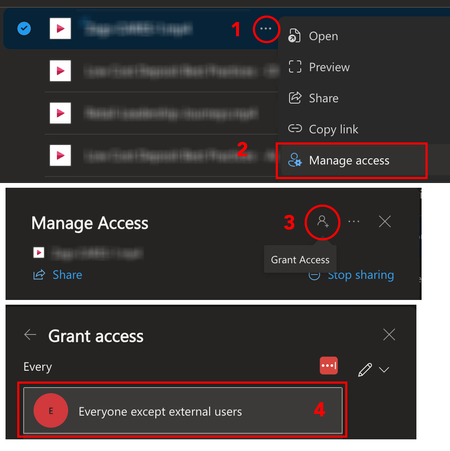
Ok, I figured out how to give company-wide access. 1. Once you've uploaded to OneDrive/Stream Click the Ellipsis next to the video title 2. Select Manage Access 3. Do not try and type in the box. Click the tiny little "Grant Access" person icon. 4. Type "Everyone except external users." You should see the group pop up. It's a default user group that is everyone on your corporate DNS. I didn't include this in the image, but if you aren't ready for everyone to know about it immediately, be sure to UNCHECK the "Notify People" box at the bottom of the Grant Access screen. Hope this helps for everyone still struggling with this.3.6KViews0likes1CommentRe: Here are my issues with the new stream.
100% permissions are a literal disaster. Stream Classic was very easy and intuitive to add any number of permissions quickly and easily, now I had to dive into 12 different community posts just to figure out how to share with everyone in the company.4.4KViews1like0Comments
Recent Blog Articles
No content to show